
Introducción
This manual provides essential instructions for the proper use and maintenance of your Vikefon Type C Charging and Data Cable. This 1-meter cable is designed for efficient charging and high-speed data transfer between your Type C enabled devices and compatible power sources or computers.

Image: The Vikefon Type C Charging and Data Cable, featuring a standard USB-A connector on one end and a reversible USB-C connector on the other.
Características del producto
- USB Connector Quality: Ensures reliable charging and high-speed data transmission.
- Potencia de salida: Supports up to 5V, 3 Amp Para carga rápida.
- Compatibilidad universal: Fully compatible with all Type C mobile devices for fast charging and syncing.
- Reversible USB Type-C Connector: Allows for quick and easy connections in any orientation.
- Diseño duradero: Features intricate nylon braiding for enhanced durability and longevity, outlasting standard cables.
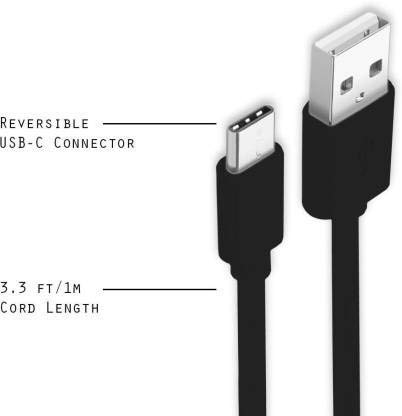
Image: A diagram illustrating the reversible nature of the USB-C connector and the cable's 1-meter (3.3 ft) cord length.
Configuración
- Identificar conectores: The cable has a standard USB-A connector on one end and a smaller, oval-shaped USB Type-C connector on the other.
- Conectar a la fuente de alimentación/computadora: Insert the USB-A end of the cable into a compatible USB port on a wall adapter, power bank, car charger, or computer.
- Conectar al dispositivo: Insert the USB Type-C end into the charging/data port of your smartphone, tablet, or other Type C enabled device. The USB Type-C connector is reversible, so it can be inserted in either orientation.
- Verificar conexión: Asegúrese de que ambos extremos estén bien conectados. El dispositivo debería indicar que se está cargando o que está conectado para transferir datos.
Instrucciones de funcionamiento
Cargando su dispositivo
- Connect the USB-A end of the cable to a compatible USB power adapter (e.g., wall charger, car charger, power bank).
- Connect the USB Type-C end to your device's charging port.
- Ensure the power adapter is plugged into a live power outlet. Your device should begin charging.
Transferencia de datos
- Conecte el extremo USB-A del cable a un puerto USB de su computadora.
- Connect the USB Type-C end to your device.
- On your device, you may receive a prompt asking to allow data access or to select a USB connection mode (e.g., "File Transfer," "MTP"). Select the appropriate option to enable data transfer.
- Su dispositivo debería aparecer como una unidad extraíble o un dispositivo multimedia en su computadora, lo que le permitirá transferir files.
Mantenimiento
- Manejo adecuado: Always grasp the connector head when plugging or unplugging the cable. Avoid pulling directly on the cable itself to prevent damage to the internal wires.
- Evite doblarse: Do not excessively bend or crimp the cable, especially near the connectors, as this can cause internal wire breakage.
- Almacenamiento: Store the cable in a clean, dry place away from extreme temperatures and direct sunlight. Avoid tangling the cable.
- Limpieza: If necessary, gently wipe the cable and connectors with a dry, soft cloth. Do not use liquids or abrasive cleaners.

Imagen: Un primer plano view highlighting the durable metal heads of the Vikefon Type C cable connectors, designed for anti-oxidation and corrosion resistance.
Solución de problemas
- El dispositivo no se carga:
- Asegúrese de que ambos extremos del cable estén bien conectados.
- Verifique que el adaptador de corriente esté funcionando correctamente y enchufado a una toma de corriente activa.
- Intente utilizar un adaptador de corriente o puerto USB diferente.
- Verifique que el puerto de carga de su dispositivo no tenga residuos ni daños.
- Carga lenta:
- Ensure you are using a power adapter that supports fast charging (e.g., 3A output).
- Cierre todas las aplicaciones en segundo plano innecesarias en su dispositivo.
- Sin transferencia de datos:
- Confirm the cable is properly connected to both your device and computer.
- On your device, check the notification panel for USB options and select "File "Transferencia" o "MTP".
- Intente conectarse a un puerto USB diferente en su computadora.
- Reinicie tanto el dispositivo como la computadora.
Presupuesto
| Característica | Detalle |
|---|---|
| Marca | Vikefon |
| Nombre del modelo | Tipo C |
| Número de modelo | Tipo C 0129 |
| Tipo de conector | USB tipo C (macho a macho) |
| Tipo de cable | USB |
| Dispositivos compatibles | Laptop, PC, Smartphone (e.g., Xiaomi Redmi 8A, Poco M2, Poco M2 Pro, Samsung, Motorola, Lenovo, Lava, Sony, HTC, LG, Karbonn, Maxx) |
| Características especiales | Charging Wire, Durable, High Data Transfer Rate, High Quality, Long Length |
| Velocidad de transferencia de datos | Up to 0.48 Gigabits Per Second (480 Mbps) |
| Tecnología de conectividad | USB |
| Especificación cumplida | YO ASI |
| Color | Negro |
| Forma del artículo | Redondo |
| Outer Material Type | Rubber (with Nylon Braiding) |
| Longitud del cable | 1 metros |
Garantía y soporte
Specific warranty details for the Vikefon Type C Charging and Data Cable are not provided in this manual. For information regarding warranty coverage, returns, or technical support, please refer to the product packaging or contact the manufacturer directly through their official channels.