
Introducción
This manual provides detailed instructions for the installation, operation, and maintenance of your EKEN V7 HD 1080P Smart WiFi Video Doorbell. Please read this manual thoroughly before using the product to ensure proper functionality and safety. Keep this manual for future reference.
Contenido del paquete
Verifique que todos los artículos enumerados a continuación estén incluidos en su paquete. Si falta algún artículo o está dañado, comuníquese con atención al cliente.

Image: The EKEN V7 Video Doorbell, two blue rechargeable batteries, and a dual-slot battery charger. These are the primary components included in the package.
- EKEN V7 HD 1080P Smart WiFi Video Doorbell
- Rechargeable Batteries (2 pcs)
- Cargador de batería
- Soporte de montaje
- Tornillos de montaje y anclajes de pared
- Manual de usuario (este documento)
Producto terminadoview
The EKEN V7 Video Doorbell is a smart security device designed to provide real-time video monitoring and two-way audio communication with visitors at your door. It features 1080P Full HD resolution, night vision, and a wide-angle lens for comprehensive coverage.

Imagen: Frente view of the EKEN V7 Video Doorbell, showing the camera lens, motion sensor, and illuminated doorbell button.
Características principales:
- Vídeo Full HD 1080P: Transmisión y grabación de vídeo nítidas.
- 166° Wide-angle Lens: Amplio campo de view to cover your entryway.
- Visión nocturna: Infrared LEDs for clear visibility in low-light conditions.
- Audio bidireccional: Speak and listen to visitors remotely via the mobile app.
- Detección de movimiento PIR: Alerts you to movement at your door.
- Resistente a la intemperie: Diseñado para soportar diversas condiciones climáticas.
- Conectividad WiFi 2.4G: Se conecta a su red doméstica para acceso remoto.
- Batería de larga duración: Efficient power consumption for extended use.
- Almacenamiento en la nube: Optional cloud service for video recording storage.

Image: An infographic highlighting the key features of the EKEN V7 Video Doorbell, such as 1080P Full HD, PIR Motion Detection, Night Vision, 166° Wide-angle Camera Lens, Long Battery Life, and 7 Days Free Cloud Service.

Image: A visual representation comparing the doorbell's view during the day (color) and at night (monochrome infrared), demonstrating the 166-degree wide-angle lens.
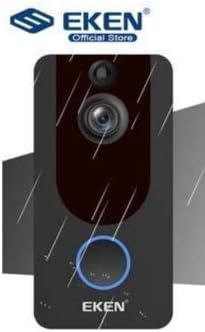
Image: The EKEN V7 Video Doorbell depicted with rain effects, illustrating its weather-resistant design suitable for outdoor installation.
Configuración
1. Carga de las baterías
- Insert the two rechargeable batteries into the provided battery charger.
- Conecte el cargador a una fuente de alimentación.
- Allow the batteries to charge fully before first use. The indicator light on the charger will change when charging is complete.
2. Instalación del timbre
- Elija una ubicación adecuada cerca de su puerta, asegurándose de que haya un espacio libre. view y buena señal wifi.
- Utilice el soporte de montaje como plantilla para marcar los agujeros en la pared.
- Perfore agujeros e inserte anclajes de pared si es necesario.
- Fije el soporte de montaje a la pared utilizando los tornillos proporcionados.
- Insert the charged batteries into the doorbell unit.
- Coloque la unidad del timbre en el soporte de montaje, asegurándose de que encaje firmemente en su lugar.
3. Conexión a Wi-Fi y configuración de la aplicación
- Download the official EKEN doorbell app from your smartphone's app store (iOS or Android).
- Abra la aplicación y cree una cuenta o inicie sesión.
- Follow the in-app instructions to add your new doorbell device. This typically involves scanning a QR code on the doorbell or manually entering its ID.
- Connect the doorbell to your 2.4GHz Wi-Fi network. Ensure your phone is also connected to the same 2.4GHz network during setup.
- Una vez conectado, podrás view live video, receive notifications, and adjust settings through the app.
Instrucciones de funcionamiento
Vivir View y audio bidireccional
- Open the EKEN app on your smartphone.
- Select your doorbell from the device list to access the live video feed.
- To speak to a visitor, tap the microphone icon in the app. To listen, ensure the speaker icon is enabled.

Image: A user communicating with a delivery person at their door using the EKEN V7 Video Doorbell's two-way audio feature through the mobile application.
Alertas de detección de movimiento
- When motion is detected, the doorbell will send a push notification to your smartphone.
- Toca la notificación para view la transmisión en vivo o el evento grabado.
- Adjust motion sensitivity settings within the app to minimize false alerts.
Grabación y reproducción de video
- The doorbell automatically records video when motion is detected or the doorbell button is pressed.
- Recorded videos are stored in the cloud (subscription may be required after initial free period) or on a local SD card (if supported and installed).
- Access and playback recorded events through the app's history or event log.

Image: The EKEN V7 Video Doorbell shown next to a smartphone displaying a live 1080P Full HD video feed, illustrating remote monitoring capabilities.
Mantenimiento
- Limpieza: Limpie suavemente la lente de la cámara y la superficie del timbre con un paño suave.amp Paño. Evite limpiadores abrasivos o disolventes.
- Gestión de la batería: Recharge batteries when the app indicates low power. For optimal performance, consider having a spare set of charged batteries.
- Actualizaciones de firmware: Regularly check the app for available firmware updates for your doorbell. Updates can improve performance and add new features.
- Conexión Wi-Fi: Ensure your Wi-Fi router is functioning correctly and the doorbell has a strong signal for uninterrupted operation.
Solución de problemas
- El timbre no se conecta al Wi-Fi:
- Ensure your Wi-Fi network is 2.4GHz. The doorbell does not support 5GHz networks. Check Wi-Fi password and signal strength. Try resetting the doorbell and your router.
- Alertas de detección de movimiento:
- Verify that motion detection is enabled in the app settings. Adjust sensitivity levels. Ensure the doorbell's view no está obstruido.
- Mala calidad de video o retraso:
- Check your Wi-Fi signal strength at the doorbell's location. Move the router closer or consider a Wi-Fi extender. Ensure your internet connection is stable.
- El audio bidireccional no funciona:
- Check microphone and speaker permissions for the app on your smartphone. Ensure the doorbell's microphone and speaker are not obstructed.
- El timbre no se enciende:
- Ensure batteries are fully charged and correctly inserted. If using wired power, check connections.
Presupuesto
| Característica | Detalle |
|---|---|
| Marca | EVENTO |
| Modelo | V7 |
| Resolución de grabación de vídeo | 1080p Full HD |
| Tecnología de fotosensor | CMOS |
| Tecnología de conectividad | Wi-Fi (solo 2.4 GHz) |
| Características especiales | Night Vision, Two-Way Audio, PIR Motion Detection, Weather Resistant |
| Estabilización de imagen | No |
| Referencia del fabricante | Ia-112 |
| ASIN | B08PMXWFF3 |
| Primera fecha disponible | 17 de diciembre de 2020 |
Garantía y soporte
For warranty information and technical support, please refer to the official EKEN webSitio web o contacte directamente con su servicio de atención al cliente. Los detalles sobre los períodos de garantía específicos y los canales de soporte suelen encontrarse en la documentación de compra o en el sitio web del fabricante. websitio.
Guaranteed software updates until: Unknown.