
symcode MJ-2020DA-BL
Symcode Bluetooth 2D QR Barcode Scanner User Manual
Model: MJ-2020DA-BL
1. Introducción
This manual provides detailed instructions for the setup, operation, and maintenance of your Symcode Bluetooth 2D QR Barcode Scanner (Model: MJ-2020DA-BL). Please read this manual thoroughly before using the device to ensure proper functionality and to maximize its lifespan.
2. Producto terminadoview
2.1 Características principales
- Conectividad 3 en 1: Supports 2.4G Wireless, Bluetooth 4.1, and USB 2.0 Wired connections for versatile operation.
- Retroalimentación táctil: Provides a mild vibration alert upon successful scans, with an option to mute the buzzer for quiet environments.
- Rango de transmisión extendido: Up to 200m in open air via 2.4G wireless mode and 30m via Bluetooth mode.
- Durabilidad industrial: IP67 rated for dustproof and waterproof performance, capable of being rinsed with tap water and submerged for up to 30 minutes. Features a robust TPU protective case and withstands 6ft (1.8m) drops to concrete.
- Amplia compatibilidad: Connects with smartphones, tablets, and PCs running Windows XP/7.0/8.0/Win 10, Windows Mobile, Android OS, and iOS devices.
- Personalización avanzada: Offers over 180 configuration options, including editable prefixes/suffixes (up to 32 digits), partial barcode hiding, and adding keyboard keys/combinations.
- Alta capacidad de decodificación: Capable of decoding both 1D and 2D barcodes, including UPC/EAN, QR Code, Data Matrix, PDF417, Code 39, Code 128, and more, even with blurring or incompleteness.
- Gran capacidad de almacenamiento: Internal memory can store up to 10,000 codes before uploading.
2.2 Contenido del paquete
El paquete incluye los siguientes artículos:
- Symcode Barcode Scanner (Model: MJ-2020DA-BL)
- Cable de carga
- Manual de usuario (este documento)
2.3 Diagrama del producto

Figure 2.3.1: Symcode Bluetooth 2D QR Barcode Scanner with its charging stand. The scanner is black and orange, designed for comfortable handheld use, and rests securely in its black charging base.
3. Configuración
3.1 Carga del escáner
Before initial use, fully charge the scanner. Connect the charging cord to the scanner and a power source. The charging time is approximately 2.5 hours, providing a battery life of up to 30 hours of continuous use. Note that the base itself does not charge; the USB cable must be plugged directly into the scanner for charging.
3.2 Modos de conexión
The scanner supports three connection modes: Wired, 2.4GHz Wireless, and Bluetooth. Choose the mode that best suits your operational needs.

Figure 3.2.1: Visual representation of the scanner's three connection modes: Wired (USB cable for charging and data), 433MHz Wireless (with a dedicated dongle for PC), and Bluetooth (direct connection to mobile devices without a driver).
3.2.1 conexiones cableadas
Connect the scanner directly to your computer using the provided USB cable. The cable serves as both a charging cable and a data transmission cable. This mode is plug-and-play and requires no additional drivers.
3.2.2 Conexión inalámbrica de 2.4 GHz
For 2.4GHz wireless operation, plug the wireless dongle (if included, typically integrated with the charging stand) into your computer's USB port. The scanner will automatically pair with the dongle. This mode offers a transmission range of up to 200m in open air.
3.2.3 Conexión Bluetooth
To connect via Bluetooth, ensure your device's Bluetooth is enabled. The scanner can pair with smartphones, tablets, and PCs. No driver installation is required. This mode provides a transmission range of up to 30m in open air.
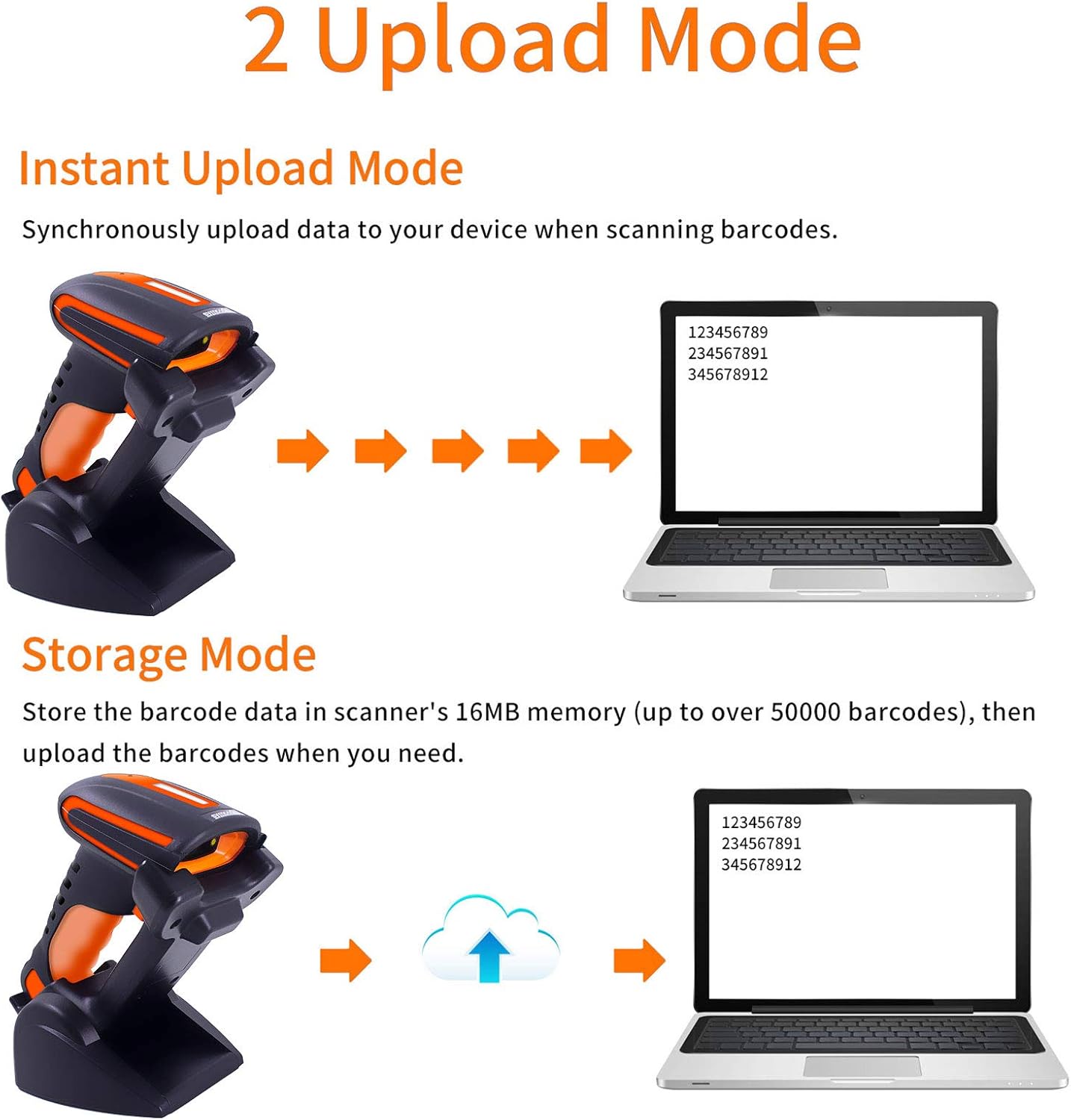
Figure 3.2.2: The scanner demonstrates strong compatibility with multiple operating systems, including Android, Apple (iOS/macOS), Windows, and Linux, allowing seamless integration with various devices.
4. Instrucciones de funcionamiento
4.1 Escaneo de códigos de barras
Point the scanner's light beam at the barcode you wish to scan. A successful scan will be indicated by a mild vibration. The buzzer can be muted for quiet operation if desired.

Figure 4.1.1: The scanner possesses superior decoding capabilities for both 1D and 2D barcodes, including Data Matrix, QR Code, and PDF417. It can even decode blurred or incomplete codes. Example barcodes shown include 20123456789, 2125551212, 4603146002134, y 1234567890135.
4.2 Modos de carga de datos
El escáner admite dos modos principales de carga de datos:
- Modo de carga instantánea: Los datos se cargan de forma sincronizada en su dispositivo conectado inmediatamente después del escaneo.
- Modo de almacenamiento: Scanned barcodes are stored in the scanner's 16MB internal memory (up to over 50,000 barcodes). Data can be uploaded to your device later when needed.

Figure 4.2.1: Comparison of Instant Upload Mode, where data transmits immediately, and Storage Mode, where data is saved internally for later batch upload.
4.3 Adjusting the Charging Stand
The charging stand's base can be rotated 45 degrees, allowing for flexible positioning of the scanner during charging or when used in presentation mode.

Figure 4.3.1: The scanner's base can be adjusted by rotating 45 degrees, providing ergonomic flexibility for various scanning setups.
4.4 Escenarios de aplicación
The Symcode barcode scanner is designed for various industrial and commercial applications, including but not limited to:
- Express and Logistics
- Gestión de almacenes
- Supermarket and Retail
- File Room and Document Management

Figura 4.4.1: Examples of the scanner's use in different environments, highlighting its versatility in express delivery, warehouse operations, retail, and file gestión.
5. Mantenimiento
To ensure the longevity and optimal performance of your Symcode barcode scanner, follow these maintenance guidelines:
- Limpieza: Limpie periódicamente el exterior del escáner con un paño suave y húmedo.amp cloth. For the scanning window, use a lint-free cloth and a mild cleaning solution if necessary. Avoid abrasive cleaners.
- Resistencia al agua: The scanner is IP67 rated, meaning it is dustproof and can withstand immersion in water up to 1 meter for 30 minutes. It can be rinsed with tap water. However, ensure the charging port is dry before connecting the charging cable.
- Protección contra caídas: The scanner is designed to withstand drops from 6ft (1.8m) onto concrete due to its robust TPU protective case and internal consolidation. While durable, avoid unnecessary drops.
- Almacenamiento: Guarde el escáner en un lugar fresco y seco, alejado de la luz solar directa y de temperaturas extremas.
- Cuidado de la batería: To preserve battery life, avoid fully discharging the battery frequently. If storing for extended periods, charge the battery to about 50% and recharge every few months.
6. Solución de problemas
If you encounter issues with your Symcode barcode scanner, please refer to the following common problems and solutions:
| Problema | Posible causa / solución |
|---|---|
| El escáner no se enciende. | La batería está baja o agotada. Cargue el escáner durante al menos 2.5 horas. |
| El escáner no se conecta a través de Bluetooth/2.4 GHz. |
|
| El escáner no lee códigos de barras. |
|
| Los datos escaneados son incorrectos o incompletos. |
|
If the problem persists, please contact Symcode customer support for assistance. Refer to the "Support" section for contact information.
7. Especificaciones
| Característica | Detalle |
|---|---|
| Modelo | MJ-2020DA-BL |
| Vol de entradatage | DC5V±0.25V |
| Actual | 25 mA (trabajo); 95 mA (instantáneo) |
| Velocidad de decodificación | 100 veces / seg |
| Alcance inalámbrico (2.4 G) | Hasta 200m (al aire libre) |
| Alcance inalámbrico (Bluetooth) | Hasta 30m (al aire libre) |
| Tiempo de carga | 2.5 horas |
| Duración de la batería | 30 horas |
| Tipo de batería | 1 batería de iones de litio (incluida) |
| Dimensiones del producto | 8 x 8 x 3 pulgadas |
| Peso del artículo | 1.59 libras |
| Clasificación IP | IP67 (a prueba de polvo, resistente al agua) |
| Resistencia a caídas | Withstands 6ft (1.8m) drops to concrete |
| Tipos de códigos de barras admitidos | 1D: UPC/EAN, Code 39, Code 128, Codabar, Interleaved 2 of 5, Code 93, MSI, Code 11, RSS variants, Chinese 2 of 5. 2D: PDF417, QR-code, Data Matrix. |
| Almacenamiento interno | 16 MB (hasta 50,000 códigos de barras) |
| Sistemas operativos compatibles | Windows XP/7.0/8.0/Win 10, Windows Mobile, Android OS, iPhone/iPad (iOS), Linux |
8. Soporte y garantía
Symcode is committed to providing high-quality products and customer satisfaction. While specific warranty details are not provided in this manual, please retain your proof of purchase for any warranty claims.
For technical support, troubleshooting assistance, or product customization inquiries, please contact Symcode customer service. Contact information can typically be found on the Symcode official websitio o a través de su minorista.
You can also visit the official Symcode store on Amazon for more information and support: Symcode Amazon Store.
Ask a question about this manual
Ask about setup, troubleshooting, compatibility, parts, safety, or missing instructions. Manuals+ will review the question and use this page’s manual context to help answer it.