
Introducción
The Mi Electric Toothbrush T100 is designed to provide an efficient and superior cleaning experience compared to traditional manual toothbrushes. It incorporates advanced features such as high-frequency vibrations, multiple brushing modes, and a smart timer to enhance your daily oral hygiene routine. This manual provides essential information for the proper use, maintenance, and care of your device.

Figura 1: Mi Electric Toothbrush T100 and packaging.
Características principales:
- Ultra Soft Bristles: Designed for effective yet gentle cleaning.
- Vibración de alta frecuencia: Up to 18,000 vibrations per minute for thorough cleaning.
- Dual Pro Brush Modes: Two distinct modes to suit individual preferences.
- EquiClean Auto Timer: Ensures optimal brushing duration for each quadrant of your mouth.
- Diseño impermeable IPX7: Allows for safe use and easy cleaning under running water.
- Batería de larga duración: Up to 30 days of usage on a single charge.
- Carga rápida USB: Recarga cómoda y rápida.
- Indicador LED: Provides battery status alerts.
- Funcionamiento con bajo nivel de ruido: Funciona a aproximadamente 60 dB.
- Diseño antideslizante: Ensures a secure grip during use.
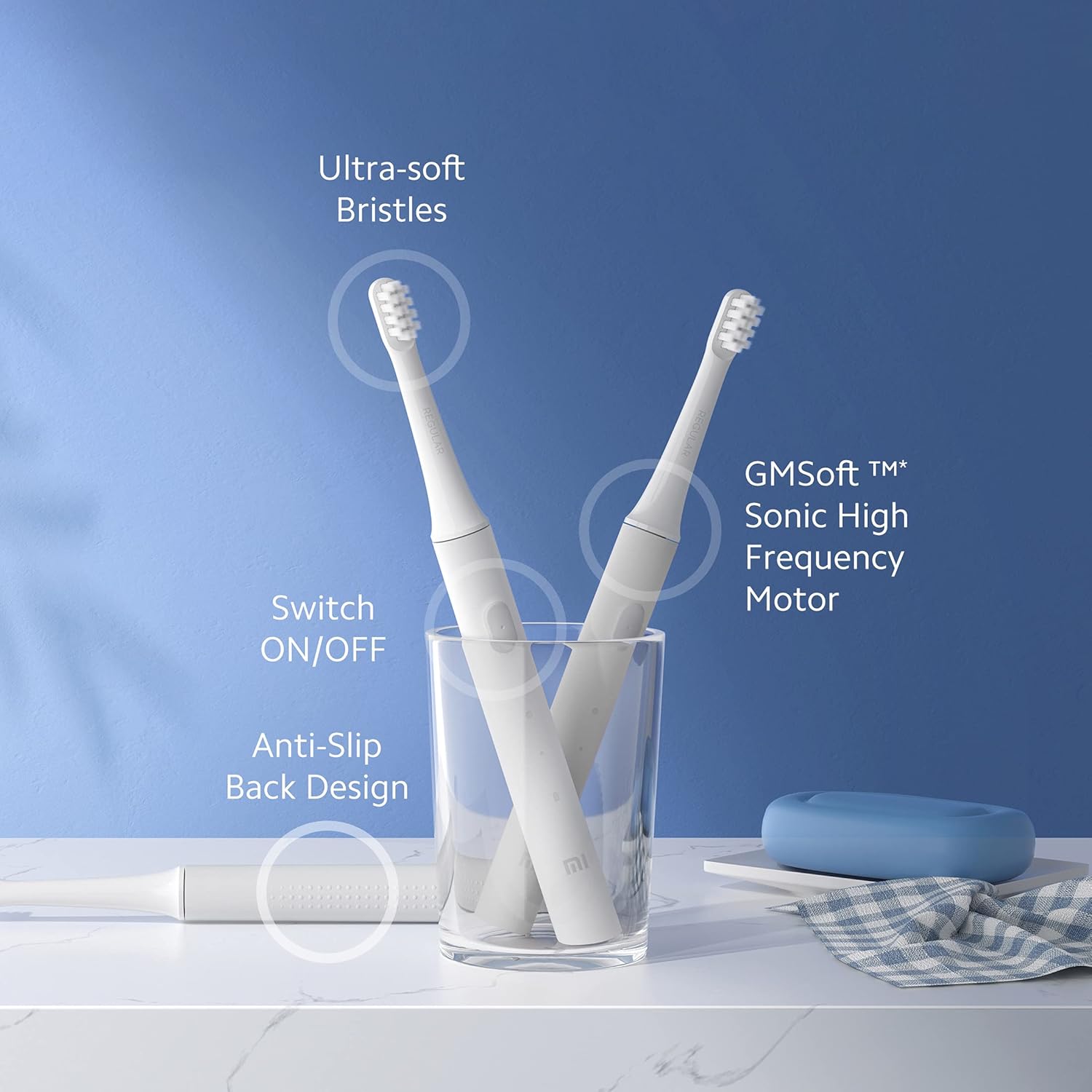
Figura 2: Encimaview of Mi Electric Toothbrush T100 features.
Contenido del paquete
Antes de continuar con la configuración, verifique que todos los elementos estén presentes en el paquete:
- Mi Electric Toothbrush T100 Handle
- Brush Head (Ultra Soft Bristles)
- Cable de carga USB
- Manual de usuario (este documento)
Configuración
1. Carga inicial
Before first use, fully charge the toothbrush. The device is equipped with a rechargeable Lithium-Ion battery.
- Localice el puerto de carga USB en la parte inferior del mango del cepillo de dientes.
- Abra la tapa protectora del puerto de carga.
- Connect the provided USB charging cable to the toothbrush and a compatible USB power adapter (not included).
- Plug the adapter into a power outlet. The LED indicator on the handle will illuminate to show charging status.
- Allow the toothbrush to charge until the LED indicator shows a full charge (refer to the LED indicator section for details). A full charge typically provides up to 30 days of usage.

Figura 3: USB fast charging port.
2. Colocación del cabezal del cepillo
Alinee el cabezal con el eje metálico del mango y presiónelo firmemente hasta que encaje en su lugar. Asegúrese de que esté bien fijado antes de usarlo.
Instrucciones de funcionamiento
1. Cepillarse los dientes
- Humedezca las cerdas y aplique una pequeña cantidad de pasta de dientes.
- Coloque el cabezal del cepillo contra los dientes en un ligero ángulo hacia la línea de las encías.
- Presione el botón de encendido para encender el cepillo de dientes.
- Gently move the brush head slowly across each tooth, allowing the high-frequency vibrations to clean. Avoid scrubbing vigorously.
- El EquiClean Auto Timer will pause briefly every 30 seconds to indicate when to move to the next quadrant of your mouth. After 2 minutes, the toothbrush will automatically turn off, signaling the completion of the recommended brushing time.
- After brushing, press the power button again to turn off the toothbrush if it hasn't already.
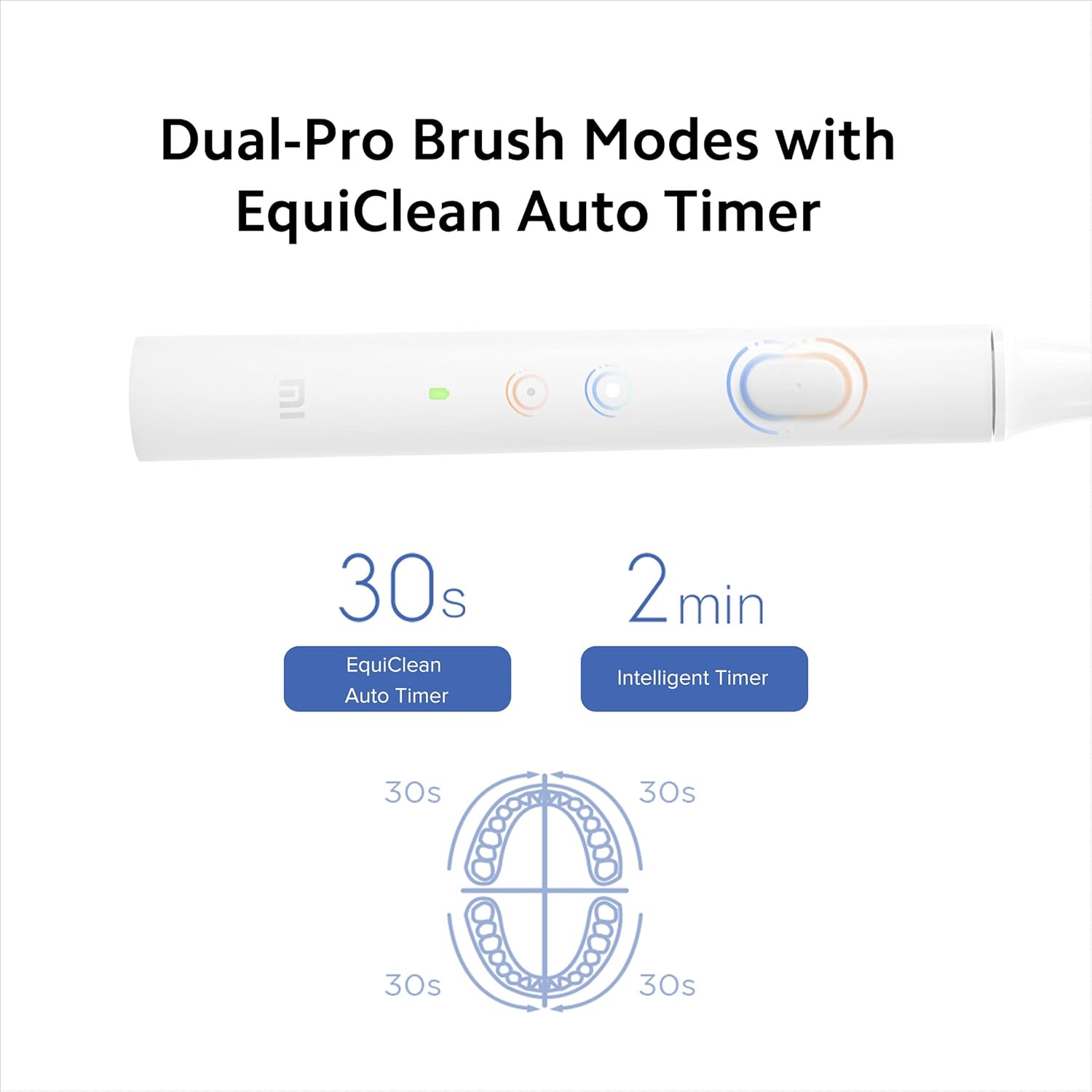
Figura 4: Dual-Pro Brush Modes and EquiClean Auto Timer.
2. Dual Pro Brush Modes
The Mi T100 offers two brushing modes. Press the power button repeatedly to cycle through the modes:
- Modo estándar: Para limpieza diaria.
- Modo suave: For sensitive teeth and gums.

Figura 5: GMSoft Sonic High Frequency Motor for multi-dimensional cleaning.
Mantenimiento
1. Limpieza del cepillo de dientes
Regular cleaning ensures hygiene and extends the lifespan of your toothbrush.
- After each use, rinse the brush head thoroughly under running water while the toothbrush is still on to remove any remaining toothpaste or debris.
- Apague el cepillo de dientes y retire el cabezal del cepillo.
- Rinse both the brush head and the handle separately under running water. Pay attention to the junction area between the head and the handle to prevent accumulation of residue.
- Seque el mango con un paño suave.
- The toothbrush is IPX7 waterproof, allowing it to be safely rinsed under water.

Figura 6: IPX7 Waterproof design for easy cleaning.
2. Reemplazo del cabezal del cepillo
It is recommended to replace the brush head every three months, or sooner if the bristles become frayed or worn. Worn bristles are less effective at cleaning and can irritate gums.
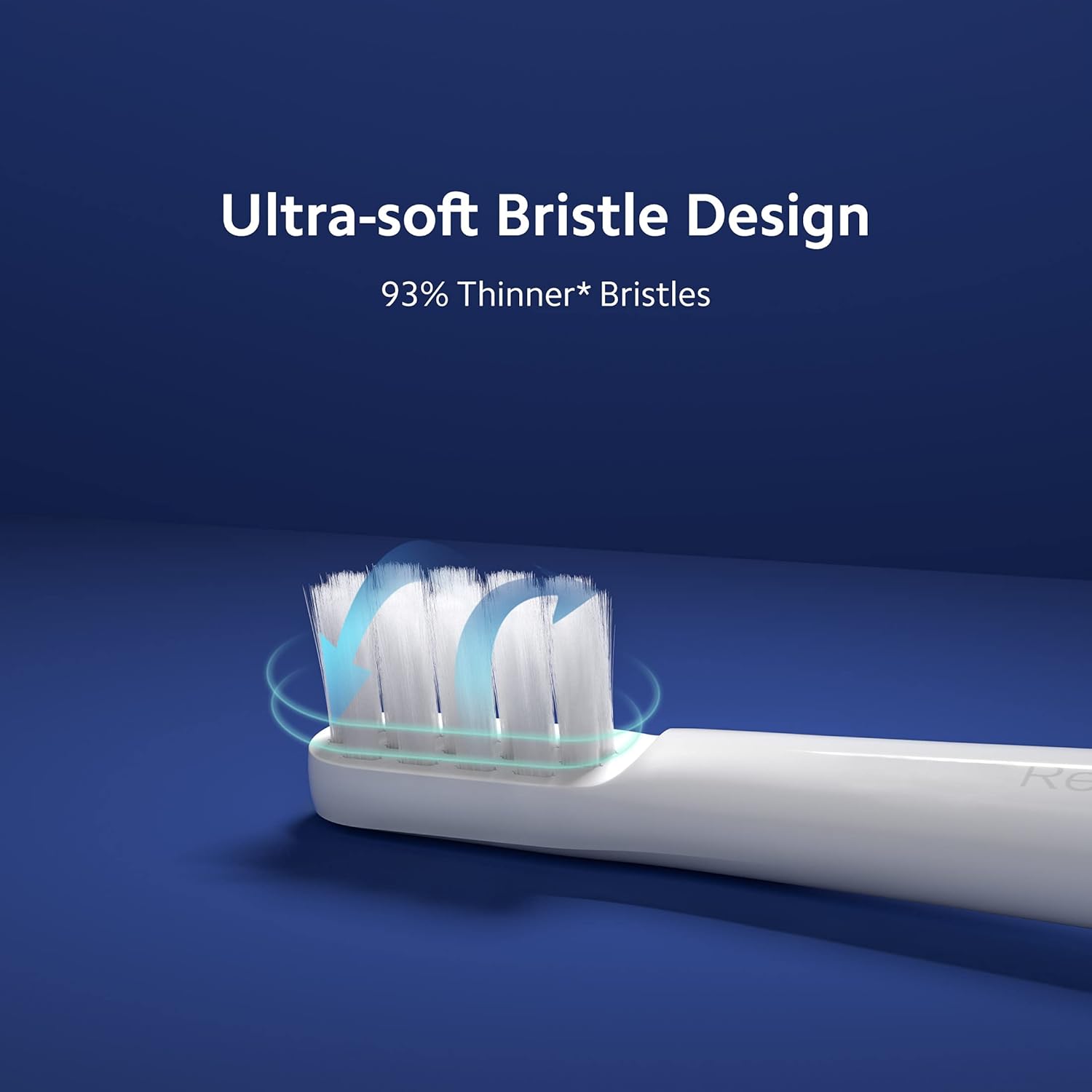
Figura 7: Ultra-soft bristle design.
3. Cuidado de la batería
To maintain optimal battery performance, avoid fully discharging the battery frequently. Recharge the toothbrush when the LED indicator signals low battery.
Solución de problemas
If you encounter issues with your Mi Electric Toothbrush T100, refer to the following common problems and solutions:
| Problema | Posible causa | Solución |
|---|---|---|
| El cepillo de dientes no se enciende. | Batería baja o agotada. | Charge the toothbrush fully using the provided USB cable. |
| Reduced vibration intensity. | Batería baja o cabezal de cepillo desgastado. | Recharge the battery. Replace the brush head if it is old or worn. |
| Toothbrush stops unexpectedly during use. | Battery protection mechanism or residue accumulation. | Ensure the battery is sufficiently charged. Clean the junction between the brush head and handle thoroughly to remove any dried toothpaste or water residue. |
| El indicador de carga no funciona. | Cable o fuente de alimentación defectuoso. | Prueba con otro cable USB o adaptador de corriente. Asegúrate de que el puerto de carga esté limpio y sin residuos. |
Presupuesto
| Característica | Detalle |
|---|---|
| Modelo | T100 (Item model number: 26283) |
| Dimensiones (LxAnxAl) | 21.9 x 2.1 x 2 cm |
| Peso | 46 gramos |
| Frecuencia de vibración | Hasta 18,000 rpm |
| Duración de la batería | Hasta 30 días (según el uso típico) |
| Clasificación de impermeabilidad | IPX7 |
| Tipo de cerdas | Ultra suave |
| Fuente de poder | Funciona con pilas (iones de litio recargables) |
| Nivel de ruido | Aproximadamente 60 dB |
| Color | Blanco |
| Característica del material | Reciclable |
| Rango de edad recomendado | 15 a 65 años |
| Fabricante | Wuxi Qinghe Xiaobei Technolody Co. Ltd. |
| Importador | Xiaomi Technology India Pvt. Ltd. |

Figura 8: Low noise design for comfortable use.

Figura 9: Diseño antideslizante para un manejo seguro.
Garantía y soporte
Información de garantía
The Mi Electric Toothbrush T100 comes with a One Year Pan-India Warranty covering all manufacturing defects. Please retain your purchase receipt for warranty claims.
Información de seguridad
- Este producto está destinado a ser utilizado por adultos.
- Recommended for individuals 18 years and older.
- Do not use if you have severe oral conditions or have recently undergone oral surgery without consulting a dentist.
Atención al cliente
For further assistance, technical support, or warranty inquiries, please contact Xiaomi Technology India Pvt. Ltd. customer service. Refer to the official MI websitio o su documentación de compra para obtener detalles de contacto.