
Introducción
Thank you for choosing the Zoop Kids Digital Watch. This manual provides essential information for the proper setup, operation, and maintenance of your new watch. Please read it carefully to ensure optimal performance and longevity of the product.
The Zoop Kids Digital Watch is designed for children who appreciate style and functionality. It features a durable strap material for easy maintenance and a secure buckle closure. With a water resistance rating of 30 meters, it is suitable for everyday wear and minor water exposure.
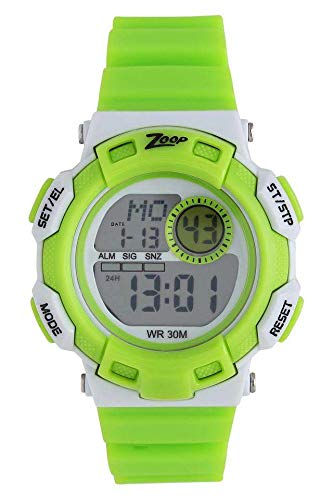
This image shows the Zoop Kids Digital Watch in grey, featuring a round dial and a green strap. The digital display is visible.
Configuración
Encendido inicial y ajuste de la hora
- Activar el reloj: If the display is off, press any button to activate the watch.
- Ingrese al modo de configuración: Locate the 'MODE' button (usually on the side). Press and hold it until the time display starts flashing.
- Ajustar hora: Use the 'SET' or 'ADJUST' button (refer to watch specific button labels) to change the flashing digits (hours, then minutes). Press 'MODE' again to switch between hours and minutes.
- Fecha de establecimiento (si corresponde): After setting the time, continue pressing 'MODE' to cycle through date settings (month, day, year) and adjust using the 'SET' or 'ADJUST' button.
- Salir del modo de configuración: Once all settings are complete, press 'MODE' or wait a few seconds for the watch to automatically exit the setting mode.
Información de la batería
The watch requires 1 Lithium Metal battery. The battery is pre-installed. For optimal performance, ensure the battery is properly seated. If the display is dim or unresponsive, the battery may need replacement.
Instrucciones de funcionamiento
Funciones básicas
- Visualización de la hora: The watch primarily displays the current time (hours, minutes, seconds).
- Visualización de la fecha: Press the 'MODE' button briefly to cycle through different display modes, which may include the date.
- Iluminar desde el fondo: Some models feature a backlight. Press the designated 'LIGHT' button (if available) to illuminate the display in low-light conditions.
Resistencia al agua
This watch has a water resistance depth of 30 meters (3 ATM). This means it is suitable for everyday use and can withstand splashes or brief immersion in water. It is no Recomendado para nadar, ducharse o bucear, ya que la exposición prolongada al agua o a chorros de agua a alta presión pueden comprometer los sellos.
Mantenimiento
Limpieza de su reloj
- Limpie la caja y la correa del reloj con un paño suave y seco.
- Para suciedad difícil, utilice un limpiador ligeramenteamp Paño y jabón suave, luego séquelo inmediatamente.
- Evite utilizar productos químicos agresivos, disolventes o limpiadores abrasivos, ya que pueden dañar el acabado o los sellos del reloj.
Reemplazo de batería
When the display becomes dim or the watch stops functioning, the battery may need to be replaced. It is recommended to have the battery replaced by a qualified watch technician to ensure the water resistance seal is properly maintained.
Almacenamiento
Store your watch in a cool, dry place away from direct sunlight and extreme temperatures to prevent damage to the battery and internal components.
Solución de problemas
- El reloj no muestra la hora: Check if the battery is depleted. If recently replaced, ensure it is inserted correctly.
- Hora incorrecta mostrada: Refer to the 'Setup' section to reset the time.
- Los botones no responden: Ensure the watch is not in a locked mode (if applicable). Try pressing buttons firmly. If unresponsive, the battery might be very low or depleted.
- Condensación bajo el cristal: This indicates a breach in the water resistance. Avoid further water exposure and seek professional service immediately.
Presupuesto
| Marca | Zoop |
| Número de modelo | 206499368 |
| Nombre del modelo del artículo | Reloj digital para niños |
| Tipo de pantalla | Digital |
| Tipo de movimiento | Automático |
| Forma de la caja | Redondo |
| Diámetro de la caja | 43 milímetros |
| Grosor de la caja | 15 milímetros |
| Ancho de banda | 20 milímetros |
| Color de banda | Verde |
| Color de la esfera | Gris |
| Tipo de correa | Two Piece Strap |
| Tipo de cierre | Hebilla de espiga |
| Profundidad de resistencia al agua | 30 metros |
| Peso del artículo | 46 gramos |
| Pilas necesarias | 1 batería de metal de litio |
| Departamento | Unisex-Niño |
Garantía y soporte
Información de garantía
Zoop products are manufactured to high-quality standards. For specific warranty details, please refer to the warranty card included with your purchase or visit the official Zoop webSitio. La garantía generalmente cubre defectos de fabricación en condiciones normales de uso.
Atención al cliente
If you encounter any issues not covered in this manual or require further assistance, please contact Zoop customer support. Contact details can usually be found on the product packaging or the official brand websitio.
- Soporte en línea: Visit the official Zoop webSitio para preguntas frecuentes y recursos de soporte.
- Centros de servicio: For repairs or technical assistance, locate an authorized service center.