
Introducción
The Sharkoon Skiller SGK30 is a mechanical gaming keyboard designed for performance and durability. It features customizable RGB lighting, N-Key rollover, and a 1000Hz polling rate for responsive gameplay and typing. This manual provides essential information for setting up, operating, and maintaining your keyboard.

Image: Sharkoon Skiller SGK30 Mechanical Gaming Keyboard banner displaying the product name and type.
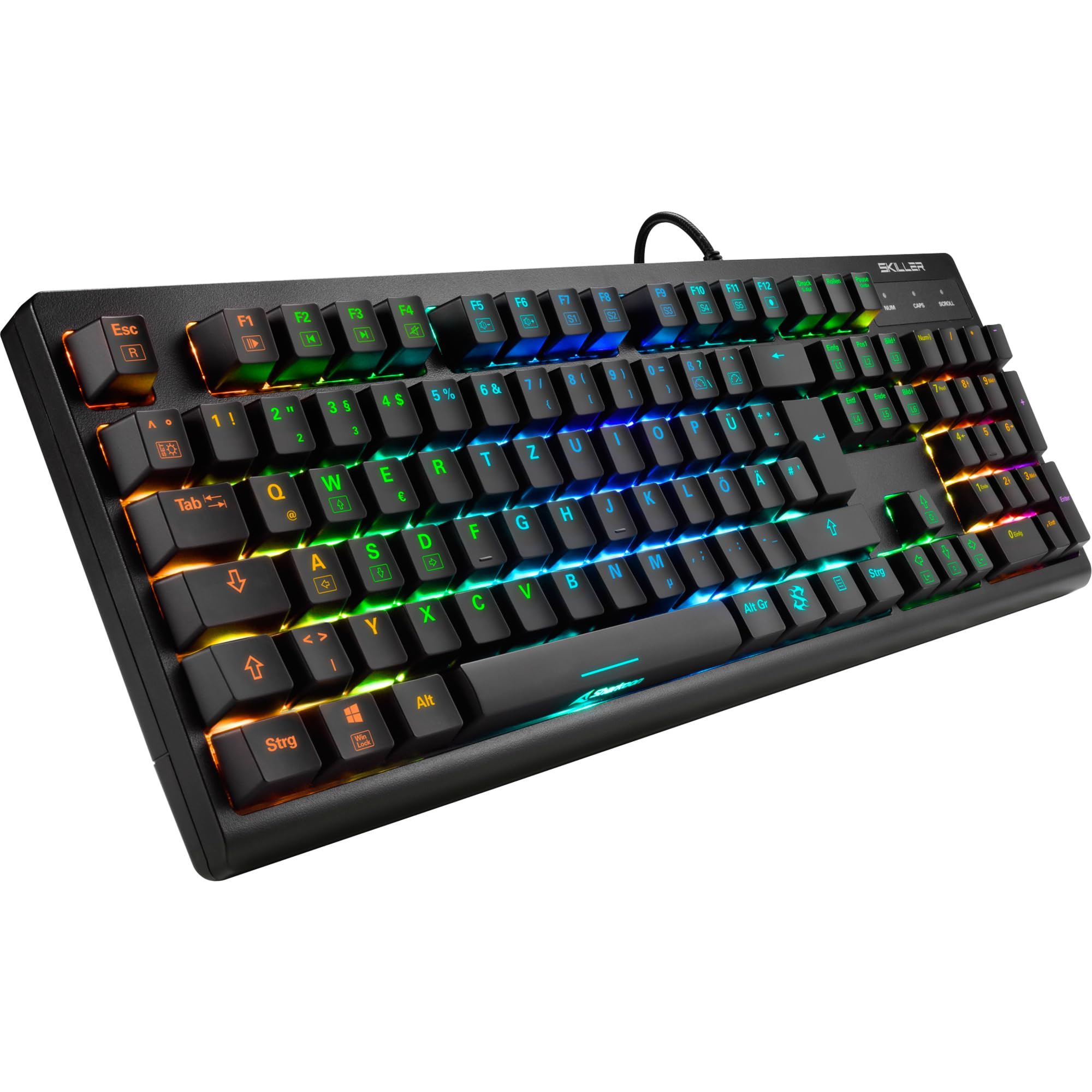
Imagen: Una vista de arriba hacia abajo view of the Sharkoon Skiller SGK30 mechanical gaming keyboard, showcasing su diseño completo y su retroiluminación RGB vibrante.
Producto terminadoview Video
Vídeo: Un producto oficial terminadoview of the Sharkoon Skiller SGK30 Mechanical Gaming Keyboard, demonstrating its features, RGB lighting effects, and mechanical switches.
Configuración
Follow these steps to set up your Sharkoon Skiller SGK30 keyboard:
- Desembalaje del teclado: Retire con cuidado el teclado y el cable USB incluido de su embalaje.
- Conectar a la computadora: Plug the Micro USB end of the cable into the keyboard's port and the standard USB-A end into an available USB port on your computer.
- Instalación del controlador: The keyboard is plug-and-play. Your operating system (Windows 10 or later recommended) should automatically detect and install the necessary drivers.
- Instalación de software (opcional): For advanced customization of RGB lighting and key assignments, download the official Sharkoon software from the manufacturer's websitio.

Image: The Sharkoon Skiller SGK30 keyboard positioned on a desk, ready for connection.
Instrucciones de funcionamiento
Funciones clave básicas
The Sharkoon Skiller SGK30 features a standard layout with additional function keys accessible via the FN llave.
- FN + F1-F12: Access multimedia controls (e.g., play/pause, volume up/down, mute).
- FN + tecla de Windows: Bloquea/desbloquea la tecla Windows para evitar pulsaciones accidentales durante el juego.
- Cambio de tecla N: All keys are registered simultaneously, ensuring every keystroke is detected, even during rapid input.
Control de iluminación RGB
The keyboard offers extensive RGB lighting customization. Use the following combinations to adjust lighting effects:
- FN + Insert/Home/Page Up/Delete/End/Page Down: Recorra varios efectos de iluminación preprogramados.
- FN + Arrow Keys (Up/Down): Adjust brightness levels of the lighting.
- FN + Arrow Keys (Left/Right): Ajuste la velocidad de los efectos de iluminación dinámicos.
- Custom Illumination: Use the dedicated software for advanced per-key lighting customization.

Imagen: Un primer plano view of the keyboard keys highlighting the adjustable RGB illumination capabilities.
Personalización de software
For advanced settings, macro programming, and detailed RGB customization, download and install the Sharkoon Skiller SGK30 software from the official Sharkoon webSitio. El software le permite:
- Crea y guarda programas de iluminación personalizadosfiles.
- Program macros for specific keys.
- Reasignar funciones clave.

Image: A screenshot showing the graphical user interface of the Sharkoon Skiller SGK30 customization software, illustrating various options for lighting and key remapping.
Mantenimiento
Un mantenimiento adecuado garantiza la longevidad y el rendimiento de su teclado:
- Limpieza: Use a soft, dry cloth to wipe the surface of the keyboard. For deeper cleaning, use compressed air to remove dust and debris from between the keycaps.
- Extracción de la tecla: If necessary, keycaps can be carefully removed using a keycap puller (not included) for thorough cleaning of the switches. Reinstall keycaps by pressing them firmly onto the switch stems.
- Evite los líquidos: No exponga el teclado a líquidos. En caso de derrames, desconéctelo inmediatamente y deje que se seque completamente antes de volver a conectarlo.
- Almacenamiento: Guarde el teclado en un lugar fresco y seco, alejado de la luz solar directa y de temperaturas extremas.

Imagen: Un primer plano view of the mechanical switches on the Sharkoon Skiller SGK30 keyboard, illustrating their design for durability and ease of maintenance. Note: This model is available with Red switches, while the image shows Blue switches.
Solución de problemas
If you encounter issues with your Sharkoon Skiller SGK30 keyboard, refer to the following common solutions:
| Problema | Posible causa | Solución |
|---|---|---|
| Teclado no responde | Conexión USB suelta, puerto USB defectuoso, problema con el controlador. |
|
| La iluminación RGB no funciona o es incorrecta | Lighting settings incorrect, software conflict. |
|
| Las claves no se registran | Polvo/residuos debajo de la tecla, interruptor defectuoso. |
|
Presupuesto
| Característica | Detalle |
|---|---|
| Marca | Tiburón |
| Número de modelo | 4044951030026 |
| Tipo de teclado | Teclado de juegos mecánicos |
| Tipo de interruptor | Red Switch (Blue switches are also available for this model series) |
| Conectividad | Micro USB |
| Tasa de sondeo | 1000 Hz |
| Cambio de teclas N | Apoyado |
| Iluminación RGB | RGB personalizable |
| Sistema operativo | Windows 10 (y compatible con otras versiones de Windows) |
| Dimensiones (LxAnxAl) | 44 x 14.4 x 3.5 cm |
| Peso | 867 gramos |
¿Qué hay en la caja?
The Sharkoon Skiller SGK30 package includes:
- Sharkoon Skiller SGK30 Mechanical Gaming Keyboard
- Cable USB
Garantía y soporte
Para obtener información sobre la garantía y soporte técnico, consulte el sitio web oficial de Sharkoon. webSitio web o contacte a su distribuidor local. Conserve su comprobante de compra para reclamaciones de garantía.
Nota: Las especificaciones y características del producto están sujetas a cambios sin previo aviso.


