
1. Introducción
Gracias por la compraasing the QFX E-B3 Bluetooth Professional High-Power Speaker. This manual provides essential information for the safe and efficient operation of your speaker. Please read it thoroughly before use and retain it for future reference.
The QFX E-B3 is designed to deliver powerful audio with features including Bluetooth connectivity, FM radio, USB/SD card playback, LED party lights, and a 250W power amplifier. It also supports True Wireless System (TWS) for stereo pairing with another compatible speaker.
2. Información de seguridad
- Fuente de energía: Conecte el altavoz únicamente a la fuente de alimentación especificada como se indica en la unidad.
- Ventilación: Asegúrese de que haya suficiente ventilación alrededor del altavoz. No bloquee ninguna abertura de ventilación.
- Agua y humedad: This speaker is not waterproof. Do not expose it to rain, moisture, or any liquids to prevent electric shock or fire.
- Calor: Mantenga el altavoz alejado de fuentes de calor como radiadores, rejillas de calefacción, estufas u otros aparatos que produzcan calor.
- Limpieza: Desconecte el altavoz de la toma de corriente antes de limpiarlo. Utilice un paño seco. No utilice limpiadores líquidos ni en aerosol.
- Servicio: No intente reparar este producto usted mismo. Refiera todo el servicio a personal de servicio calificado.
- Colocación: Coloque el altavoz sobre una superficie plana y estable para evitar que se caiga.
3. Contenido del paquete
Verifique que todos los artículos estén presentes en el paquete:
- QFX E-B3 High-Power Speaker
- Micrófono
- Mando a distancia
- Cable de alimentación de CA
- Manual de usuario (este documento)
4. Producto terminadoview
The QFX E-B3 speaker features dual 15-inch woofers and a 1-inch tweeter, protected by a metal grill. It includes integrated handles and wheels for portability.

Figura 4.1: Frente view of the QFX E-B3 Speaker.
Controles y puertos del panel trasero
The rear panel houses all input/output connections and control knobs.
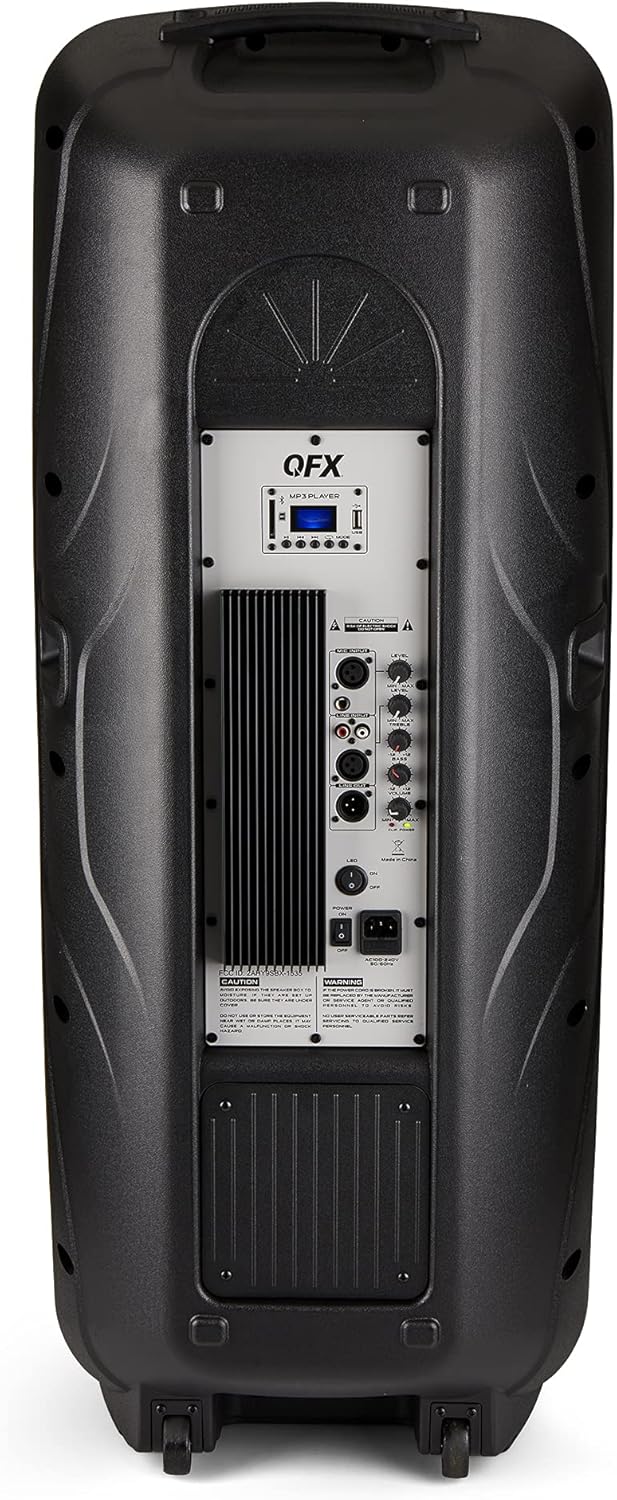
Figure 4.2: Rear panel with controls and ports.
- Interruptor de alimentación: Enciende y apaga el altavoz.
- Entrada de CA: Conecta el cable de alimentación de CA.
- USB/SD Card Ports: Para reproducir audio files desde unidades USB o tarjetas SD.
- Pantalla de visualización: Muestra el modo actual y la información de la pista.
- Botón de modo: Switches between input modes (Bluetooth, FM, USB, SD, RCA).
- Botón de reproducción/pausa: Controla la reproducción para USB/SD/Bluetooth.
- Botones de pista anterior/siguiente: Navega por pistas o estaciones de FM.
- Perilla de volumen maestro: Ajusta el volumen general.
- Bass/Treble Control Knobs: Adjusts low and high frequencies.
- Entrada de micrófono XLR: Connects a wired microphone.
- Perillas de volumen y eco del micrófono: Adjusts microphone volume and echo effect.
- Entrada RCA (L/R): Connects external audio devices via RCA cables.
- XLR Line Input/Output: For connecting to other audio equipment.
5. Configuración
Colocación inicial
Place the speaker on a stable, flat surface. For optimal sound, position it in a central location within the listening area. The integrated wheels and handle allow for easy transport.

Figure 5.1: Speaker being moved with handle and wheels.
Conexión de energía
- Asegúrese de que el interruptor de encendido del altavoz esté en la posición APAGADO.
- Connect the AC power cable to the AC input on the rear panel of the speaker.
- Conecte el otro extremo del cable de alimentación de CA a un tomacorriente de pared estándar.
- Flip the power switch to the ON position. The display screen will illuminate.
6. Instrucciones de funcionamiento
Emparejamiento Bluetooth
- Turn on the QFX E-B3 speaker.
- Presione el MODO button on the speaker or remote control until "BLUE" appears on the display screen, indicating Bluetooth mode.
- Habilite Bluetooth en su dispositivo móvil (teléfono inteligente, tableta, etc.).
- Buscar available Bluetooth devices and select "QFX E-B3" from the list.
- Una vez emparejado, el altavoz emitirá un sonido de confirmación. Ahora puede reproducir audio desde su dispositivo a través del altavoz.
True Wireless System (TWS) Pairing
TWS allows two QFX E-B3 speakers to connect wirelessly for a stereo sound experience. This feature works only in Bluetooth mode.
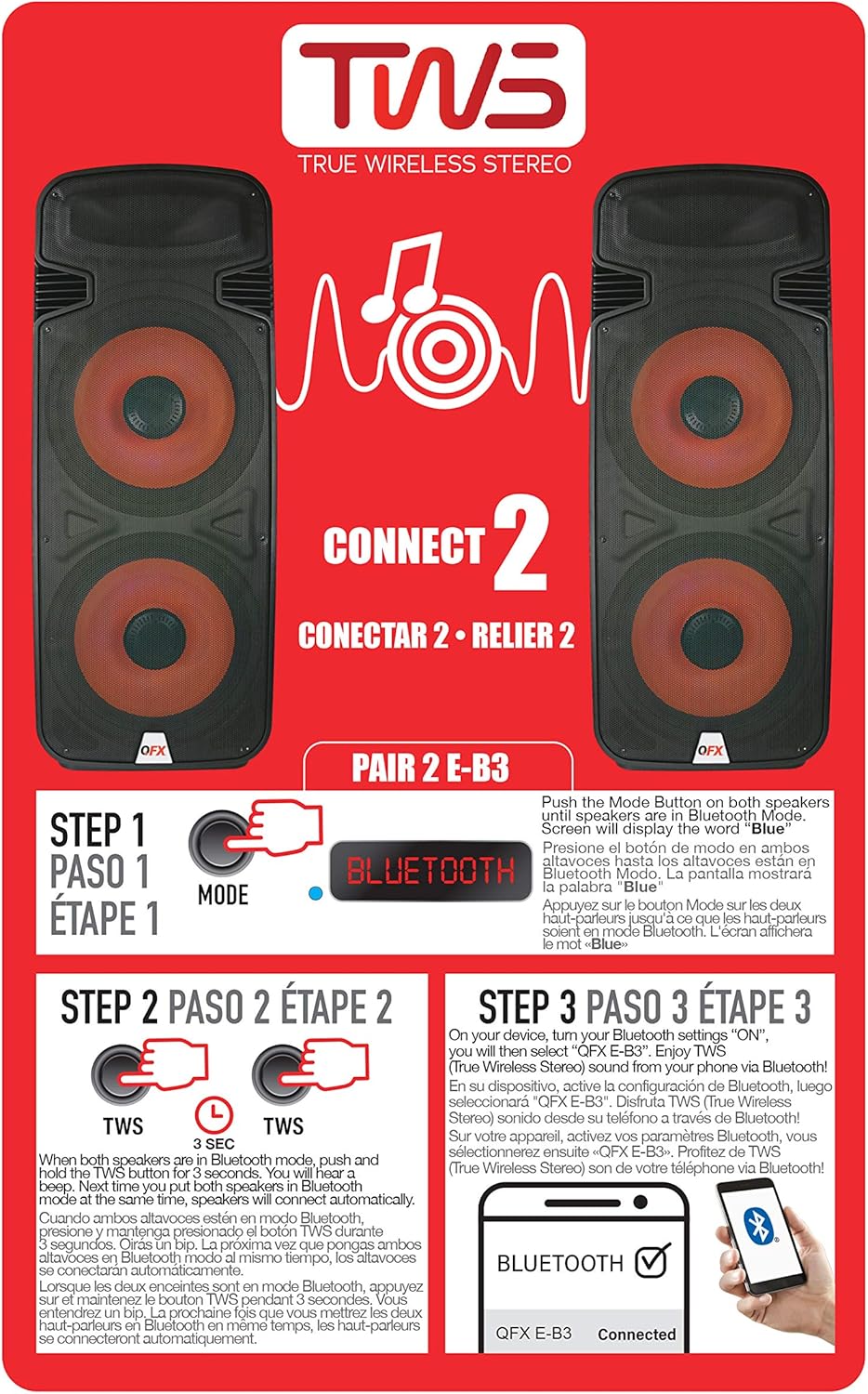
Figure 6.1: TWS Pairing Instructions.
- Ensure both QFX E-B3 speakers are powered on and in Bluetooth mode. The display on both speakers should show "BLUE".
- En uno de los altavoces (este será su altavoz principal), mantenga presionado el botón TWS button for approximately 3 seconds. The speakers will attempt to connect to each other.
- Once successfully paired, you will hear a confirmation sound, and the display on the primary speaker will show "BLUE" while the secondary speaker will show "BLUE" as well.
- On your Bluetooth-enabled device, search for and select "QFX E-B3". The two speakers will now play audio in stereo.
Funcionamiento de la radio FM
- Presione el MODO Botón para cambiar al modo de radio FM. La pantalla mostrará la frecuencia FM.
- Mantenga pulsado el Reproducir/Pausa Botón para iniciar una búsqueda automática de emisoras FM. El altavoz guardará todas las emisoras encontradas.
- Utilice el Pista anterior / siguiente Botones para navegar a través de las estaciones de FM guardadas.
Reproducción de tarjeta USB / SD
- Inserte una unidad flash USB o una tarjeta SD (con audio compatible) files) en el puerto correspondiente en el panel trasero.
- El altavoz cambiará automáticamente al modo USB/SD y comenzará a reproducir el audio. files. Si no, presione el MODO Botón para seleccionar el modo USB o SD.
- Utilice el Reproducir/Pausa y Pista anterior / siguiente Botones para controlar la reproducción.
Entrada de micrófono
- Connect a microphone to the XLR Microphone Input on the rear panel.
- Adjust the Microphone Volume and Echo knobs to achieve the desired sound.
Entrada RCA
- Connect an external audio source (e.g., CD player, mixer) to the RCA Input (L/R) ports using appropriate RCA cables.
- Presione el MODO button to select RCA input mode.
- Adjust the master volume on the speaker and the volume on your external audio source.
Luces LED para fiestas
The speaker features integrated LED party lights that activate automatically when the speaker is powered on. There are no specific controls for the LED lights mentioned; they are designed to enhance the audio experience.
7. Mantenimiento
Limpieza
- Always unplug the speaker before cleaning.
- Utilice un paño suave y seco para limpiar las superficies exteriores del altavoz.
- No utilice limpiadores abrasivos, ceras o disolventes ya que pueden dañar el acabado.
- Mantenga las aberturas de ventilación libres de polvo y residuos.
Almacenamiento
When not in use for extended periods, store the speaker in a cool, dry place, away from direct sunlight and extreme temperatures. Cover the speaker to protect it from dust.
8. Solución de problemas
If you encounter issues with your QFX E-B3 speaker, refer to the following common problems and solutions:
| Problema | Posible causa | Solución |
|---|---|---|
| Sin poder | Cable de alimentación no conectado; Toma de corriente no activa; Interruptor de encendido del altavoz apagado. | Ensure AC cable is securely connected to speaker and outlet. Check if outlet is working. Turn speaker power switch ON. |
| Sin sonido | Volumen demasiado bajo; Modo de entrada incorrecto seleccionado; Fuente de audio no se reproduce. | Increase master volume. Press MODE button to select correct input. Ensure audio source is playing and its volume is up. |
| El Bluetooth no se conecta | Speaker not in Bluetooth mode; Device Bluetooth off; Speaker already paired to another device; Device too far. | Ensure speaker is in Bluetooth mode ("BLUE" on display). Turn on device Bluetooth. Disconnect from other devices. Move device closer to speaker (within 30 feet). |
| El emparejamiento TWS falló | Los altavoces no están en modo Bluetooth; el botón TWS no se mantiene presionado el tiempo suficiente. | Ensure both speakers are in Bluetooth mode. Press and hold the TWS button on one speaker for 3 seconds. |
| La reproducción USB/SD no funciona | Modo incorrecto; Incompatible file formato;Tarjeta USB/SD dañada. | Press MODE to select USB/SD. Ensure audio files are in a compatible format (e.g., MP3). Try a different USB/SD card. |
9. Especificaciones
| Característica | Especificación |
|---|---|
| Marca | QFX |
| Número de modelo | E-B3 |
| Potencia máxima de salida del altavoz | 250 vatios |
| Tecnología de conectividad | USB, Bluetooth |
| Modo de salida de audio | Estéreo |
| Tipo de montaje | Montaje en enchufe, montaje en rueda |
| Tipo de altavoz | Woofer (Dual 15 Inches) |
| Tipo de controlador | Mando a distancia |
| Color | Party LED |
| es resistente al agua | FALSO |
| Método de control | Remoto |
| Diámetro del woofer | 15 pulgadas |
| Cantidad de canales de audio | 2.0 |
| Tecnología inalámbrica | Bluetooth |
| Protocolo de conectividad | Bluetooth |
| Fuente de poder | Eléctrico con cable |
| Tipo de controlador de audio | Controlador dinámico |
| Tamaño del controlador de audio | 15 pulgadas |
| Dimensiones del artículo (Pr. x An. x Al.) | 16.77" de profundidad x 13.98" de ancho x 23.74" de alto |
| Peso del artículo | 13.2 libras |
| Dispositivos compatibles | Portátil, reproductor de MP3, teléfono inteligente, tableta, televisión |
| Código Postal | 606540039618 |
10. Información de garantía
This product is covered by a limited warranty. For specific details regarding warranty coverage and terms, please refer to the warranty information provided at the point of purchase or contact QFX customer support directly. The warranty is typically per contract with the retailer.
11. Soporte
For technical assistance, troubleshooting beyond this manual, or inquiries about your QFX E-B3 speaker, please contact QFX customer support or your retailer. Contact information can usually be found on the manufacturer's websitio o en su recibo de compra.