
Bytech BY-AU-BS-152-BK
Manual del usuario del altavoz inalámbrico Bluetooth Boost Link True de Bytech
Modelo: BY-AU-BS-152-BK
Introducción
Gracias por la compraasing the Bytech True Wireless Bluetooth Boost Link True Speaker. This manual provides essential information for setting up, operating, and maintaining your new speakers. Please read this manual thoroughly before use to ensure proper operation and to maximize your listening experience. These speakers feature True Wireless Stereo (TWS) functionality, Bluetooth connectivity, FM Radio, and Bass Boost for rich audio.
Información de seguridad
- No exponga los altavoces a temperaturas extremas, humedad o luz solar directa.
- Evite dejar caer o someter los altavoces a impactos fuertes.
- Do not disassemble, repair, or modify the speakers yourself. Refer all servicing to qualified personnel.
- Mantenga los altavoces alejados del agua y otros líquidos.
- Utilice únicamente el cable de carga y el adaptador de corriente especificados.
- Limpie los altavoces con un paño suave y seco. No utilice limpiadores abrasivos ni disolventes.
- Escuche a niveles de volumen moderados para evitar daños auditivos.
Contenido del paquete

Image: The Bytech Boost Link True Wireless Speakers shown in their retail packaging, highlighting the two speakers and the Bluetooth connectivity feature.
Por favor, compruebe que todos los artículos estén presentes y en buen estado:
- 2 x Bytech Boost Link True Wireless Speakers
- 1 x cable de carga (USB)
- 1 x Manual de usuario (este documento)
Producto terminadoview

Imagen: Un primer plano frontal view of the two Bytech Boost Link True Wireless Speakers, showing the speaker grilles and control buttons at the bottom.
Familiarícese con los componentes y controles del altavoz:
- Rejilla del altavoz: Protects the speaker driver.
- Botones de control:
- Botón de encendido: Power On/Off, Play/Pause.
- Botón de modo: Switch between Bluetooth, FM Radio, etc.
- Botón de pista anterior/bajar volumen: Pulsación corta para la pista anterior, pulsación larga para bajar el volumen.
- Botón de subir volumen/pista siguiente: Presione brevemente para pasar a la siguiente pista, presione prolongadamente para subir el volumen.
- Puerto de carga: Para conectar el cable de carga USB.
- Indicador LED: Shows power status, charging status, and pairing status.
Configuración
Carga de los altavoces
Before first use, fully charge both speakers. Connect the supplied USB charging cable to the charging port on each speaker and plug the other end into a USB power adapter (not included) or a computer's USB port. The LED indicator will show charging status and turn off or change color when fully charged.
Encendido/apagado
- Para encender: Press and hold the Power button on each speaker until the LED indicator lights up and you hear a power-on prompt.
- Para apagar: Press and hold the Power button on each speaker until the LED indicator turns off and you hear a power-off prompt.
Instrucciones de funcionamiento
Emparejamiento Bluetooth (modo de altavoz único)
- Asegúrese de que el altavoz esté encendido y en modo de emparejamiento Bluetooth (el indicador LED parpadeará).
- En su dispositivo (teléfono inteligente, tableta, computadora portátil), habilite Bluetooth y busque los dispositivos disponibles.
- Select "BYTECH BOOST LINK" (or similar name) from the list.
- Una vez emparejado, el indicador LED dejará de parpadear y permanecerá fijo, y escuchará un sonido de confirmación.
Emparejamiento estéreo inalámbrico verdadero (TWS) (dos altavoces)
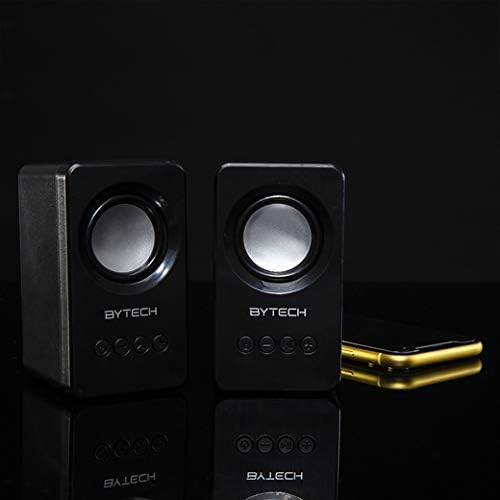
Image: The two Bytech Boost Link True Wireless Speakers positioned next to a smartphone, symbolizing their ability to connect wirelessly to each other and a device for stereo sound.
For a true stereo sound experience, you can pair both speakers together:
- Power on both Bytech Boost Link speakers. Do not connect them to your Bluetooth device yet.
- The speakers will automatically attempt to pair with each other. You will hear a confirmation sound when they are successfully linked for TWS. One speaker will become the master (left channel) and the other the slave (right channel).
- Once TWS paired, the master speaker will enter Bluetooth pairing mode (LED flashing).
- On your device, enable Bluetooth and search for "BYTECH BOOST LINK". Connect to this single entry.
- Ambos altavoces ahora reproducirán audio en estéreo.
- Nota: If the speakers do not automatically pair, try double-pressing the Mode button on one of the speakers to initiate TWS pairing.
Funcionamiento de la radio FM
- Encienda el(los) altavoz(es).
- Presione el Modo Presione y mantenga presionado el botón repetidamente hasta que escuche el mensaje de radio FM.
- Para escanear y guardar estaciones automáticamente, mantenga presionada la tecla Reproducir/Pausa button. The speaker will scan and store available FM stations.
- Utilice el Pista anterior y Pista siguiente Botones para navegar entre estaciones guardadas.
Reproducción de audio y control de volumen
- Reproducir/Pausa: Presione brevemente el botón de encendido.
- Pista siguiente: Short press the Next Track/Volume Up button.
- Pista anterior: Short press the Previous Track/Volume Down button.
- Sube el volumen: Long press the Next Track/Volume Up button.
- Bajar volumen: Long press the Previous Track/Volume Down button.
Mantenimiento
- Limpieza: Use a soft, dry, lint-free cloth to clean the surface of the speakers. Do not use liquid cleaners, aerosols, or solvents.
- Almacenamiento: Cuando no los utilice durante períodos prolongados, guarde los altavoces en un lugar fresco y seco, alejado de la luz solar directa y de temperaturas extremas.
- Cuidado de la batería: To prolong battery life, avoid fully discharging the battery frequently. Charge the speakers regularly, even if not in use.
Solución de problemas
| Problema | Posible causa | Solución |
|---|---|---|
| El altavoz no se enciende. | Batería baja. | Cargue el altavoz completamente. |
| No se puede emparejar a través de Bluetooth. | El altavoz no está en modo de emparejamiento; el Bluetooth del dispositivo está desactivado; está demasiado lejos del dispositivo. | Ensure speaker LED is flashing; Turn on Bluetooth on your device; Move speaker closer to device (within 10 meters). |
| No hay sonido. | Volume too low; Speaker not connected; Incorrect mode. | Increase volume on speaker and device; Re-pair Bluetooth; Ensure correct mode (Bluetooth/FM). |
| El emparejamiento de TWS falla. | Altavoces ya conectados a un dispositivo; Altavoces demasiado separados. | Disconnect speakers from any device; Power off and on both speakers, then try TWS pairing again; Ensure speakers are close to each other. |
| Mala recepción de radio FM. | Señal débil; Interferencia. | Relocate the speaker to an area with better reception; Extend the charging cable (can act as an antenna). |
Presupuesto
- Modelo: POR-AU-BS-152-BK
- Marca: Tecnología de bytes
- Tecnología de conectividad: Inalámbrico (Bluetooth)
- Modo de salida de audio: Rodear
- Tipo de altavoz: Sonido envolvente
- Características especiales: Wireless Bluetooth, Bass Boost, FM Radio, True Wireless Stereo (TWS)
- Usos recomendados: Para reproductores de música
- Dispositivos compatibles: Ordenador portátil, tableta, teléfono inteligente
- Tipo de controlador: Botones en el dispositivo
- Dimensiones del paquete: 20.7 x 16 x 9 cm
- Peso: 560 gramos
Garantía y soporte
Bytech products are designed and manufactured to the highest quality standards. For information regarding warranty coverage, technical support, or service inquiries, please refer to the warranty card included with your purchase or visit the official Bytech webSitio web. Conserve su comprobante de compra para reclamaciones de garantía.
For further assistance, please contact Bytech customer support.
Ask a question about this manual
Ask about setup, troubleshooting, compatibility, parts, safety, or missing instructions. Manuals+ will review the question and use this page’s manual context to help answer it.