
1. Introducción
Thank you for choosing the OSSURET Quad-Core Android 10 GPS Navigation System. This manual provides essential information for the proper installation, operation, and maintenance of your new car multimedia system. Please read this manual thoroughly before using the product to ensure optimal performance and safety. This unit is designed for Mitsubishi Lancer models manufactured between 2007 and 2017.
2. Información de seguridad
- Utilice siempre el dispositivo de forma responsable y conforme a las normas de tráfico locales. Conducir distraído puede provocar accidentes.
- No intente instalar ni reparar la unidad usted mismo si no está cualificado. Una instalación incorrecta puede dañar el sistema eléctrico del vehículo o la propia unidad. Se recomienda la instalación profesional.
- Ensure all wiring connections are secure to prevent short circuits or electrical fires.
- Mantenga la pantalla limpia y libre de obstrucciones para mantener una visibilidad clara.
- Evite exponer la unidad a temperaturas extremas, luz solar directa durante períodos prolongados o humedad excesiva.
3. Producto terminadoview
3.1 Características principales
- Sistema operativo: Androide 10
- Procesador: Quad-Core ARM A7 4*1.2GHz
- Memoria: 1 GB de RAM, 16 GB de almacenamiento flash
- Mostrar: 10.1-inch Capacitive Touchscreen, 1024x600 Resolution
- Navegación: Built-in GPS, supports offline maps, Google Maps, Waze, and other Android navigation apps.
- Conectividad: Integrated WiFi, Bluetooth (Hands-free calling, A2DP music streaming), USB.
- Multimedia: Supports 1080P video decoding, various audio and video formats (MP4, AVI, MP3, WMA, JPEG, etc.).
- Funciones avanzadas: Split Screen, Steering Wheel Control, Mirror Link (AirPlay for iOS, Easy-Connect for Android), Rearview Camera Input support, Android Market access.
3.2 Contenido del paquete (Accesorios)
The package includes the main head unit and various cables and adapters necessary for installation and functionality. Please verify all components are present upon unboxing.

Imagen: Various wiring harnesses, USB cables, and adapters included with the OSSURET car multimedia system.
4. Configuración e instalación
4.1 Compatibilidad del vehículo
This unit is specifically designed for Mitsubishi Lancer models from 2007 to 2017. It is intended for left-hand drive vehicles. Always confirm the center console of your vehicle matches the product's design before installation.

Imagen: This image shows the dashboard of a Mitsubishi Lancer before and after the installation of the OSSURET Android head unit, demonstrating the integrated fit.
4.2 Pasos de instalación (se recomienda instalación profesional)
- Preparación: Desconecte la batería del vehículo para evitar daños eléctricos.
- Retire la unidad original: Retire con cuidado el estéreo del automóvil existente y los paneles de moldura.
- Conectar el cableado: Connect the provided wiring harnesses to the vehicle's existing connectors. Ensure all connections are secure.
- Antena GPS: Instale la antena GPS en un lugar despejado. view del cielo, generalmente en el tablero o debajo del parabrisas.
- Cables USB: Coloque los cables USB en un lugar accesible, como la guantera.
- Funcionalidad de prueba: Before fully reassembling the dashboard, reconnect the battery and power on the unit to test basic functions (power, audio, touchscreen, GPS signal).
- Unidad segura: Monte la nueva unidad principal de forma segura en la abertura del tablero.
- Volver a montar: Reinstall all trim panels and ensure a neat finish.
4.3 Encendido inicial y configuración
After installation, power on the unit. The system will boot into the Android 10 interface. Follow any on-screen prompts for initial setup, such as language selection and time zone. Connect to a Wi-Fi network to enable online features and app downloads.
5. Instrucciones de funcionamiento
5.1 Navegación básica
- Pantalla táctil: The unit features a responsive touchscreen for all interactions. Tap to select, swipe to scroll, and pinch to zoom.
- Pantalla de inicio: The main interface provides access to frequently used applications and widgets.
- Cajón de aplicaciones: Swipe up from the bottom of the screen or tap the app icon to access all installed applications.
5.2 Navegación GPS
The system comes with pre-loaded offline map data. It also supports online navigation applications like Google Maps and Waze when connected to the internet.
- Iniciando Navegación: Tap the 'Navigation' or 'Maps' icon on the home screen or app drawer.
- Ingresando Destino: Use the on-screen keyboard to enter your destination address or select from saved locations.
- Guía de voz: The system provides voice-guided turn-by-turn directions.
- Mapa 2D/3D Views: Cambiar entre mapa 2D y 3D views as preferred.
- Función de zona dual: Navigate while listening to music or other audio sources simultaneously.
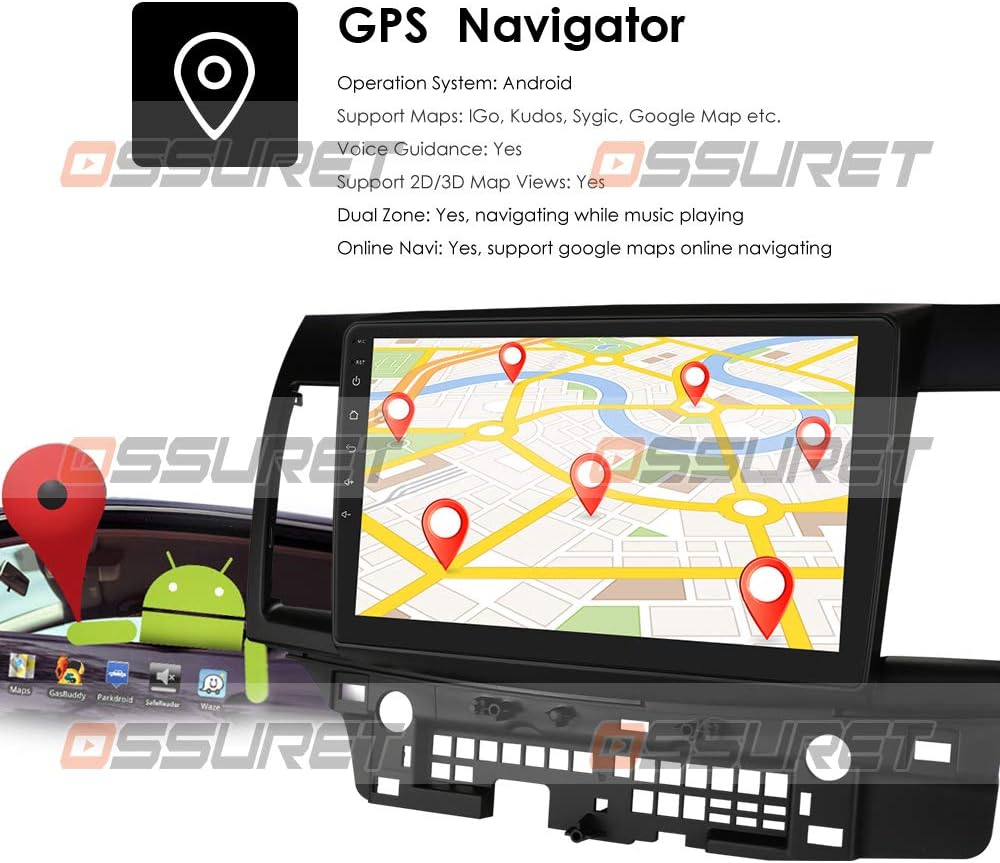
Imagen: A visual representation of the GPS navigation interface, showing a map with route markers and an Android robot icon, indicating Android OS functionality.
5.3 Radio (FM/DAB+)
- Radio FM: Access the FM radio application to scan for stations, save presets, and adjust settings. The FM frequency range is 87.5-108MHz.
- DAB/DAB+ (Optional): If a DAB+ box is connected (sold separately), you can enjoy digital audio broadcasting with higher sound quality and more channels. Connect the DAB+ box via a USB port.

Imagen: This image illustrates the connection of an optional DAB+ box via USB and provides a table comparing the advantages of DAB+ over traditional FM radio, such as CD-like quality and robust signal reception.
5.4 Función Bluetooth
Conecte su teléfono inteligente a través de Bluetooth para realizar llamadas manos libres y transmisión de audio.
- Emparejamiento: Go to Bluetooth settings on the unit and your phone, search for available devices, and pair with the OSSURET unit.
- Llamadas manos libres: Make and receive calls directly from the unit's screen. The built-in microphone allows for clear communication.
- Música Bluetooth (A2DP): Stream audio from your phone to the car speakers. Control playback (play/pause, next/previous) from the unit.
- Directorio telefónico: Download your phone's contacts to the unit for easy access and searching.
- Registros de llamadas: View dialed, received, and missed calls.

Imagen: This image displays the Bluetooth interface for phone calls, showing a dial pad on the car stereo screen and a smartphone displaying a similar interface, highlighting hands-free calling capability.
5.5 Reproducción multimedia
The unit supports various media formats for music, video, and images.
- Reproductor de música: Supports MP3, WMA, AAC, RM, FLAC, etc.
- Reproductor de video: Supports MPEG-1/2/4, H264, H263, VC1, RV, RMVB, DivX, VP8, AVS Stream, etc., with 1080P video decoding.
- Imagen Viewes: Admite formatos JPS, BMP, PNG, GIF.
5.6 Función de pantalla dividida
Perform two tasks simultaneously by running two applications side-by-side on the screen. For example, navigate with Google Maps while listening to music or browsing a web página.
5.7 Control del volante
The unit supports your vehicle's original steering wheel controls, allowing you to manage music playback and volume without taking your hands off the wheel, enhancing driving safety.
5.8 Enlace espejo
Mirror your smartphone's screen onto the head unit's display.
- For Apple iPhones (AirPin PRO): Connect your iPhone via Wi-Fi. The unit can create a Wi-Fi hotspot. Buscar this hotspot on your iPhone and connect. You can then mirror your iPhone's display, including the main menu, photos, videos, and online navigation maps.
- For Android Phones (Easy-Connect): Connect your Android phone using a USB charging cable. You can mirror the connected Android smartphone display, including the main menu, photos, videos, and online navigation maps.

Imagen: This image demonstrates the Mirror Link feature, showing an iPhone connected wirelessly via Wi-Fi (AirPlay) and an Android phone connected via USB (Easy-Connect), both mirroring their screens to the car stereo.
5.9 Traseroview Entrada de cámara
El sistema admite una parte traseraview camera input (camera sold separately). When the vehicle is in reverse, the display automatically switches to the camera feed, providing a clear view of the area behind the car and assisting with parking and avoiding obstacles.

Imagen: Esta imagen ilustra la parte traseraview camera input feature, showing a car backing up with a visual overlay of parking guidelines on the screen, indicating support for a backup camera system.
5.10 Android Market and App Installation
Access the Android Market (Google Play Store) to download and install a wide variety of applications, games, and utilities. The unit supports Android Package (APK) installer for manual app installation.

Imagen: This image depicts the Android Market feature, showing various app icons floating around a tablet-like device, symbolizing access to a wide range of applications. It also highlights the 16GB ROM and support for APK installation.
6. Mantenimiento
- Limpieza de pantalla: Utilice un paño suave que no deje pelusa para limpiar la pantalla táctil. Para manchas difíciles, frote ligeramente.ampEnjuague el paño con agua o un limpiador de pantallas. Evite productos químicos agresivos.
- Actualizaciones de software: Periodically check for system software updates to ensure optimal performance and access to new features. Updates can usually be found in the system settings menu.
- Copia de seguridad de datos: Realice copias de seguridad periódicas de datos o configuraciones importantes, si corresponde.
7. Solución de problemas
| Problema | Posible causa | Solución |
|---|---|---|
| La unidad no enciende | Conexión de alimentación suelta, fusible quemado, problema con la batería del vehículo. | Check power cables and fuse. Ensure vehicle battery is charged. Consult a professional if needed. |
| Sin sonido | Volumen demasiado bajo, silencio activado, problema de cableado del altavoz. | Sube el volumen, comprueba el estado de silencio. Verifica las conexiones de los altavoces. |
| Señal GPS perdida o inexacta | Antena GPS obstruida, mala recepción de satélite. | Asegúrese de que la antena GPS tenga una vista clara. view del cielo. Muévete a un área abierta. |
| El Bluetooth no se conecta | Bluetooth off on unit or phone, device not in pairing mode. | Ensure Bluetooth is enabled on both devices. Put phone in pairing mode. Restart both devices. |
| La pantalla táctil no responde | Congelamiento del sistema, falla temporal del software. | Restart the unit. If issue persists, perform a factory reset (refer to system settings). |
8. Especificaciones
| Característica | Detalle |
|---|---|
| Sistema operativo | Androide 10 |
| UPC | Quad-Core ARM A7 4*1.2GHz |
| RAM | 1 GB |
| Memoria Flash | 16 GB |
| Tamaño de pantalla | 10.1 pulgadas |
| Resolución | 1024 x 600 |
| Descodificación de vídeo | 1080P HD H.265 2160p, Multi-format FHD video decoding |
| Rango de frecuencia FM | 87.5-108MHz (EU/US) |
| Wi-Fi | Incorporado |
| Bluetooth | Hands-free calls, A2DP music, Phonebook download |
| GPS | Offline maps pre-loaded, supports Google Maps/Waze |
| Conectividad | USB |
| Modo de salida de audio | Estéreo |
| Tipo de instalación | Montaje en tablero o parabrisas |
| Dimensiones del producto | 17.78 x 10.16 x 3.05 cm |
| Referencia del fabricante | T1MTLC101001B |
9. Garantía y soporte
OSSURET provides a garantía de un año and technical support for this car stereo system. If you have any questions regarding installation or the product itself, please contact us via message. We aim to respond within 24 hours to assist you.