
1. Producto terminadoview
The SKYSHL SS322T-2G1 is a high-performance Single Mode Optical Time Domain Reflectometer (OTDR) designed for comprehensive fiber optic network testing. It integrates multiple essential functions including OTDR, Optical Power Meter (OPM), Optical Light Source (OLS), Visual Fault Locator (VFL), Event Map, and APP Module connectivity. With 1310nm and 1550nm wavelengths and a dynamic range of 49dB, it is capable of testing distances up to 280km (174 miles). The device features a 7-inch touch screen for intuitive operation and supports various connector types, making it a versatile tool for fiber optic professionals.

Figura 1: Frente view of the SKYSHL SS322T-2G1 OTDR Fiber Tester, showcasing su interfaz de pantalla táctil de 7 pulgadas.
2. Información de seguridad
Lea atentamente todas las instrucciones de seguridad antes de utilizar el dispositivo. El incumplimiento de estas instrucciones podría provocar lesiones o daños al dispositivo.
- Seguridad láser: This device uses lasers. Do not look directly into the optical output ports when the device is active. Laser radiation can cause severe eye damage.
- Fuente de energía: Use only the specified power adapter and battery. Incorrect power sources can damage the device or cause fire.
- Manejo: Manipule el dispositivo con cuidado. Evite dejarlo caer o someterlo a impactos fuertes.
- Ambiente: No exponga el dispositivo a temperaturas extremas, humedad o ambientes corrosivos.
- Mantenimiento: Refer to the maintenance section for cleaning and care. Do not attempt to disassemble or repair the device yourself.
3. Contenido del paquete
Verifique que todos los artículos estén presentes en el paquete:
- 1x OTDR Set (main unit)
- 2x Fiber Optic Patch Cords (1*SM FC/UPC-FC/UPC + 1*SM FC/UPC-FC/APC)
- Various Connectors (FC-SC, FC-ST, FC-FC, FC-LC)
- Cable USB
- Adaptador de corriente
- Manual de usuario
- Los hisopos de limpieza
- Bolsa de transporte

Figure 2: Included accessories and the main unit of the SKYSHL SS322T-2G1 OTDR Fiber Tester.
4. Características principales
- Dual Wavelengths & High Dynamic Range: 1310nm+1550nm with 49dB+49dB dynamic range, supporting test distances up to 280km.
- Multi-Function Integration: Combines OTDR, Optical Power Meter (OPM), Optical Light Source (OLS), and Visual Fault Locator (VFL) in one handheld device.
- Zonas muertas cortas: Event Dead Zone (EDZ) of 0.5m (typical for SM) and Attenuation Dead Zone (ADZ) of 3.0m (typical for SM) for precise fault detection.
- Operación inteligente: Features automatic testing, scheduled testing, and event mapping for simplified use.
- Smart APP & PC Software: Supports connectivity to Android phones/tablets and Windows PCs for real-time data viewing, sharing, analysis, and saving.
- Broad Connector Compatibility: Includes adapters for SC/UPC, ST/UPC, FC/UPC, LC/UPC, SC/APC, ST/APC, FC/APC, and LC/APC.
- Gestión de datos: Allows saving test traces to SD card and USB flash disk, supports EI&SOR format, one-click screenshot, and one-click PDF generation.
5. Disposición e interfaces del dispositivo
Familiarize yourself with the physical components and connection ports of the SS322T-2G1.

Figura 3: Arriba view of the device showing the VFL, OTDR, and OPM ports, along with USB and Ethernet ports.
- Puertos ópticos: Dedicated ports for OTDR, VFL, and OPM functions. Ensure correct fiber connection to the appropriate port.
- Puertos USB: Type A and Type B USB ports for connecting USB disks, external devices, or connecting to a computer.
- Ranura Micro SD: Para ampliar la capacidad de almacenamiento.
- Puerto Ethernet: For network connectivity and functions like PING test.
- Botón de encendido: Located on the front panel for turning the device on/off.
- Botones de navegacion: Arrow keys and OK button for menu navigation and selection.
- Pantalla táctil de 7 pulgadas: Primary interface for all operations and data display.
6. Configuración
6.1 Encendido inicial
- Mantenga presionado el botón de encendido hasta que el dispositivo se encienda.
- The device will display the boot screen and then the main menu.
6.2 Configuración de idioma y hora
To configure language and time:
- Desde el menú principal, toque el Sistema icono.
- Navegar a Configuración general.
- Seleccionar Idioma and choose 'English'.
- Ajustar el Tiempo configuraciones según sea necesario.
6.3 Network Settings (Optional)
To connect to a Wi-Fi network for APP module functionality:
- Desde Sistema menu, tap on Configuración de red.
- Habilite Wi-Fi y busque redes disponibles.
- Select your desired network and enter the password to connect.
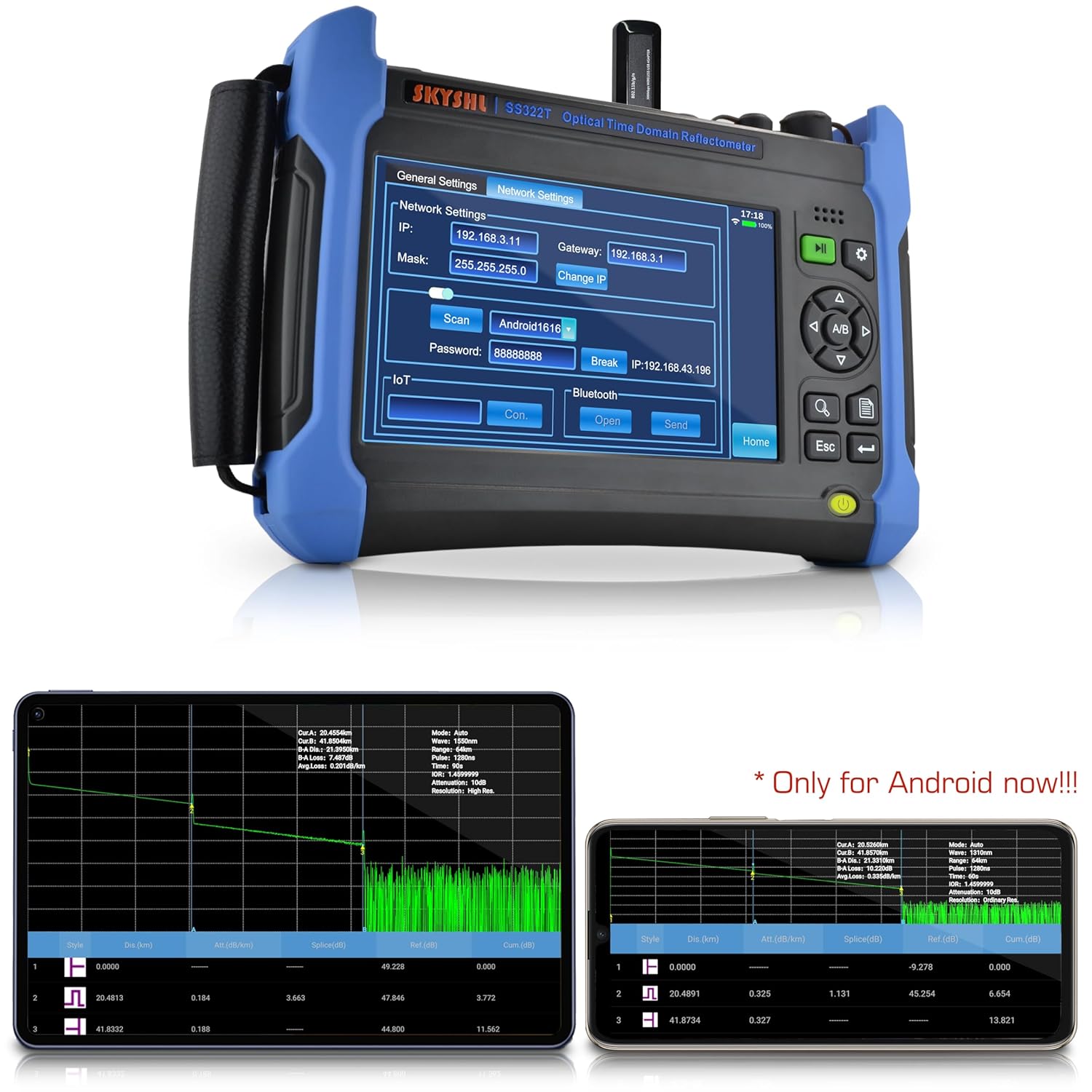
Figure 4: The network settings interface on the SS322T-2G1, showing options for IP, Mask, Gateway, and Wi-Fi connection.
Video 1: Demonstrates how to connect the SKYSHL SS322T OTDR to a Wi-Fi network, enabling remote access and data transfer capabilities.
7. Instrucciones de funcionamiento
7.1 Pruebas OTDR
The OTDR function is used to characterize optical fibers. Ensure the fiber under test is clean and properly connected.
- Desde el menú principal, toque el OTDR icono.
- Connect the fiber to the OTDR port. Ensure the connector type matches (UPC/APC). Use appropriate adapters if necessary.
- Grifo Configuración to configure test parameters.
- Seleccione el deseado Longitud de onda (1310nm or 1550nm).
- Elige el Modo (Auto-Test for automatic parameter selection or Manual for custom settings).
- Ajustar Tiempo Medio (averaging time), Rango, y Ancho de pulso if in Manual mode.
- Grifo Prueba or Promedio para iniciar la medición.
- El rastro del OTDR se mostrará en la pantalla, mostrando eventos como empalmes, conectores y extremos de fibra.

Figura 5: Example of 1310nm and 1550nm graphics analysis on the OTDR screen, detailing events and their characteristics.
Video 2: A real-time introduction to the SKYSHL SS322T OTDR, demonstrating its immediate response and display during fiber testing.
Video 3: An introduction to the fiber test capabilities of the SKYSHL SS322T OTDR, showing how to perform and interpret fiber optic measurements.
7.2 Medidor de potencia óptica (OPM)
El OPM mide la potencia óptica de una señal de fibra óptica.
- Desde el menú principal, toque el OPM icono.
- Conecte la fibra al puerto OPM.
- Select the desired wavelength (850nm to 1650nm).
- The screen will display the measured optical power in dBm or mW.
7.3 Fuente de luz óptica (OLS)
The OLS provides a stable light source for various fiber optic tests.
- Desde el menú principal, toque el MCO icono.
- Conecte la fibra al puerto OLS.
- Select the desired wavelength (1310nm or 1550nm).
- Choose the output mode (CW, 270Hz, 1kHz, 2kHz).
- Grifo Comenzar to activate the light source.
7.4 Localizador visual de fallas (VFL)
The VFL emits a visible red laser to quickly locate breaks, bends, and faulty connectors in fiber optic cables.
- Desde el menú principal, toque el VFL icono.
- Conecte la fibra al puerto VFL.
- Grifo Comenzar to activate the VFL.
- Observe the fiber for any visible red light leakage, indicating a fault.
7.5 Mapa de eventos
The Event Map function provides a simplified, graphical representation of the fiber link, making it easier to identify and locate events without detailed trace analysis.
- After performing an OTDR test, tap on the Mapa del evento icon (if available in your UI version) or navigate to the analysis section.
- The map will display icons representing different events (e.g., splices, connectors, fiber ends) and their distances.

Figure 6: Diagram illustrating various OTDR test event types such as splicing points, adapters, fractures, and fiber ends, as displayed on the test curve.
7.6 Gestión de los datos
The SS322T-2G1 allows for efficient management of test data.
- Ahorro Files: After a test, tap Ahorrar to store the trace data. You can choose to save to internal memory, SD card, or a connected USB disk.
- Cargando Files: Grifo File to browse and load previously saved test files.
- Transferencia Files: Use the USB Type A port to connect a USB flash drive for easy transfer of files between the device and external storage.
- Generación de informes PDF: The device supports one-click PDF report generation for professional documentation of test results.
Video 4: Demonstrates how to copy test files between the internal memory, SD card, and a USB disk on the SKYSHL SS322T OTDR.
Video 5: Shows the process of directly creating PDF test reports from the SKYSHL SS322T OTDR, simplifying documentation.
7.7 APP Module Connectivity
The Smart APP module allows for enhanced functionality and remote interaction with the device.
- Ensure the device is connected to Wi-Fi (refer to Section 6.3).
- Install the SKYSHL APP on your Android device (currently Android only) or Windows PC.
- Follow the APP's instructions to connect to the SS322T-2G1.
- Ahora puedes view, share, analyze, and save test data in real-time from your connected device.
8. Mantenimiento
Proper maintenance ensures the longevity and accuracy of your SS322T-2G1 OTDR.
- Limpieza de puertos ópticos: Regularly clean the optical ports and fiber connectors using the provided cleaning swabs and appropriate fiber optic cleaning solutions. Dust and debris can significantly affect measurement accuracy.
- Limpieza de pantalla: Use a soft, lint-free cloth to clean the touch screen. Avoid abrasive materials or harsh chemicals.
- Cuidado de la batería: Charge the device regularly. For long-term storage, ensure the battery is partially charged (around 50%) and store in a cool, dry place. Avoid fully discharging the battery for extended periods.
- Actualizaciones de software: Verifique el fabricante website periodically for software updates to ensure optimal performance and access to new features.
- Almacenamiento: When not in use, store the device in its carrying bag to protect it from dust, moisture, and physical damage.
9. Solución de problemas
This section addresses common issues you might encounter with your SS322T-2G1 OTDR.
| Problema | Posible causa | Solución |
|---|---|---|
| Sin energía/El dispositivo no se enciende | Low battery; Faulty power adapter; Device malfunction | Charge the battery; Use a different power adapter; Contact technical support |
| Inaccurate OTDR readings | Dirty optical connectors; Incorrect test parameters; Damaged fiber/patch cord | Clean connectors thoroughly; Verify and adjust test parameters; Inspect fiber/patch cord for damage |
| VFL light not visible | VFL not activated; Fiber too long/attenuated; Severe fiber break | Ensure VFL is 'ON'; VFL is for short-distance visual fault location; Check for complete fiber break |
| Cannot connect to Wi-Fi/APP | Incorrect password; Out of range; Network issue; APP not installed/updated | Verify Wi-Fi password; Move closer to access point; Check network status; Install/update APP |
| La pantalla táctil no responde | Fallo temporal del software; daño en la pantalla | Restart the device; Contact technical support if issue persists |
10. Especificaciones técnicas
| Característica | Especificación |
|---|---|
| Número de modelo | SS322T-2G1 |
| Longitudes de onda | 1310 nm / 1550 nm |
| Rango dinámico | 49 dB / 49 dB |
| Zona muerta de eventos (EDZ) | 0.5m (typical for SM) |
| Zona muerta de atenuación (ZDA) | 3.0m (typical for SM) |
| Distancia máxima de prueba | 280km / 174 miles |
| Tamaño de pantalla | 7 pulgadas |
| Sistema operativo | Android / Windows (for APP/Software) |
| Fuente de poder | Battery-powered + AC/DC (11.1V 6800mAh Lithium Battery included) |
| Dimensiones del producto | 9.83 x 7.08 x 2.16 pulgadas |
| Peso del artículo | 7.87 libras |
| Conectores compatibles | SC/UPC, ST/UPC, FC/UPC, LC/UPC, SC/APC, ST/APC, FC/APC, LC/APC |
11. Garantía y soporte
SKYSHL provides a 3-year free replacement warranty for the SS322T-2G1 OTDR Fiber Tester, along with lifetime maintenance. For any technical assistance, troubleshooting, or warranty claims, please contact SKYSHL customer support. A professional technical support team is available 24 hours a day to assist you.
For further information, please visit the official SKYSHL websitio o consulte los datos de contacto que se proporcionan en el embalaje de su producto.