
1. Introducción
Gracias por la compraasing the Spider-Man Touch Screen Interactive Watch. This multi-function watch is designed for children and combines traditional watch functions with modern touch screen technology. It features a camera, video recording, various games, a calculator, voice recorder, multiple clock dials, an alarm, a pedometer, and an album viewer. This manual provides detailed instructions to help you set up, operate, and maintain your watch.
2. Información de seguridad
- This product is intended for children. Adult supervision is recommended during initial setup and use.
- Do not expose the watch to extreme temperatures, direct sunlight for prolonged periods, or excessive moisture.
- Avoid dropping the watch or subjecting it to strong impacts, as this may damage the screen or internal components.
- Do not attempt to disassemble or repair the watch yourself. Refer to the troubleshooting section or contact customer support for assistance.
- Keep the watch away from small children who may attempt to put it in their mouth, as small parts could pose a choking hazard.
- Limpie el reloj con un paño suave y seco. No utilice productos químicos agresivos ni limpiadores abrasivos.
3. Contenido del paquete
Por favor revise el paquete para asegurarse de que todos los artículos estén presentes:
- Spider-Man Touch Screen Interactive Watch (Model: SPD4705AC)
- Cable de carga USB
- Manual de usuario (este documento)
4. Producto terminadoview
Familiarize yourself with the different parts of your Spider-Man Interactive Watch.

Figura 4.1: Frente view of the watch, displaying the digital clock face with Spider-Man's iconic eyes and a red and blue web-patterned strap.
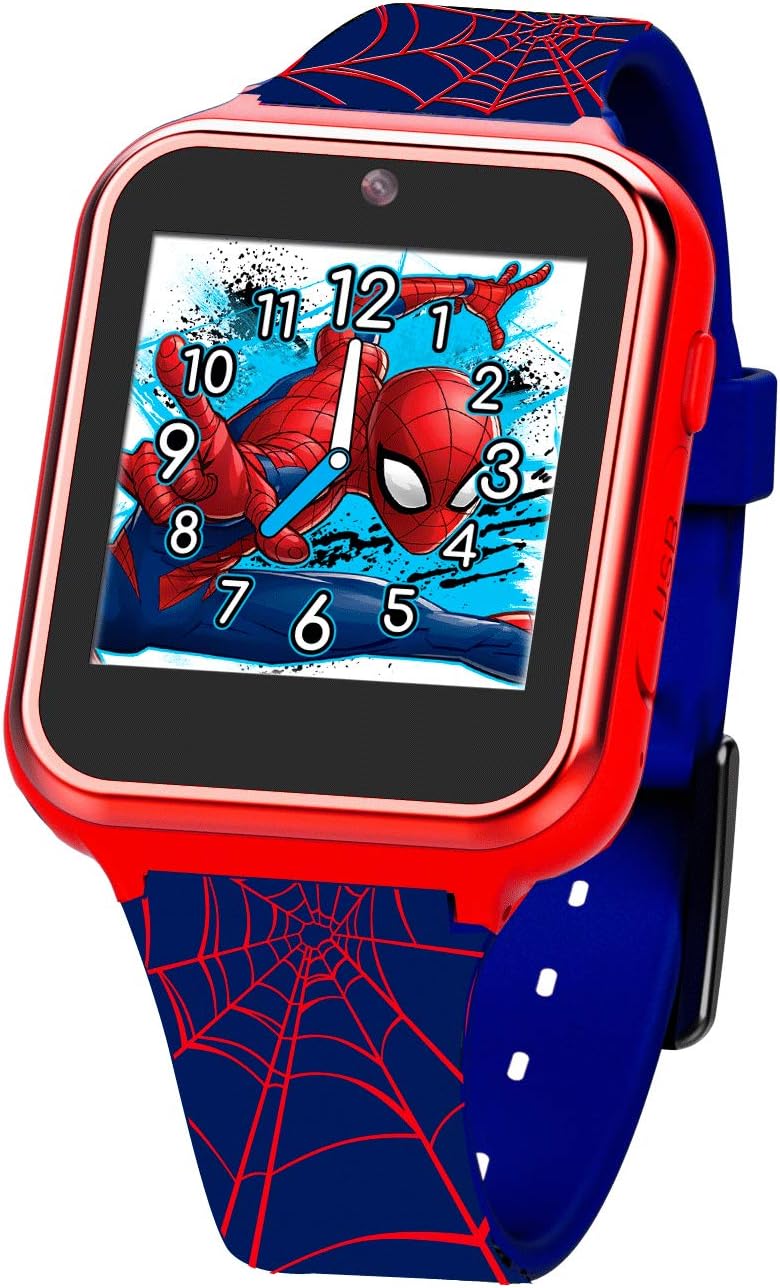
Figura 4.2: Angulado view of the watch, highlighting the side button and the USB charging port. The screen displays a vibrant image of Spider-Man in action.
The watch features a touch-sensitive screen for navigation, a side button for power and menu access, and a micro-USB port for charging and data transfer.
5. Configuración
5.1. Carga inicial
Before first use, fully charge the watch. Connect the provided USB charging cable to the watch's USB port and plug the other end into a USB power adapter (not included) or a computer's USB port. The charging indicator will appear on the screen. A full charge typically takes approximately 2-3 hours.
5.2. Encendido / apagado
- Para encender: Mantenga presionado el botón lateral durante unos segundos hasta que la pantalla se ilumine.
- Para apagar: Press and hold the side button until the power-off option appears on the screen. Tap to confirm.
5.3. Configuración de fecha y hora
Upon first power-on or after a factory reset, you may need to set the date and time. Navigate to the 'Settings' menu, then select 'Date & Time' to adjust the current time, date, and time format.
6. Instrucciones de funcionamiento
The watch features a touch screen interface. Swipe left or right to navigate between applications and tap an icon to open it.
6.1. Cámara
Tap the 'Camera' icon to open the camera application. Tap the screen to take a photo. Photos are saved to the watch's internal memory and can be viewed en el 'Álbum Vieweh'.
6.2. Grabadora de vídeo
Select the 'Video' icon to start recording. Tap the screen once to begin recording and tap again to stop. Videos are also saved to the watch's memory.
6.3. Juegos
The watch comes pre-loaded with several interactive games. Tap the 'Games' icon and select a game from the list to play. Follow the on-screen instructions for each game.
6.4. Calculadora
Access the 'Calculator' application for basic arithmetic operations. Use the touch screen to input numbers and operations.
6.5. Grabadora de voz
Open the 'Voice Recorder' to record short audio clips. Tap the record button to start and stop. Recordings can be played back within the application.
6.6. Clock Dial
Customize the watch face by selecting different 'Clock Dials'. Swipe through the available designs and tap to set your preferred one.
6.7. Alarm
Set alarms by navigating to the 'Alarm' application. You can set multiple alarms with custom times.
6.8. Podómetro
The 'Pedometer' tracks steps taken. Ensure the watch is worn securely on the wrist for accurate readings. You can view your daily step count in this application.
6.9 Álbum Viewer
View photos and videos taken with the watch's camera in the 'Album Viewer'. You can swipe through media files and delete unwanted items.
6.10. Stop Watch
Use the 'Stop Watch' function for timing activities. It includes start, stop, and reset options.
7. Mantenimiento
7.1. Limpieza
Limpie la pantalla y el cuerpo del reloj con un paño suave que no deje pelusa. Para manchas difíciles, limpie ligeramenteampen the cloth with water. Do not use chemical cleaners, abrasives, or immerse the watch in water.
7.2. Cuidado de la batería
To prolong battery life, avoid fully discharging the battery frequently. Charge the watch regularly, especially if it will not be used for an extended period. Store the watch in a cool, dry place.
7.3. Transferencia de datos
To transfer photos and videos to a computer, connect the watch using the provided USB cable. The watch should appear as a removable storage device on your computer, allowing you to copy files.
8. Solución de problemas
| Problema | Posible causa | Solución |
|---|---|---|
| El reloj no se enciende. | La batería está agotada. | Charge the watch for at least 30 minutes before attempting to power on again. |
| La pantalla no responde. | Fallo de software o congelamiento temporal. | Mantenga presionado el botón lateral durante 10 a 15 segundos para forzar el reinicio. |
| no se puede transferir files a la computadora. | Conexión USB incorrecta o problema con el controlador. | Asegúrese de que el cable USB esté bien conectado. Pruebe con otro puerto USB o computadora. |
| Mala calidad de imagen de la cámara. | Iluminación insuficiente o lente sucia. | Ensure adequate lighting. Gently clean the camera lens with a soft cloth. |
9. Especificaciones
| Característica | Detalle |
|---|---|
| Número de modelo | SPD4705AC |
| Fabricante | tiempo de batería |
| Dimensiones (Parcela) | 14.9 x 9.1 x 8.3 cm |
| Peso (Paquete) | 250 gramos |
| País natal | Porcelana |
| Funciones | Camera, Video, Games, Calculator, Voice Recorder, Clock Dial, Alarm, Pedometer, Album Viewer, Stop Watch |
| Mostrar | Pantalla táctil |
10. Garantía y soporte
For warranty information and customer support, please refer to the documentation included with your purchase or visit the manufacturer's official webSitio. Conserve su comprobante de compra para cualquier reclamación de garantía.