
1. Introducción
The Avidsen HomeCam Battery is a 100% wireless outdoor surveillance camera designed for easy installation and robust home protection. Featuring 1080P Full HD resolution, a solar panel for continuous power, night vision, and two-way audio, this camera allows you to monitor your property remotely via a smartphone application without any subscription fees. This manual provides detailed instructions for setting up, operating, and maintaining your camera.
2. ¿Qué hay en la caja?
Por favor, compruebe que todos los componentes estén presentes en el paquete:
- 1 x Avidsen HomeCam Battery IP WiFi Camera
- 1 x Solar Panel (PV module)
- 2 x 18650 baterías
- 1 x Camera Sealing Gasket
- Tornillos de montaje y tacos de pared

Image: The Avidsen HomeCam Battery camera and its accompanying solar panel, unmounted, showing the main components included in the box.
3. Guía de configuración
3.1. Instalación de la batería
- Localice el compartimento de la batería en la cámara.
- Inserte las dos baterías 18650, asegurándose de la polaridad correcta (+/-).
- Cierre bien el compartimento de la batería.
3.2. Montaje de la cámara y el panel solar
The camera and solar panel are designed for outdoor use and can be mounted separately or together. Choose a location that provides optimal sunlight exposure for the solar panel and a clear view para la cámara.
- Montaje de cámara: The camera features an innovative magnetic mount for precise orientation. Secure the base of the mount to a wall using the provided screws and wall plugs. Attach the camera to the magnetic base and adjust its angle.
- Montaje del panel solar: Monte el panel solar en un lugar con luz solar directa durante varias horas al día. Conecte el cable del panel solar al puerto de carga de la cámara.
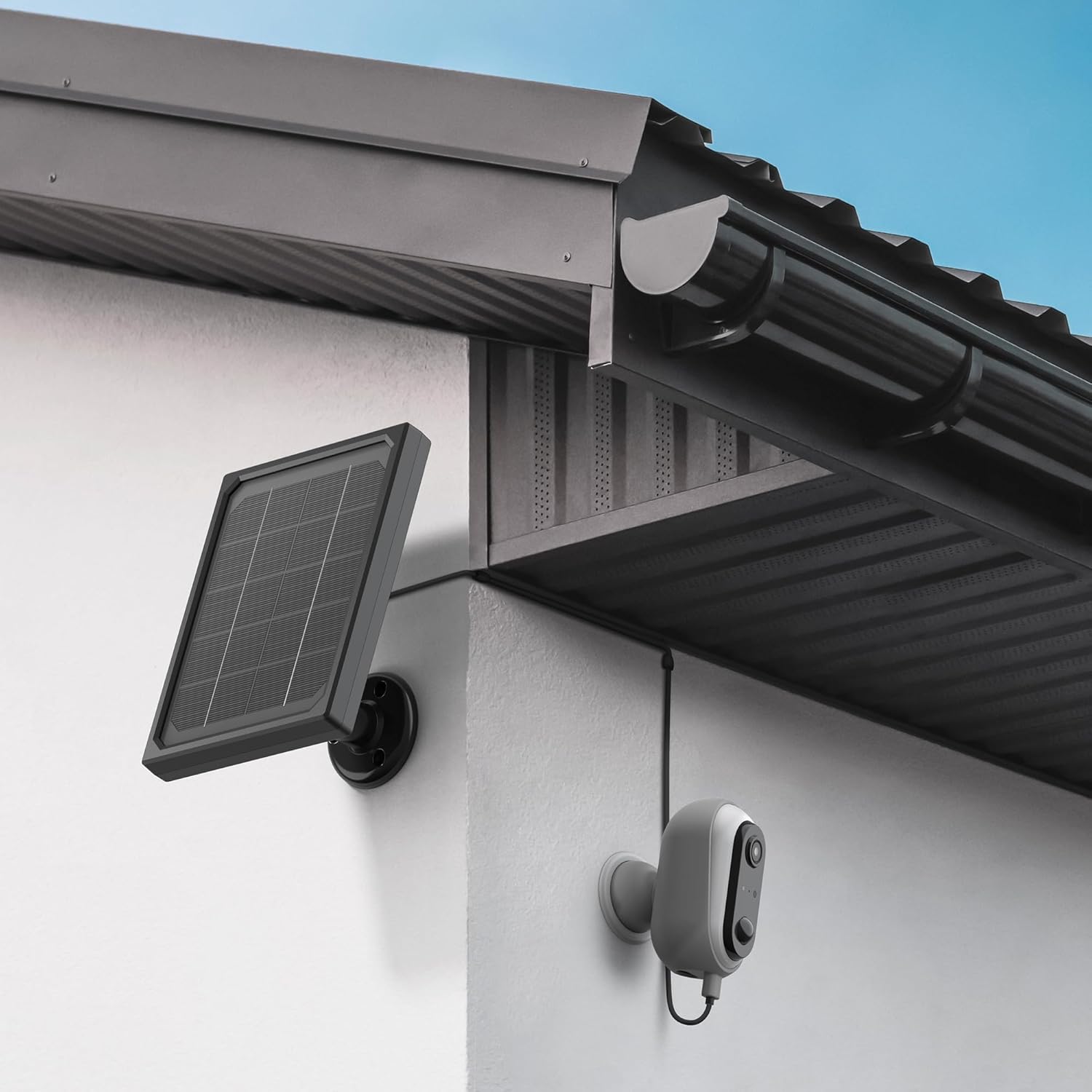
Image: The Avidsen HomeCam Battery camera and its solar panel are shown securely mounted on an exterior wall, positioned to capture sunlight and monitor the area.

Imagen: Un primer plano view of the Avidsen HomeCam Battery camera, highlighting its adjustable magnetic mount which allows for flexible positioning and angle adjustments.
3.3. Descarga de la aplicación y emparejamiento inicial
- Download the "Avidsen Home" application from your smartphone's app store (available on Google Play and Apple App Store).
- Abra la aplicación y cree una cuenta o inicie sesión si ya tiene una.
- Follow the in-app instructions to add a new device. This typically involves scanning a QR code on the camera or manually selecting the device type.
- Asegúrese de que su teléfono inteligente esté conectado a una red Wi-Fi de 2.4 GHz durante el proceso de emparejamiento.
3.4 Conexión wifi
During the app pairing process, you will be prompted to connect the camera to your home Wi-Fi network.
- Enter your Wi-Fi network name (SSID) and password when requested by the app.
- The camera supports 2.4GHz Wi-Fi networks only. Ensure your router is configured accordingly.
- Una vez conectado, la luz indicadora de la cámara cambiará y la aplicación confirmará el emparejamiento exitoso.
4. Operación de la cámara
4.1. Vivir View y controles
Once connected, open the Avidsen Home app to access the live feed from your camera.
- Vídeo en vivo: Toque la cámara en la aplicación para view la transmisión de vídeo en tiempo real.
- Audio bidireccional: Use the microphone icon in the app to speak through the camera's speaker and the speaker icon to listen to audio from the camera's microphone.
- Grabación: Manually record video or capture screenshots directly from the live view interfaz.
- Reproducción: Acceder a foo grabadotage stored on the MicroSD card (not included) via the app's playback feature.

Image: A smartphone screen showing the Avidsen Home app, with options for live view, screenshot, two-way talk, recording, playback, and photo album.
4.2. Detección de movimiento y notificaciones
The camera features motion detection to alert you to activity.
- Habilitar/Deshabilitar: In the app settings for your camera, you can enable or disable motion detection.
- Sensibilidad: Ajuste la sensibilidad de detección de movimiento para minimizar las falsas alarmas.
- Notificaciones: When motion is detected, you will receive a notification on your smartphone.
- Grabación: Motion-triggered events are automatically recorded to the MicroSD card (if installed).
4.3. Visión nocturna
The integrated infrared LEDs provide clear visibility up to 8 meters in total darkness.
- La visión nocturna se activa automáticamente en condiciones de poca luz.
- The camera provides a clear black and white image in night vision mode.
4.4. Almacenamiento local (tarjeta microSD)
The camera supports local storage via a MicroSD card (up to 128GB, not included).
- Insert the MicroSD card into the designated slot on the camera.
- Ensure the card is formatted correctly (FAT32 recommended).
- All recordings, including motion-triggered events, will be saved to this card.
4.5. Integración de hogares inteligentes
The Avidsen HomeCam Battery is compatible with Amazon Alexa and Google Assistant.
- Link your Avidsen Home account with your Alexa or Google Assistant app.
- Utilice comandos de voz para view La señal de su cámara se transmite a pantallas inteligentes compatibles.
5. Mantenimiento
5.1. Limpieza
- Limpie periódicamente la lente de la cámara y la superficie del panel solar con un paño suave.amp Tela para garantizar un rendimiento óptimo.
- Evite utilizar productos químicos agresivos o materiales abrasivos que puedan dañar las superficies.
5.2. Cuidado de la batería
- The solar panel is designed to keep the batteries charged. Ensure the panel is free from obstructions and receives adequate sunlight.
- If the camera's battery level drops significantly, consider repositioning the solar panel or manually charging the batteries if possible (refer to specific battery charging instructions if applicable).
5.3. Connection Check
- Periodically check the physical connection between the solar panel and the camera to ensure it is secure and free from corrosion.
- Verify the camera's Wi-Fi connection status in the Avidsen Home app.
6. Solución de problemas
6.1. No hay energía/la cámara no se enciende
- Ensure the 18650 batteries are correctly inserted with the right polarity.
- Check if the batteries are charged. If not, ensure the solar panel is connected and receiving sunlight, or try charging the batteries externally if possible.
- Verify the power button (if any) is pressed.
6.2. No se puede conectar al Wi-Fi
- Confirme que su red Wi-Fi sea de 2.4 GHz. La cámara no admite redes de 5 GHz.
- Asegúrese de que la contraseña de Wi-Fi ingresada en la aplicación sea correcta.
- Acerque la cámara a su enrutador Wi-Fi para mejorar la intensidad de la señal.
- Reinicie el enrutador y la cámara.
- If issues persist, try resetting the camera to factory settings (refer to the reset procedure in the app or device manual) and re-pairing.
6.3. Mala calidad de imagen
- Limpie la lente de la cámara para eliminar suciedad o manchas.
- Asegúrese de que no haya obstrucciones delante de la lente.
- Verifique la intensidad de su señal Wi-Fi; una señal débil puede afectar la calidad de transmisión de video.
6.4. La detección de movimiento no funciona o hay demasiadas falsas alarmas
- Verify motion detection is enabled in the Avidsen Home app.
- Adjust the motion detection sensitivity settings in the app. Lower sensitivity for fewer false alarms, higher for more sensitive detection.
- Asegúrese de que el campo de la cámara view is clear and not obstructed by moving objects like tree branches.
7. Especificaciones
| Nombre del modelo | HOME CAM BATTERY (127070) |
| Resolución | 1080p Full HD |
| Conectividad | Inalámbrico (Wi-Fi 2.4 GHz) |
| Fuente de poder | Solar Panel (5V 3W), 2x 18650 Batteries |
| Rango de visión nocturna | Hasta 8 metros |
| Campo de View | 130° |
| Clasificación IP | IP65 (uso en exteriores) |
| Almacenamiento | Tarjeta MicroSD (hasta 128 GB, no incluida) |
| Características especiales | Motion Detection, Two-Way Audio, Smart Home Compatibility (Alexa, Google Assistant) |
| Dimensiones | 31.5 x 21 x 8.5 cm |
| Peso | 1100 gramos |
8. Garantía y soporte
8.1. Garantía del fabricante
This Avidsen product is covered by a Garantía del fabricante de 2 años A partir de la fecha de compra. Conserve el comprobante de compra para reclamaciones de garantía. La garantía cubre defectos de materiales y mano de obra en condiciones normales de uso.
8.2. Soporte técnico
For technical assistance, troubleshooting, or further inquiries, please visit the official Avidsen website or contact their customer support. You can find contact information and FAQs on their websitio:


