
1. Introducción
The thinkcar ThinkEASY is a 12V car battery tester designed to analyze the health of various lead-acid batteries, including those found in cars, trucks, motorcycles, ATVs, SUVs, boats, and golf carts. This device connects via Bluetooth 5.0 to a mobile application, providing detailed reports on battery health, cranking system performance, and charging system efficiency. It supports a wide range of battery types and CCA values, making it a versatile tool for both professionals and DIY enthusiasts.

Image: The ThinkEASY tester is compatible with various 12V vehicles including ATVs, trucks, motorcycles, boats, and cars.
2. Información de seguridad
Please read and understand all safety instructions before using the thinkcar ThinkEASY battery tester. Failure to follow these instructions may result in electric shock, fire, or serious injury.
- Utilice siempre protección para los ojos y ropa protectora cuando trabaje cerca de baterías.
- Asegúrese de que el vehículo esté en un área bien ventilada.
- Avoid sparks and open flames near the battery. Batteries can produce explosive gases.
- Do not touch battery terminals or clamps con las manos desnudas mientras está conectado a una fuente de energía.
- Mantenga el probador fuera del alcance de los niños.
- Si el ácido de la batería entra en contacto con la piel o los ojos, lávelos inmediatamente con abundante agua y busque atención médica.
- Asegúrese de que el clamps are connected correctly: red to positive (+), black to negative (-).
3. Contenido del paquete
Verifique que todos los artículos estén presentes en su paquete:
- thinkcar ThinkEASY 12V Car Battery Tester unit with integrated clamps.
- Manual de usuario (este documento).
4. Producto terminadoview
The thinkcar ThinkEASY battery tester consists of a compact main unit with integrated red (positive) and black (negative) clamps. The device communicates wirelessly via Bluetooth to a dedicated mobile application, displaying test results and analysis on your smartphone or tablet.

Image: The thinkcar ThinkEASY battery tester features robust red and black clamps for secure connection to a 12V battery.
5. Configuración
5.1 Descarga e instalación de aplicaciones
- Para dispositivos Android: Buscar and download the "Thinkdiag+" App from the Google Play Store.
- Para dispositivos iOS: Buscar and download the "Thinkdiag" App from the Apple App Store.
- Instale la aplicación en su teléfono inteligente o tableta.
5.2 Conexión Bluetooth
- Asegúrese de que Bluetooth esté habilitado en su dispositivo móvil.
- Connect the ThinkEASY tester to your vehicle's 12V battery (red clamp al terminal positivo, cl negroamp to negative terminal). The device will power on automatically.
- Open the Thinkdiag/Thinkdiag+ app. Navigate to the 'Gadget' menu within the app.
- The app should automatically detect the ThinkEASY device. Select it to establish a Bluetooth connection.

Image: The ThinkEASY app interface on a smartphone, demonstrating Bluetooth connectivity to the battery tester.
6. Instrucciones de funcionamiento
The ThinkEASY tester performs various tests to assess your battery and vehicle's electrical system. Ensure the tester is properly connected to the battery and the app is connected via Bluetooth before proceeding.

Image: The ThinkEASY app displays results for Battery Health, Start System, and Charging Health tests.
6.1 Battery Health Test
This test evaluates the overall condition of your battery, including its capacity and internal resistance. Select "Battery Health Test" in the app. The app will guide you through the process and display results such as State of Health (SOH) and State of Charge (SOC).
6.2 Start System Test (Cranking Test)
This test assesses the vehicle's starting system, including the starter motor and battery's ability to deliver sufficient current during engine cranking. Follow the app's instructions to start the engine. The app will display cranking voltage and duration, indicating if the starting system is performing normally.
6.3 Charging System Test (Alternator Test)
This test checks the vehicle's charging system, primarily the alternator, to ensure it is properly charging the battery. The app will measure on-load and no-load voltages, as well as ripple voltage, to determine the charging system's efficiency.
6.4 Additional Tests and Features
The ThinkEASY app also provides access to other diagnostic functions:
- VolumentagePrueba: Muestra el volumen actual de la bateríatage.
- Ripple Analysis: Measures the AC ripple voltage from the alternator, indicating potential issues with the rectifier diodes.
- Prueba de resistencia: Measures the internal resistance of the battery.
- Prueba de carga: Simulates a load on the battery to assess its performance under demand.
- Monitoreo de temperatura: With a built-in temperature sensor, the device can monitor the engine bay temperature in real-time via the app.

Image: The ThinkEASY app offers multiple test options including State of Health (SOH), State of Charge (SOC), Charging Test, Cranking Test, Voltage Test, Ripple Analysis, Resistance Test, and Load Test.

Image: The ThinkEASY tester includes a temperature sensor to monitor engine bay temperature, operating within a range of -20°C to 50°C.
6.5 Supported Battery Types and CCA Range
The ThinkEASY supports various 12V lead-acid battery types and a CCA (Cold Cranking Amps) range of 100-2000.
- Baterías de gel
- Regular-flooded batteries
- Baterías de placa plana AGM
- Baterías espirales AGM

Image: The ThinkEASY tester supports various 12V battery types including GEL, Regular-flooded, AGM Flat Plate, and AGM Spiral, with a CCA range of 100-2000.
7. Mantenimiento
- Clean the tester's clamps after each use to prevent corrosion and ensure good electrical contact. Use a dry cloth.
- Guarde el dispositivo en un lugar seco y fresco, alejado de la luz solar directa y de temperaturas extremas.
- Do not attempt to disassemble or modify the tester. This will void the warranty and may cause damage.
8. Solución de problemas
- App Not Found: Ensure you are searching for "Thinkdiag+" for Android or "Thinkdiag" for iOS. If issues persist, contact thinkcar support for alternative app recommendations.
- Fallo de conexión Bluetooth:
- Verifique que Bluetooth esté habilitado en su dispositivo móvil.
- Ensure the ThinkEASY tester is properly connected to a 12V battery and powered on.
- Reinicie la aplicación e intente conectarse nuevamente.
- Check if the battery has enough charge to power the Bluetooth module. If the battery is completely dead, the tester may not be able to establish a connection.
- Lecturas inexactas:
- Asegúrese de que los terminales de la batería estén limpios y el clamps tienen una conexión sólida.
- Verify the battery type and CCA input in the app match your battery's specifications.
9. Especificaciones
| Característica | Especificación |
|---|---|
| Marca | thinkcar |
| Modelo | ThinkEasy |
| Fuente de poder | Alimentado por batería (de la batería del vehículo) |
| Modo de conexión | Bluetooth + APP |
| Measuring CCA Range | 100-2000 ACC |
| Measuring Capacity Range | 30-80 Ah |
| Vol de medicióntage Rango | 11-16 V |
| Temperatura de trabajo | -20 °C a 50 °C (-4 °F a 122 °F) |
| Dimensiones del producto (L x An x Al) | 6.3 x 3.94 x 1.18 pulgadas |
| Peso del artículo | 11.3 onzas |
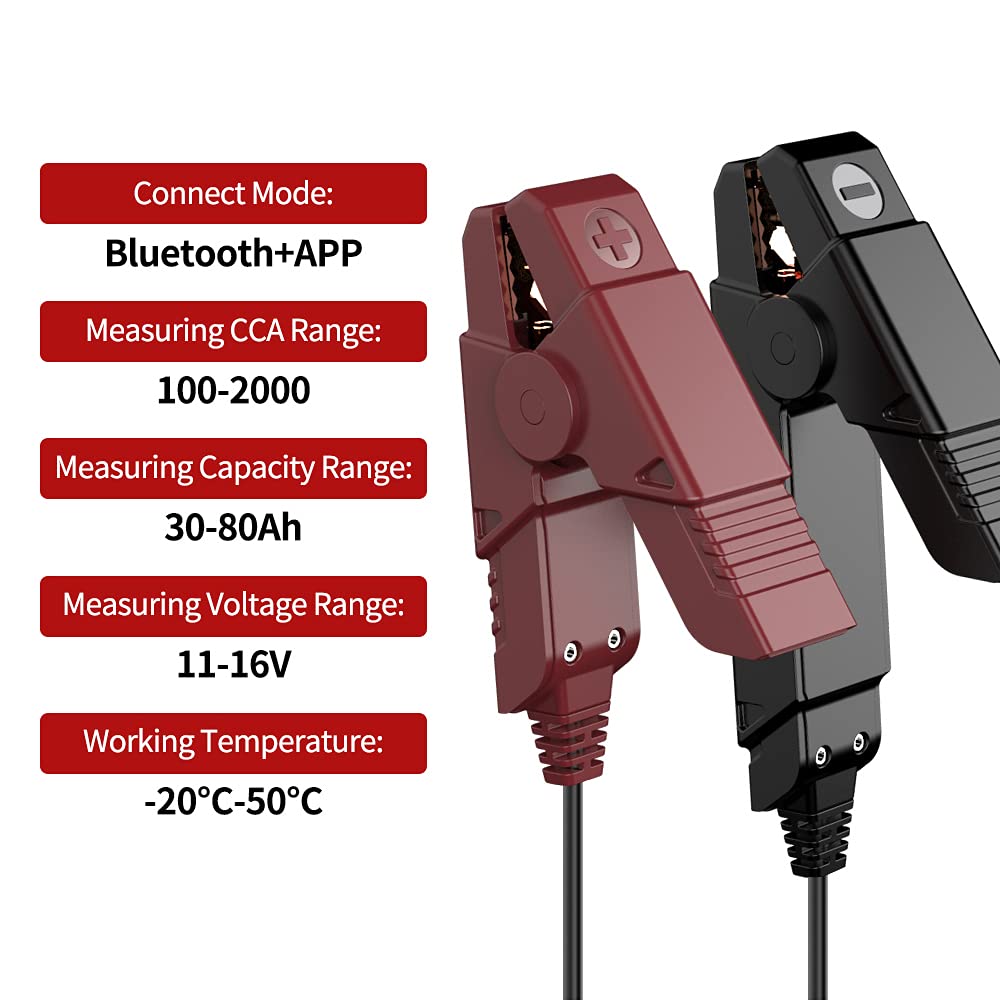
Image: Key specifications of the thinkcar ThinkEASY battery tester, including connection mode, measurement ranges, and operating temperature.
10. Garantía y soporte
thinkcar products are designed for reliability and performance. For warranty information, technical support, or service inquiries, please refer to the official thinkcar webSitio web o contacte directamente con el servicio de atención al cliente. Conserve su recibo de compra como comprobante para reclamaciones de garantía.
Oficial Websitio: www.pensarcar.com