1. Introducción
Thank you for choosing the SWISSTEN Stonebuds True Wireless Bluetooth Earphones. These earphones are designed to provide a high-quality audio experience with the convenience of true wireless technology. This manual will guide you through the features, setup, and operation of your new earphones.
Características principales:
- True wireless design with Bluetooth connectivity.
- Over 10 hours of total music playback (2.5 hours from earphones + 7.5 hours from charging case).
- Ergonomic shape for comfortable, all-day wear.
- Elegant design suitable for all users.
- Quick charging time of 2 hours.
2. Contenido del paquete
Por favor revise el paquete para ver los siguientes artículos:
- SWISSTEN Stonebuds True Wireless Earphones (Left and Right)
- Estuche de carga portátil
- Cable de carga
- Manual de usuario
3. Producto terminadoview
Familiarize yourself with the components of your SWISSTEN Stonebuds earphones and charging case.
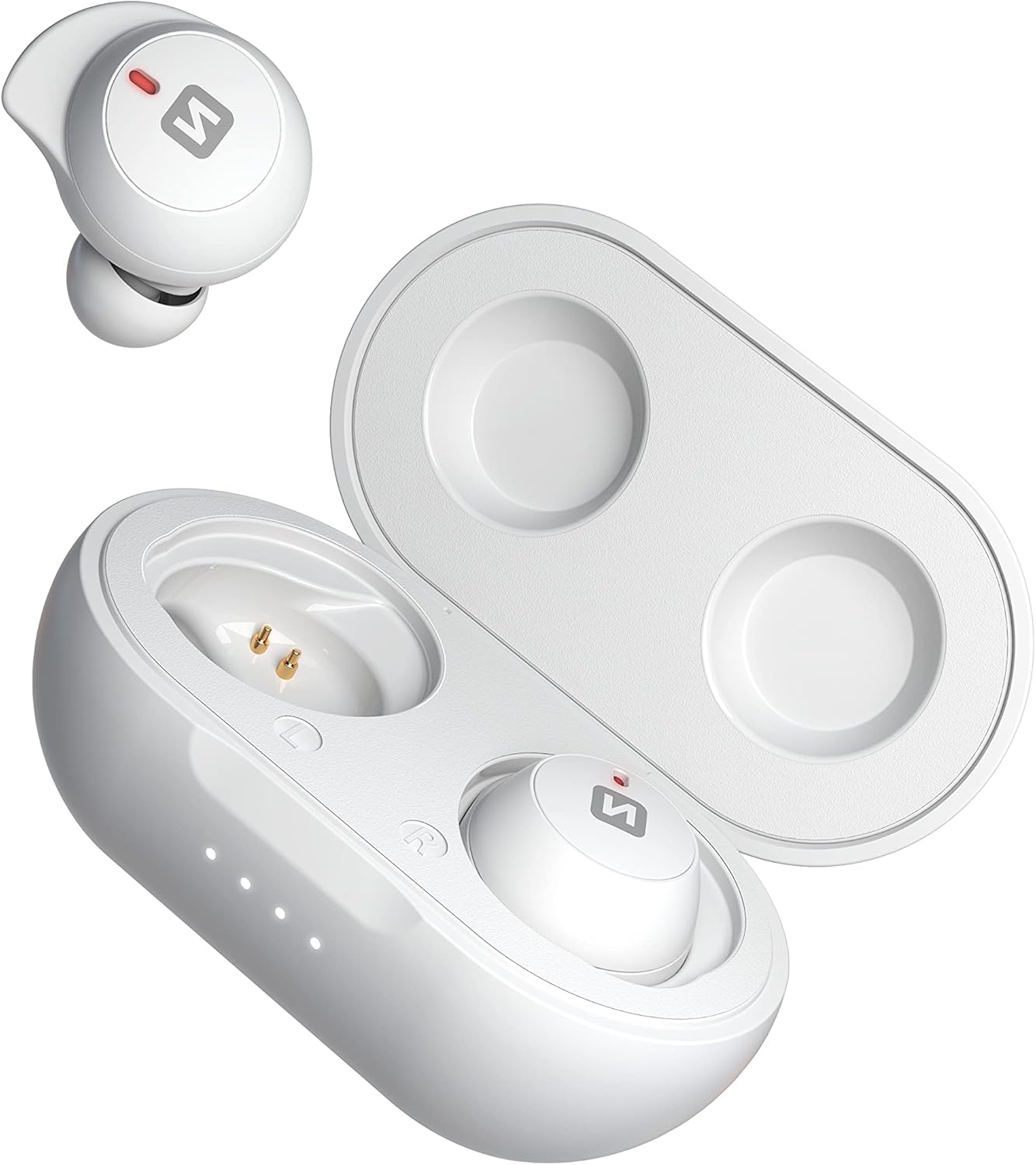
Image: SWISSTEN Stonebuds earphones shown with the charging case open, displaying the earbuds and charging contacts.

Imagen: Un acercamiento view of the SWISSTEN Stonebuds earphones securely placed inside their open charging case.

Imagen: Detallada view of the left and right SWISSTEN Stonebuds earphones, highlighting their ergonomic shape and charging points.

Image: The compact and sleek SWISSTEN Stonebuds charging case in its closed state, featuring the brand logo.

Image: The SWISSTEN Stonebuds earphones positioned next to their closed charging case, showcasing el conjunto completo.

Image: A stylized view of the SWISSTEN Stonebuds earphones and open charging case against a dark background, with the 'STONEBUDS' branding.
4. Configuración y primer uso
4.1 Carga del estuche y los auriculares
- Antes del primer uso, cargue completamente el estuche de carga y los auriculares.
- Place both earphones into the charging case. Ensure they are correctly seated and the charging indicators light up.
- Conecte el cable de carga al puerto de carga del estuche y conecte el otro extremo a una fuente de alimentación USB (por ejemplo, computadora, adaptador de pared).
- Las luces indicadoras del estuche mostrarán el estado de carga. Una carga completa tarda aproximadamente 2 horas.
4.2 Emparejamiento con un dispositivo Bluetooth
- Abre el estuche de carga. Los auriculares se encenderán automáticamente y entrarán en modo de emparejamiento.
- En su dispositivo (teléfono inteligente, tableta, etc.), habilite Bluetooth.
- Buscar new Bluetooth devices. You should see "SWISSTEN Stonebuds" in the list.
- Select "SWISSTEN Stonebuds" to connect. Once connected, you will hear a confirmation tone, and the earphone indicators will stop flashing.
- If pairing fails, turn off Bluetooth on your device, place the earphones back in the case, close it, and then repeat the steps.
5. Instrucciones de funcionamiento
5.1 Encendido y apagado
- Encendido: Open the charging case, and the earphones will automatically power on. Alternatively, press and hold the touch control area on both earphones for 3 seconds.
- Apagado: Place the earphones back into the charging case and close the lid. Alternatively, press and hold the touch control area on both earphones for 5 seconds.
5.2 Reproducción de música
- Reproducir/Pausa: Toque el área de control táctil en cualquiera de los auriculares una vez.
- Pista siguiente: Toque dos veces el área de control táctil en el auricular derecho.
- Pista anterior: Toque dos veces el área de control táctil en el auricular izquierdo.
- Sube el volumen: Toque tres veces el área de control táctil en el auricular derecho.
- Bajar volumen: Toque tres veces el área de control táctil en el auricular izquierdo.
5.3 Gestión de llamadas
- Responder/Finalizar llamada: Toque el área de control táctil en cualquiera de los auriculares una vez.
- Rechazar llamada: Mantén pulsado el área de control táctil de cualquiera de los auriculares durante 2 segundos.
5.4 Asistente de voz
- Activar asistente de voz: Press and hold the touch control area on either earphone for 2 seconds (when not on a call).
6. Batería y carga
The SWISSTEN Stonebuds offer extended listening time with their portable charging case.
- Duración de la batería del auricular: Hasta 2.5 horas con una sola carga.
- Capacidad del estuche de carga: Provides an additional 7.5 hours of listening time (multiple recharges).
- Tiempo total de reproducción: Over 10 hours with the charging case.
- Tiempo de carga: Aproximadamente 2 horas para una carga completa del estuche y los auriculares.
Always ensure the charging contacts on the earphones and inside the case are clean and dry before charging.
7. Mantenimiento y cuidado
To ensure the longevity and optimal performance of your SWISSTEN Stonebuds, follow these care guidelines:
- Limpieza: Utilice un paño suave, seco y sin pelusa para limpiar los auriculares y el estuche de carga. No utilice limpiadores abrasivos, alcohol ni disolventes químicos.
- Almacenamiento: Cuando no los utilice, guarde los auriculares en su estuche de carga para protegerlos y mantenerlos cargados.
- Evite el agua: Los auriculares no son resistentes al agua. Evite la exposición al agua, la humedad o las temperaturas extremas.
- Tratar con cuidado: Do not drop, disassemble, or attempt to repair the earphones or charging case yourself. This may void the warranty.
8. Solución de problemas
If you encounter issues with your SWISSTEN Stonebuds, try the following solutions:
| Problema | Posible solución |
|---|---|
| Los auriculares no se emparejan/conectan. |
|
| Sólo funciona un auricular. |
|
| No hay sonido o volumen bajo. |
|
| El estuche de carga no carga. |
|
9. Especificaciones
| Característica | Detalle |
|---|---|
| Nombre del modelo | Stonebuds |
| Número de modelo del artículo | 54100200 |
| Marca | suizos |
| Tecnología de conectividad | Inalámbrico (Bluetooth) |
| Tecnología de comunicación inalámbrica | Bluetooth |
| Colocación de orejas | En la oreja |
| Factor de forma | En la oreja |
| Color | Blanco |
| Material | Plástico |
| Impedancia | 16 ohmios |
| Aislamiento de ruido | Aislamiento acústico |
| Sensibilidad | 105 dB |
| Capacidad de la batería del auricular | 2 x 45 mAh |
| Capacidad de la batería de la caja | 300 mAh |
| Composición de la batería | Polímero de litio |
| Batería recargable | Sí |
| Tiempo de carga | 2 horas |
| Componentes incluidos | Cable |
| Rango de edad (descripción) | Adulto |
| Fabricante | suizos |
| Fecha de primera disponibilidad en Amazon.com.be | 15 de abril de 2022 |
10. Garantía y soporte
For warranty information and customer support, please refer to the documentation provided with your purchase or visit the official Swissten webSitio. Conserve su comprobante de compra para cualquier reclamación de garantía.
Disponibilidad de repuestos: Información no disponible sobre repuestos.
Actualizaciones de software garantizadas hasta: Información no disponible.