
1. Introducción
The ICOM IC-M94DE is a state-of-the-art floating VHF marine transceiver, designed for reliable communication and enhanced safety at sea. It is the world's first handheld VHF radio to integrate Digital Selective Calling (DSC), Automatic Identification System (AIS) receiver, and Global Navigation Satellite System (GNSS) capabilities. This lightweight yet highly durable device offers versatile, innovative, and high-performance features essential for any marine environment.
Características principales:
- Integrated AIS Receiver and DSC Functionality for enhanced safety.
- 6W RF Output Power providing extended communication range.
- 10 Hours Operating Time with the supplied BP-306 Li-Ion battery.
- 1500 mW Audio Output for clear sound in noisy marine environments.
- Navigation Function guiding you to specified waypoints.
- Float'n Flash and MOB Auto Set functions for easy recovery and emergency signaling if dropped in water.
- Integrated GPS Receiver for accurate positioning.
- Active Noise Cancellation Technology for improved audio clarity.
- IPX7 Waterproof Rating (1 meter depth for 30 minutes).
- Dualwatch and Tri-watch Functions for monitoring multiple channels.
- AquaQuake Draining Function to clear water from the speaker.
2. Contenido del paquete
Asegúrese de que todos los siguientes elementos estén incluidos en el paquete de su producto:
- BP-306 Li-Ion Battery (7.2V/2400 mAh)
- BC-251 Rapid Desktop Charger
- BC-242 AC Adapter
- FA-SC59V Antenna
- Clip para cinturón MB-133
- Correa de muñeca
- Manual de usuario
3. Producto terminadoview
The ICOM IC-M94DE is designed for ease of use and durability in marine conditions. Familiarize yourself with the radio's physical components and controls.

Figura 3.1: Frente view of the IC-M94DE radio, highlighting its compact design, clear LCD screen, and intuitive button layout. The antenna is visible at the top.

Figura 3.2: La parte trasera view of the IC-M94DE, featuring the prominent red DISTRESS button, crucial for emergency situations. This button is protected to prevent accidental activation.

Figura 3.3: Una vista detallada view of the radio's display, showing channel 16, which is the international distress, safety, and calling frequency.
4. Configuración
4.1 Instalación de la batería
- Asegúrese de que la radio esté apagada.
- Localiza la tapa del compartimento de las pilas en la parte posterior de la radio.
- Desenganche o desatornille la tapa según lo indiquen las marcas.
- Insert the BP-306 Li-Ion battery, ensuring the contacts align correctly.
- Securely close the battery compartment cover, ensuring it is watertight.
4.2 Carga de la batería
- Connect the BC-242 AC adapter to a power outlet.
- Plug the AC adapter into the BC-251 rapid desktop charger.
- Place the IC-M94DE radio into the BC-251 charger cradle. Ensure the charging contacts on the radio align with those in the cradle.
- The charging indicator on the charger will illuminate, typically red during charging and green when fully charged.
- Una carga completa suele tardar varias horas. No sobrecargue la batería.
4.3 Conexión de la antena
- Carefully screw the FA-SC59V antenna onto the antenna connector at the top of the radio.
- Tighten it securely by hand, but do not overtighten.
4.4 Encendido inicial
- Mantenga presionado el botón de encendido (generalmente marcado con un símbolo de encendido) hasta que la pantalla se ilumine.
- The radio will perform a self-test and display the current channel.
- Ajuste la perilla de volumen a un nivel de escucha cómodo.
5. Instrucciones de funcionamiento
5.1 Funcionamiento básico
- Encendido/apagado: Mantenga presionado el botón de encendido.
- Ajuste de volumen: Rotate the volume knob clockwise to increase, counter-clockwise to decrease.
- Ajuste del silenciador: Use the dedicated squelch button or menu option to adjust the receiver sensitivity and eliminate background noise.
- Selección de canal: Use the UP/DOWN arrow buttons to change channels. Press the '16' button for instant access to Channel 16 (distress and calling).
- Transmitir (PTT): Mantenga presionado el botón PTT (pulsar para hablar) en el lateral de la radio para transmitir. Suéltelo para recibir.
5.2 Llamada selectiva digital (DSC)
The IC-M94DE features integrated DSC for automated distress and safety calls.
- Llamada de socorro: In an emergency, lift the protective cover on the back of the radio and press the red ANGUSTIA button for several seconds. This will transmit a distress alert with your vessel's position.
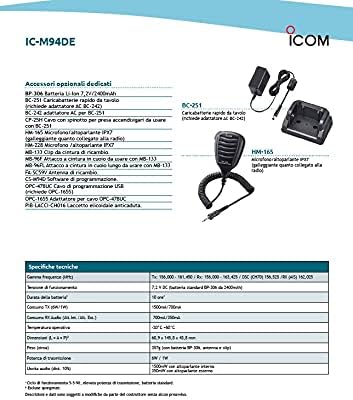
Figure 5.1: This screen indicates an active distress call, showing the radio is waiting for acknowledgment and the time until the next retransmission. It also provides options to cancel, resend, or pause the distress signal.
- Individual/Group Calls: Use the menu to initiate individual or group DSC calls to other vessels with known MMSI numbers.
- Receiving DSC Calls: The radio will alert you to incoming DSC calls. Follow the on-screen prompts to respond.
5.3 Automatic Identification System (AIS)
The integrated AIS receiver displays real-time vessel traffic information on the screen.
- Viewing AIS Targets: Access the AIS display mode through the menu. The screen will show nearby vessels as icons, along with their range and bearing.

Figure 5.2: The radio's display showing nearby AIS targets, represented by triangles, relative to the user's vessel (center). The range is set to 1.5 nautical miles, with options to adjust range (RNG) and target (TGT) views.

Figura 5.3: Otro view of the AIS display, this time with a 3 nautical mile range, illustrating how the radio visualizes surrounding vessel traffic for enhanced situational awareness.
- Llamada de objetivo AIS: Select an AIS target on the display to initiate a direct DSC individual call to that vessel.
5.4 GNSS (GPS Receiver)
The integrated GNSS receiver provides accurate position information and navigation capabilities.
- Navigation Function: Use the navigation menu to set a waypoint and receive guidance to that location.
- Waypoint Storage: The radio allows you to store up to 50 favorite points or fishing destinations as waypoints.
5.5 Float'n Flash and MOB Auto Set
If the IC-M94DE is accidentally dropped into water, it will float, and its LCD screen, keys, and the distress button on the rear panel will flash, making it easier to locate and retrieve. If the distress button is pressed while the Float'n Flash function is active, it will automatically transmit a Man Overboard (MOB) distress signal.
5.6 AquaQuake Draining Function
This function helps to clear water from the speaker grille, preventing audio degradation after the radio has been exposed to water. Activate it via the menu or a dedicated button if available.
5.7 Cancelación activa de ruido
The built-in active noise cancellation technology reduces background noise in both transmit and receive audio, ensuring clearer communication even in loud marine environments.
6. Mantenimiento
- Limpieza: Limpie la radio con un paño suave yamp cloth. Do not use abrasive cleaners or solvents. For saltwater exposure, rinse thoroughly with fresh water and dry completely.
- Cuidado de la batería: To maximize battery life, avoid fully discharging the battery frequently. Store the battery in a cool, dry place when not in use for extended periods.
- Almacenamiento: Store the radio in a dry, temperate environment away from direct sunlight and extreme temperatures. Ensure the battery is partially charged (around 50%) for long-term storage.
7. Solución de problemas
If you encounter issues with your IC-M94DE, refer to the following common problems and solutions:
| Problema | Posible causa | Solución |
|---|---|---|
| La radio no se enciende | Batería baja o muerta; batería instalada incorrectamente. | Cargue la batería; asegúrese de que esté instalada correctamente. |
| No hay audio o el audio es débil | Volume too low; squelch set too high; water in speaker. | Increase volume; adjust squelch; use AquaQuake function. |
| No se puede transmitir ni recibir | Incorrect channel; antenna not attached; out of range. | Verify channel; attach antenna securely; move closer to other stations. |
| GPS/AIS not working | Poor satellite signal; unit indoors or obstructed view. | Muévete a un área abierta con cielo despejado. view. |
If the problem persists after trying these solutions, please contact ICOM customer support.
8. Especificaciones
| Marca | ICOM |
| Número de modelo | IC-M94DE |
| Color | Negro |
| Número de canales | 121 |
| Características especiales | DSC and AIS Integration, Float'n Flash, MOB Auto Set, GPS Receiver, Active Noise Cancellation, AquaQuake, IPX7 Waterproof |
| Espectro de frecuencia | 156-174 MHz |
| Nivel de resistencia al agua | IPX7 (impermeable) |
| Duración de la batería | 10 Hours (typical) |
| Protocolo de conectividad | VHF |
| Fabricante | Icom |
9. Información de garantía
This ICOM product is covered by a standard manufacturer's warranty. Please refer to the warranty card included in your package or visit the official ICOM website for detailed terms and conditions regarding coverage, duration, and service procedures. Keep your proof of purchase for warranty claims.
10. Información de soporte
For technical assistance, product inquiries, or service, please contact ICOM customer support. Contact details can typically be found on the official ICOM websitiowww.icomjapan.com) or in the documentation provided with your product. Ensure you have your model number (IC-M94DE) and serial number ready when contacting support.
Nota sobre los vídeos: No relevant official product videos from the seller were available for the ICOM IC-M94DE model in the provided data. Therefore, no videos have been embedded in this manual.