
1. Introducción
Thank you for choosing the Moultrie MCG-14001 A-900 Game and Trail Camera. This manual provides essential information for setting up, operating, and maintaining your camera to ensure optimal performance. The A-900 camera is designed for outdoor surveillance, featuring a 30 MP resolution, a rapid 0.4-second trigger speed, and 1280x720 HD video recording capabilities. Its Illumi-Night Sensor enhances nighttime image clarity, and the 70-foot flash range ensures clear captures at a distance. Please read this manual thoroughly before use.
2. Configuración
2.1 Desempaquetado y componentes
Antes de comenzar, asegúrese de que todos los componentes estén presentes:
- Moultrie A-900 Game Camera
- Heavy-duty Camera Strap
- Tarjeta SD de 16 GB
- 8 pilas AA

Image 2.1: The Moultrie A-900 Game Camera shown with the included 16GB SD card and 8 AA batteries.
2.2 Instalación de la batería
- Abra el pestillo de la carcasa de la cámara.
- Ubique el compartimiento de la batería.
- Inserte 8 pilas AA, asegurándose de la polaridad correcta (+/-).
- Cierre bien el compartimento de la batería.
2.3 Inserción de la tarjeta SD
- Con la carcasa de la cámara abierta, localice la ranura para tarjeta SD.
- Inserte la tarjeta SD de 16 GB en la ranura hasta que encaje. Asegúrese de que la tarjeta esté correctamente orientada.
- Para retirarla, presione la tarjeta suavemente para liberarla.
2.4 Montaje de la cámara
The camera can be mounted using the provided heavy-duty strap.
- Thread the strap through the mounting slots on the back of the camera.
- Secure the camera to a tree or post at the desired height and angle.
- Asegúrese de que la cámara esté estable y apuntando hacia el área que desea monitorear.
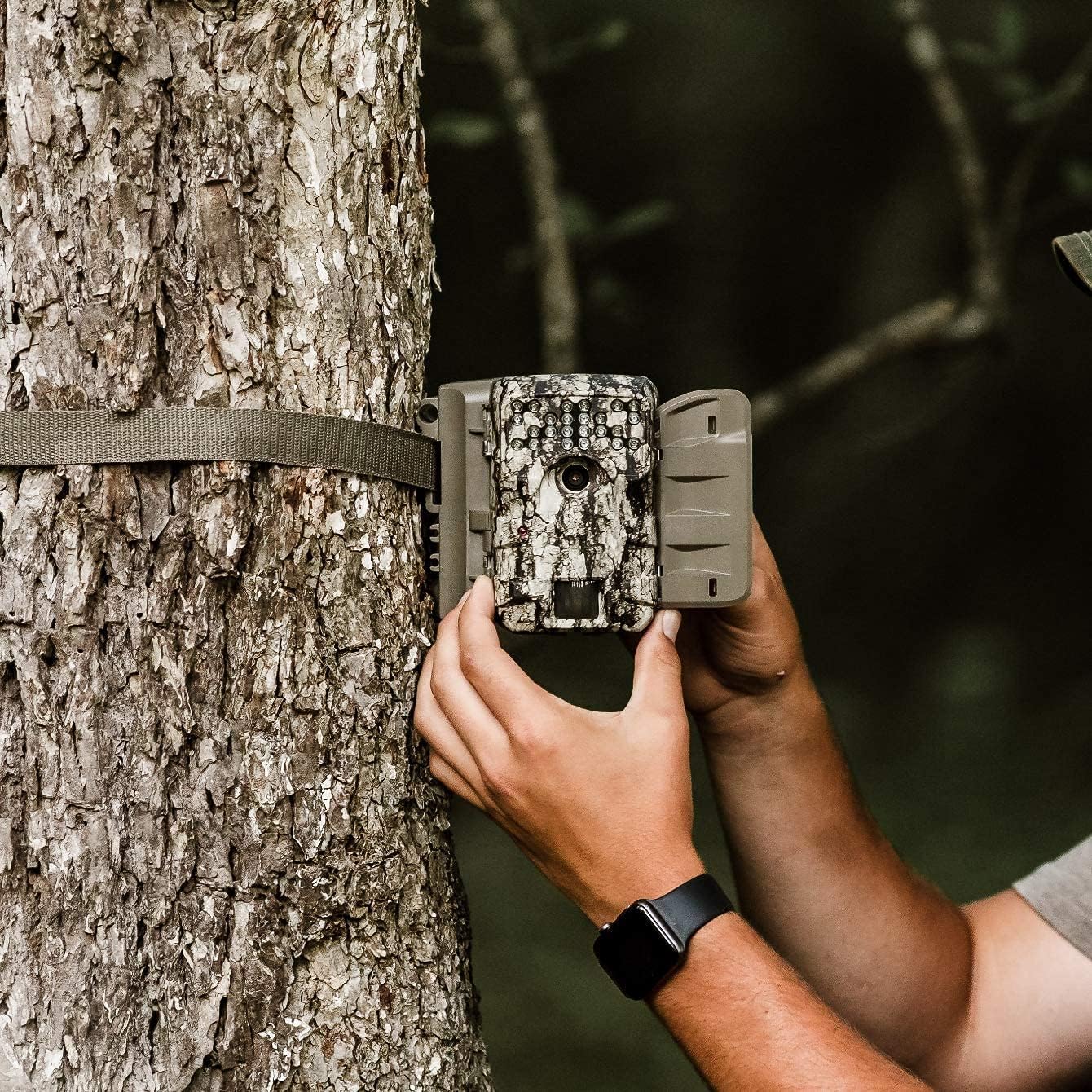
Image 2.2: A user demonstrating the process of securing the camera to a tree.

Image 2.3: The Moultrie A-900 Game Camera shown securely mounted to a tree, ready for operation.
2.5 Encendido inicial
After installing batteries and the SD card, close the camera housing. Power on the camera using the designated power switch. The camera will perform a self-check and enter standby mode.
3. Instrucciones de funcionamiento
3.1 Modos básicos de funcionamiento
The A-900 camera offers several capture options:
- Modo foto: Captura imágenes fijas.
- Modo de vídeo: Graba videoclips HD de 1280x720.
- Modo Foto + Vídeo: Captura una imagen fija seguida de un videoclip.
Refer to the camera's internal menu for selecting and configuring these modes.
3.2 Capture Options
Within Photo Mode, you can configure the number of photos taken per trigger event:
- Foto 1: Takes a single image per trigger.
- 3 Fotos: Takes three consecutive images per trigger.
Image resolution can also be set to either low or high resolution for both single and multiple photo captures.
3.3 Illumi-Night Sensor and Night Vision
The camera is equipped with an Illumi-Night Sensor to produce bright and clear images during nighttime operation. This feature automatically activates in low-light conditions, utilizing the 70-foot flash range to illuminate subjects.
3.4 Funcionalidad del sensor de movimiento
The integrated motion sensor detects movement within its range, triggering the camera to capture images or videos. The 0.4-second trigger speed ensures that fast-moving subjects are captured effectively. Adjust the sensor sensitivity in the camera settings if needed.
4. Mantenimiento
4.1 Reemplazo de batería
When the battery indicator shows low power, replace all 8 AA batteries with new ones. Always use high-quality alkaline or lithium batteries for best performance and longevity.
4.2 Gestión de tarjetas SD
Regularly check the SD card capacity. It is recommended to format the SD card periodically using the camera's menu function to ensure optimal performance and prevent data corruption. Always back up important files antes de formatear.
4.3 Limpieza de la cámara
To maintain image quality, periodically clean the camera lens and the motion sensor window with a soft, lint-free cloth. For the camera housing, use a damp cloth to wipe away dirt and debris. Do not use abrasive cleaners or solvents.
5. Solución de problemas
| Problema | Posible causa | Solución |
|---|---|---|
| La cámara no enciende | Baterías agotadas o mal instaladas | Reemplace las baterías, verifique la polaridad |
| Mala calidad de imagen | Lente sucia, poca luz, configuración incorrecta | Clean lens, check Illumi-Night settings, adjust resolution |
| El sensor de movimiento no se activa | Obstruction, incorrect sensitivity, out of range | Clear sensor path, adjust sensitivity, reposition camera |
| Error de tarjeta SD | Tarjeta llena, dañada o incompatible | Format SD card (backup data first), replace with compatible card |
Para problemas no cubiertos aquí, consulte la sección Garantía y soporte para obtener información de contacto.
6. Especificaciones
- Resolución: 30 megapíxeles
- Velocidad de disparo: 0.4 segundos
- Resolución de vídeo: 1280x720 alta definición
- Rango de destello: 70 pies
- Sensor: Illumi-Night Motion Sensor
- Almacenamiento: Admite tarjetas SD de hasta 16 GB
- Fuerza: 8 AA Batteries (not included in all bundles)
- Uso: Exterior
- Características especiales: Sensor de movimiento, visión nocturna
7. Garantía y soporte
Moultrie products are manufactured to high-quality standards. For specific warranty details, please refer to the warranty card included with your product or visit the official Moultrie website. If you encounter any issues or require technical assistance, please contact Moultrie customer support through their official channels. Keep your purchase receipt as proof of purchase for warranty claims.