
Introducción
Thank you for choosing the Renkforce RF-SBS-500 2D Wired Barcode Scanner. This device is designed for efficient and reliable scanning of both 1D and 2D barcodes from various surfaces, including paper and smartphone screens. Its omnidirectional scanning capability and hands-free operation make it suitable for a wide range of applications. This manual provides essential information for the proper setup, operation, and maintenance of your scanner.
Instrucciones de seguridad
- No exponga el escáner a temperaturas extremas, humedad o luz solar directa.
- Evite dejar caer el escáner o someterlo a impactos fuertes.
- No intente desmontar ni modificar el escáner. Esto anulará la garantía.
- Keep the scanning window clean to ensure optimal performance. Use a soft, dry cloth.
- Ensure the USB cable is connected securely to prevent accidental disconnection.
Contenido del paquete
- Renkforce RF-SBS-500 2D Wired Barcode Scanner
- Cable USB-A integrado
- Manual de usuario (este documento)
Configuración
Follow these steps to set up your Renkforce RF-SBS-500 barcode scanner:
- Desembalaje del escáner: Retire con cuidado el escáner de su embalaje.
- Conéctese a una computadora: Plug the integrated USB-A cable from the scanner into an available USB port on your desktop or laptop computer.
- Instalación del controlador: The scanner is typically plug-and-play. Your operating system (Windows, macOS, Linux) should automatically detect and install the necessary drivers. Wait for the installation to complete.
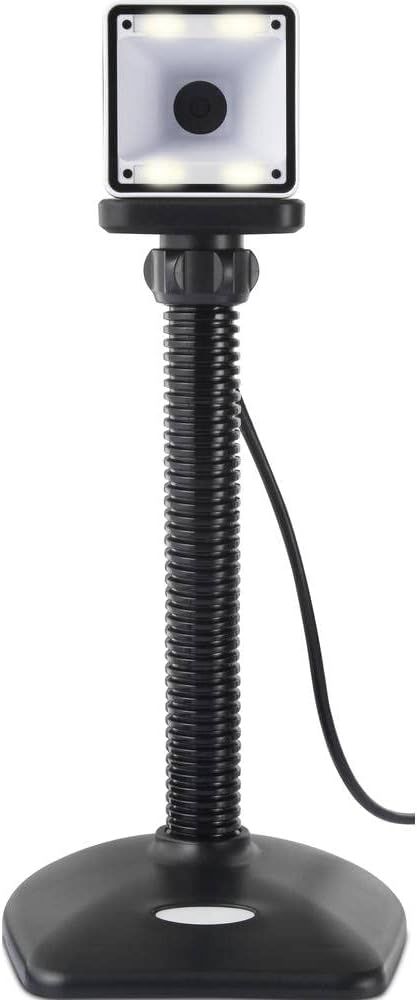
- Colocación: Place the scanner on a stable, flat surface. The flexible neck allows for adjustment of the scanning head angle for optimal positioning.

Operación del escáner
The Renkforce RF-SBS-500 is designed for ease of use with its omnidirectional and hands-free capabilities.
- Encendido: Once connected via USB, the scanner will power on automatically. The LED indicators on the scanner head may illuminate briefly.
- Escaneando un código de barras: Position the barcode within the scanning area of the scanner head. The scanner will automatically detect and read the barcode.
- Comentarios visuales y audibles: Upon successful scanning, the integrated buzzer will emit a short beep, and the LED display on the scanner will flash or change color, indicating a successful read.
- Lectura omnidireccional: The scanner can read barcodes regardless of their orientation, eliminating the need to align the barcode precisely.
- Hands-Free Mode (Presentation Mode): The scanner operates continuously in a presentation mode, allowing you to simply pass items with barcodes in front of the scanning window without pressing any buttons. This saves time and improves workflow efficiency.
- Códigos de barras compatibles: The scanner supports both 1D (e.g., EAN, UPC, Code 39) and 2D (e.g., QR Code, Data Matrix, PDF417) barcode types.
Mantenimiento
Un mantenimiento adecuado garantiza la longevidad y el rendimiento óptimo de su escáner.
- Limpieza de la ventana de escaneo: Limpie periódicamente la ventana de escaneo con un paño suave que no deje pelusa. Para la suciedad persistente, limpie ligeramenteampEnjuague el paño con agua o un limpiador suave no abrasivo. No rocíe el limpiador directamente sobre el escáner.
- Limpieza general: Limpie el exterior del escáner con un paño seco o ligeramente húmedo.amp paño. Evite el uso de productos químicos agresivos o materiales abrasivos.
- Almacenamiento: Cuando no esté en uso, guarde el escáner en un entorno limpio y seco, alejado de la luz solar directa y de temperaturas extremas.
Solución de problemas
Si tiene problemas con su escáner, consulte los siguientes problemas y soluciones comunes:
| Problema | Posible causa | Solución |
|---|---|---|
| El escáner no se enciende. | El cable USB no está conectado correctamente o el puerto USB está defectuoso. | Ensure the USB cable is firmly connected to both the scanner and the computer. Try a different USB port. |
| El escáner no lee códigos de barras. | Barcode damaged, scanning window dirty, or incorrect barcode type. | Check the barcode for damage. Clean the scanning window. Ensure the barcode type is supported (1D/2D). Adjust the distance and angle of the barcode to the scanner. |
| No hay pitido ni respuesta del LED después del escaneo. | Barcode not read successfully. | Refer to the "Scanner does not read barcodes" solution. If the issue persists, contact support. |
| Los datos escaneados aparecen incorrectamente. | Disposición incompatible del teclado o problema de software. | Ensure your computer's keyboard layout matches the expected output. Test with a simple text editor. |
If the problem persists after trying these solutions, please contact Renkforce customer support.
Presupuesto
| Característica | Especificación |
|---|---|
| Número de modelo | RF-4679568 |
| Capacidad de escaneo | Códigos de barras 1D y 2D |
| Tecnología de conectividad | USB-A (con cable) |
| Velocidad de escaneo | 60 imágenes por segundo |
| Modo de escaneo | Omnidirectional, Hands-free (Presentation Mode) |
| Comentario | Integrated Buzzer, LED Display |
| Dispositivos compatibles | Desktop Computer, Laptop, Smartphone (via appropriate adapter if needed) |
| Dimensiones (L x An x Al) | 150 x 5.2 x 5.2 cm |
| Peso del artículo | 102 gramos |
| Fuente de poder | Powered USB |
| País natal | Alemania |
Garantía y soporte
Renkforce products are manufactured to high-quality standards and come with a standard warranty. Please refer to your purchase documentation or the Renkforce official webSitio para conocer los términos y condiciones de garantía específicos aplicables a su región.
For technical support, troubleshooting assistance, or warranty claims, please contact Renkforce customer service. Contact details can typically be found on the Renkforce websitio o en el embalaje de su producto.