
1. Introducción
Thank you for choosing the MEDION X64060 Party Speaker. This manual provides essential information for the safe and efficient use of your device. Please read it thoroughly before operating the speaker and keep it for future reference.
The MEDION X64060 is a versatile party speaker designed for various entertainment needs, featuring powerful audio output, integrated DJ and karaoke functions, and dynamic light effects.
2. Instrucciones de seguridad
- Lea atentamente todas las instrucciones antes de usar.
- Mantenga el altavoz alejado del agua, la humedad y las temperaturas extremas.
- No bloquee las aberturas de ventilación.
- Use only the power cord supplied with the device.
- No intente reparar el dispositivo usted mismo. Deje todas las reparaciones a personal cualificado.
- Ensure the speaker is placed on a stable, level surface to prevent tipping.
- Evite la exposición prolongada a niveles de volumen altos para evitar daños auditivos.
3. Contenido del paquete
Por favor revise el paquete para ver los siguientes artículos:
- MEDION X64060 Party Speaker
- 1 x micrófono
- Cable de alimentación
- Manual de usuario (este documento)
4. Producto terminadoview
Familiarize yourself with the main components and controls of your MEDION X64060 Party Speaker.

Image: Control Panel Overview
This image displays a close-up of the speaker's top control panel, showing various knobs and buttons for audio adjustments, DJ functions, and input selections.

Image: Speaker Dimensions and Connections
This image illustrates the overall dimensions of the speaker (980mm height, 350mm width, 340mm depth) and highlights the available connection ports: 1x USB, 2x Microphone (6.3 mm), 1x Guitar (6.3 mm), 1x Audio Input (3.5 mm), and 1x Audio Input (RCA).
4.1 Panel frontal
- Oradores: Two main speakers with integrated LED lighting.
- Efectos de luz: Dynamic LED lights that synchronize with music.
4.2 Panel de control superior
- Botón de encendido: Para encender/apagar el altavoz.
- Controles de volumen: Main volume, microphone volume (MIC1 VOL, MIC2 VOL), guitar volume (GUITAR VOL), and echo volume (ECHO VOL).
- Ecualizador (EQ): 5-band equalizer for sound adjustment.
- Selectores de entrada: Buttons for Bluetooth, USB, AUX.
- DJ Functions: Cross-fader, scratch wheel, drum pads (HI-HAT, SNARE, BASS DRUM, CYMBAL, TOM1, TOM2), and record function.
- Puerto USB: Para reproducción USB.
- Entradas de micrófono: Two 6.3 mm jack inputs.
- Entrada de guitarra: One 6.3 mm jack input.
- Entrada auxiliar: 3.5 mm jack input.
4.3 Panel trasero
- Entrada de energía: Para conectar el cable de alimentación.
- Entrada de audio RCA: Additional audio input.
4.4 Características de movilidad
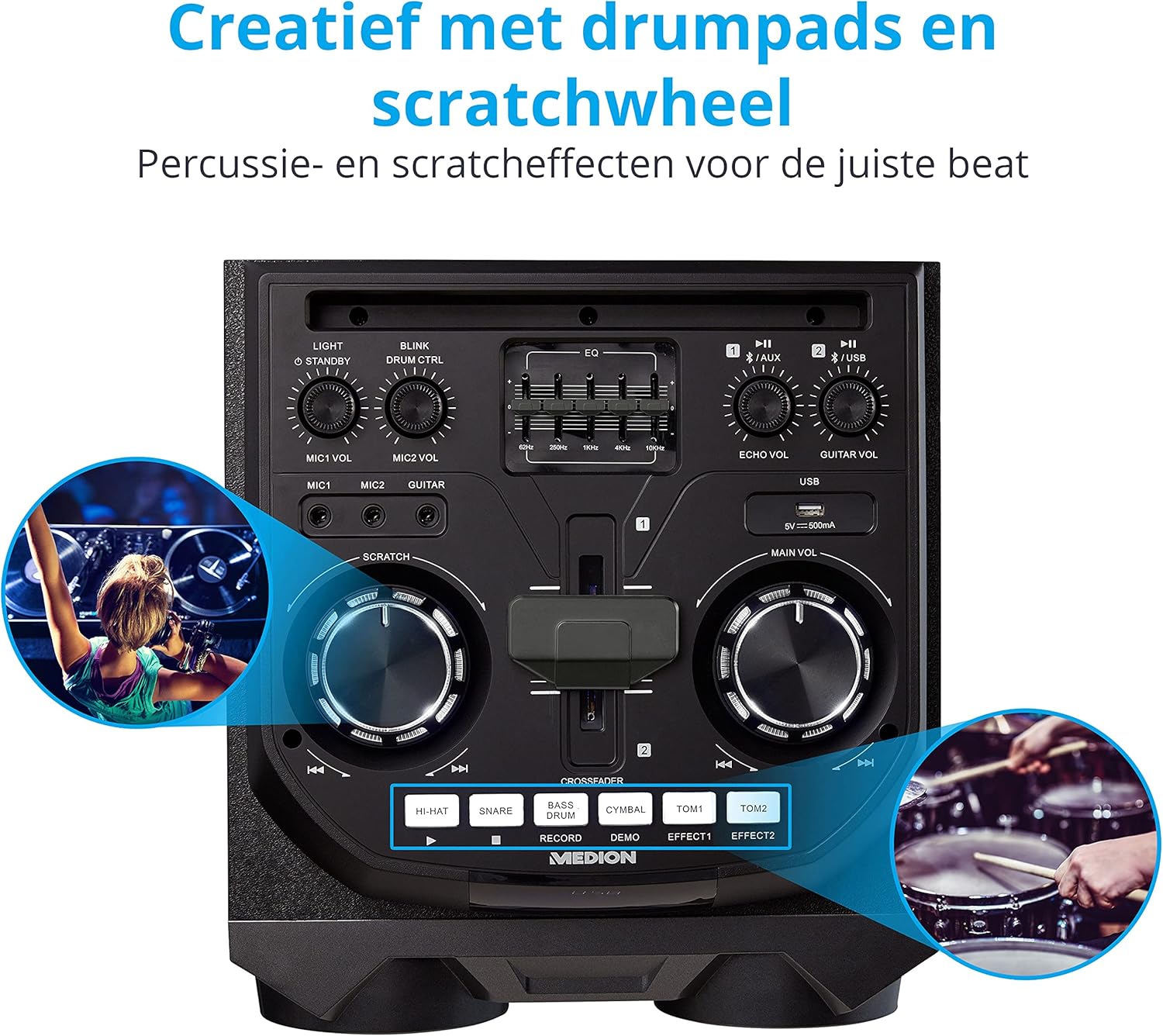
Image: Integrated Wheels for Portability
This image shows the back of the speaker, highlighting the integrated wheels at the bottom, designed for easy transport.
- Ruedas integradas: For easy transportation of the speaker.
- Manijas: Ergonomic handles for lifting and moving.
5. Configuración
5.1 Colocación inicial
Coloque el altavoz sobre una superficie estable y plana. Asegúrese de que haya suficiente ventilación alrededor de la unidad. Evite colocarlo cerca de fuentes de calor o expuesto a la luz solar directa.
5.2 Conexión de alimentación
- Conecte el cable de alimentación suministrado a la entrada de alimentación en la parte posterior del altavoz.
- Conecte el otro extremo del cable de alimentación a una toma de pared adecuada.
- Press the power button on the top control panel to turn on the speaker. The LED lights will illuminate.
5.3 Connecting a Microphone or Guitar
For karaoke or live instrument performance:
- Plug your microphone(s) into the MIC1 or MIC2 6.3 mm jack inputs on the top panel.
- Plug your guitar into the GUITAR 6.3 mm jack input on the top panel.
- Adjust the respective volume knobs (MIC1 VOL, MIC2 VOL, GUITAR VOL) and ECHO VOL to your preference.
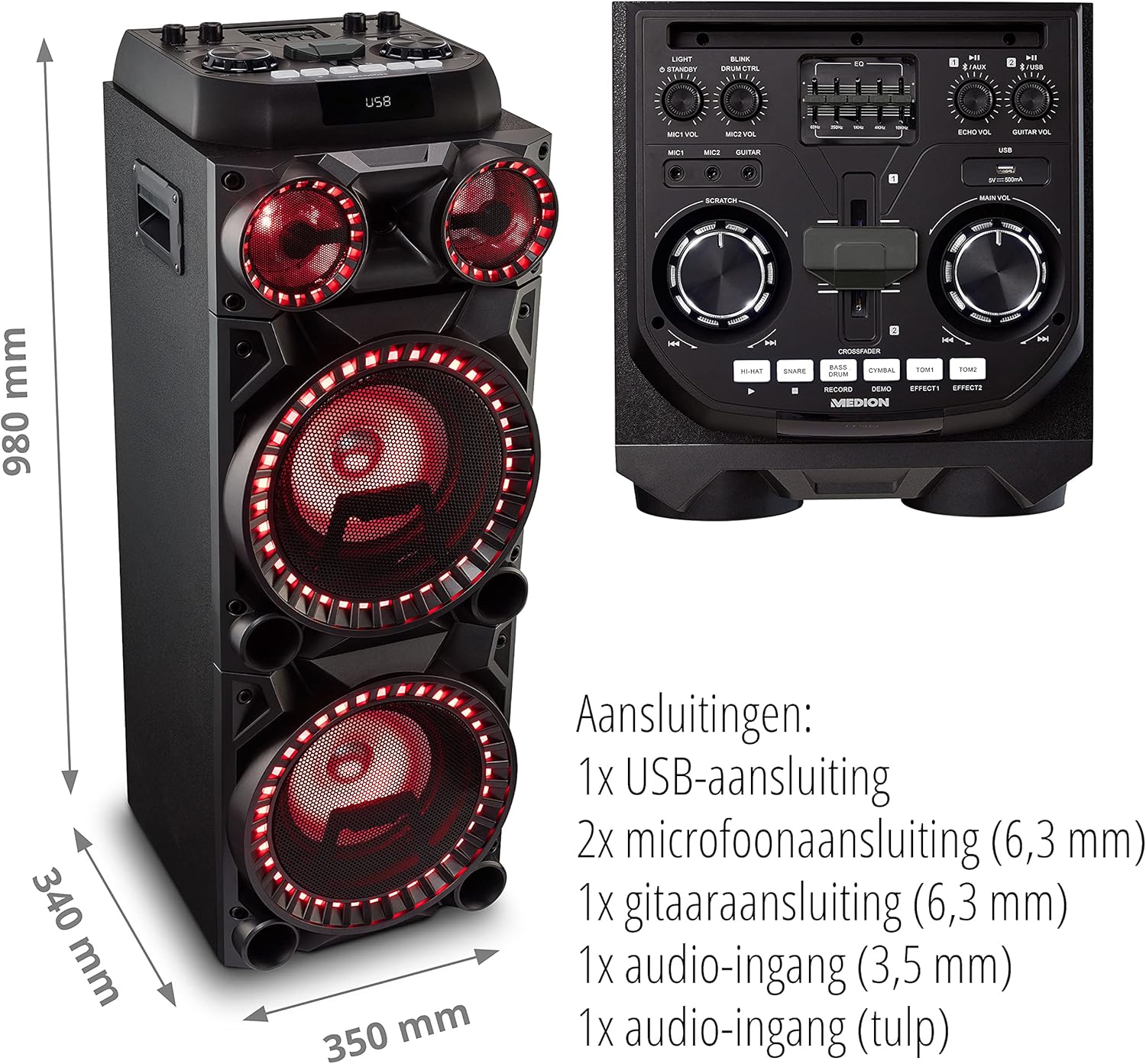
Image: Microphone and Guitar Connection for Karaoke
This image shows individuals enjoying karaoke, demonstrating the use of a microphone connected to the speaker for singing.
6. Instrucciones de funcionamiento
6.1 Conexión Bluetooth
- Presione el Bluetooth button on the control panel. The Bluetooth indicator will blink.
- Habilite Bluetooth en su teléfono inteligente, tableta u otro dispositivo de audio.
- Buscar "MEDION X64060" in your device's Bluetooth settings and select it to pair.
- Once connected, the Bluetooth indicator will stop blinking and remain solid. You can now play music wirelessly.

Image: Bluetooth Music Playback
This image shows a smartphone displaying a music application, indicating a wireless Bluetooth connection to the speaker for audio streaming.
Reproducción USB 6.2
- Inserte una unidad flash USB que contenga audio files into the USB port on the top panel.
- Presione el USB botón para seleccionar el modo USB.
- El altavoz detectará automáticamente y comenzará a reproducir audio. files from the USB drive. Use the playback controls (play/pause, skip track) on the control panel.
6.3 entrada auxiliar
- Connect an external audio device (e.g., MP3 player, laptop) to the 3.5 mm AUX input or the RCA audio input on the rear panel using an appropriate audio cable (not included).
- Presione el Auxiliar Botón para seleccionar el modo AUX.
- Reproduce audio desde tu dispositivo conectado. El altavoz emitirá el sonido.
6.4 Funciones de DJ
The MEDION X64060 includes various DJ features for creative sound mixing.

Image: DJ Function Controls
Esta imagen proporciona una visión detallada view of the DJ control section, including the cross-fader, scratch wheel, and various drum pads.
- Cross-fader: Use the cross-fader to smoothly transition between different audio sources or effects.
- Scratch Wheel: Manipulate the scratch wheel for classic DJ scratch effects.
- Almohadillas de batería: Presione el HI-HAT, TRAMPA, TAMBOR DE BAJO, PLATILLO, TOM1, y TOM2 pads to add drum sound effects to your music.
- Función de grabación: Utilice el REGISTRO button to record your drum pad sequences.
6.5 Función de karaoke
Connect a microphone as described in section 5.3. Play your chosen karaoke track via Bluetooth, USB, or AUX. Adjust the microphone and echo volumes for the desired effect.
6.6 Efectos de luz
The speaker features dynamic LED light effects that respond to the music. These lights automatically activate when the speaker is on. There may be a dedicated button (e.g., "LIGHT" or "BLINK") to control or cycle through different light modes, refer to the control panel for specific options.

Image: Dynamic Blue Light Effects
This image showcases the speaker with its blue LED lights illuminated, demonstrating the atmospheric light effects.

Image: Dynamic Red Light Effects
This image shows the speaker with its red LED lights illuminated, highlighting another color option for the atmospheric light effects.
7. Mantenimiento
7.1 Limpieza
- Desenchufe siempre el altavoz de la toma de corriente antes de limpiarlo.
- Utilice un paño suave y seco para limpiar las superficies exteriores.
- Do not use liquid cleaners, aerosols, or abrasive materials, as these can damage the finish or internal components.
7.2 Almacenamiento
When not in use for extended periods, store the speaker in a cool, dry place, away from direct sunlight and extreme temperatures. Cover the unit to protect it from dust.
8. Solución de problemas
| Problema | Posible causa | Solución |
|---|---|---|
| Sin poder | Power cord not connected properly; Power outlet not working. | Ensure the power cord is securely plugged into both the speaker and a working wall outlet. Test the outlet with another device. |
| Sin sonido | Volume too low; Incorrect input selected; Device not paired (Bluetooth); Cable not connected (AUX/Guitar/Mic). | Increase the main volume and individual input volumes. Select the correct input source (Bluetooth, USB, AUX). Re-pair Bluetooth device. Check all cable connections. |
| La conexión Bluetooth falla | El altavoz no está en modo de emparejamiento; Dispositivo demasiado lejos; Interferencia. | Ensure the speaker is in Bluetooth pairing mode (blinking indicator). Move your device closer to the speaker. Avoid obstacles and other wireless devices. |
| El micrófono/guitarra no funciona | Volume too low; Cable faulty; Incorrect input. | Increase MIC/GUITAR VOL. Check microphone/guitar cable. Ensure the instrument is properly connected. |
9. Especificaciones
| Marca | MEDION |
| Número de modelo | X64060 | MD44060 |
| Potencia de salida | 2 x 100 W RMS (2 x 1000 W max. music output power) |
| Tecnología de conectividad | Bluetooth 5.0, USB, AUX (3.5mm, RCA) |
| Entradas de audio | 2 x Microphone (6.3 mm), 1 x Guitar (6.3 mm), 1 x AUX (3.5 mm), 1 x RCA |
| Igualada | 5 bandas |
| Color | Negro |
| Material | Plástico |
| Dimensiones del producto (L x An x Al) | 38.8 x 35 x 101 cm |
| Peso del artículo | 15 kilogramos |
| Tipo de montaje | Piso de pie |
| Fuente de poder | Eléctrico con cable |
| Dispositivos compatibles | Computadoras portátiles, teléfonos inteligentes |
10. Garantía y soporte
Para obtener información sobre la garantía y soporte técnico, consulte la tarjeta de garantía incluida con su producto o visite el sitio web oficial de MEDION. webSitio. Conserve su comprobante de compra para cualquier reclamación de garantía.
Servicio de atención al cliente de MEDION: For assistance, please contact MEDION customer support through their official channels. Contact details can typically be found on the MEDION websitio o en el embalaje del producto.


