
Introducción
Thank you for choosing the Hbada Ergonomic Gaming Chair. This manual provides essential information for the safe and efficient assembly, operation, and maintenance of your new chair. Please read these instructions carefully before use and retain them for future reference.

Image: The Hbada Ergonomic Gaming Chair in a modern gaming environment, showcasing su diseño y presencia.
Información de seguridad
- Asegúrese de que todos los componentes estén presentes y sin daños antes del montaje. No lo utilice si alguna pieza falta o está rota.
- Siga las instrucciones de montaje con precisión. Un montaje incorrecto puede provocar inestabilidad y lesiones.
- No se suba a la silla. Úsela solo para sentarse.
- No exceda la capacidad máxima de peso (consulte las especificaciones).
- Mantenga a los niños y las mascotas alejados de la silla durante el montaje.
- Evite exponer la silla a la luz solar directa o temperaturas extremas para evitar la degradación del material.
Dimensiones del producto
Understanding the dimensions of your chair is important for proper placement and comfortable use. Below are the key measurements:
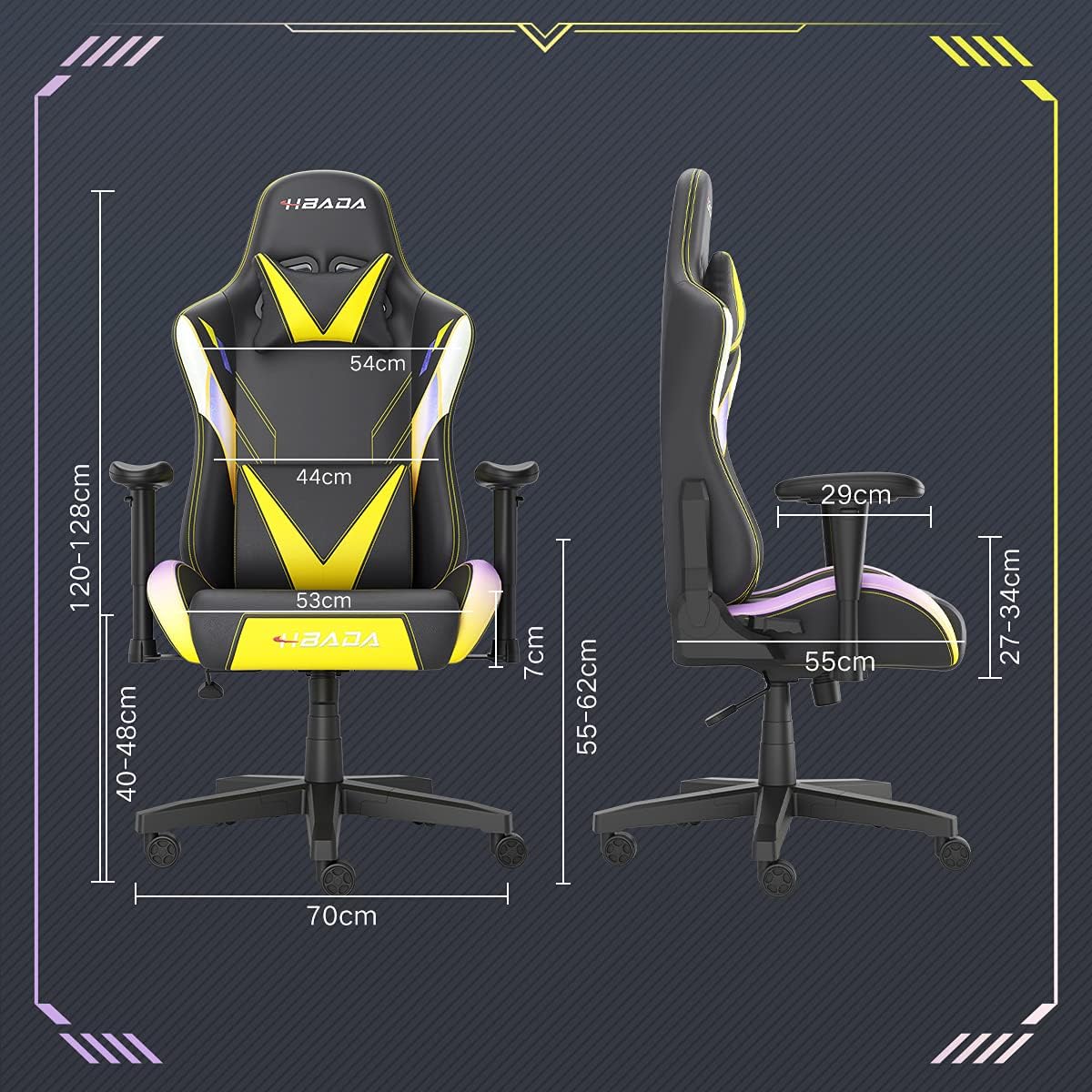
Image: A detailed diagram illustrating the various dimensions of the Hbada Gaming Chair, including height, width, and depth measurements.
- Altura total: 120-128 cm (ajustable)
- Altura del asiento: 40-48 cm (ajustable)
- Ancho del asiento: 53 centímetros
- Profundidad del asiento: 55 centímetros
- Ancho del respaldo: 54 cm (shoulder area), 44 cm (lumbar area)
- Altura del reposabrazos (desde el asiento): 7 cm (adjustable)
- Diámetro de la base: 70 centímetros
Configuración y montaje
Please follow these steps carefully to assemble your Hbada Gaming Chair. It is recommended to have a clear, spacious area for assembly.
Pasos de montaje:
- Step 1: Assemble the Base and Wheels
Insert the five casters into the holes on the star base. Then, place the gas lift cylinder into the center hole of the base.

Image: Illustration of attaching the five casters to the chair's star-shaped base and inserting the gas lift cylinder.
- Step 2: Attach the Seat and Backrest
Connect the backrest to the seat using the provided screws and mounting plates. Ensure all screws are tightened securely.

Image: Diagram showing the process of securing the backrest to the seat cushion using screws and brackets.
- Paso 3: Instale los apoyabrazos
Attach the armrests to the sides of the seat using the designated screws. Make sure they are firmly attached.

Image: Visual guide for attaching the armrests to the chair's seat base.
- Step 4: Connect Seat to Base
Carefully place the assembled seat onto the gas lift cylinder, ensuring it is properly seated and stable.

Image: Depiction of lowering the assembled seat onto the gas lift cylinder, connecting the upper and lower parts of the chair.
- Step 5: Attach Headrest and Lumbar Pillow
Secure the detachable headrest and lumbar support pillow to the chair as desired for optimal comfort.

Image: Instructions for attaching the headrest and lumbar support pillows to the gaming chair.
Instrucciones de funcionamiento
Your Hbada Gaming Chair is designed with several adjustable features to provide personalized comfort and support.
Key Adjustable Functions:
- Adjustable Sitting Height: Use the lever located under the seat on the right side to raise or lower the chair. Pull the lever up to adjust the height, then release it at your desired position. The seat has an 8 cm elevation range.
- Reclining Backrest (90° to 155°): The backrest can be reclined from 90 degrees (upright) to 155 degrees (nearly flat). Use the recline lever on the side of the chair to adjust the angle. Lean back to your preferred position and lock the lever.
- Reposabrazos ajustables: The armrests can be adjusted in height by 7 cm. Locate the button or lever on the side of each armrest to unlock, adjust, and then lock them into your desired height.
- 360° Free Swivel: The chair features a full 360-degree swivel function, allowing for easy movement and access to your surroundings without needing to move the entire chair.
- Detachable Headrest and Lumbar Support: The chair includes a removable headrest pillow and lumbar support cushion for enhanced ergonomic comfort. Adjust their positions or remove them based on your preference.

Imagen: Una sobreview of the chair's ergonomic systems, highlighting adjustable sitting height, armrests, 155° reclining, 360° swivel, cool racing casters, and durable base.

Image: The Hbada Gaming Chair demonstrated in its 155-degree reclined position, illustrating the recline controller.
Mantenimiento
Regular maintenance will help prolong the life and appearance of your Hbada Gaming Chair.
- Limpieza del cuero PU: Limpie las superficies de cuero PU con un paño suave y seco.amp Paño. Para manchas difíciles, use una solución de jabón suave y luego limpie con un paño limpio y seco.amp paño. Evite productos químicos fuertes o limpiadores abrasivos, ya que pueden dañar el material.
- Cuidado de las ruedas: Periodically check the casters for accumulated dust or hair. Clean them with a brush or vacuum cleaner to ensure smooth movement and prevent damage to your flooring.
- Marco y componentes: Inspeccione periódicamente todos los tornillos y pernos para asegurarse de que estén bien apretados. Vuelva a apretarlos si es necesario para mantener la estabilidad.
- Evite la luz solar directa: Prolonged exposure to direct sunlight can cause the PU leather to fade and crack. Position your chair away from direct sunlight when possible.
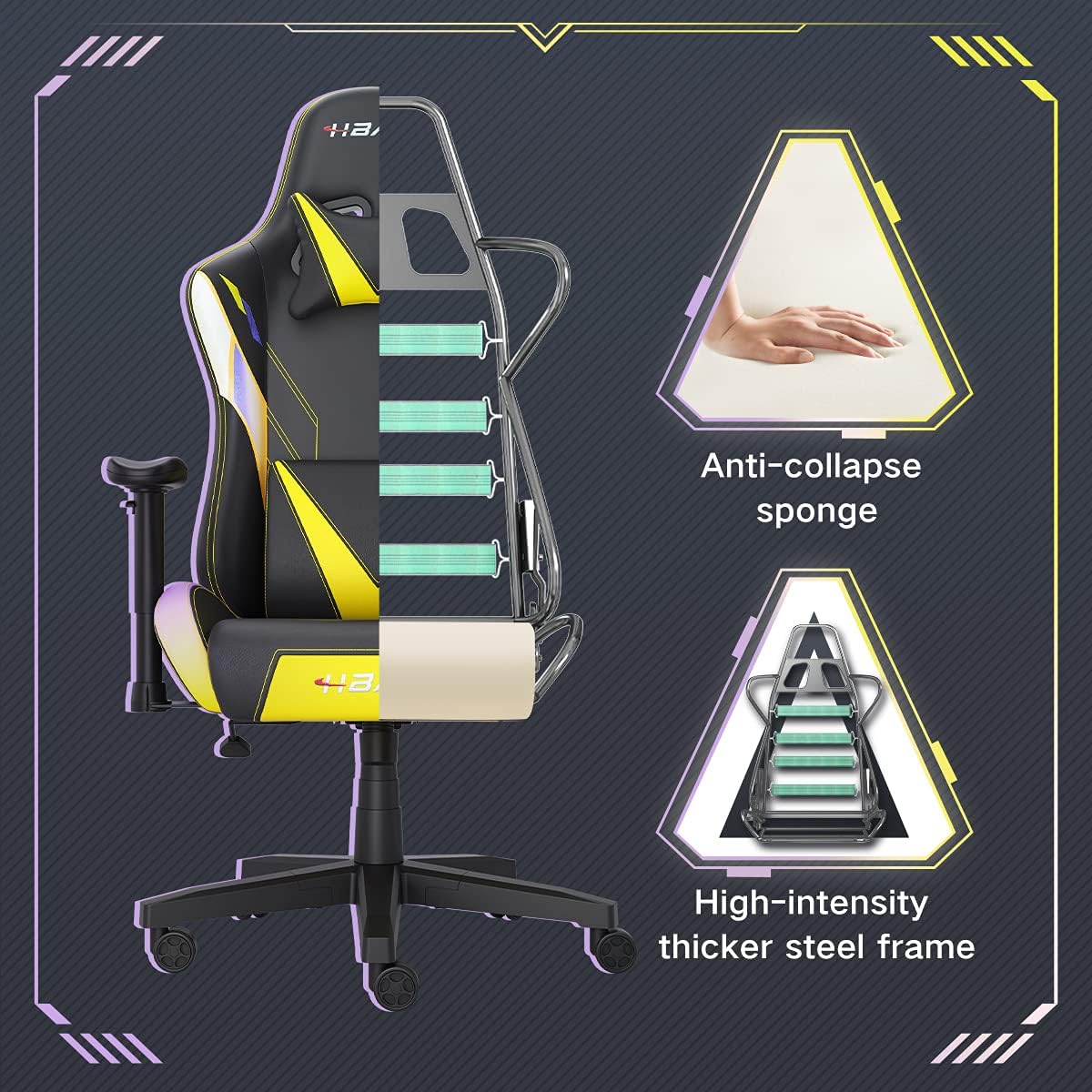
Imagen: Un corte transversal view of the chair's internal structure, highlighting the anti-collapse sponge padding and the high-intensity thicker steel frame, indicating durable construction.
Solución de problemas
If you encounter any issues with your Hbada Gaming Chair, refer to the following common problems and solutions:
| Problema | Posible causa | Solución |
|---|---|---|
| La silla no ajusta la altura | Mal funcionamiento del elevador de gas o palanca no activada. | Asegúrese de que la palanca de ajuste de altura esté completamente enganchada. Si el problema persiste, es posible que sea necesario reemplazar el pistón de gas. Contacte con atención al cliente. |
| La silla es inestable o tambaleante | Tornillos flojos o montaje incorrecto. | Check all assembly screws and bolts, and tighten them securely. Refer to the assembly instructions. |
| Las ruedas no giran con suavidad | Residuos (cabello, polvo) atrapados en las ruedas. | Dale la vuelta a la silla y retira cualquier residuo de las ruedas giratorias. |
| El respaldo no se reclina ni se bloquea | Mecanismo de reclinación atascado o palanca no activada. | Ensure the recline lever is fully engaged. Check for any obstructions around the mechanism. |
Presupuesto
| Característica | Detalle |
|---|---|
| Marca | hbada |
| Número de modelo | W203YMA/EU |
| ASIN | B095PSFLKX |
| Color | Amarillo |
| Material | PU Leather, Metal Frame |
| Dimensiones del producto | 70 x 70 x 128 cm (Largo x Ancho x Alto) |
| Peso del producto | 22 kilogramos |
| Características especiales | Ergonomic, Swivel, Casters, Headrest Support, Adjustable Recline (90°-155°), Adjustable Seat Height (8cm range), Adjustable Armrests (7cm range) |
| Número de unidades | 1.0 Conteo |
Garantía y soporte
Your Hbada Gaming Chair comes with a garantía de un año A partir de la fecha de compra. Esta garantía cubre defectos de fabricación y defectos de material en condiciones normales de uso.
If you experience any issues during use, including problems with installation, damage, or missing parts, please do not hesitate to contact Hbada customer service. We are committed to providing reliable service and can offer free exchanges for covered issues.
For support, please visit the official Hbada websitio o póngase en contacto con su distribuidor.