
Gamefitz GF-2002
Manual de instrucciones de la silla gaming Gamefitz GF-2002
Model: GF-2002 | Brand: Gamefitz
1. Introducción
This manual provides essential instructions for the safe assembly, operation, and maintenance of your Gamefitz GF-2002 Gaming Chair. Please read this manual thoroughly before use and retain it for future reference.
Información de seguridad
Tenga en cuenta las siguientes pautas de seguridad para evitar lesiones o daños:
- Asegúrese de que todos los componentes estén bien sujetos antes de su uso.
- No te subas a la silla.
- Evite colocar objetos pesados sobre la silla.
- Mantenga las manos y los dedos alejados de las piezas móviles durante el ajuste.
- Esta silla está diseñada únicamente para uso en interiores.
- Maximum weight capacity: 250 lbs (approximate, refer to product specifications for exact details).
2. Configuración y montaje
The Gamefitz GF-2002 Gaming Chair requires assembly. Please ensure all parts are present before beginning. Assembly typically involves attaching the base, casters, gas lift, seat, backrest, and armrests. The head and lumbar pillows are adjustable and can be positioned as desired.

This image displays the Gamefitz GF-2002 Gaming Chair in its upright position, showcasing its black and red design, ergonomic shape, and included head and lumbar support pillows. The retractable footrest is shown in its stored position beneath the seat.
Componentes incluidos:
- Base de silla con ruedas
- Cilindro elevador de gas
- Conjunto de asiento
- Montaje del respaldo
- Apoyabrazos (preinstalados o separados)
- Almohada para la cabeza
- Almohada lumbar
- Kit de hardware (tornillos, arandelas, llave Allen)
Refer to the separate assembly diagram for detailed step-by-step instructions.
3. Instrucciones de funcionamiento
Ajuste de altura de la silla
To adjust the chair height, locate the lever on the right side beneath the seat. While seated, pull the lever up to lower the chair. To raise the chair, stand up slightly and pull the lever up. Release the lever at the desired height.
Ajuste de reclinación del respaldo
The chair features a reclining backrest. Locate the recline lever on the right side of the chair, typically near the armrest. Pull the lever up to unlock the backrest, then lean back to the desired angle. Release the lever to lock the backrest in place. The chair has one reclining position.
Funcionamiento del reposapiés
The GF-2002 includes a retractable footrest for added comfort.
- To extend: Pull the footrest handle located beneath the front of the seat. The footrest will slide out.
- Para retraerlo: Empuje el reposapiés hacia atrás debajo del asiento hasta que esté completamente guardado.

This image illustrates the Gamefitz GF-2002 Gaming Chair with its integrated footrest extended forward, demonstrating its use for leg support. The chair maintains its black and red color scheme.
Head and Lumbar Pillow Adjustment
The head and lumbar pillows are designed for adjustable support. They are attached with straps that can be moved up or down to suit your preference and body type. Position them to provide optimal comfort for your neck and lower back.
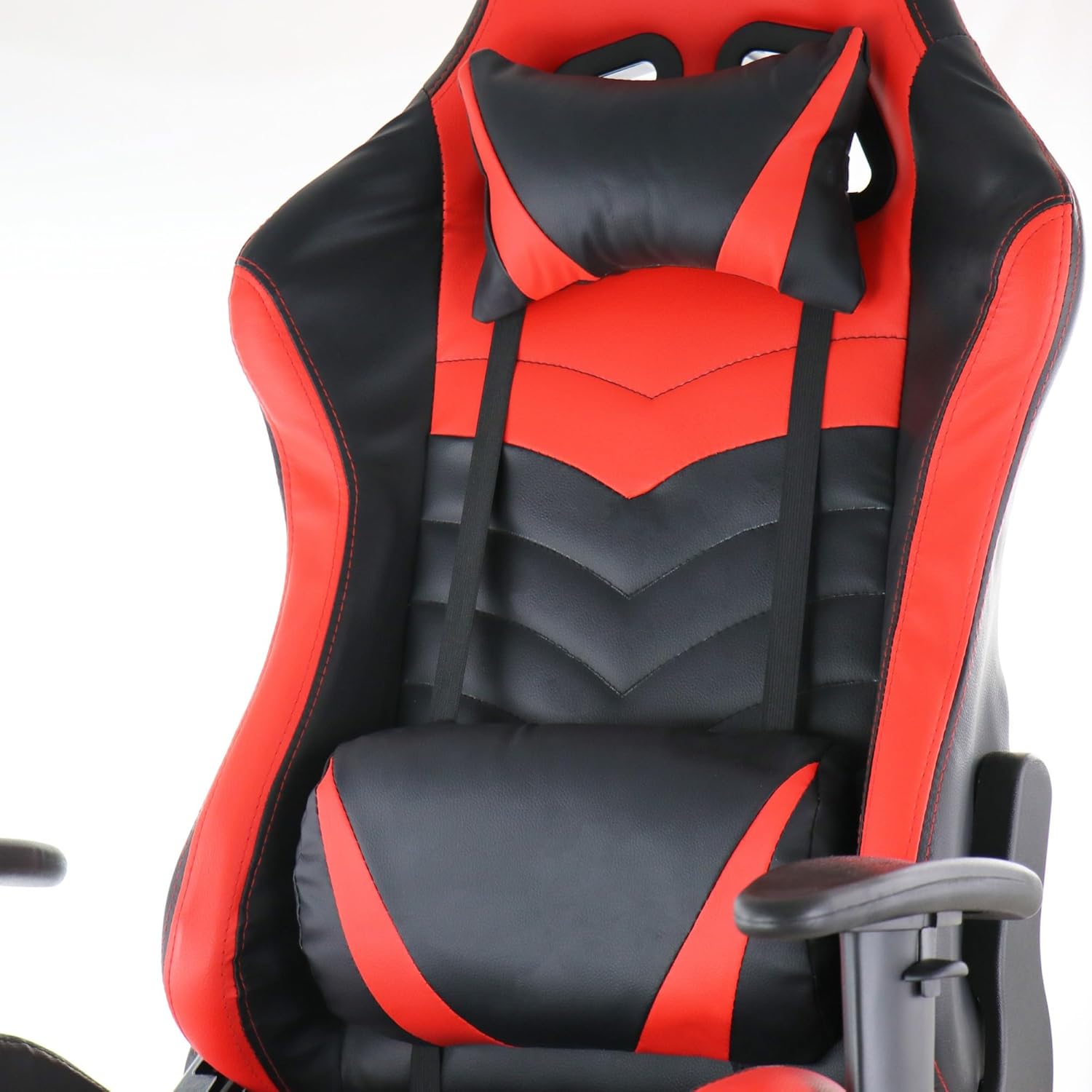
Un detallado view of the Gamefitz GF-2002 Gaming Chair's headrest and lumbar support pillows. Both pillows are black with red accents and are adjustable via straps, designed to provide ergonomic support during use.
4. Mantenimiento
Instrucciones de limpieza
To clean the pleather material of your Gamefitz GF-2002 Gaming Chair, simply wipe it clean with a damp Paño. Para manchas difíciles, use una solución de jabón suave y luego limpie con un paño limpio y seco.amp paño. Evite productos químicos fuertes o limpiadores abrasivos, ya que pueden dañar el material.
Cuidados generales
- Regularly check all screws and bolts to ensure they are tight. Retighten as necessary.
- Evite la exposición prolongada a la luz solar directa para evitar la decoloración y la degradación del material.
- Keep the chair away from heat sources.
5. Solución de problemas
La silla no ajusta la altura
Ensure the gas lift lever is fully engaged or disengaged as required. Check if the gas lift cylinder is properly installed into the base and seat mechanism. If the issue persists, the gas lift cylinder may need replacement.
La silla chirría o se tambalea
Tighten all assembly screws and bolts. Lubricate moving parts, such as the recline mechanism or caster stems, with a silicone-based lubricant if squeaking persists.
Footrest Does Not Extend/Retract Smoothly
Check for any obstructions in the footrest mechanism. Ensure the sliding rails are clean and free of debris. A small amount of lubricant on the rails may improve movement.
6. Especificaciones
| Marca | Juego de ajuste |
| Nombre del modelo | GF-2002 |
| Color | Negro, rojo |
| Peso del artículo | 42 libras |
| Tipo de material del asiento | Leather (Pleather) |
| Usos recomendados | Juego de azar |
| Componentes incluidos | Foot Rest, Head Pillow, Lumbar Pillow |
| Características especiales | Arm Rest, Cushion Availability, Foldable Footrest |
| Movimiento de la base del mueble | Girar |
| Recuento de posiciones reclinadas | 1 |
| Instrucciones de cuidado del producto | Limpiar |
| Código Postal | 840191200304 |
7. Información de garantía
Specific warranty details for the Gamefitz GF-2002 Gaming Chair are not provided in this manual. Please refer to the warranty card included with your purchase or contact the retailer/manufacturer directly for information regarding warranty coverage and terms.
8. Soporte
For further assistance, technical support, or to inquire about replacement parts, please contact Gamefitz customer service or the retailer from whom you purchased the product. Have your model number (GF-2002) and purchase date ready when contacting support.
Ask a question about this manual
Ask about setup, troubleshooting, compatibility, parts, safety, or missing instructions. Manuals+ will review the question and use this page’s manual context to help answer it.