
Introducción
The Macally BTBLZKEYSG is a full-size backlit Bluetooth keyboard designed specifically for Mac and iOS devices. It features a MacOS-specific layout with 107 scissor-switch keys and 14 convenient shortcuts, enhancing workflow and productivity. This keyboard allows seamless pairing and switching between up to three Bluetooth-enabled devices, including MacBooks, iMacs, iPhones, and iPads. The integrated white LED backlighting offers three adjustable brightness levels for comfortable typing in various lighting conditions. Powered by a built-in 1500mAh rechargeable battery, it provides extended usage time between charges.
Contenido del paquete
- Macally BTBLZKEYSG Backlit Bluetooth Keyboard
- Cable de carga USB-C
- Manual de instrucciones
Características del producto
- Teclas retroiluminadas: Crisp white LEDs with 3 brightness levels for typing in low-light environments. Backlight can be turned off.
- MacOS Specific Layout: 107 scissor-switch keys with 14 macOS shortcuts for familiar and efficient use.
- Bluetooth para múltiples dispositivos: Easily pair and switch between up to 3 Bluetooth-enabled devices (Mac, iPhone, iPad) within a 30 ft wireless range.
- Batería recargable: Built-in 1500mAh battery provides 1 to 4 weeks of runtime with backlighting on. USB-C charging cable included.
- Diseño delgado y cómodo: Only 0.87 inches thin with an integrated kickstand for ergonomic typing.
Configuración
1. Carga del teclado
Before initial use, fully charge the keyboard. Connect the supplied USB-C charging cable to the keyboard's USB-C port and the other end to a USB power source (e.g., computer USB port, USB wall adapter). The LED indicator will show charging status.
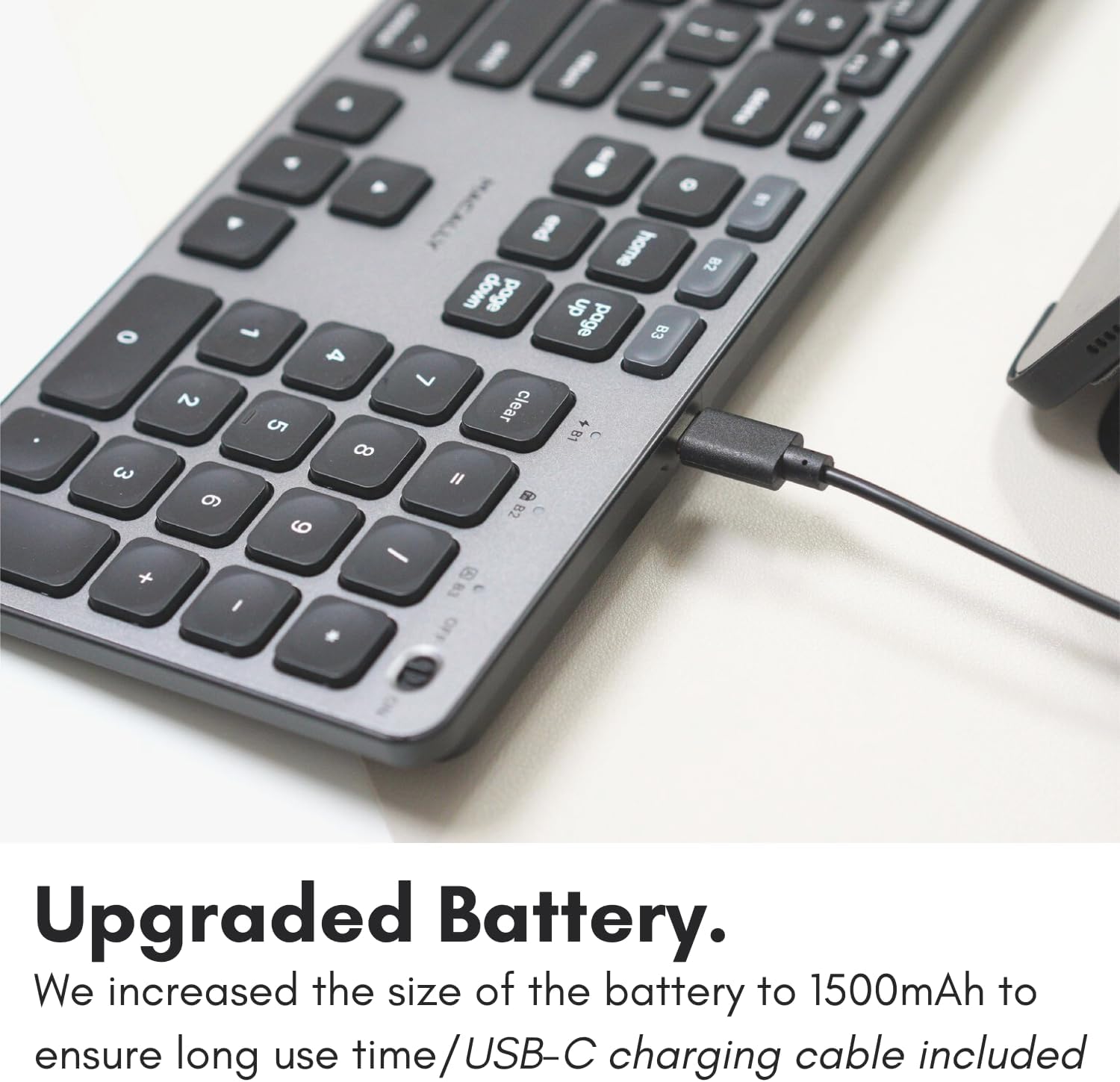
Image: The USB-C charging port on the side of the Macally BTBLZKEYSG keyboard, with the charging cable inserted.
2. Encendido
Locate the power switch on the keyboard, usually on the top right edge. Slide the switch to the 'ON' position.
3. Emparejamiento con un dispositivo
- Asegúrese de que el teclado esté encendido.
- Press and hold one of the Bluetooth pairing keys (B1, B2, or B3) for 3-5 seconds until the corresponding LED indicator above the key starts blinking rapidly. This indicates the keyboard is in pairing mode.
- En su dispositivo Mac o iOS, vaya a Configuración del sistema (o Preferencias del sistema) > Bluetooth.
- Look for "Macally BTBLZKEYSG" (or similar name) in the list of available devices and click/tap to connect.
- Si se le solicita, ingrese el código de emparejamiento que se muestra en su pantalla usando el teclado y presione Ingresar.
- Once connected, the LED indicator for the selected Bluetooth channel will stop blinking and remain solid for a few seconds before turning off.

Image: The Macally BTBLZKEYSG keyboard shown with a MacBook and an iPad, illustrating its multi-device capability.
Instrucciones de funcionamiento
MacOS Specific Keys and Shortcuts
The keyboard features a standard MacOS layout, including function keys (F1-F12) that double as media and system control shortcuts. Use the Fn key in combination with these keys to access their secondary functions.
- Fn+F1: Disminuir el brillo de la pantalla
- Fn+F2: Aumentar el brillo de la pantalla
- Fn+F3: Control de misión
- Fn+F4: Plataforma de lanzamiento
- Fn+F7: Pista anterior
- Fn+F8: Reproducir/Pausa
- Fn+F9: Pista siguiente
- Fn+F10: Silenciar volumen
- Fn+F11: Bajar volumen
- Fn+F12: Aumentar el volumen
Control de luz de fondo
The keyboard's backlight can be adjusted to three brightness levels or turned off completely. Use the dedicated backlight control keys, typically located near the function keys or arrow keys, to cycle through the brightness settings.

Image: The Macally BTBLZKEYSG keyboard with its white LED backlighting illuminated at different intensity levels.
Cambiar entre dispositivos emparejados
To switch between your paired Bluetooth devices, simply press the corresponding Bluetooth pairing key (B1, B2, or B3) that your device is connected to. The keyboard will automatically connect to the selected device.
Mantenimiento
Para garantizar la longevidad y el rendimiento óptimo de su teclado, siga estas pautas de mantenimiento:
- Limpieza: Utilice un paño suave y sin pelusa ligeramente seco.ampened with water or a mild cleaning solution to wipe the keyboard surface. Avoid harsh chemicals or abrasive materials.
- Eliminación de polvo: Utilice aire comprimido para eliminar el polvo y los residuos entre las teclas.
- Almacenamiento: Cuando no utilice el teclado durante períodos prolongados, guárdelo en un lugar seco y fresco.
- Evite los líquidos: No exponga el teclado a humedad excesiva ni derrame líquidos sobre él.
Solución de problemas
| Problema | Solución |
|---|---|
| El teclado no se enciende. | Ensure the power switch is in the 'ON' position. Charge the keyboard using the supplied USB-C cable. |
| El teclado no se empareja con el dispositivo. | Ensure the keyboard is in pairing mode (LED blinking). Check your device's Bluetooth settings to ensure Bluetooth is enabled and the keyboard is visible. Try restarting both the keyboard and your device. |
| El teclado se desconecta con frecuencia. | Ensure the keyboard is within the 30 ft wireless range of your device. Check for interference from other wireless devices. Ensure the keyboard battery is sufficiently charged. |
| La luz de fondo no funciona. | Press the backlight control keys to cycle through brightness levels. Ensure the keyboard battery is charged, as low battery may disable backlighting. |
| Las teclas no responden. | Check the Bluetooth connection. If connected, try restarting the keyboard. Ensure no debris is lodged under the keys. |
Presupuesto
| Característica | Detalle |
|---|---|
| Número de modelo | BTBLZKEYSG |
| Conectividad | Bluetooth, inalámbrico |
| Dispositivos compatibles | Mac Mini / Pro Studio, iMac, Macbook Air, MacBook Pro, iPhone, iPad |
| Descripción del teclado | Backlit Keyboard for Mac |
| Características especiales | Backlit, Multi-Device Bluetooth, Rechargeable |
| Color | Gris |
| Retroiluminación del teclado | Single Color (White), 3 Brightness Levels |
| Dimensiones del producto | 16.8" de largo x 4.6" de ancho x 0.87" de alto |
| Número de llaves | 107 |
| Fuente de poder | Alimentado por batería (1500 mAh recargable) |
| Tipo de interruptor | Tactile Scissor Keys |
| Disposición del teclado | QWERTY (MacOS) |
| Material | Aluminio |
| Código Postal | 701107500362 |
Vídeo oficial del producto
Vídeo: Un overview of the Macally Backlit Bluetooth Keyboard for Mac & iOS, highlighting its features and compatibility.
Garantía y soporte
The Macally BTBLZKEYSG Backlit Bluetooth Keyboard comes with a warranty of up to two years. For technical support, warranty claims, or further assistance, please visit the official Macally websitio o comuníquese con su departamento de servicio al cliente.