
JOYING 6GB+128GB
JOYING 10.1 Inch Android Car Stereo User Manual
Modelo: 6 GB + 128 GB
Introducción
This manual provides comprehensive instructions for the installation, operation, maintenance, and troubleshooting of your JOYING 10.1 Inch Android Car Stereo. Please read this manual thoroughly before using the device to ensure proper functionality and safety.
The JOYING Android Car Stereo is an advanced in-dash navigation and entertainment system designed to enhance your driving experience. It features a high-resolution display, powerful processing capabilities, and seamless smartphone integration.

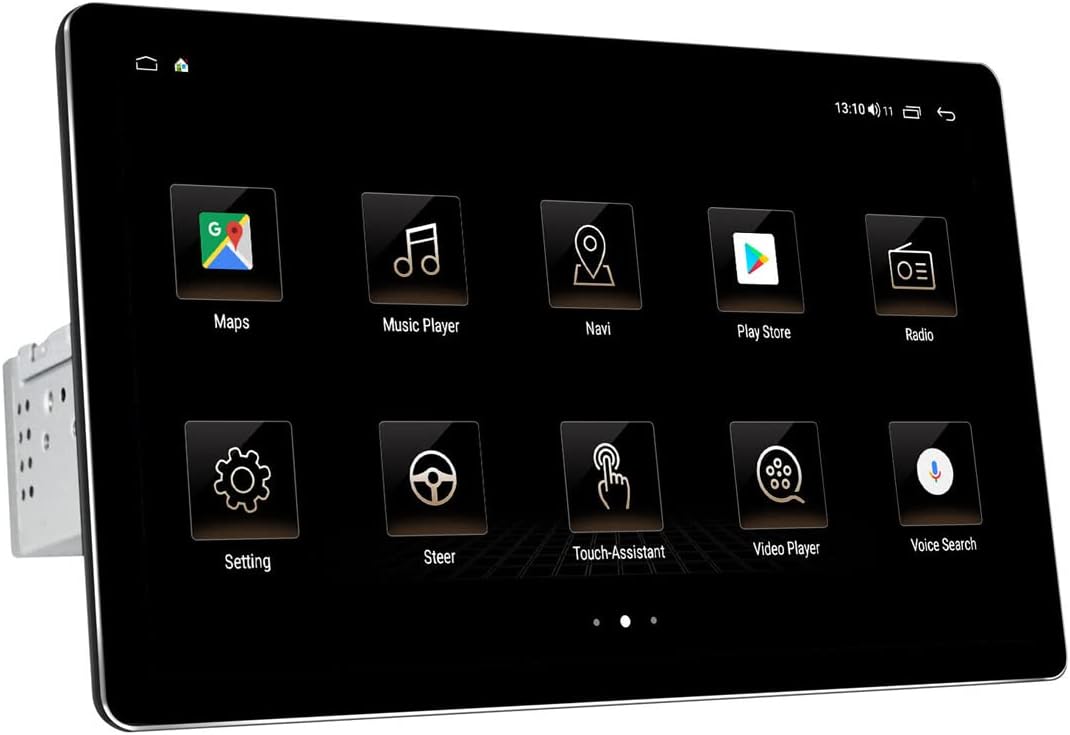
Frente view of the JOYING 10.1 Inch Android Car Stereo.
Configuración e instalación
Una instalación correcta es crucial para el rendimiento óptimo de su estéreo. Si no está familiarizado con el cableado de audio para autos, se recomienda que la unidad sea instalada por un profesional.
1. Contenido y dimensiones del paquete
Before beginning, verify all components are present as listed in the package contents. Familiarize yourself with the unit's dimensions to ensure compatibility with your vehicle's dashboard.

Dimensions and included accessories for the JOYING car stereo.
2. Detachable Screen and Adjustable Mount
The unit features a detachable screen and an adjustable fixed mount. This design allows for flexible positioning to avoid obstructing air-conditioning vents or control switches during installation.

Illustration of the detachable screen and adjustable mounting system.
3. Cableado y conexiones
Connect the main power harness, speaker wires, and other necessary cables to the corresponding ports on the back of the unit. Ensure all connections are secure. If your car has a CANbus system, an additional CANbus decoder harness may be required (sold separately).

Detallado view of the rear connections and ports on the car stereo.

Example of the wiring harness for connecting the stereo to the vehicle's electrical system.
4. SIM Card and WiFi Setup
The unit supports a built-in 4G module. Insert a SIM card for internet access. It also supports dual-band WiFi (2.4GHz and 5GHz) for stable network connectivity.

Instructions for inserting a SIM card into the unit's 4G module.
5. Initial Power-Up and Screen Attachment
After all connections are made, power on the unit. The first boot-up may take longer (approx. 30-40 seconds). Once the main unit is powered, attach the display screen to the main unit using the provided connectors.
Video demonstrating the physical dimensions, screen attachment, and initial setup of the JOYING 10.1 Inch Car Radio.
Instrucciones de funcionamiento
Your JOYING car stereo runs on Android 10 OS, providing a familiar and intuitive user interface.
1. Navegación por la interfaz de usuario
The 10.1-inch touchscreen allows for easy navigation through various applications and settings. The home screen provides quick access to frequently used functions like Maps, Music Player, and Radio.

Examples of the JOYING car stereo's user interface screens.
2. CarLink (Android Auto / CarPlay)
The unit features built-in Carlink, supporting both wired/wireless CarPlay (iOS 10.1 or later) and wired Android Auto (Android 7.0 or later). This allows for seamless integration of your smartphone for navigation, calls, and music, minimizing distractions while driving.

CarPlay interface displaying navigation and music simultaneously.

Explanation of Car-Smartphone Connectivity features.
3. Bluetooth 5.1
With Bluetooth 5.1, the stereo supports audio streaming, automatic phone book transfer, and hands-free calling. Note that it primarily supports phone and OBD dongle connections.
4. Built-in DSP and Audio Settings
The unit features a built-in Digital Signal Processor (DSP) with a 32-band equalizer, allowing independent adjustment for front and rear speakers. This provides enhanced sound quality and customizable audio experiences, including bass reinforcement and filtering.
DSP interface for advanced audio customization.

Visual representation of the Built-in DSP capabilities.
5. Video Playback and Display Quality
The 1920x1200 resolution screen offers a high-definition viewing experience for videos and other media. The brightness adjusts to ensure clear visibility even in daylight.

Resolution comparison illustrating the superior clarity of the 1920x1200 display.
6. Control del volante
The unit supports factory steering wheel controls, allowing you to easily switch songs, radio channels, and adjust volume for a safer and more enjoyable journey.

Integración de control del volante para una operación conveniente.
Mantenimiento
Para garantizar la longevidad y el rendimiento óptimo de su estéreo para automóvil JOYING, siga estas pautas de mantenimiento:
- Limpieza de pantalla: Utilice un paño suave y sin pelusa para limpiar suavemente la pantalla táctil. Para manchas difíciles, limpie ligeramenteampEnjuague el paño con agua o un limpiador de pantallas. Evite materiales abrasivos o productos químicos agresivos.
- Eliminación de polvo: Regularly use a soft brush or compressed air to remove dust from vents and connection ports to prevent overheating and maintain proper airflow.
- Actualizaciones de software: Revise periódicamente las instrucciones del fabricante. website or the unit's settings for available software updates. Keeping the software updated can improve performance, add new features, and fix bugs.
- Condiciones ambientales: Evite exponer la unidad a temperaturas extremas, luz solar directa durante períodos prolongados o humedad excesiva.
Solución de problemas
If you encounter issues with your JOYING car stereo, refer to the following common problems and their solutions:
| Problema | Posible causa | Solución |
|---|---|---|
| La unidad no se enciende. | Cableado incorrecto; fusible quemado; problema de fuente de alimentación. | Check all power connections (yellow and red wires may need to be swapped if not powering on correctly). Inspect the fuse on the unit's wiring harness. Ensure stable power supply from the vehicle. |
| Poor sound quality or crackling microphone. | Improper audio settings; Loose speaker connections; External microphone interference. | Adjust DSP and equalizer settings. Ensure all speaker wires are securely connected. Check external microphone placement and connection; consider relocating it if experiencing excessive noise. |
| Main screen/launcher cannot be changed or font is too small. | Default software limitations; Display scaling settings. | While direct font size adjustment may be limited, some users report success by enabling Developer Options (Settings > About device > Build number, tap 7 times) and adjusting 'Smallest width' (DPI) settings. Installing an alternative launcher from the Play Store may also provide more customization. |
| CarPlay/Android Auto no se conecta o es inestable. | Incorrect cable; Software incompatibility; Phone settings. | Ensure you are using a high-quality USB cable. Verify your phone's operating system is compatible (Android 7.0+ for Android Auto, iOS 10.1+ for CarPlay). Check phone settings for CarLink permissions. Try restarting both the phone and the car stereo. |
| Los controles del volante no funcionan. | Incorrect wiring; Missing CANbus decoder. | Ensure the steering wheel control wires are correctly connected. If your car has a CANbus system, an additional CANbus decoder harness may be required for full functionality. |
Presupuesto
- Dimensiones del producto: 9.65 x 5.08 x 6.34 pulgadas
- Peso del artículo: 5.99 libras
- ASIN: B09CM17SZ2
- Fecha de primera disponibilidad: 14 de agosto de 2021
- Fabricante: ALEGRIA
- Marca: ALEGRIA
- Tecnología de conectividad: Bluetooth, Wi-Fi, USB
- Tipo de controlador: iOS, Android
- Característica especial: LENGUADO
- Dispositivos compatibles: teléfono inteligente, altavoz
- Puertos HDMI totales: 4
- Tipo de conector: USB
- Codificación de audio: Estéreo
- Modo de salida de audio: Estéreo
- Configuración del canal de sonido envolvente: Canal 4
Garantía y soporte
For warranty information and technical support, please refer to the official JOYING webSitio web o contacte directamente con el servicio de atención al cliente. Conserve su recibo de compra como comprobante para cualquier reclamación de garantía.
Ask a question about this manual
Ask about setup, troubleshooting, compatibility, parts, safety, or missing instructions. Manuals+ will review the question and use this page’s manual context to help answer it.