
1. Introducción
Thank you for choosing the A4tech FG1112 Fstyler Wireless Keyboard and Mouse Set. This compact and efficient combo provides a reliable 2.4GHz wireless connection, offering convenience and comfort for your daily computing needs. The keyboard features a Q Turkish layout with FN multimedia keys, while the mouse offers precise 1200 DPI optical tracking. This manual will guide you through the setup, operation, and maintenance of your new device.
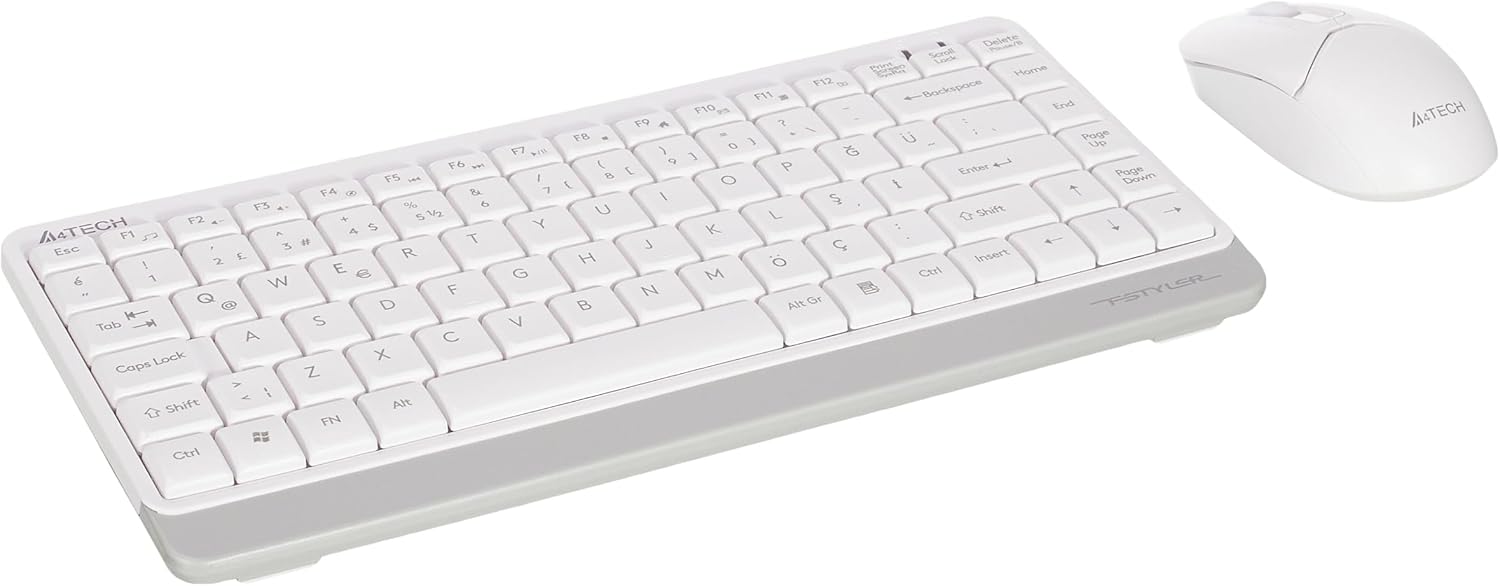
Image 1.1: A4tech FG1112 Fstyler Wireless Keyboard and Mouse Set (White)
2. Contenido del paquete
Verifique el contenido del paquete para asegurarse de que todos los artículos estén presentes:
- 1 x A4tech FG1112 Wireless Keyboard
- 1 x A4tech Fstyler Wireless Mouse
- 1 x nanorreceptor USB
- 2 pilas AAA (para teclado)
- 1 x AA Battery (for mouse, typically included)
- 1 x Manual de usuario (este documento)
3. Instrucciones de configuración
- Inserte las baterías:
- For the keyboard: Open the battery compartment cover on the underside of the keyboard. Insert two AAA batteries, ensuring correct polarity (+/-). Close the cover.
- For the mouse: Open the battery compartment cover on the underside of the mouse. Insert one AA battery, ensuring correct polarity (+/-). Close the cover.

Image 3.1: Mouse bottom view showing battery compartment and power switch.
- Conectar el nano receptor USB: Locate the USB Nano Receiver, typically stored inside the mouse's battery compartment or packaged separately. Plug the receiver into an available USB port on your computer.
- Encendido:
- For the keyboard: Ensure the keyboard is powered on. There might be a power switch on the top right or underside.
- Para el mouse: deslice el interruptor de encendido en la parte inferior del mouse a la posición "ON".
- Conexión automática: Your computer should automatically detect and install the necessary drivers for the keyboard and mouse. This process may take a few moments. Once complete, your devices are ready for use.
Video 3.1: A short demonstration of the A4tech Fstyler Wireless Keyboard and Mouse Set, showing its compact design and wireless connectivity. This video illustrates the product's features and ease of use.
4. Instrucciones de funcionamiento
4.1 Uso del teclado
The A4tech FG1112 keyboard features a compact design with a Q Turkish layout. It is designed for comfortable and quiet typing.

Imagen 4.1: Arriba view of the A4tech FG1112 Wireless Keyboard, highlighting its Q Turkish layout.
Teclas multimedia y de función:
The keyboard includes 12 multimedia and internet function keys integrated into the F1-F12 keys. To activate these functions, press the FN tecla simultáneamente con la tecla F deseada.
- FN + F1: Reproductor multimedia
- FN + F2: Bajar volumen
- FN + F3: Sube el volumen
- FN + F4: Silenciar
- FN + F5: Pista anterior
- FN + F6: Siguiente pista
- FN + F7: Reproducir/Pausa
- FN + F8: Detener
- FN + F9: Página de inicio
- FN + F10: E-mail
- FN + F11: Mi computadora
- FN + F12: Calculadora

Image 4.2: Illustration of FN key functionality for multimedia controls.
4.2 Uso del ratón
The A4tech Fstyler mouse provides precise 1200 DPI optical tracking for smooth and accurate cursor movement.

Imagen 4.3: Arriba view of the A4tech Fstyler Wireless Mouse.
Funciones básicas:
- Click izquierdo: Primary function, used for selecting items, opening filey etc.
- Botón derecho del ratón: Secondary function, typically opens context menus.
- Rueda de desplazamiento: Se utiliza para desplazarse por documentos y web Páginas verticalmente. También puede funcionar como botón central.
5. Mantenimiento
- Limpieza: Utilice un paño suave y seco para limpiar el teclado y el ratón. Para la suciedad difícil, utilice un paño ligeramente seco.amp Se puede utilizar un paño, pero asegúrese de que no entre líquido en los dispositivos.
- Reemplazo de batería: When the keyboard or mouse becomes unresponsive or exhibits delayed input, it's time to replace the batteries. Follow the "Insert Batteries" steps in the Setup section.
- Almacenamiento: When not in use for extended periods, turn off the mouse to conserve battery life. Store the devices in a cool, dry place.
6. Solución de problemas
| Problema | Posible solución |
|---|---|
| El teclado/ratón no responde |
|
| Delayed or intermittent response |
|
| Las teclas multimedia no funcionan |
|
7. Especificaciones
| Característica | Detalle |
|---|---|
| Marca | A4tech |
| Modelo | FG1112 |
| Tecnología de conectividad | 2.4GHz inalámbrica |
| Disposición del teclado | Q Turkish |
| Tipo de teclado | Multimedia Membrane |
| DPI del ratón | Óptico de 1200 DPI |
| Fuente de alimentación del teclado | 2 pilas AAA |
| Fuente de alimentación del ratón | 1 x AA Battery (typical) |
| Características especiales | Wireless, Mini, Multimedia Keys, Optical Mouse, Laser Printed Keys, Water-resistant design (with drainage channels) |
| Peso del producto | 0.62 Kilograms (Set) |
| Dimensiones (Teclado) | Approx. 315mm (Width) x 146mm (Depth) x 25mm (Height) |
| Dimensiones (ratón) | Approx. 64mm (Width) x 108mm (Depth) x 35mm (Height) |

Image 7.1: Dimensions of the A4tech FG1112 Keyboard and Mouse.
8. Garantía y soporte
This A4tech FG1112 Fstyler Wireless Keyboard and Mouse Set comes with a 2 año de garantía A partir de la fecha de compra. Conserve el comprobante de compra para reclamaciones de garantía.
For technical support, troubleshooting assistance, or warranty inquiries, please contact A4tech customer service through their official websitio o su distribuidor local.
Puede encontrar más información y recursos de apoyo en A4tech Store on Amazon.