
Mixx HEX1-CG-CP-183
Mixx EX1 Wireless Bluetooth Over Ear Headphones User Manual
Model: HEX1-CG-CP-183
Introducción
Thank you for choosing the Mixx EX1 Wireless Bluetooth Over Ear Headphones. This manual provides essential information for setting up, operating, maintaining, and troubleshooting your headphones to ensure a long-lasting and enjoyable audio experience. The Mixx EX1 headphones are designed for comfort and superior sound, offering up to 40 hours of playtime and versatile connectivity options.

Image: Mixx EX1 Rose Gold Wireless Bluetooth Over Ear Headphones, showcasing su elegante diseño.
Configuración
¿Qué hay en la caja?
- Mixx EX1 Wireless Bluetooth Over Ear Headphones
- Cable de carga USB
- Cable de audio de 3.5 mm
- Manual de usuario
Carga de los auriculares
Before first use, fully charge your Mixx EX1 headphones. Connect the provided USB charging cable to the charging port on the headphones and to a USB power source. The LED indicator will show charging status. A full charge provides up to 40 hours of playtime. For quick power, a 15-minute charge can provide an additional 8 hours of playtime.

Image: Graphic indicating up to 40 hours of total playtime.
Emparejamiento Bluetooth
- Asegúrese de que los auriculares estén cargados y apagados.
- Mantenga presionado el botón de encendido hasta que el indicador LED parpadee, lo que indica el modo de emparejamiento.
- En su dispositivo (teléfono inteligente, tableta, computadora), habilite Bluetooth y busque los dispositivos disponibles.
- Select "Mixx EX1" from the list of devices.
- Una vez conectado, el indicador LED mostrará una luz fija.
Conexión por cable
The Mixx EX1 headphones can also be used with a wired connection. Simply plug the 3.5mm audio cable into the headphone jack on the earcup and the other end into your audio device. This is useful when the battery is low or for devices without Bluetooth connectivity.

Image: Close-up of the Mixx EX1 headphone showing the 3.5mm audio cable connected to the earcup.
Instrucciones de funcionamiento
Controles sobreview
The Mixx EX1 headphones feature intuitive touch controls located on the earcup for easy management of your audio and calls.
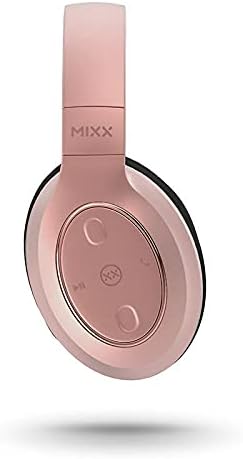
Imagen: Detallada view of the touch controls on the Mixx EX1 headphone earcup.
- Encendido/apagado: Mantenga presionado el botón de encendido.
- Reproducir/Pausa: Single tap the play/pause button.
- Subir/Bajar volumen: Tap the respective volume buttons.
- Pista siguiente: Double tap the next track button.
- Pista anterior: Triple tap the previous track button.
- Responder/Finalizar llamada: Single tap the call button.
- Rechazar llamada: Press and hold the call button.
- Activar Asistente de voz (Siri/Asistente de Google): Press the voice assistant button.
Modos de ecualización
The Mixx EX1 headphones offer three preset EQ modes to optimize your listening experience:
- Modo música: Audio balanceado para escuchar música en general.
- Modo de refuerzo de graves: Enhances low frequencies for a richer bass sound.
- Modo de voz: Optimizes audio for clear voice reproduction, ideal for podcasts or calls.
Refer to the quick start guide included with your headphones for specific button presses to cycle through EQ modes.
Sistema de micrófono dual
The integrated dual microphone system ensures clear phone calls and accurate voice command recognition for your device's virtual assistant.
Mantenimiento
Limpieza
Para mantener el estado de sus auriculares:
- Limpie los auriculares y la diadema con un paño suave, seco y que no suelte pelusa.
- No utilice limpiadores abrasivos, disolventes ni aerosoles directamente sobre los auriculares.
- Mantenga los puertos de carga y los conectores de audio libres de polvo y residuos.
Almacenamiento
When not in use, store your headphones in a cool, dry place away from direct sunlight and extreme temperatures. The adjustable headband and cushioned over-ear pads are designed for comfort and can be folded for compact storage.
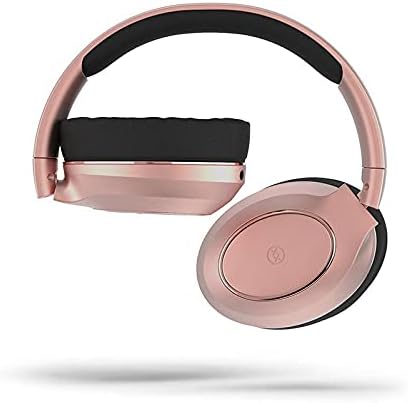
Image: Mixx EX1 headphones shown in a folded position, demonstrating their portability.
Solución de problemas
If you encounter issues with your Mixx EX1 headphones, please refer to the following common solutions:
| Problema | Posible solución |
|---|---|
| Los auriculares no se encienden | Ensure the headphones are fully charged. Connect to a power source and wait a few minutes before attempting to turn on. |
| No se puede emparejar a través de Bluetooth | Make sure the headphones are in pairing mode (flashing LED). Turn off and on Bluetooth on your device. Ensure no other devices are connected to the headphones. Try forgetting the device on your phone and re-pairing. |
| Audio cutting in/out or skipping | Ensure your device is within the Bluetooth range (typically 10 meters/33 feet) and there are no significant obstructions. Avoid strong Wi-Fi signals or other wireless interference. |
| Sin sonido | Check the volume level on both the headphones and your connected device. Ensure the headphones are properly paired or the 3.5mm cable is fully inserted. |
| El micrófono no funciona | Ensure the headphones are connected and selected as the audio input device on your computer or smartphone. Check application permissions for microphone access. |
Si estos pasos no resuelven su problema, consulte la sección Garantía y soporte para obtener más ayuda.
Presupuesto
| Característica | Detalle |
|---|---|
| Marca | Mezclar |
| Nombre del modelo | HEX1-CG-CP-183 |
| Color | Oro rosa |
| Colocación de orejas | Sobre la oreja |
| Factor de forma | Sobre la oreja |
| Tecnología de conectividad | Bluetooth, Wired (3.5 mm Jack) |
| Tecnología de comunicación inalámbrica | Bluetooth |
| Baterías | 1 batería de polímero de litio (incluida) |
| Dimensiones del producto | 18 x 17.5 x 8.5 cm |
| Peso | 560 gramos |
| Fabricante | Mixx Ltd |
| ASIN | B09F6QG189 |
| Componentes incluidos | Ear cushions (pre-installed), USB charging cable, 3.5mm audio cable |
| Rango de edad (descripción) | Adulto |
Garantía y soporte
Información de garantía
The Mixx EX1 Wireless Bluetooth Over Ear Headphones come with a 2 año de garantía when purchased directly through Mixx on Amazon. This warranty covers manufacturing defects and ensures your product performs as expected under normal use. Please retain your proof of purchase for warranty claims.
Atención al cliente
For further assistance, technical support, or warranty claims, please visit the official Mixx website or contact Mixx customer service through the platform where you purchased the product. Detailed contact information can typically be found on the manufacturer's websitio o su recibo de compra.
Ask a question about this manual
Ask about setup, troubleshooting, compatibility, parts, safety, or missing instructions. Manuals+ will review the question and use this page’s manual context to help answer it.