
1. Introducción
Gracias por la compraasing the MONODEAL Portable CD Player. This device is designed for personal and portable audio playback, featuring built-in speakers, anti-skip protection, and dual headphone jacks. This manual provides detailed instructions for setup, operation, maintenance, and troubleshooting to ensure optimal performance and longevity of your CD player.

Image: The MONODEAL Portable CD Player, a compact black device with a clear top cover and control buttons on the front.
2. ¿Qué hay en la caja?
Verifique el contenido del paquete para asegurarse de que todos los artículos estén presentes:
- Reproductor de CD
- Auriculares
- Cable de carga USB
- Cable auxiliar
- Manual de usuario

Image: The MONODEAL CD Player, its packaging, and all included accessories: earphones, USB charging cable, and aux cable.
3. Producto terminadoview
Familiarize yourself with the various parts and controls of your CD player:
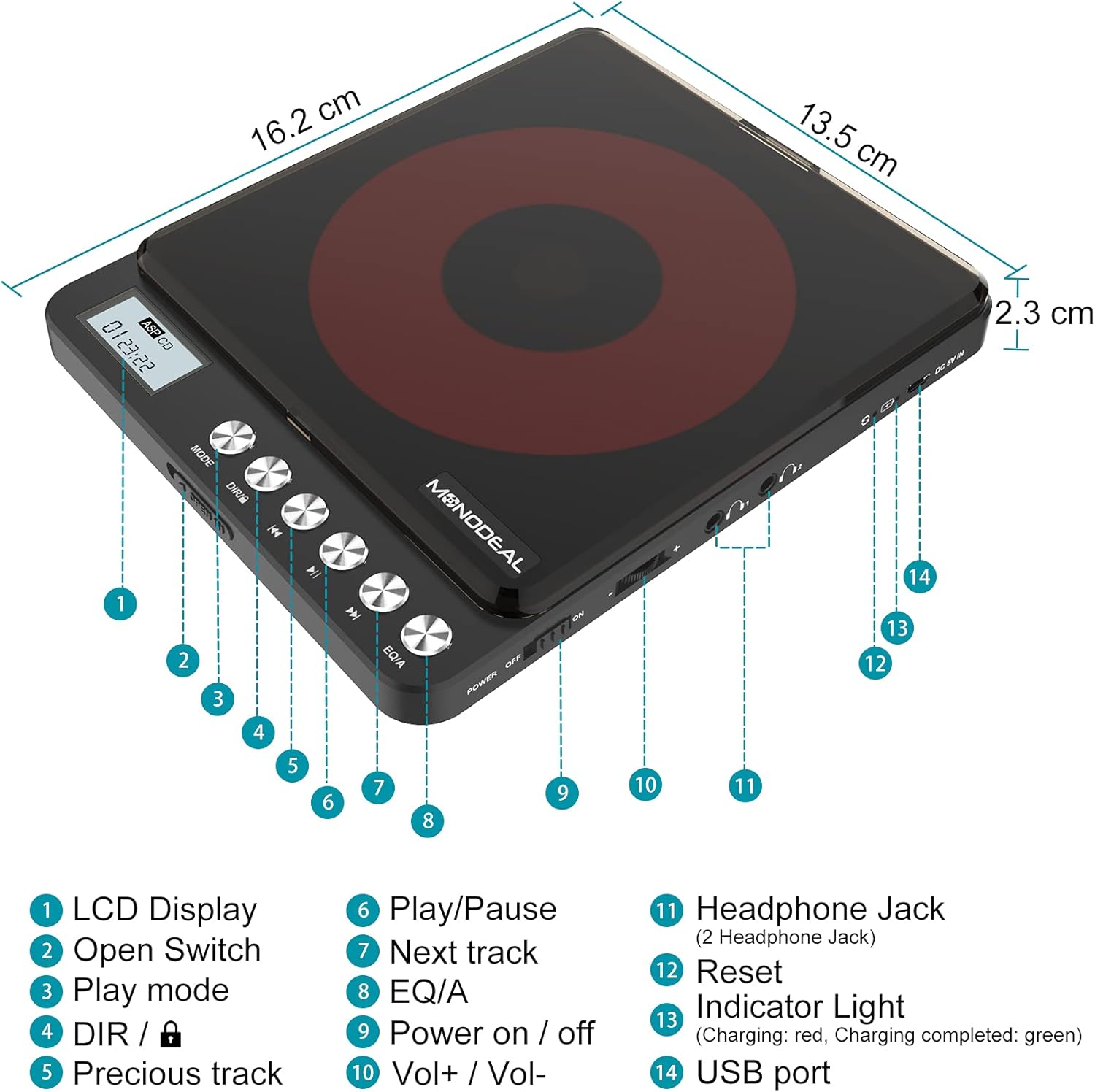
Image: A detailed diagram of the MONODEAL Portable CD Player, highlighting its various components with numbered labels.
- Pantalla LCD: Muestra el número de pista, el tiempo y el estado de reproducción.
- Interruptor abierto: Used to open the CD compartment.
- Modo de juego: Cycles through playback modes (e.g., repeat, random).
- DIR / Lock: Directory navigation for MP3 CDs / Key lock function.
- Pista anterior: Salta al comienzo de la pista actual o a la pista anterior.
- Reproducir/Pausa: Inicia o pausa la reproducción.
- Pista siguiente: Salta a la siguiente pista.
- EQ/A: Equalizer settings / Anti-skip function indicator.
- Encendido / apagado: Interruptor principal.
- Vol+ / Vol-: Control de volumen.
- Headphone Jack (2 Headphone Jacks): Salida de audio para auriculares.
- Reset: Recessed button to reset the device (requires a thin object like a needle).
- Luz indicadora: Shows charging status (red for charging, green for fully charged).
- Puerto USB: Para cargar el dispositivo.
4. Configuración
4.1 Carga del dispositivo
The CD player has a built-in rechargeable battery. Before first use, fully charge the device. A full charge provides up to 15 hours of playback.
- Connect the supplied USB charging cable to the USB port (14) on the CD player.
- Connect the other end of the USB cable to a power adapter, car charger, laptop, or power bank.
- The indicator light (13) will show red during charging and turn green when fully charged.
- La carga suele tardar aproximadamente 4 horas.

Image: The MONODEAL CD Player being charged via various methods including a power bank, power adapter, laptop, and car charger.
4.2 Connecting to External Audio Systems
You can connect the CD player to external speakers, car audio systems, or home stereos using the provided 3.5mm AUX cable.
- Insert one end of the 3.5mm AUX cable into one of the headphone jacks (11) on the CD player.
- Insert the other end of the AUX cable into the 3.5mm auxiliary input port of your car stereo or external sound system.
- Nota: The CD player is not compatible with car's USB ports or Bluetooth connections for audio output. An AUX port is required.
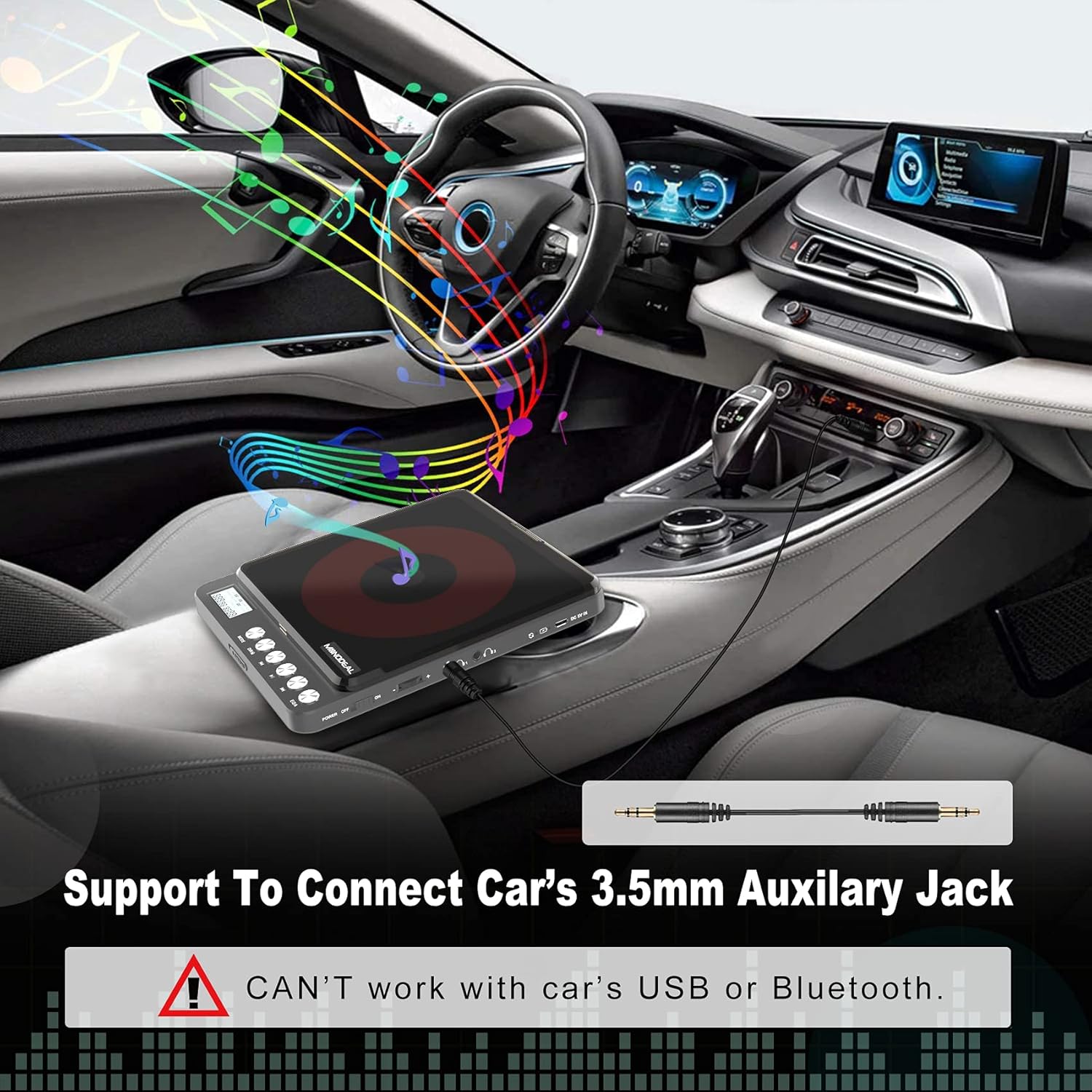
Image: The MONODEAL CD Player connected to a car's dashboard via a 3.5mm auxiliary cable, illustrating its use in a vehicle.
5. Instrucciones de funcionamiento
5.1 Reproducción básica
- Slide the Power On/Off switch (9) to the "ON" position.
- Press the Open Switch (2) to open the CD compartment.
- Carefully place a compatible CD (CD, MP3, CD-R, CD-RW, HDCD) onto the spindle, ensuring it is seated correctly.
- Cierre el compartimento de CD.
- The LCD display (1) will show "READ" and then the total number of tracks and total playback time.
- Presione el botón Reproducir/Pausa (6) para iniciar la reproducción.
- Adjust the volume using the Vol+ / Vol- controls (10).
- To pause, press the Play/Pause button (6) again. Press again to resume.
- To skip to the next track, press the Next Track button (7).
- To go back to the previous track or the beginning of the current track, press the Previous Track button (5).
- To turn off the player, slide the Power On/Off switch (9) to the "OFF" position. The player will remember the last played position if a disc remains inside.
5.2 modos de juego
Press the Play Mode button (3) repeatedly to cycle through different playback modes:
- Jugar en orden: Reproduce pistas secuencialmente.
- Repeat a track: Repite la pista actual.
- Repite todo: Repite todas las pistas del disco.
- Introducción: Reproduce los primeros 10 segundos de cada pista.
- Shuf (Shuffle): Reproduce pistas en un orden aleatorio.

Image: A visual representation of the five play modes available on the MONODEAL CD Player, including play in order, repeat track, repeat all, intro, and shuffle.
5.3 Dual Headphone Jacks
The MONODEAL CD Player is equipped with two headphone jacks (11), allowing two users to listen simultaneously. Simply plug two sets of headphones into the available jacks.

Image: Two individuals sharing the MONODEAL CD Player using both headphone jacks, emphasizing the dual listening feature.
5.4 Altavoces incorporados
For listening without headphones, the CD player features built-in stereo speakers. The sound quality is suitable for personal listening in quiet environments. The maximum volume of the internal speakers is designed for portability and may not be as loud as larger audio systems.

Image: The MONODEAL CD Player with an overlay indicating the location of its built-in dual speakers, shown in a setting with people dancing to music.
6. Mantenimiento
- Keep the CD player clean by wiping it with a soft, dry cloth.
- No utilice limpiadores abrasivos ni disolventes.
- Regularly clean the disc and the optical pickup lens of the CD player with a dry, lint-free cloth.
- Evite exponer el dispositivo a temperaturas extremas, humedad o luz solar directa.
- Guarde el reproductor en un lugar fresco y seco cuando no esté en uso.
7. Solución de problemas
| Problema | Posible causa | Solución |
|---|---|---|
| El CD salta o no se reproduce. | Disc is dirty, scratched, or incompatible format. Low battery. |
|
| No sound from internal speakers. | Volume too low. Headphones plugged in. |
|
| No sound when connected to car/external speakers. | Incorrect connection. Car/external system not set to AUX input. |
|
| El reproductor no se enciende. | Low battery. Power switch off. |
|
8. Especificaciones
| Característica | Detalle |
|---|---|
| Nombre del modelo | CW705 |
| Dimensiones del producto | 6.1 x 5.1 x 1.1 pulgadas |
| Peso del artículo | 1.3 libras |
| Color | Negro |
| Tecnología de conectividad | Auxiliar |
| Característica especial | Portable, Built-in Speakers, Anti-Skip, Dual Headphone Jacks, Rechargeable |
| Formatos de disco admitidos | CD, MP3, CD-R, CD-RW, HDCD |
| Formatos de música compatibles | CD-DA, MP3, WMA |
| Duración de la batería | Up to 15 hours playback (after full charge) |

Image: The MONODEAL CD Player highlighting its 2000mAh built-in rechargeable battery for up to 15 hours of playback, and listing supported disc and music formats.
9. Garantía y soporte
For warranty information or further assistance, please refer to the official MONODEAL website or contact customer support through your purchase platform. A digital version of this user manual is also available for download at: MONODEAL User Manual PDF.