
Mytrix Sakura(Type C)
Mytrix Pink RGB LED Gaming Mouse Pad User Manual
Model: Sakura(Type C)
Producto terminadoview
The Mytrix Pink RGB LED Gaming Mouse Pad is an extra-large gaming mousepad designed to enhance your gaming and office experience with its vibrant RGB lighting and durable construction. Featuring a unique Sakura pink cherry blossoms design, this mouse pad brings a distinctive aesthetic to your desktop.

Image: The Mytrix Pink RGB LED Gaming Mouse Pad, showcasing its Sakura cherry blossom design and illuminated RGB edges.
Las características principales incluyen:
- Sakura Pink Cherry Blossoms Design: A Japanese cherry theme with RGB light, providing a unique and aesthetically pleasing mira.
- 14 modos de iluminación RGB: Offers a variety of LED lighting profiles, including breathing and flashing effects, with 2-Zone RGB dynamic illumination.
- Superficie impermeable: The micro-woven smooth surface is waterproof, optimizing mouse accuracy and resisting spills.
- Base de goma antideslizante: A durable, non-slip rubber base ensures stability during intense use.
- Conectar y usar: No driver installation required; powered by USB.
- Large Gaming Mousepad: Measures 800 x 300 x 4 mm (31.5 x 11.8 x 0.16 inch), providing ampDeja espacio para el teclado y el ratón.
Instrucciones de instalación
Setting up your Mytrix RGB LED Gaming Mouse Pad is a straightforward process due to its plug-and-play design.
- Desenrolle la alfombrilla del ratón: Carefully unroll the mouse pad and place it on a flat, clean surface. Allow some time for it to flatten completely if it retains any curl del embalaje.
- Conectar a USB: Locate the USB-C port on the mouse pad's control module and connect the provided USB cable.
- Conecte a la fuente de alimentación: Plug the other end of the USB cable into an available USB port on your computer or a USB wall adapter. The mouse pad will automatically power on and illuminate.

Imagen: Primer plano view of the USB-C connection and control button on the Mytrix mouse pad, illustrating the plug-and-play setup.
Instrucciones de funcionamiento
The Mytrix RGB LED Gaming Mouse Pad features an intuitive control button for managing its lighting effects.
- Changing RGB Lighting Modes: Press the control button once to cycle through the 14 available LED RGB lighting profiles. These modes include various static colors, breathing effects, flashing patterns, and more.
- Ajuste del brillo: Press the control button twice in quick succession to change the brightness level of the RGB illumination.
- Encendido/apagado: To power the mouse pad on or off, press and hold the control button for 3 seconds.

Imagen: Un diagrama ilustrativo muestraasing the 14 distinct RGB lighting modes that can be selected on the mouse pad.

Image: The large gaming mouse pad with its dimensions clearly marked, indicating its extended size for keyboard and mouse.
Mantenimiento
Proper care will ensure the longevity and performance of your Mytrix RGB LED Gaming Mouse Pad.
- Limpieza de la superficie: The mouse pad features a waterproof surface. For minor spills or dust, gently wipe the surface with a damp cloth. For more stubborn stains, use a mild soap solution and a soft cloth, then wipe dry. Ensure the USB connection point is not exposed to liquids.
- Maintaining the Base: The non-slip rubber base requires minimal maintenance. Keep it free from excessive dust or debris to ensure optimal grip on your desk surface.
- Edge Care: The stitched edges are designed to prevent fraying. Avoid sharp objects or excessive pulling on the edges to maintain their integrity.
- Almacenamiento: When not in use for extended periods, it is recommended to gently roll the mouse pad (design side out) and store it in a cool, dry place to prevent creasing.
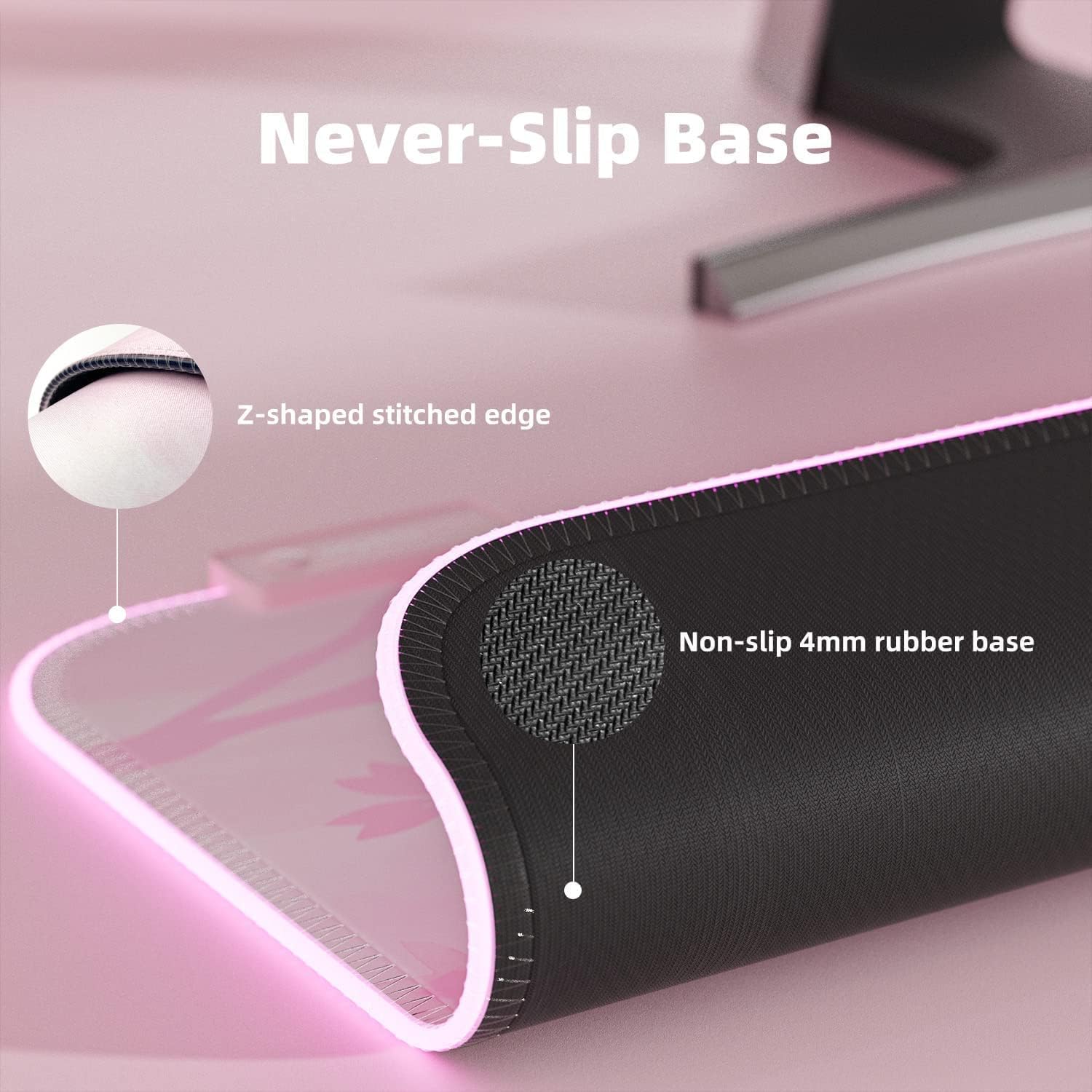
Imagen: Un primer plano view demonstrating the waterproof surface of the mouse pad, with water beads visible.

Imagen: Un detalle view of the mouse pad's non-slip rubber base and the reinforced Z-shaped stitched edge.
Solución de problemas
If you encounter any issues with your Mytrix RGB LED Gaming Mouse Pad, refer to the following common solutions:
| Problema | Posible causa | Solución |
|---|---|---|
| Las luces RGB no se encienden. | No power, loose USB connection, or unit is off. |
|
| Las luces parpadean o cambian inesperadamente. | Unstable power supply or loose connection at the control module. |
|
| Problemas de seguimiento del mouse. | Dirty surface or incompatible mouse sensor. |
|
Presupuesto
| Característica | Detalle |
|---|---|
| Dimensiones del producto | 31.5 x 12 x 0.16 pulgadas (800 x 300 x 4 mm) |
| Peso del artículo | 1.25 libras |
| Marca | Mytrix |
| Color | Rosa |
| Material | Rubber (Base), Micro-woven cloth (Surface) |
| Característica especial | Waterproof, RGB Lighting, Non-slip Base |
| Usos recomendados | Juegos, Oficina |
| Modos de iluminación | 14 modos RGB |
| Conectividad | USB (Plug & Play) |
Garantía y soporte
For warranty information, product support, or to inquire about returns, please refer to the following:
- Política de devoluciones: This product is eligible for a 30-day return/replacement policy from the date of purchase. Please refer to your retailer's specific return guidelines.
- Soporte del fabricante: For technical assistance or further inquiries, please visit the official Mytrix websitio o comuníquese con su servicio de atención al cliente.
- Manual de usuario (PDF): An official user manual in PDF format is available for download aquí.
- Manual de instalación (PDF): An installation manual in PDF format is available for download aquí.
Ask a question about this manual
Ask about setup, troubleshooting, compatibility, parts, safety, or missing instructions. Manuals+ will review the question and use this page’s manual context to help answer it.