
1. Introducción
This manual provides essential instructions for the proper setup, operation, and maintenance of your SENTRY BLWHC102 Wired Overhead Headphones and Earbuds 2-Pack. Please read this manual thoroughly before using the product to ensure optimal performance and longevity. This package includes one pair of overhead headphones and one pair of in-ear earbuds, both featuring a 3.5mm stereo plug for universal compatibility with various audio devices.
2. Contenido del paquete
Upon opening your SENTRY BLWHC102 2-Pack, verify that all items listed below are present and in good condition.
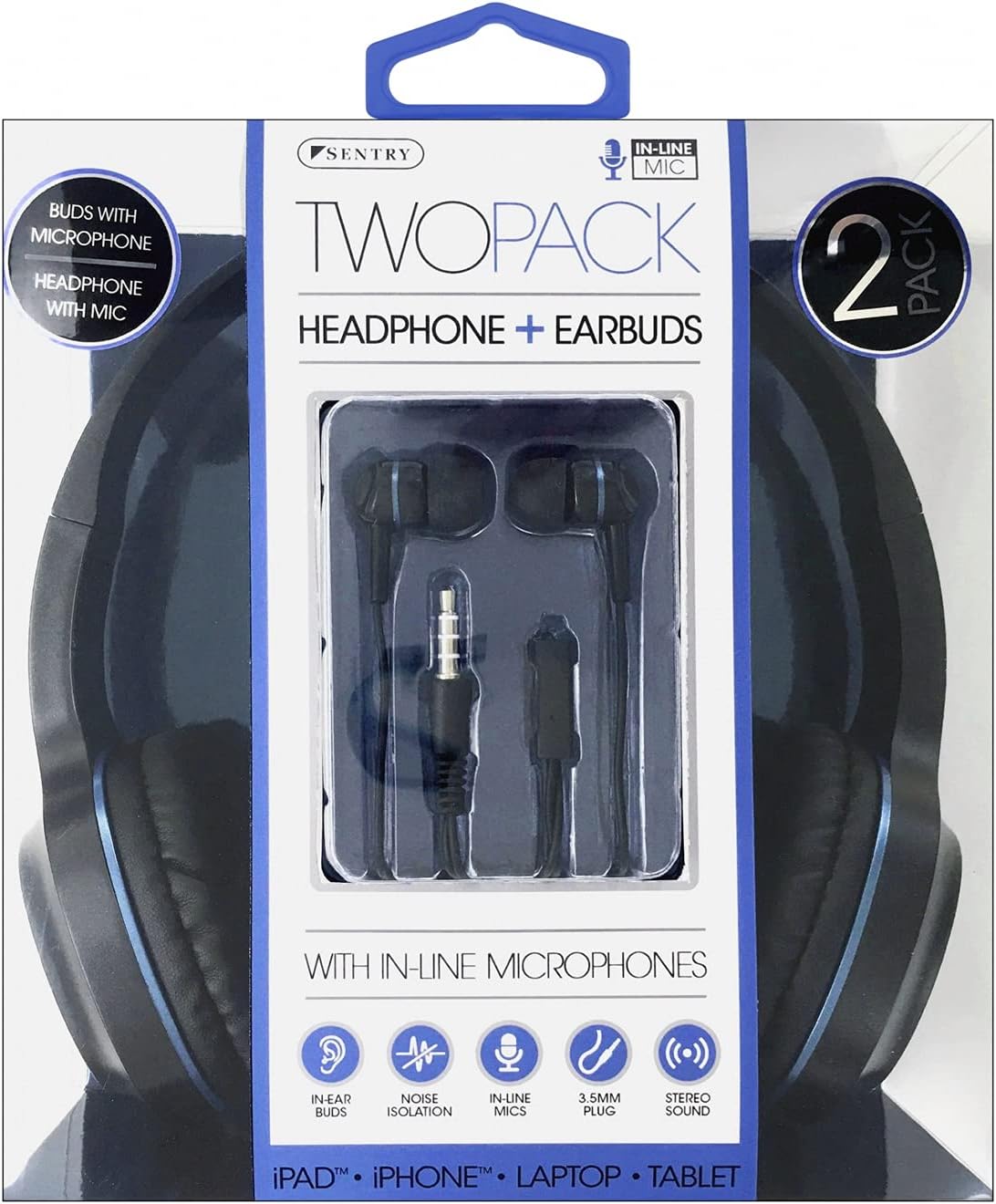
Image 2.1: SENTRY BLWHC102 2-Pack Retail Packaging. The packaging displays both the overhead headphones and the in-ear earbuds, along with key features like in-line microphones and 3.5mm stereo plugs.
- 1 x SENTRY Overhead Headphones (Wired)
- 1 x SENTRY In-Ear Earbuds (Wired)
- 1 x Manual de usuario (este documento)
3. Producto terminadoview
The SENTRY BLWHC102 package provides two distinct audio solutions: comfortable overhead headphones and discreet in-ear earbuds, both designed for clear audio and communication.

Image 3.1: SENTRY BLWHC102 Overhead Headphones and Earbuds. This image displays both audio devices included in the 2-pack, highlighting their 3.5mm audio jack and in-line microphone.
3.1 Overhead Headphones

Image 3.2: SENTRY BLWHC102 Overhead Headphones. This image shows the full overhead headphone unit with its adjustable headband and cushioned earcups.
- Diadema ajustable: Para un ajuste cómodo y seguro.
- Auriculares acolchados: Diseñado para una comodidad auditiva prolongada.
- Conector de audio de 3.5 mm: Conector estándar para dispositivos de audio.
- Micrófono en línea: Para comunicación manos libres.
3.2 In-Ear Earbuds

Image 3.3: SENTRY BLWHC102 In-Ear Earbuds. This image focuses on the in-ear earbuds, showing their design and the in-line microphone with a single button control.
- Diseño ergonómico: For a comfortable fit within the ear canal.
- Conector de audio de 3.5 mm: Conector estándar para dispositivos de audio.
- In-line Microphone with Control Button: For hands-free calls and media playback control.
4. Configuración y conexión
Both the overhead headphones and the earbuds utilize a standard 3.5mm audio jack for connection.
4.1 Conexión a un dispositivo de audio
- Identify the 3.5mm audio port on your device (e.g., smartphone, tablet, laptop, MP3 player). This port is typically marked with a headphone icon.
- Insert the 3.5mm audio jack of either the SENTRY Overhead Headphones or the SENTRY Earbuds firmly into the audio port of your device.
- Ensure the connection is secure. If the audio is not immediately recognized, try rotating the jack slightly or re-inserting it.
- Adjust the volume on your audio device to a comfortable listening level.
5. Instrucciones de funcionamiento
5.1 Using the Overhead Headphones
- Agotador: Place the headphones over your head, ensuring the earcups fully cover your ears. Adjust the headband for a snug yet comfortable fit.
- Reproducción de audio: Once connected, audio from your device will play through the headphones. Control playback (play/pause, skip tracks) and volume directly from your connected device.
- Micrófono: The in-line microphone is automatically active when connected to a compatible device for calls or voice commands.
5.2 Using the In-Ear Earbuds
- Agotador: Gently insert the earbuds into your ear canals. Ensure a comfortable and secure fit for optimal sound quality and noise isolation.
- Reproducción de audio: Audio from your device will play through the earbuds. Control playback and volume directly from your connected device.
- In-line Control Button: The earbuds feature a single multi-function button on the in-line microphone.
- Presione una vez: Reproducir/Pausar música, Responder/Finalizar llamada.
- Presione dos veces: Skip to next track (for music playback).
- Presione tres veces: Go to previous track (for music playback).
- Micrófono: The in-line microphone is active for calls and voice commands when connected to a compatible device.
6. Cuidado y mantenimiento
Proper care will extend the life of your SENTRY audio devices.
- Limpieza: Use a soft, dry cloth to clean the exterior surfaces of both the headphones and earbuds. Do not use liquid cleaners or solvents.
- Consejos para los auriculares: For hygiene, regularly clean the earbud tips with a dry cotton swab.
- Almacenamiento: When not in use, store the headphones and earbuds in a clean, dry place, away from extreme temperatures and direct sunlight. Avoid tangling the cables.
- Evite la humedad: Do not expose the devices to water or excessive moisture. They are not waterproof.
- Cuidado de cables: Avoid sharp bends or excessive pulling on the cables, as this can damage internal wiring.
7. Solución de problemas
Si encuentra problemas, consulte las siguientes soluciones comunes:
| Problema | Posible solución |
|---|---|
| No sound from headphones/earbuds. |
|
| El sonido está distorsionado o es intermitente. |
|
| El micrófono no funciona. |
|
| In-line control button not responding (earbuds). |
|
8. Especificaciones técnicas
Below are the general specifications for the SENTRY BLWHC102 audio devices.
| Característica | Detalle |
|---|---|
| Modelo | BLWHC102 |
| Marca | CENTINELA |
| Conectividad | Wired (3.5mm Stereo Plug) |
| Micrófono | Micrófono en línea |
| Color | Negro/Azul |
| Material | Faux Leather (Headphones) |
| Peso del artículo | 6.4 onzas (paquete total) |
| Dimensiones del paquete | 8 x 6.5 x 2.5 pulgadas |
| Código Postal | 080068431022 |
9. Garantía y soporte
SENTRY products are manufactured with quality and reliability in mind. For specific warranty information, please refer to the documentation included with your purchase or visit the official SENTRY website. If you require technical assistance or have questions not covered in this manual, please contact SENTRY customer support through their official channels.
Conserve este manual para futuras consultas.