
1. Introducción
Thank you for choosing the Aurora AU200MA 200-Sheet Auto-Feed Micro-Cut Paper Shredder. This manual provides essential information for the safe and efficient operation, maintenance, and troubleshooting of your new shredder. Please read these instructions thoroughly before use and retain them for future reference.

Figure 1.1: Aurora AU200MA Paper Shredder
The Aurora AU200MA is designed for commercial and home office use, offering high-security micro-cut shredding for sensitive documents. It features an automatic feed for up to 200 sheets and a manual feed slot for up to 10 sheets, including credit cards and small paper clips.
2. Instrucciones de seguridad importantes
Para reducir el riesgo de incendio, descarga eléctrica o lesiones, siga siempre las precauciones básicas de seguridad al utilizar este aparato:
- Lea todas las instrucciones antes de utilizar la trituradora.
- Mantenga a los niños y las mascotas alejados de la trituradora.
- Mantenga la ropa suelta, las joyas, el cabello y las manos lejos de la ranura de entrada de papel.
- Do not spray any aerosol-based products into or around the shredder.
- Do not shred metal objects, cardboard, or plastic other than credit cards.
- No opere la trituradora si el cable de alimentación está dañado.
- Desenchufe siempre la trituradora antes de moverla, limpiarla o vaciar el contenedor de residuos.
- Asegúrese de que la trituradora esté colocada sobre una superficie estable y nivelada.
3. Producto terminadoview
3.1 Componentes
- Bandeja de alimentación automática: For automatic shredding of up to 200 sheets.
- Ranura de alimentación manual: For manual shredding of up to 10 sheets, credit cards, and small paper clips.
- Panel de control: Features power button and indicator lights.
- Cubo de basura: 8.5-gallon pullout bin for shredded materials.
- Ruedas: Para facilitar la movilidad de la unidad.
3.2 Panel de control e indicadores

Figura 3.1: Panel de controlview
The control panel includes various LED indicators to communicate the shredder's status:
- Apoyar: Indica que la trituradora está encendida y lista para funcionar.
- Sobrecalentar: Se ilumina cuando la trituradora ha excedido su tiempo de funcionamiento continuo y necesita enfriarse.
- Bin-full: Indicates the waste bin is full and needs to be emptied.
- Sobrecarga: Lights up if too much paper is inserted, triggering the anti-jam auto-reverse function.
- Puerta abierta: Indicates the waste bin is not properly closed or inserted.
4. Configuración
- Desembalaje de la trituradora: Retire con cuidado la trituradora de su embalaje.
- Coloque la trituradora: Place the shredder on a flat, stable surface. The integrated casters allow for easy movement.
- Conecte la electricidad: Enchufe el cable de alimentación en un tomacorriente estándar de 120 V CA.
- Ensure Bin is Closed: Make sure the pullout waste bin is fully and correctly inserted into the shredder. The "Door Open" indicator should not be lit.
5. Instrucciones de funcionamiento
5.1 Trituración con alimentación automática

Figure 5.1: Auto-Feed Tray with Documents
La función de alimentación automática permite triturar cómodamente varias hojas sin necesidad de alimentación manual.
- Abra la cubierta de la bandeja de alimentación automática.
- Stack up to 200 sheets of paper neatly into the auto-feed tray. Ensure the paper is free of staples, paper clips (except small ones in manual feed), and other foreign objects.
- Cierre la tapa de la bandeja de alimentación automática. La destructora comenzará a procesar los documentos automáticamente.
- The shredder has a continuous run time of 60 minutes. After this period, it may enter an overheat state to cool down.
5.2 Trituración con alimentación manual

Figure 5.2: Manual Feed Slot and Shredding Capabilities
For smaller quantities of paper or other shreddable items:
- Inserte hasta 10 hojas de papel en la ranura de alimentación manual.
- The manual feed slot can also shred credit cards and small paper clips. Insert these items one at a time into the center of the manual feed slot.
5.3 Anti-Jam Auto-Reverse
The shredder is equipped with an anti-jam auto-reverse function. If too much paper is inserted, the shredder will automatically reverse to clear the jam. If a jam persists, press the reverse button on the control panel to manually clear the paper.
5.4 Auto Power-Sleep
For energy efficiency, the shredder will automatically enter a power-sleep mode after a period of inactivity. It will reactivate when paper is detected or a button is pressed.
6. Mantenimiento
6.1 Vaciado de la papelera

Figure 6.1: Pullout Waste Bin
When the "Bin-full" indicator illuminates, the waste bin needs to be emptied.
- Ensure the shredder is in standby mode or unplugged.
- Gently pull out the 8.5-gallon waste bin from the front of the shredder.
- Deseche el material triturado.
- Slide the waste bin back into the shredder until it clicks securely into place. Ensure the "Door Open" indicator is off.
6.2 Shredder Oiling
Regular oiling of the shredder blades is recommended to maintain optimal performance and extend the life of your micro-cut shredder. Use shredder oil specifically designed for paper shredders.
- Aplique una línea fina de aceite para trituradora a lo largo de la ranura de entrada del papel.
- Run a few sheets of paper through the manual feed slot to distribute the oil.
- Repeat this process after every 30 minutes of accumulated shredding or when you notice a decrease in performance.
6.3 Limpieza
Limpie el exterior de la trituradora con un paño suave y seco. No utilice limpiadores abrasivos ni disolventes.
7. Solución de problemas
| Problema | Posible causa | Solución |
|---|---|---|
| La trituradora no funciona. | Sin energía; El contenedor de basura no está insertado correctamente; Protección contra sobrecalentamiento activada. | Check power connection; Ensure waste bin is fully closed (Door Open indicator off); Allow shredder to cool down if Overheat indicator is on. |
| Atasco de papel. | Demasiado papel insertado; el papel no se insertó de manera recta. | The shredder has an anti-jam auto-reverse function. If it persists, press the reverse button on the control panel to manually clear the paper. Reduce the amount of paper for future shredding. |
| La trituradora se detiene durante el funcionamiento. | Protección contra sobrecalentamiento activada; contenedor de basura lleno. | Allow shredder to cool down if Overheat indicator is on; Empty the waste bin if Bin-full indicator is on. |
| El material triturado no es lo suficientemente fino. | Not applicable (Micro-cut shredder). | The Aurora AU200MA is a micro-cut shredder, producing tiny particles (P-5 security level). |
8. Especificaciones
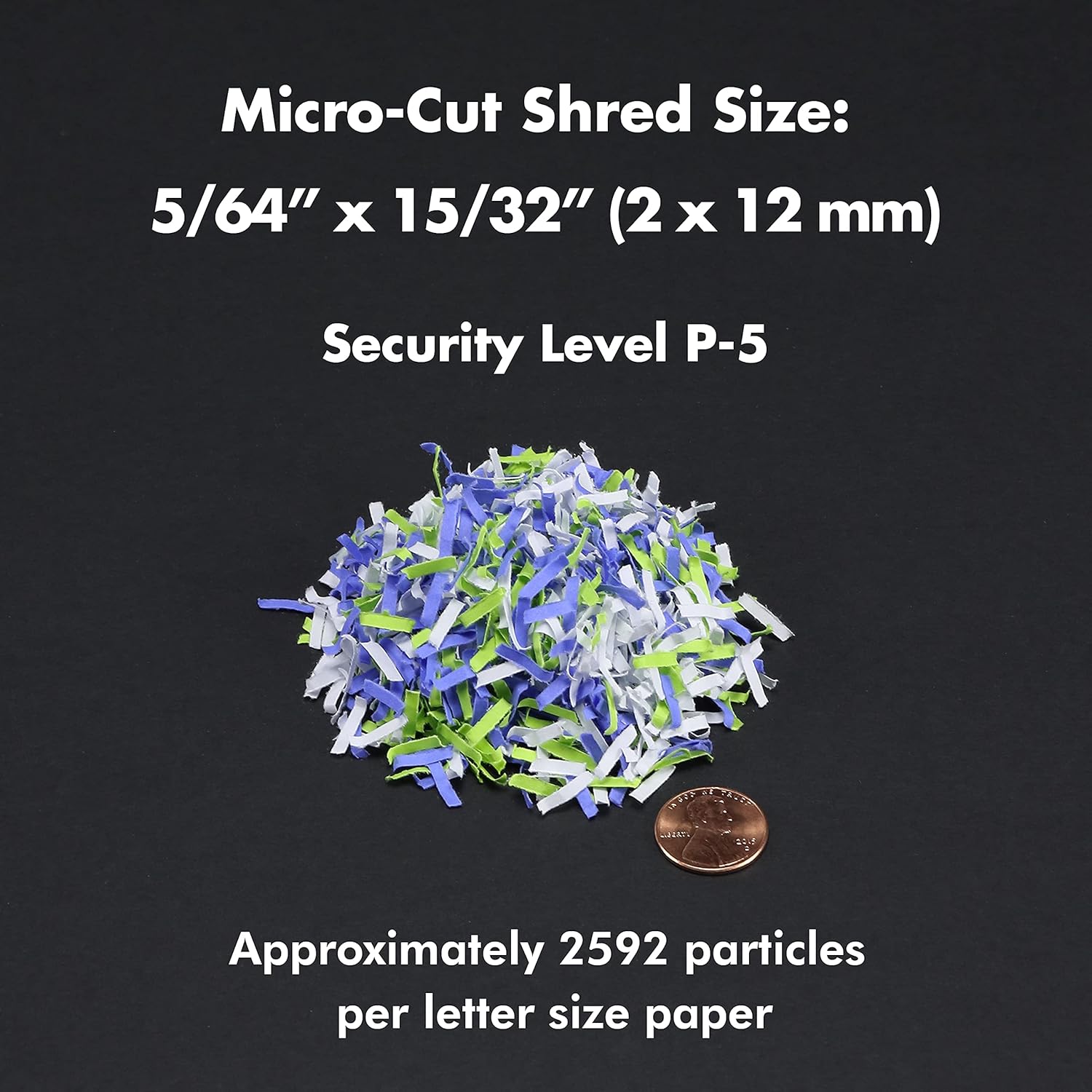
Figure 8.1: Micro-Cut Shred Size and Security Level
- Modelo: AU200MA
- Tipo de trituración: Microcorte
- Tamaño de trituración: 5/64" x 15/32" (2 x 12 mm)
- Nivel de seguridad: P-5
- Capacidad de alimentación automática: Hasta 200 hojas
- Capacidad de alimentación manual: Hasta 10 hojas
- Tiempo de ejecución continua: 60 minutos
- Tiempo de enfriamiento: Approximately 30-40 minutes (after 60 min continuous use)
- Capacidad del contenedor de basura: 8.5 galones
- fragmentos: Paper, Credit Cards, Small Paper Clips
- Volumentage: 120 V CA
- Frecuencia: 60 Hz
- Product Dimensions (H x W x L): 22.83" x 14.02" x 18.35"
- Peso del artículo: 38.1 libras
9. Garantía y soporte
For warranty information or technical support, please refer to the warranty card included with your product or visit the official Aurora website. You may also contact Aurora customer service directly for assistance.
Aurora Customer Service: Please refer to your product packaging or the official Aurora webSitio para obtener la información de contacto más actualizada.