
Casio LWA-M141D-7AJF&DQD-805J-8JF_set1
Casio Wave Ceptor Set User Manual
Models: LWA-M141D-7AJF (Watch) & DQD-805J-8JF (Alarm Clock)
Introducción
This user manual provides detailed instructions for the proper setup, operation, and maintenance of your Casio Wave Ceptor Solar Radio-Controlled Watch (LWA-M141D-7AJF) and Radio-Controlled Alarm Clock (DQD-805J-8JF). Please read this manual thoroughly before using your devices to ensure optimal performance and longevity.

Image: The Casio Wave Ceptor set, featuring the silver-toned solar radio-controlled wristwatch and the compact white radio-controlled alarm clock.
Componentes del producto
Your Casio Wave Ceptor set includes the following items:
- Casio Wave Ceptor Solar Radio-Controlled Watch (LWA-M141D-7AJF)
- Casio Wave Ceptor Radio-Controlled Alarm Clock (DQD-805J-8JF)
- Instruction Manual (includes Warranty Card)
- 2 x AA Manganese Dry Cell Batteries (for Alarm Clock)
Configuración
Watch (LWA-M141D-7AJF) Setup
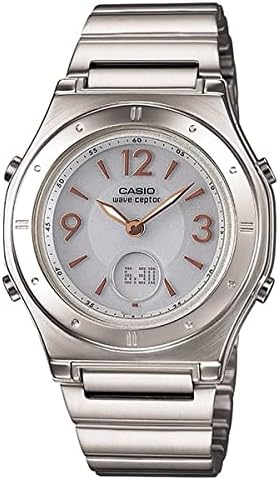
Imagen: Primer plano frontal view of the Casio Wave Ceptor LWA-M141D-7AJF watch, showing the analog dial with digital display and radio-controlled indicators.
- Carga inicial: The watch is solar-powered. Upon first use or after prolonged storage in darkness, expose the watch face to bright light (natural sunlight is ideal) for several hours to ensure a full charge. Avoid extreme heat.
- Time Synchronization (Radio Control): The watch automatically receives time calibration signals. Place the watch near a window overnight for optimal signal reception. If manual reception is desired, refer to the detailed instructions in the included manual.
- Manual Time/Date Adjustment: In areas where radio signals are not available, or if manual adjustment is preferred, follow the specific button operations outlined in the watch's dedicated section of the included instruction manual.
- Ajuste de banda: For proper fit, the metal band may need adjustment. It is recommended to have this done by a qualified jeweler or watch repair service.
Alarm Clock (DQD-805J-8JF) Setup
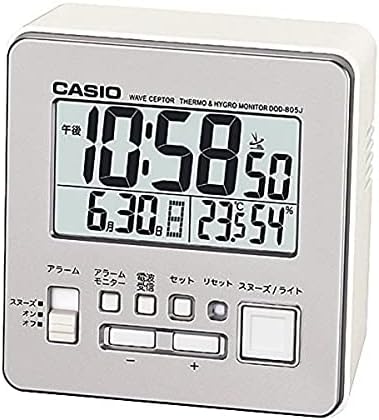
Imagen: Frente view of the Casio Wave Ceptor DQD-805J-8JF alarm clock, displaying the digital time, date, temperature, and humidity, along with control buttons.
- Instalación de la batería: Open the battery compartment on the back of the alarm clock. Insert the two included AA manganese dry cell batteries, ensuring correct polarity (+/-). Close the compartment securely.

Imagen: Trasera view of the alarm clock, showing the battery compartment cover and ventilation slots.
- Time Synchronization (Radio Control): The alarm clock will attempt to receive a time calibration signal automatically after battery installation. Place it in an area with good signal reception, away from electronic devices that may cause interference.
- Configuración de alarma: Use the dedicated alarm buttons (usually labeled 'Alarm Set' or similar) to set your desired alarm time. Ensure the alarm is switched 'ON' using the side switch.
- Manual Time/Date Adjustment: If radio signal reception is poor or unavailable, you can manually set the time and date using the 'Set' and '+' / '-' buttons. Refer to the alarm clock's section in the main manual for specific steps.
- Visualización de temperatura/humedad: The alarm clock features built-in sensors to display current temperature and humidity. No setup is required for these functions; they will display automatically once the clock is powered on.
Instrucciones de funcionamiento
Watch (LWA-M141D-7AJF) Operation
- Checking Time/Date: The analog hands display the current time, while the digital display can show various information such as date, day of the week, or secondary time zone, depending on the mode selected.
- Radio Signal Reception Status: Pressing a specific button (refer to manual) will indicate the last successful signal reception time and strength.
- Resistencia al agua: The watch is designed with a certain level of water resistance. Refer to the markings on the watch back or the included manual for specific depth ratings and usage guidelines (e.g., daily use, showering, swimming). Avoid operating buttons underwater.
Alarm Clock (DQD-805J-8JF) Operation
- Alarma encendida/apagada: Use the slide switch on the side of the clock to activate or deactivate the alarm. When the alarm sounds, it will typically beep for a set duration.
- Función de repetición/luz: Press the large button on top of the clock to activate the snooze function, which temporarily silences the alarm and causes it to sound again after a few minutes. This button also illuminates the display for a few seconds.
- Modos de visualización: The clock typically cycles through or allows selection of different display modes, showing time, date, day of the week, temperature (°C/°F), and humidity (%).
Mantenimiento
- Limpieza: Wipe both the watch and alarm clock with a soft, dry cloth. For stubborn dirt on the watch, a slightly damp Se puede usar un paño y secarlo. Evite usar limpiadores químicos.
- Ver carga solar: To maintain optimal battery life, ensure the watch is regularly exposed to light. If stored in darkness for extended periods, the power reserve may deplete, requiring a full recharge.
- Alarm Clock Battery Replacement: When the display dims or the clock functions become erratic, it is time to replace the AA batteries. Always replace both batteries at the same time with new ones. Dispose of old batteries responsibly.
- Almacenamiento: When not in use, store the devices in a cool, dry place away from direct sunlight, extreme temperatures, and strong magnetic fields.
Solución de problemas
| Problema | Posible causa | Solución |
|---|---|---|
| Watch time is incorrect or not syncing. | Insufficient light exposure (watch); poor radio signal reception; manual time set incorrectly. | Expose watch to bright light for several hours. Place watch near a window overnight. Attempt manual time adjustment as per manual. |
| Alarm clock time is incorrect or not syncing. | Low batteries; poor radio signal reception; manual time set incorrectly. | Replace batteries. Relocate clock to an area with better signal reception. Attempt manual time adjustment. |
| Alarm clock alarm not sounding. | Alarm switch is OFF; alarm time not set; low batteries. | Ensure alarm switch is ON. Set alarm time correctly. Replace batteries. |
| Display is dim or blank (alarm clock). | Baterías bajas o muertas. | Reemplace las baterías. |
Presupuesto
Casio Wave Ceptor Watch (LWA-M141D-7AJF)
- Dimensiones (H × W × D): 38.6 × 34.6 × 11.5 mm
- Peso: 64 gramos
- Fuente de energía: Solar
- Cronometraje: Radio-controlled (automatic reception)
- Resistencia al agua: Refer to watch back or included manual for specific rating.
Casio Wave Ceptor Alarm Clock (DQD-805J-8JF)
- Dimensiones (H × W × D): 82 × 78 × 49 mm
- Peso: 135 gramos
- Fuente de energía: 2 x AA Manganese Dry Cell Batteries
- Cronometraje: Radio-controlled (automatic reception)
- Características adicionales: Temperature display, Humidity display, Snooze/Light function.
Garantía y soporte
Your product comes with a manufacturer's warranty. Please refer to the warranty card included with your instruction manual for details regarding coverage, terms, and conditions. For technical support, service, or further inquiries, please contact the retailer or the official Casio customer service in your region. Keep your proof of purchase for warranty claims.
Ask a question about this manual
Ask about setup, troubleshooting, compatibility, parts, safety, or missing instructions. Manuals+ will review the question and use this page’s manual context to help answer it.