
Introducción
This manual provides detailed instructions for the installation, operation, and maintenance of your Hama 00118498 Monitor Desk Mount. Designed to enhance your ergonomic workspace, this monitor arm allows for flexible positioning of your display, promoting a comfortable and productive environment. Please read these instructions carefully before beginning installation.
Instrucciones de instalación
Follow these steps to correctly install your Hama 00118498 Monitor Desk Mount.
1. Fijación del Desk Clamp
- Coloque el escritorio clamp assembly onto the edge of your desk. Ensure the desk surface is sturdy and can support the weight of the mount and your monitor.
- Apriete el clamp screw firmly until the mount is securely fastened to the desk. Do not overtighten.
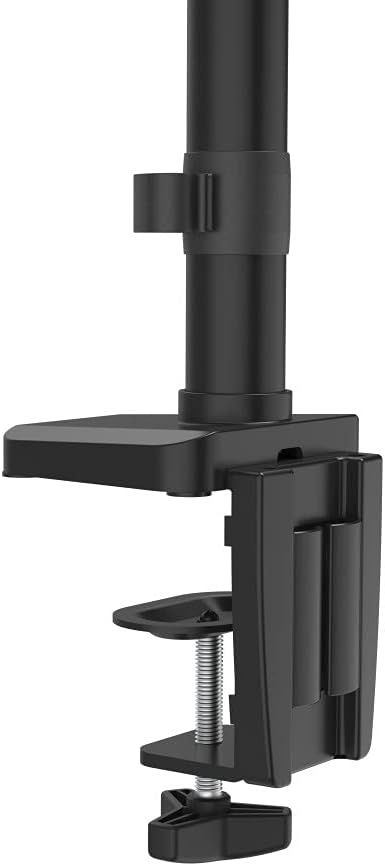
Imagen: El escritorio clamp mechanism, showing how it attaches to the desk edge for secure mounting.
2. Conexión del monitor
- Ensure your monitor is VESA compatible (100x100mm or 75x75mm).
- Carefully attach the VESA plate from the monitor arm to the back of your monitor using the provided screws. Make sure the screws are tightened securely.
- Slide the monitor (with the attached VESA plate) onto the arm's mounting head. Ensure it clicks into place or is secured with any locking mechanism provided.

Image: The monitor arm's VESA plate and adjustable joint, ready for monitor attachment.

Imagen: Un lado view of the assembled monitor arm, highlighting the VESA mount and integrated cable management channels.
3. Gestión de cables
Utilize the integrated cable management system to route your monitor cables neatly along the arm. This helps maintain a tidy workspace and prevents cable clutter.
Instrucciones de funcionamiento
The Hama 00118498 Monitor Desk Mount offers various adjustment options for optimal viewing comodidad.
- Ajuste de altura: The integrated pneumatic spring allows for smooth and effortless vertical height adjustment. Gently push or pull the monitor to your desired height.
- Girar: The arm can swivel horizontally, allowing you to rotate your monitor to share your screen or change your viewángulo de ing.
- Inclinación: Adjust the monitor's tilt angle (up or down) to reduce glare and find the most comfortable viewposición de ing.
- Rotación: Rotate your monitor from landscape to portrait orientation as needed for different tasks.
Adjustments should be smooth. If the monitor does not hold its position, refer to the troubleshooting section for tension adjustments.
Mantenimiento
El mantenimiento regular garantiza la longevidad y el rendimiento óptimo de su brazo de monitor.
- Limpieza: Limpie la superficie del brazo del monitor con un paño suave.amp paño. Evite el uso de limpiadores o disolventes abrasivos.
- Comprobar conexiones: Revise periódicamente todos los tornillos y conexiones para asegurarse de que estén bien apretados y seguros. Vuelva a apretarlos si es necesario.
- Lubricación: The pneumatic spring is maintenance-free. Do not attempt to lubricate internal components.
Solución de problemas
If you encounter issues with your Hama 00118498 Monitor Desk Mount, refer to the following common problems and solutions:
- El monitor se hunde o no mantiene la posición: The tension of the pneumatic spring may need adjustment. Locate the tension adjustment screw (usually found on the arm joint) and turn it clockwise to increase tension for heavier monitors, or counter-clockwise for lighter monitors. Adjust gradually until the monitor holds its position.
- El monitor es difícil de mover: If the arm is too stiff, the tension may be too high. Turn the tension adjustment screw counter-clockwise to decrease tension.
- Arm Feels Loose on Desk: Asegúrese de que el escritorio esté limpioamp is fully tightened. If the desk surface is too thin or fragile, consider adding a protective pad between the clamp and the desk.
- El monitor se tambalea: Check all mounting screws on the VESA plate and the arm joints to ensure they are securely fastened.
Presupuesto
| Característica | Detalle |
|---|---|
| Número de modelo | 00118498 |
| Tipo de montaje | Escritorio Clamp |
| Tipo de movimiento | Rotating, Swivel, Tilt, Height Adjustable (Pneumatic Spring) |
| Marca | Hama |
| Material | Aluminio |
| Color | Negro |
| Dispositivos compatibles | Monitor |
| Tamaño mínimo compatible | 10 pulgadas |
| Tamaño máximo compatible | 32 pulgadas |
| Peso del artículo | 2.2 kilogramos |
| País natal | Porcelana |
Garantía y soporte
Para obtener información sobre la garantía o asistencia técnica, consulte la documentación incluida con su compra o visite el sitio web oficial de Hama. website. You can typically find support contact details, FAQs, and additional resources there.
Hama oficial Websitio: www.hama.com