
1. Introducción
The VEDINDUST HDMI Audio Embedder (Model CHD801) is designed to integrate external audio into an HDMI video signal. This device allows you to replace the original HDMI audio with digital optical (TOSLINK/SPDIF) or analog (3.5mm line) audio sources. It supports high-resolution video up to 4K@60Hz with 18Gbps bandwidth, HDR, CEC, and HDCP2.2/1.4 pass-through. This manual provides detailed instructions for setup, operation, and troubleshooting to ensure optimal performance.
2. Características
- Digital/Analog Audio to HDMI Embedding: Replaces the original HDMI audio with external digital optical (TOSLINK/SPDIF) or analog (3.5mm line) audio.
- Soporte de alta resolución: Supports video resolutions up to 4K@60Hz 4:4:4 with 18Gbps bandwidth. Also compatible with 1080p and 720p.
- Funciones de vídeo avanzadas: Supports HDMI2.0, 10-bit High Dynamic Range (HDR), HDCP 2.2/1.4, and CEC pass-through.
- Audio Format Compatibility: HDMI port passes through all digital/analog audio formats including PCM, LPCM. Optical audio input supports various digital formats. 3.5mm audio input supports 2-channel stereo PCM audio.
- DVI to HDMI Conversion: Supports combining DVI signals with audio signals into HDMI signals using DVI to HDMI cables.
- Conectar y usar: No software installation required for operation.
3. Contenido del paquete
Verifique que todos los artículos enumerados a continuación estén incluidos en su paquete:
- VEDINDUST HDMI Audio Embedder Unit (Model CHD801)
- Cable de alimentación micro USB
- Manual de usuario
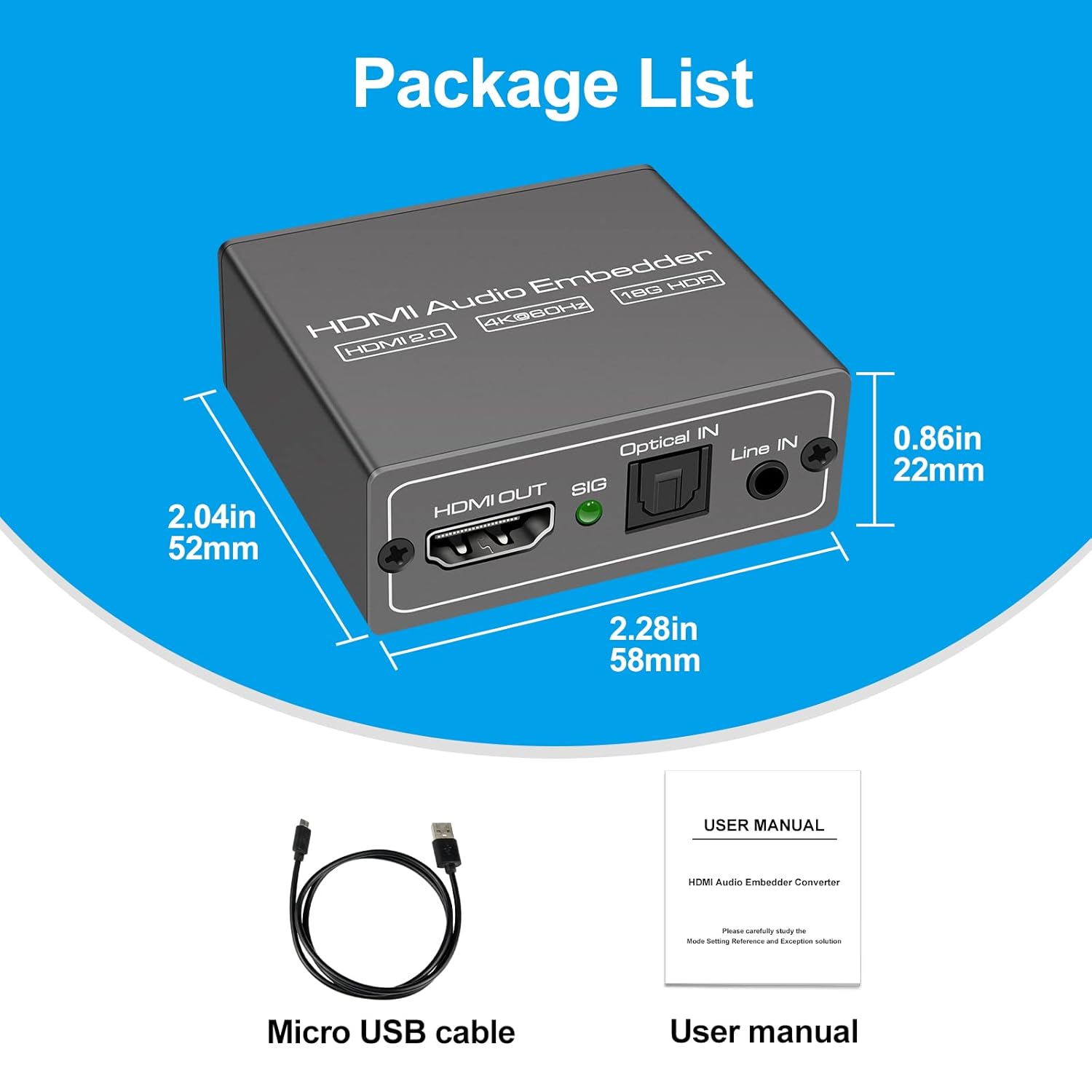
This image displays the items included in the product package: the VEDINDUST HDMI Audio Embedder unit, a Micro USB power cable, and the user manual.
4. Producto terminadoview y puertos
Familiarícese con los puertos y controles del dispositivo:

This close-up shows the mode switch on the device, allowing selection between 'Optical' audio input, 'Line' (3.5mm) audio input, or 'Pass' through mode for original HDMI audio.

This image details the audio output and input ports: HDMI OUT, Optical IN (TOSLINK), and 3.5mm Line IN, along with the signal indicator light.
- ENTRADA HDMI: Connect your HDMI video source (e.g., laptop, TV box, game console).
- SALIDA HDMI: Connect to your display device (e.g., TV, projector).
- Entrada óptica: Connect your digital optical audio source (TOSLINK/SPDIF).
- Line IN: Connect your analog 3.5mm audio source.
- USB 5V (PW): Connect the Micro USB power cable to a 5V power adapter (not included) or a USB port on your display device.
- Cambio de modo: Selects the desired audio input mode (Pass, Optical, or Line).
- Indicador SIG: Lights up when a signal is detected.
5. Configuración
Follow these steps to set up your HDMI Audio Embedder:
- Connect your HDMI video source (e.g., laptop, TV box, PS4, Blu-Ray DVD player) to the HDMI EN port on the embedder using an HDMI cable.
- Connect your display device (e.g., HD TV, projector) to the SALIDA HDMI port on the embedder using an HDMI cable.
- Connect your external audio source to either the Entrada óptica puerto (para audio digital) o el Line IN (3.5mm) port (for analog audio), depending on your desired audio input.
- Connect the provided Micro USB power cable to the USB 5V (PW) port on the embedder and then to a 5V power source.
- Select the appropriate audio input mode using the Cambio de modo on the device (refer to Section 6: Operating Modes).
- Ensure all connections are secure and power on all connected devices.

This diagram shows how to connect various devices to the HDMI Audio Embedder. HDMI sources (laptop, TV box, PS4, Blu-Ray DVD) connect to the HDMI IN. External audio sources (3.5mm or optical) connect to their respective inputs. The HDMI OUT connects to a display device like a projector or HD TV.
6. Modos de funcionamiento
The HDMI Audio Embedder features a mode switch to select how audio is handled:
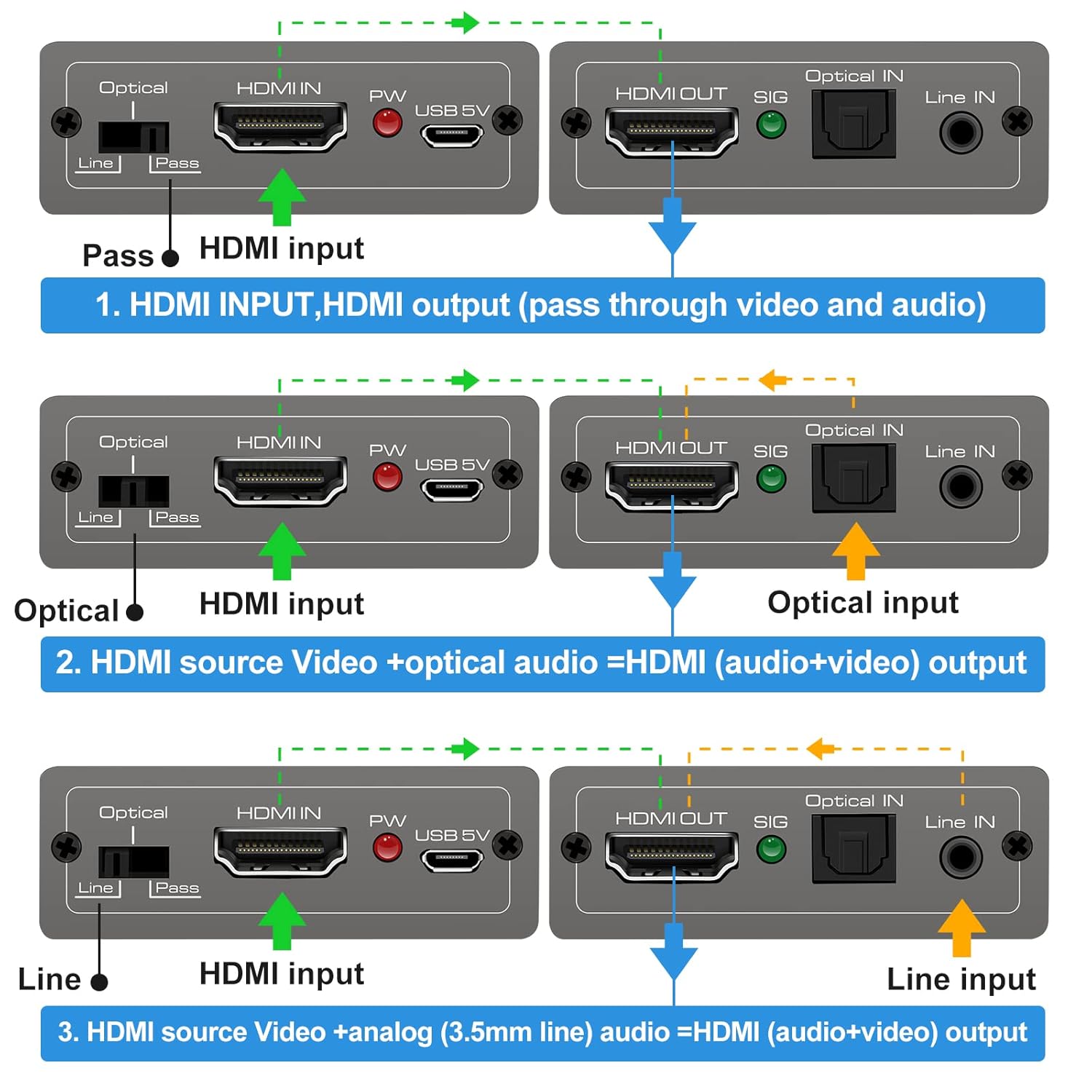
This diagram illustrates the three operational modes: 1. Pass Mode: HDMI input video and audio pass directly to HDMI output. 2. Optical Mode: HDMI input video combines with optical audio input for HDMI output. 3. Line Mode: HDMI input video combines with 3.5mm line audio input for HDMI output.
- Modo de pase: In this mode, the original HDMI audio from your source device is passed through directly to the HDMI output, along with the video signal. No external audio is embedded.
- Modo óptico: When selected, the HDMI video signal from your source is combined with the audio signal received from the Entrada óptica port. The embedded audio is then sent to the HDMI output.
- Modo de línea: When selected, the HDMI video signal from your source is combined with the audio signal received from the Line IN (3.5mm) port. The embedded audio is then sent to the HDMI output.
To change modes, simply slide the switch to the desired position. The device will automatically adjust the audio routing.
7. Especificaciones
Technical specifications for the VEDINDUST HDMI Audio Embedder:
- Modelo: CHD801
- Versión HDMI: HDMI 2.0
- Versión HDCP: HDCP 2.2/1.4
- Resolución de vídeo: Up to 4K@60Hz (YUV 4:4:4)
- Ancho de banda: 18 Gbps
- Soporte HDR: 10-bit HDR
- Apoyo de la CCA: Paso a través
- Audio Input (Digital): Optical (TOSLINK/SPDIF)
- Audio Input (Analog): 3.5mm Line In (2-channel stereo PCM)
- Salida de audio: HDMI (embedded audio)
- Fuente de alimentación: DC 5 V (a través de Micro USB)
- Dimensiones: 10.16 x 5.18 x 2.18 cm (4.0 x 2.04 x 0.86 pulgadas)
- Peso: 110 gramos (3.88 onzas)
- Fabricante: VEDINDUSTRIA
- Código postal: 798610311141

This image highlights the device's capability to support high-resolution video, up to 4K at 60Hz, ensuring clear and detailed visuals.
8. Solución de problemas
If you encounter issues with your HDMI Audio Embedder, please refer to the following common troubleshooting steps:
- Sin salida de vídeo:
- Asegúrese de que todos los cables HDMI estén conectados de forma segura.
- Verify the power adapter is connected and the device is receiving power.
- Intente conectar la fuente HDMI directamente a la pantalla para confirmar que la fuente y la pantalla funcionan correctamente.
- Check if the display's input source is correctly selected.
- No Audio Output / Incorrect Audio:
- Ensure the correct audio input mode (Pass, Optical, or Line) is selected on the embedder's switch.
- Verify that the external audio source is properly connected and producing sound.
- Check the volume levels on both your audio source and display device.
- If using Optical or 3.5mm input, ensure the cables are fully inserted and not damaged.
- Some audio formats may not be supported by all devices. Try adjusting the audio output format on your source device.
- Señal intermitente:
- Utilice cables HDMI de alta calidad, especialmente para resoluciones 4K.
- Ensure the power supply is stable and sufficient (5V).
- Avoid excessive cable lengths.
Si el problema persiste después de intentar estos pasos, comuníquese con el servicio de atención al cliente.
9. Mantenimiento
To ensure the longevity and optimal performance of your HDMI Audio Embedder, follow these maintenance guidelines:
- Limpieza: Utilice un paño suave y seco para limpiar el dispositivo. No utilice limpiadores líquidos ni aerosoles.
- Ambiente: Mantenga el dispositivo en un lugar fresco y seco, alejado de la luz solar directa, fuentes de calor y humedad.
- Manejo: Evite dejar caer o someter el dispositivo a impactos fuertes.
- Ventilación: Ensure proper airflow around the device to prevent overheating.
- Fuerza: Disconnect the power supply when the device is not in use for extended periods.
10. Garantía y soporte
VEDINDUST products are designed for reliability and performance. For information regarding warranty coverage, technical support, or service, please refer to the warranty card included with your product or visit the official VEDINDUST website. Please have your model number (CHD801) and purchase information ready when contacting support.