
ELEFOCUS RC-815S, TX-8030, RC-816S, RC-903S, RC-904S, TX-8160, TX-8050, TX-8140
ELEFOCUS Replacement Remote Control User Manual
For Onkyo RC-815S, TX-8030, RC-816S, RC-903S, RC-904S, TX-8160, TX-8050, TX-8140 Network Audio/Video AV Stereo Receivers
Introducción
This manual provides essential information for the proper use and maintenance of your ELEFOCUS replacement remote control. This remote is designed as a direct replacement for various Onkyo Network Audio/Video AV Stereo Receivers, including models RC-815S, TX-8030, RC-816S, RC-903S, RC-904S, TX-8160, TX-8050, and TX-8140.
Please note that this is a replacement item and while it functions out of the box with compatible models, some advanced or specific functions of your original remote may not be fully supported. No complex programming is required; simply insert batteries to begin use.
Configuración
1. Instalación de la batería
El control remoto requiere dos (2) pilas AAA (no incluidas). Siga estos pasos para instalarlas:
- Ubique el compartimiento de la batería en la parte posterior del control remoto.
- Presione la pestaña y deslice la tapa de la batería hacia abajo para abrirla.
- Inserte dos pilas AAA, asegurándose de que los terminales positivo (+) y negativo (-) estén alineados correctamente con las marcas dentro del compartimiento.
- Deslice la tapa de la batería nuevamente en su lugar hasta que haga clic de forma segura.
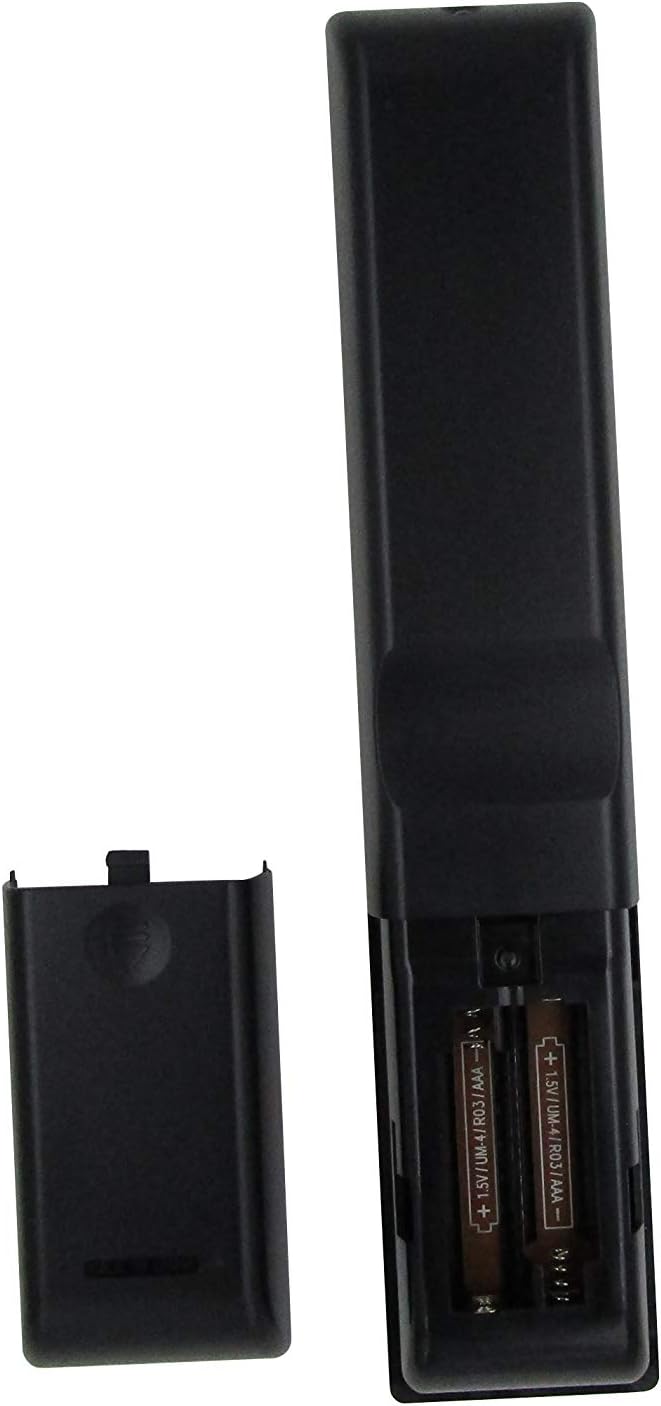
Figura 1: Compartimento para pilas AAA. Asegúrese de que la polaridad sea correcta al insertar las pilas.
Once batteries are installed, the remote is ready for use. No additional programming or setup is typically required for compatible Onkyo receiver models.
Instrucciones de funcionamiento
This replacement remote control provides essential functions for your Onkyo receiver. Point the remote directly at the receiver's infrared (IR) sensor for optimal performance.

Figura 2: Encimaview del diseño del control remoto.
Funciones clave:
- Botón de encendido (⏻): Enciende o apaga el receptor.
- Input Selector Buttons (BD/DVD, CBL/SAT, PC, Game, TV/Tape, CD, Phono, Tuner, NET, Bluetooth): Selecciona la fuente de entrada de audio/video deseada.
- Subir/bajar volumen (▲ / ▼): Ajusta el nivel del volumen principal.
- Silenciar: Silencia o reactiva la salida de audio.
- Panel de navegación (Arriba, Abajo, Izquierda, Derecha, Enter): Se utiliza para navegar por los menús y confirmar selecciones en la pantalla de su receptor.
- Menú: Accede al menú principal del receptor.
- Configuración: Enters the setup menu for configuration.
- Devolver: Vuelve al menú o pantalla anterior.
- Audio: Recorre los modos o configuraciones de audio.
- Playback Controls (Rewind, Play/Pause, Fast Forward, Stop, Previous Track, Play, Next Track): Controla la reproducción multimedia para dispositivos conectados.
- Repetir: Activa o desactiva el modo de reproducción repetida.
- Aleatorio: Toggles random/shuffle playback mode.
- Orador A/B: Selects speaker output groups.
- Teclado numérico (0-9): Para la entrada directa de números, como frecuencias de radio o números de pista.
- Gorras: Functionality may vary by receiver model.
- > 10: For entering numbers greater than 9 on some systems.
- D.TUN: Direct tuning for radio.
- Mostrar: Changes display information on the receiver.
- Regulador de intensidad: Ajusta el brillo de la pantalla del receptor.
- Dormir: Establece un temporizador de apagado automático para el receptor.
- CLR: Borra la entrada o selección actual.
Nota importante:
As a replacement remote, some advanced or specific functions present on your original Onkyo remote may not be replicated or fully functional. This remote is designed to cover the primary and most commonly used features.
Mantenimiento
1. Reemplazo de la batería
Reemplace las pilas cuando el control remoto responda con lentitud o deje de funcionar. Siempre reemplace ambas pilas a la vez por pilas AAA nuevas. No mezcle pilas viejas y nuevas, ni pilas de diferentes tipos.
2. Limpieza
Para limpiar el control remoto, utilice un paño suave y seco. Para la suciedad difícil, frote ligeramente.ampLimpie el paño con agua o un limpiador suave no abrasivo. No utilice productos químicos agresivos, disolventes ni estropajos abrasivos, ya que pueden dañar la superficie o los componentes internos del control remoto.
3. Almacenamiento
Si no lo usa durante un período prolongado, se recomienda retirar las pilas para evitar fugas, ya que podrían dañar el control remoto. Guarde el control remoto en un lugar fresco y seco, alejado de la luz solar directa y de temperaturas extremas.
Solución de problemas
| Problema | Posible causa | Solución |
|---|---|---|
| El control remoto no funciona en absoluto. |
|
|
| Algunas funciones no funcionan. |
|
|
| El control remoto funciona de forma intermitente. |
|
|
If your specific Onkyo receiver model is not listed in the product title (RC-815S, TX-8030, RC-816S, RC-903S, RC-904S, TX-8160, TX-8050, TX-8140), this remote may not be compatible. Please verify compatibility before purchase.
Presupuesto
- Marca: ELEFOCUS
- Dispositivos compatibles: Onkyo Network Audio/Video AV Stereo Receivers (Models: RC-815S, TX-8030, RC-816S, RC-903S, RC-904S, TX-8160, TX-8050, TX-8140)
- Tecnología de conectividad: Infrarrojos (IR)
- Fuente de energía: Pilas 2 x AAA (no incluidas)
- Característica especial: Diseño ergonómico
- Número máximo de dispositivos compatibles: 1 (specific Onkyo receiver)
Información de garantía
Specific warranty details for this ELEFOCUS replacement remote control are not provided in the product information. Please refer to the seller's return policy or contact the seller directly for information regarding warranty coverage and terms.
Atención al cliente
For further assistance or inquiries regarding your ELEFOCUS replacement remote control, please contact the seller directly through the platform where the purchase was made. As this is a third-party replacement product, direct manufacturer support may not be available.
For general information about your Onkyo receiver, please refer to the original user manual provided with your receiver or visit the official Onkyo support websitio.
Producto adicional Views

Figura 3: Angular view del mando a distancia.

Figura 4: Close-up of the upper section of the remote, showing input and media controls.
Vídeos oficiales de productos
No official product videos from the seller were provided for this item.