
1. Introducción
The RCYAGO BLE-9909 is a multi-parameter smart tester designed for precise measurement of pH, Total Dissolved Solids (TDS), Electrical Conductivity (EC), Salinity, and Temperature. This device integrates Bluetooth connectivity, allowing seamless data synchronization with the YINMIK mobile application for enhanced data management and analysis. It is suitable for various applications including domestic drinking water, hydroponics, laboratory testing, and aquariums.

Figure 1: RCYAGO BLE-9909 Smart Tester in operation.
2. Características del producto
- Medición de múltiples parámetros: Measures pH, TDS (ppm), EC (conductivity), Salinity (ppt), and Temperature.
- Conectividad Bluetooth: Compatible with the YINMIK mobile application for real-time data transmission and control.
- Gestión de datos basada en la nube: Enables easy saving, management, and sharing of test data, preventing data loss.
- Calibración automática: Features a 5-point calibration method for pH (Asian standard: pH 4.00, pH 6.86, pH 9.18; EU standard: pH 7.00, pH 10.01) ensuring high accuracy.
- High Sensitivity Glass Probe: Provides a full measurement range of 0-14 pH with 0.01 pH resolution.
- Pantalla completa: Large LCD screen displays multiple parameters simultaneously. App control allows for backlight adjustment.
- Customizable Limits: The mobile application allows setting upper and lower limits for pH and EC. Abnormal values are highlighted in red.
3. Componentes del producto
Familiarize yourself with the components of your BLE-9909 tester:

Figura 2: Explosión view of the BLE-9909 tester and its components.
- 3*1.5V Button Battery: Fuente de alimentación para el dispositivo.
- Pantalla retroiluminada: LCD screen for reading measurements.
- Data Hold/Temperature Unit Conversion Key: Button to hold readings or switch temperature units.
- Function Conversion/Calibration Key: Button to switch measurement modes or initiate calibration.
- Tecla de encendido/apagado: Botón de encendido.
- Línea de inmersión: Indicates the minimum immersion depth for accurate readings.
- Tapa protectora: Covers and protects the electrodes when not in use.
- Sonda de alta precisión: Contains the sensors for measurement.

Figura 3: detallada view of the BLE-9909 electrodes.
- TDS/EC/Salinity Sensor: Measures Total Dissolved Solids, Electrical Conductivity, and Salinity.
- External Reference: Reference electrode for stable measurements.
- Sensor de temperatura: Measures the temperature of the solution.
- Glass PH Sensor: High-sensitivity sensor for pH measurements.
4. Configuración
4.1 Instalación de la batería
- Unscrew the battery compartment cap at the top of the device (refer to Figure 2).
- Insert three 1.5V button batteries, ensuring correct polarity.
- Enrosque de nuevo firmemente la tapa del compartimento de la batería.
4.2 Mobile App Connection (YINMIK App)
The BLE-9909 connects to your smartphone via Bluetooth for advanced features and data management.
- Download the "YINMIK" mobile application from your device's app store (iOS App Store or Google Play Store).
- Asegúrese de que Bluetooth esté habilitado en su teléfono inteligente.
- Turn on the BLE-9909 tester by pressing the "ON/OFF" key.
- Open the YINMIK app. The app will automatically search for and connect to the BLE-9909 device.
- Once connected, the app will display real-time measurement data.

Figure 4: Bluetooth data synchronization with the YINMIK mobile app.
5. Instrucciones de funcionamiento
5.1 Toma de medidas
- Retire la tapa protectora del electrodo.
- Enjuague el electrodo con agua destilada y séquelo suavemente con un pañuelo limpio.
- Immerse the electrode into the solution to be tested, ensuring the immersion line is covered.
- Gently stir the solution and wait for the reading to stabilize on the LCD screen.
- Read the displayed values. The device will show pH, TDS/EC/Salinity, and Temperature.
- Después de la medición, enjuague bien el electrodo con agua destilada y vuelva a colocar la tapa protectora.
5.2 Cambio de modos de medición
Press the "MODE/CAL" key to cycle through different measurement parameters (pH, TDS, EC, Salinity). The active parameter will be indicated on the display.
5.3 Data Hold and Temperature Unit Conversion
Press the "HOLD/TEMP" key to hold the current reading on the display. Press it again to release. Long-press the "HOLD/TEMP" key to switch between Celsius (°C) and Fahrenheit (°F) temperature units.
6. Calibración
Regular calibration ensures the accuracy of your pH measurements. The BLE-9909 supports a 5-point pH calibration.
6.1 Required Calibration Solutions
- Asian Standard: pH 4.00, pH 6.86, pH 9.18
- Estándar de la UE: pH 7.00, pH 10.01
6.2 Procedimiento de calibración
- Prepare the calibration buffer solutions (e.g., pH 6.86, pH 4.00, pH 9.18 for Asian standard).
- Turn on the tester and ensure it is in pH measurement mode.
- Enjuague el electrodo con agua destilada y séquelo.
- Immerse the electrode into the first calibration solution (e.g., pH 6.86).
- Press and hold the "MODE/CAL" key until "CAL" appears on the display. The device will automatically recognize the buffer solution.
- Wait for the reading to stabilize and for the device to confirm calibration for that point.
- Remove the electrode, rinse with distilled water, and blot dry.
- Repeat steps 4-6 for the remaining calibration solutions in sequence.
- Once all points are calibrated, the device will automatically exit calibration mode.
Nota: For best accuracy, calibrate regularly, especially after prolonged storage or if readings appear inconsistent.
7. Data Management and App Features
The YINMIK mobile application provides comprehensive data management and additional control features.
- Visualización de datos en tiempo real: View all measured parameters simultaneously on your phone screen.
- Registro de datos: Automatically save measurement data to the cloud, accessible anytime.
- Datos históricos Review: Browse past measurements, including time and date stamps.
- Alarmas personalizables: Set upper and lower limits for pH and EC. The app will display values in red if they exceed these limits (see Figure 5).
- Control de luz de fondo: Adjust the backlight of the device's LCD screen directly from the app.
- Intercambio de datos: Easily share your test results.
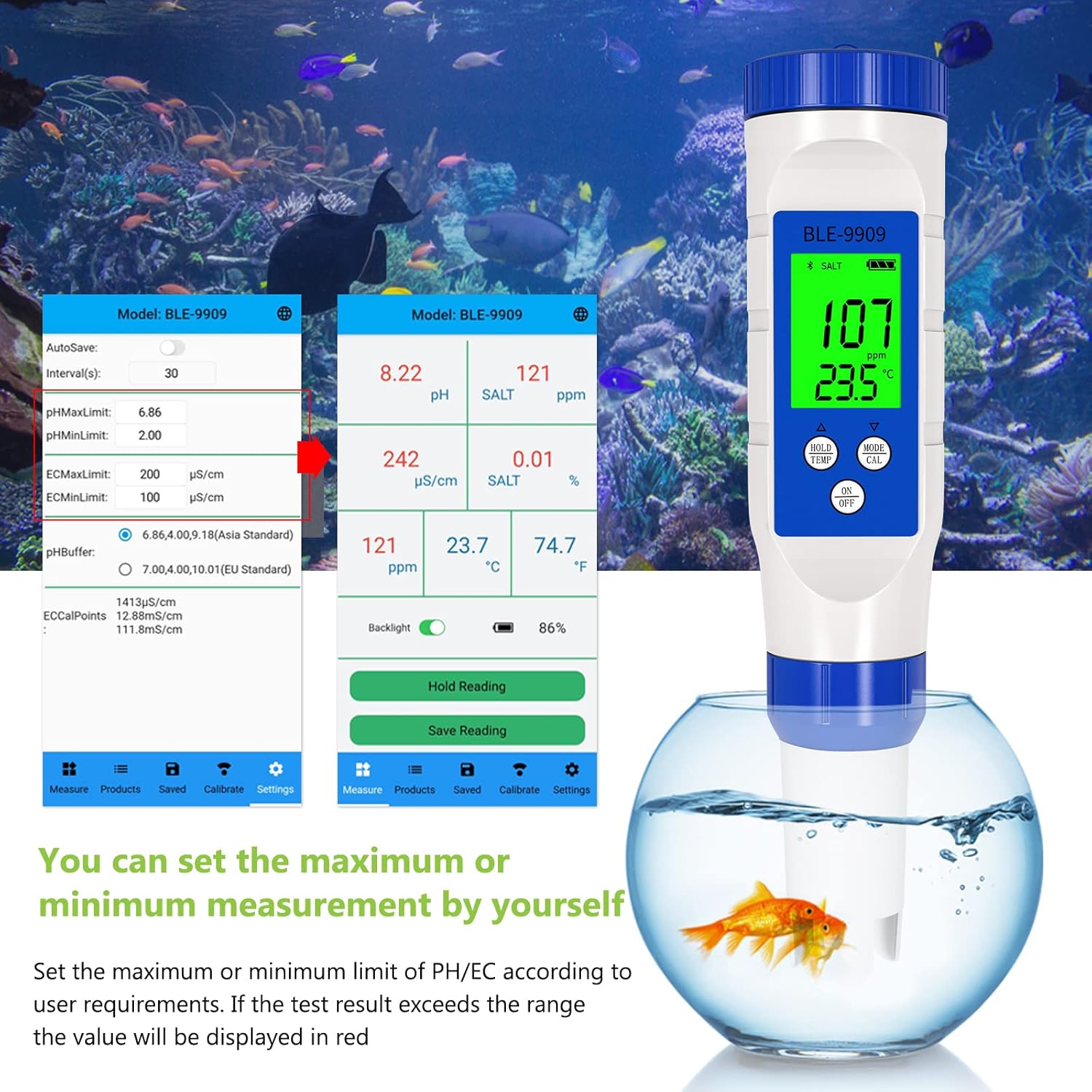
Figure 5: Setting custom measurement limits within the YINMIK app.
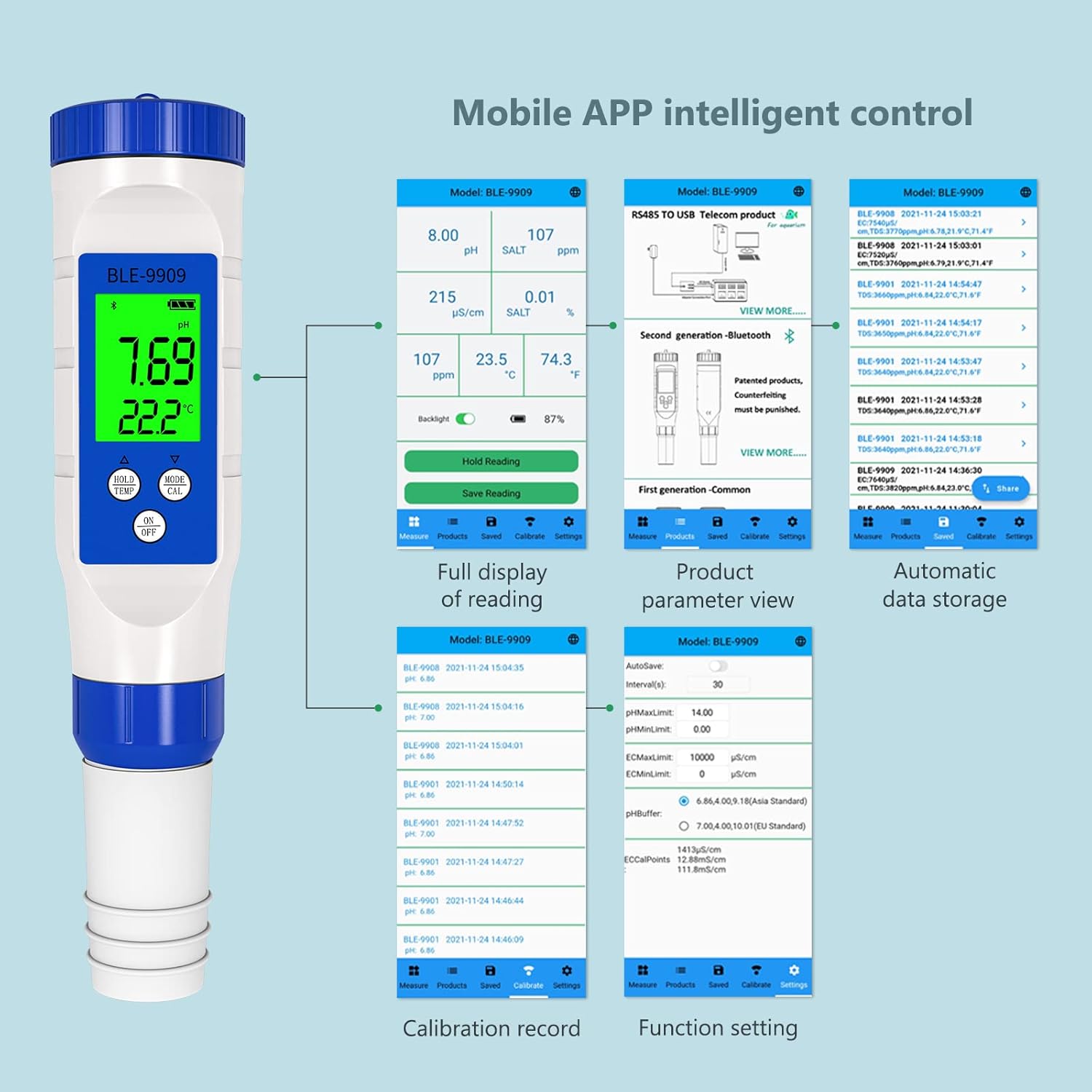
Figura 6: Sobreview of YINMIK app features including data display, settings, and historical records.
8. Mantenimiento
8.1 Limpieza de electrodos
After each use, rinse the electrode thoroughly with distilled or deionized water to prevent contamination and buildup. Do not wipe the glass bulb, as this can cause static electricity and damage the sensor. Gently blot dry with a lint-free tissue.
8.2 Almacenamiento
Always replace the protective cap after use. Ensure the sponge inside the cap remains moist with a few drops of pH storage solution or 3M KCl solution to keep the electrode hydrated. Never store the electrode dry or in distilled water, as this can shorten its lifespan.
8.3 Reemplazo de batería
When the display becomes dim or the device fails to power on, replace the batteries as described in Section 4.1.
9. Solución de problemas
| Problema | Posible causa | Solución |
|---|---|---|
| Lecturas inexactas | Electrode not calibrated; dirty electrode; expired calibration solution; damaged electrode. | Calibrate the device (Section 6); clean the electrode (Section 8.1); use fresh calibration solutions; replace electrode if damaged. |
| El dispositivo no enciende | Baterías bajas o agotadas; instalación incorrecta de la batería. | Replace batteries (Section 8.3); ensure correct battery polarity (Section 4.1). |
| Problemas de conexión Bluetooth | Bluetooth off on phone; app not open; device too far from phone; interference. | Ensure Bluetooth is on; open YINMIK app; bring device closer to phone; restart both device and app. |
| Las lecturas fluctúan excesivamente | Electrode not fully immersed; air bubbles on electrode; solution not stable; damaged electrode. | Ensure immersion line is covered; gently tap electrode to remove bubbles; wait for solution to stabilize; replace electrode if necessary. |
10. Especificaciones
| Parámetro | Valor |
|---|---|
| Número de modelo | BLE-9909 |
| Marca | RCYAGO |
| Dimensiones | 23.8 x 8 x 5.21 cm |
| Peso | 168 gramos |
| Rango de medición de pH | 0.00 - 14.00 pH |
| Resolución de pH | 0.01 pH |
| Rango de medición de temperatura | Typically 0-60°C |
| Fuente de poder | 3 x 1.5V Button Batteries |
| Conectividad | Bluetooth (Aplicación móvil YINMIK) |
11. Garantía y soporte
For warranty information, technical support, or service inquiries, please contact RCYAGO customer service through the official website or your point of purchase. Please have your model number (BLE-9909) and purchase date available when contacting support.
Fabricante: RCYAGO
First Available Date on Amazon.es: 24 de diciembre de 2021