
Dalton 2000VA/5-100A UPS
Manual del usuario de la fuente de alimentación ininterrumpida Dalton 2000VA
Model: 2000VA/5-100A UPS
1. Introducción
Thank you for choosing the Dalton 2000VA Uninterruptible Power Supply (UPS). This device is designed to provide reliable power backup and protection for your electronic equipment against power outages, surges, and fluctuations. Please read this manual thoroughly before installation and operation to ensure optimal performance and safety.
2. Instrucciones de seguridad importantes
Siga siempre estas precauciones básicas de seguridad para reducir el riesgo de incendio, descarga eléctrica y lesiones:
- No abra el SAI casing. No hay piezas que el usuario pueda reparar en el interior. Solicite el mantenimiento a personal cualificado.
- Do not use the UPS in environments with excessive dust, humidity, or extreme temperatures.
- Asegúrese de que el UPS esté conectado a una toma de corriente con conexión a tierra.
- Do not connect non-computer related items like medical equipment, life support equipment, or household appliances to the UPS.
- Coloque el UPS en un área bien ventilada, lejos de la luz solar directa o fuentes de calor.
- En caso de emergencia, presione el botón de encendido para apagar el UPS y desconectarlo de la fuente de alimentación de CA.
3. Contenido del paquete
Verifique que todos los artículos estén presentes en su paquete:
- Dalton 2000VA UPS Unit
- Cable de alimentación
- USB Communication Cable (if applicable)
- Manual de usuario (este documento)

Figura 3.1: Frente view of the Dalton 2000VA UPS unit, showing the display screen and power button.
4. Configuración e instalación
Follow these steps to set up your UPS:
- Desembalaje: Retire con cuidado el SAI de su embalaje. Inspeccione si presenta daños durante el envío.
- Colocación: Place the UPS on a flat, stable surface in a cool, dry, and well-ventilated area. Ensure there is adequate space around the unit for airflow.
- Carga inicial: Before connecting any devices, plug the UPS power cord into a grounded wall outlet. Allow the unit to charge for at least 8 hours to ensure the battery is fully charged. The display will indicate charging status.
- Conexión de dispositivos:
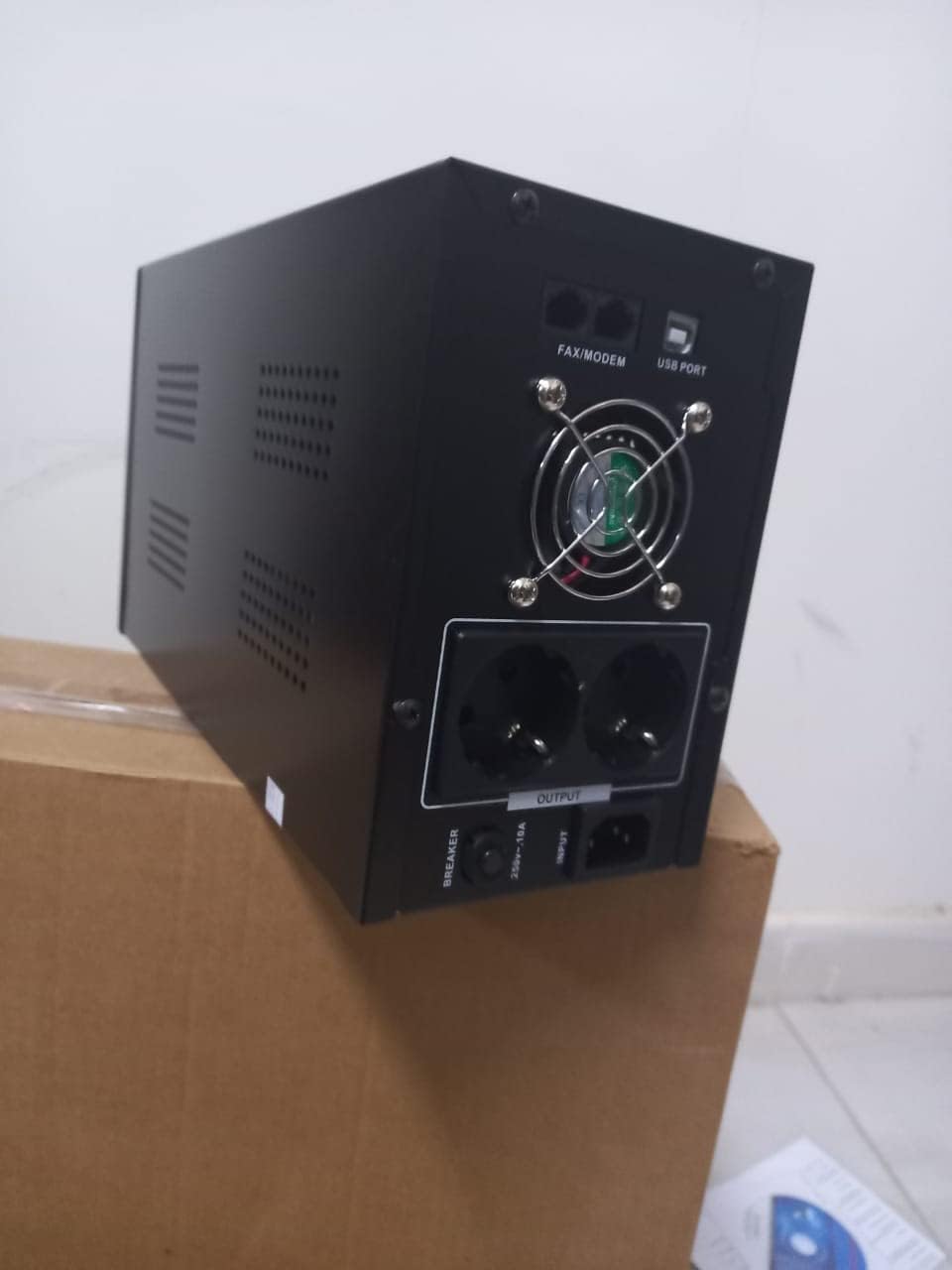
Figura 4.1: Posterior view of the Dalton 2000VA UPS, highlighting the input power port, output sockets, and USB/Modem ports.
- Once the battery is charged, connect your computer, monitor, and other critical electronic devices to the UPS output sockets.
- Do not overload the UPS. Refer to the specifications section for maximum load capacity.
- If applicable, connect the USB communication cable from the UPS to your computer for monitoring software (software not included, check manufacturer's websitio).
5. Funcionamiento del SAI
5.1 Encendido / Apagado
- Para encender: After connecting to AC power and charging, press and hold the power button on the front panel for approximately 3 seconds until you hear a beep and the display illuminates.
- Para apagar: Press and hold the power button for approximately 3 seconds until you hear a beep and the display turns off. If the UPS is running on battery, it will shut down immediately. If connected to AC, it will switch to bypass mode before shutting down.
5.2 Comprender la pantalla
The front panel LCD display provides real-time status information:
- EN: Muestra el volumen de entradatage de la red eléctrica.
- AFUERA: Muestra el volumen de salidatage provided by the UPS to connected devices.
- NORMAL: Indica que el UPS está funcionando con energía de la red eléctrica.
- Murciélago: Muestra el nivel de carga actual de la batería.
- Carga: Indica el porcentajetage de la capacidad del UPS utilizada por los dispositivos conectados.
- Battery Mode Icon: Appears when the UPS is running on battery power during an outage.

Figura 5.1: Lado view of the UPS, showing the illuminated display with power status indicators.
5.3 Función de respaldo de batería
En caso de un corte de energíatage, the UPS will automatically switch to battery power, providing continuous power to your connected devices. The duration of backup power depends on the load connected and the battery's charge level. The UPS will emit an audible alarm during battery operation.
When utility power returns, the UPS will automatically switch back to AC power and begin recharging its battery.
6. Mantenimiento
- Cuidado de la batería: To maximize battery life, ensure the UPS is always connected to an AC outlet to keep the battery charged. If the UPS is stored for an extended period, recharge it every three months for at least 8 hours.
- Limpieza: Disconnect the UPS from all power sources before cleaning. Use a soft, dry cloth to wipe the exterior. Do not use liquid or aerosol cleaners.
- Ventilación: Regularly check that the ventilation openings are not blocked by dust or debris to prevent overheating.
7. Solución de problemas
Consulte la siguiente tabla para conocer los problemas más comunes y sus soluciones:
| Problema | Posible causa | Solución |
|---|---|---|
| El UPS no se enciende. | Battery not charged or power cord disconnected. | Ensure power cord is securely plugged in and allow battery to charge for 8 hours. |
| El UPS emite un pitido continuo en modo normal. | Condición de sobrecarga. | Disconnect non-essential equipment until the alarm stops. Check total load. |
| Tiempo de respaldo corto. | La batería no está completamente cargada o está llegando al final de su vida útil. | Allow UPS to charge for 8 hours. If issue persists, battery may need replacement (contact service center). |
| UPS does not provide power during outage. | Battery discharged or internal fault. | Ensure UPS was fully charged. If problem persists, contact authorized service center. |
8. Especificaciones técnicas
| Característica | Detalle |
|---|---|
| Dimensiones del producto | 12.5 x 22.5 x 38 cm |
| Fabricante | Dalton |
| Nombre de marca | Genérico |
| Color | Negro |
| Material | Metal |
| Actual | 5 Ampantes de |
| Factor de forma | Estante |
| Rango de frecuencia | 50-60 Hz |
| Vol de salidatage | 220 voltios |
| Tipo de conector | AC |
9. Garantía y soporte
Dalton provides an authorized maintenance center for all Uninterruptible Power Supply units. For warranty claims, technical support, or service inquiries, please contact your local Dalton authorized distributor or service center. Keep your purchase receipt as proof of purchase for warranty validation.
For further assistance, please visit the official Dalton websitio o póngase en contacto con el servicio de atención al cliente.
Ask a question about this manual
Ask about setup, troubleshooting, compatibility, parts, safety, or missing instructions. Manuals+ will review the question and use this page’s manual context to help answer it.