
Introducción
The E Gate K9 Pro-Max is an advanced automatic Android projector designed to deliver a superior home theater experience. It features Full HD 1080p native resolution with 4K support, ultra-bright 600 ISO Lumens, and intelligent automatic focus and keystone correction for effortless setup. With built-in Android 9, dual-band Wi-Fi, Bluetooth, and multiple connectivity options, this projector offers seamless access to entertainment and versatile usage.

Figura 1: Frente view of the E Gate K9 Pro-Max Projector, showcasing su lente y su elegante diseño.
¿Qué hay en la caja?
Upon unboxing your E Gate K9 Pro-Max projector, please ensure all the following items are present:
- 1 x E Gate K9 Pro-Max Projector
- 1 x control remoto
- 1 x Cable de Alimentación
- 1 x AV Connector
- 1 x Manual de usuario con tarjeta de garantía
Características del producto
The E Gate K9 Pro-Max projector is equipped with a range of features designed for optimal performance and user convenience.
Pantalla y elementos visuales
- Native Full HD 1080p Resolution: Ofrece imágenes nítidas y claras.
- Compatibilidad con 4K: Compatible with 4K content for enhanced detail.
- Brillo de 600 lúmenes ISO: Provides vibrant and bright projections, suitable for various lighting conditions.
- Max Screen Size 300 inches: Capable of projecting a large, immersive display.
- 6000:1 Relación de contraste: Ensures deep blacks and bright whites for dynamic visuals.
- 100% NTSC Wide Color Gamut: Offers accurate and rich color reproduction.
- HDR+ Support: Enhances image quality with improved contrast and color.

Figure 2: Comparison illustrating the K9 Pro-Max's superior color reproduction and detail.

Figure 3: Visual representation of the projector's capability to produce large screen sizes up to 300 inches.
Funciones inteligentes y conectividad
- Sistema operativo Android 9.0: Access to pre-installed apps like Netflix, Prime Video, Hotstar, SonyLiv, and more.
- Automatic Focus and Keystone Correction: Ensures a perfectly clear and rectangular image without manual adjustments. Supports 4P & 6D Digital correction.
- Dual-Band Wi-Fi (2.4GHz + 5GHz): Provides stable and fast wireless connectivity for streaming and online content.
- Bluetooth: Connect external audio devices like speakers or soundbars wirelessly.
- Duplicación de pantalla inalámbrica: Easily cast content from Android, iOS, and Windows devices.
- Múltiples puertos: Includes 2 x HDMI, 2 x USB, AV, and Audio Out for diverse device connections.

Figure 4: The projector's automatic focus and keystone correction in action, ensuring a perfectly aligned image.

Figure 5: The built-in Android 9 interface with access to popular streaming applications.

Figure 6: Demonstrating wireless casting capabilities from mobile devices to the projector.
Audio
- 7 Watt Hi-Fi Stereo Speaker: Integrated speaker with passive bass radiator for immersive sound.
- Salida de audio Bluetooth: Connect to external speakers or soundbars for enhanced audio.
Guía de configuración
Follow these steps for initial setup of your E Gate K9 Pro-Max projector:
- Colocación: Position the projector on a stable, flat surface. Ensure there is adequate ventilation around the unit. For optimal projection, place it directly in front of your screen or wall.
- Conexión de energía: Conecte el cable de alimentación a la entrada de alimentación del proyector y luego a una toma de corriente.
- Encendido: Presione el botón de encendido en el proyector o el control remoto para encender el dispositivo.
- Ajuste automático: The projector will automatically perform focus and keystone correction upon startup or when moved, ensuring a clear and rectangular image. Allow a few seconds for this process to complete.
- Initial Setup (Android): If this is your first time using the projector, you may be prompted to complete the initial Android setup, including Wi-Fi connection and Google account login. Follow the on-screen instructions.
- Conectar dispositivos (opcional): If connecting external devices (e.g., set-top box, gaming console), use the appropriate HDMI or USB ports.
Instrucciones de funcionamiento
This section provides instructions for operating your E Gate K9 Pro-Max projector.
Operación básica
- Encendido/apagado: Presione el botón de encendido en el control remoto o en el proyector.
- Navegación: Use the directional buttons on the remote to navigate the Android interface. The "OK" button confirms selections.
- Control de volumen: Use the volume buttons on the remote to adjust audio output.
- Selección de fuente: Press the "Source" button on the remote to switch between HDMI, AV, and Android inputs.
Funciones avanzadas
- Zoom digital: Adjust the screen size digitally without moving the projector. Access this feature through the projector's settings menu.
- Duplicar pantalla:
- Asegúrese de que su proyector y dispositivo móvil estén conectados a la misma red Wi-Fi.
- Select the "Screen Mirroring" or "Wireless Display" option on the projector's home screen.
- On your mobile device (Android, iOS) or PC (Windows), enable screen mirroring/casting and select the projector from the list of available devices.
- Audio Bluetooth
- Go to Bluetooth settings in the Android interface.
- Habilite Bluetooth y busque dispositivos disponibles.
- Select your Bluetooth speaker or soundbar to pair.
Conectividad
The E Gate K9 Pro-Max offers a variety of connectivity options to integrate with your existing devices.
| Tipo de puerto | Cantidad | Función |
|---|---|---|
| HDMI | 2 | Connect set-top boxes, gaming consoles, laptops, Fire TV Stick, etc. |
| USB | 2 | Conecte unidades USB para reproducción multimedia o periféricos externos. |
| AV | 1 | Connect older devices with composite video and stereo audio output. |
| Salida de audio (conector de 3.5 mm) | 1 | Conecte auriculares con cable o altavoces externos. |
| Red local | 1 | Wired internet connection for stable network access. |
| Wifi | Doble banda (2.4 GHz + 5 GHz) | Wireless internet connectivity for streaming and online features. |
| Bluetooth | Sí | Wireless connection for audio devices (speakers, headphones). |
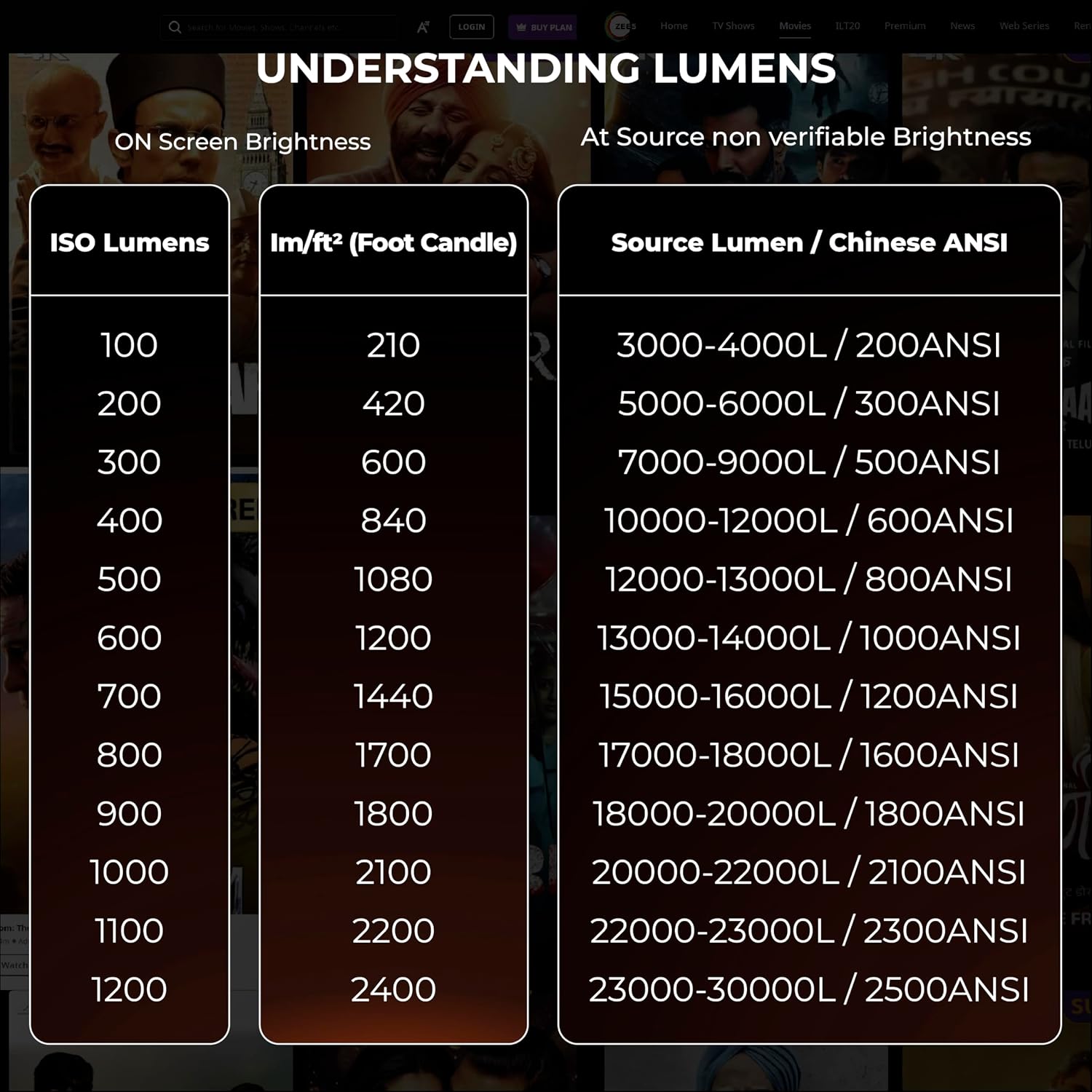
Figure 7: The projector's support for latest 2.4GHz + 5GHz Wi-Fi for faster and smoother connectivity.
Mantenimiento
Un mantenimiento adecuado garantiza la longevidad y el rendimiento óptimo de su proyector.
- Limpieza de la lente: Utilice un paño suave y sin pelusa, especialmente diseñado para lentes ópticas. Limpie la lente con cuidado para eliminar el polvo y las manchas. Evite materiales abrasivos o productos químicos agresivos.
- Limpieza del exterior: Limpie el exterior del proyector con un paño suave y seco. Para manchas difíciles, utilice un paño ligeramente seco.amp Se puede utilizar un paño y luego uno seco.
- Ventilación: Ensure the projector's ventilation openings are clear and not obstructed. This prevents overheating and maintains performance.
- Acumulación de polvo: Over time, dust may accumulate inside the projector, particularly on the LCD panel, which can affect image clarity. If you notice dark spots or reduced clarity, professional cleaning may be required. For advanced users, the LCD panel can be cleaned with care, but it is recommended to consult support or a qualified technician if unsure.
- Lamp Vida: The projector features a "Life Long Lamp" with an estimated lifespan of 60,000 hours, minimizing the need for frequent lamp reemplazo.
- Almacenamiento: When not in use for extended periods, store the projector in a cool, dry place, ideally covered to protect it from dust.
Solución de problemas
Esta sección aborda problemas comunes que puede encontrar con su proyector.
| Problema | Posible causa | Solución |
|---|---|---|
| La imagen está borrosa o desenfocada. | Projector not focused, or keystone correction issues. | The projector has automatic focus and keystone. Ensure the projector is stable and allow it to auto-adjust. If issues persist, check for obstructions or try restarting the projector. Avoid manual keystone adjustments if possible, as they can sometimes cause blurriness at edges. |
| No se muestra ninguna imagen. | Incorrect input source, loose cable connection, or device not powered on. | Verify the input source (HDMI, AV) is correctly selected. Check all cable connections (HDMI, power) are secure. Ensure the connected source device is powered on. |
| No hay sonido. | Volume too low, muted, or incorrect audio output setting. | Increase projector volume. Check if the projector or source device is muted. If using external speakers, ensure they are connected correctly via Bluetooth or 3.5mm jack and are powered on. |
| Dark spots or dust on screen. | Dust accumulation on the internal LCD panel. | This can occur over time. For minor dust, try gently tapping the projector. For persistent or significant dust, professional cleaning is recommended. Avoid opening the projector yourself unless you have technical expertise. |
| El control remoto no funciona. | Baterías agotadas, obstrucción o control remoto no emparejado. | Replace batteries in the remote. Ensure no obstructions between the remote and the projector's IR receiver. |
Presupuesto
Detailed technical specifications for the E Gate K9 Pro-Max projector:
| Atributo | Detalle |
|---|---|
| Marca | PUERTA E |
| Nombre del modelo | K9 Pro-Max |
| Número de modelo | E08i33 |
| Sistema operativo | Androide 9.0 |
| Resolución | Nativo 1920 x 1080 (Full HD), compatibilidad con 4K |
| Brillo de la imagen | 600 ISO Lumens (equivalent to 6600 ANSI Lumens) |
| Relación de contraste de imagen | 6000:1 |
| Tecnología de visualización | CONDUJO |
| Tamaño de pantalla de pie | Up to 300 Inches (762 cm) |
| Relación de aspecto | 16:9 |
| Interfaz de hardware | Bluetooth, USB, HDMI, LAN, AV |
| Conectividad inalámbrica | Dual-band Wi-Fi (2.4GHz + 5GHz), Bluetooth |
| Características especiales | Automatic Focus, Automatic Keystone (4P & 6D Digital), Digital Zoom, Wireless Screen Mirroring, HDR+ Support |
| Modo de salida de audio | Stereo (7 Watt Hi-Fi Speaker) |
| Lamp Vida | 60,000 horas |
| Dimensiones del producto | 29.21 x 17.5 x 6.5 cm |
| Peso del artículo | 1.8 kilogramos |
| Consumo de energía | 90 vatios |
| Tipo de montaje | Montaje en techo, sobremesa |
Garantía y soporte
E GATE is committed to providing excellent customer service and support for your product.
- Periodo de garantía: Your E Gate K9 Pro-Max projector comes with a 1-year warranty from the date of purchase.
- Registro de garantía: It is mandatory to register your product to avail full warranty benefits. Please refer to the warranty card included in the box or visit the official E GATE websitio para obtener detalles de registro.
- Servicio: During the warranty period, E GATE provides free home pickup and drop service for repairs.
- Contactar con soporte: For any technical assistance, troubleshooting not covered in this manual, or warranty claims, please visit the official E GATE websitio o comuníquese con su servicio de atención al cliente.