
1. Introducción
The Luminous Optimus 2300 is a Pure Sine Wave Inverter designed to provide reliable power backup for homes, offices, and shops. This manual provides essential information for the safe installation, operation, and maintenance of your inverter. Please read this manual thoroughly before using the product and retain it for future reference.
2. Instrucciones de seguridad
Tenga en cuenta las siguientes precauciones de seguridad para evitar lesiones y daños al inversor:
- Lea todas las instrucciones cuidadosamente antes de la instalación y operación.
- No abra el inversor casing. No hay piezas que el usuario pueda reparar en el interior. Solicite el servicio técnico a personal cualificado.
- Asegúrese de que haya una ventilación adecuada alrededor del inversor para evitar el sobrecalentamiento. No bloquee las aberturas de ventilación.
- Mantenga el inversor alejado del agua, la humedad, los materiales inflamables y la luz solar directa.
- Connect only to compatible batteries as specified in this manual. Incorrect battery connection can cause damage or fire.
- Mantenga a los niños y a personas no autorizadas lejos del inversor durante su funcionamiento.
- Asegúrese de que el inversor tenga una conexión a tierra adecuada.
- Turn off the inverter and disconnect all power sources before performing any maintenance or cleaning.
3. Producto terminadoview
3.1 Características principales
- Salida de onda sinusoidal pura: Proporciona energía limpia y segura para dispositivos electrónicos sensibles.
- Alta capacidad: 2000VA capacity (24V system) with 1600W output.
- Appliance Support: Capable of running essential household appliances like refrigerators (up to 250L), LED TVs (40”), multiple fans, tube lights, and LED bulbs.
- Compatibilidad de la batería: Supports 2 x 12V batteries (80Ah–220Ah) of Flat Plate, Tubular, and SMF types.
- Pantalla LCD avanzada: Provides real-time information on battery status, load level, charging status, and system alerts.
- Rendimiento eficiente: Engineered for high charge acceptance, stable output, and low maintenance.
3.2 Producto View
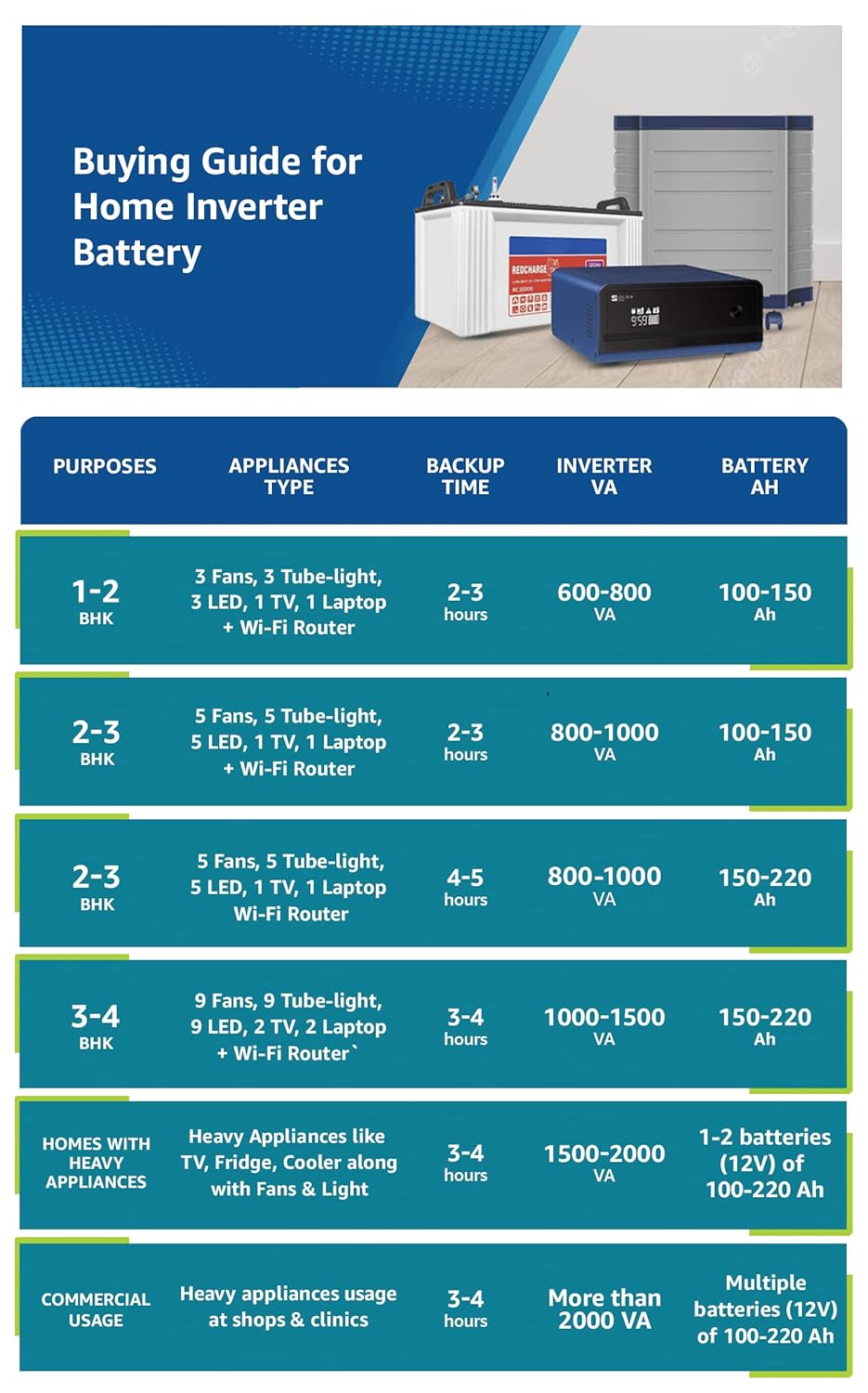
Imagen: Frente view of the Luminous Optimus 2300 Pure Sine Wave Inverter, showcasing su diseño y panel de control.

Image: Visual representation of key features including informative LCD display, pure sine wave technology, superfast battery charging, and support for all battery types.
3.3 Video del producto
Vídeo: Un breve resumenview of the Luminous Optimus 2300 Inverter, highlighting its design and key functionalities.
4. Configuración
4.1 Desembalaje e inspección
- Carefully unpack the inverter and check for any signs of damage during transit.
- Verifique que todos los componentes enumerados en la sección “Qué hay en la caja” estén presentes.
4.2 Colocación
- Choose a cool, dry, and well-ventilated area for installation.
- Asegúrese de que haya suficiente espacio libre alrededor del inversor para un flujo de aire adecuado.
- Avoid placing the inverter near heat sources, direct sunlight, or in areas with excessive dust or humidity.
4.3 Conexión de la batería
The Optimus 2300 requires two 12V batteries connected in series to form a 24V system. Follow these steps carefully:
- Ensure the inverter is switched OFF and disconnected from the AC mains supply.
- Connect the positive terminal of the first 12V battery to the negative terminal of the second 12V battery using a short, thick cable.
- Connect the remaining positive terminal of the second battery to the positive terminal of the inverter.
- Connect the remaining negative terminal of the first battery to the negative terminal of the inverter.
- Ensure all connections are tight and secure. Double-check polarity to avoid damage.
4.4 AC Mains and Load Connection
- Connect the inverter's AC input cable to a properly grounded wall socket.
- Connect your household appliances (load) to the inverter's AC output sockets. Do not exceed the inverter's rated capacity (1600W).
5. Instrucciones de funcionamiento
5.1 Encendido / Apagado
- Para encender: Press and hold the Power button on the front panel until the LCD display illuminates.
- Para apagar: Mantenga presionado el botón de encendido hasta que la pantalla se apague.
5.2 Información de la pantalla LCD
The advanced LCD display provides critical operational data:
- Estado de la batería: Shows current battery charge level and charging status.
- Nivel de carga: Indica el porcentajetage de carga conectada.
- Mains Status: Shows if AC mains power is present and if the inverter is charging.
- Alertas del sistema: Displays error codes or warnings (e.g., overload, low battery, short circuit). Refer to the troubleshooting section for details.
5.3 Operating Modes (If Applicable)
Your inverter may feature different operating modes. Consult the on-screen menu or specific buttons for mode selection (e.g., UPS Mode for sensitive appliances, Eco Mode for energy saving). Refer to the on-screen prompts for navigation.
6. Mantenimiento
Regular maintenance ensures optimal performance and longevity of your inverter and batteries.
6.1 Cuidado de la batería
- Water Level Check (for Tubular/Flat Plate Batteries): Periodically check the electrolyte level in your batteries. If low, top up with distilled water only.
- Limpieza de terminales: Keep battery terminals clean and free from corrosion. Apply petroleum jelly to prevent oxidation.
- Ventilación: Ensure batteries are in a well-ventilated area to dissipate gases.
6.2 Inverter Cleaning
- Keep the inverter's exterior clean and dust-free using a dry cloth.
- Ensure ventilation openings are clear of obstructions. Do not use liquid cleaners directly on the inverter.
7. Solución de problemas
Esta sección aborda problemas comunes que podrías encontrar. Si tienes problemas que no aparecen aquí, contacta con atención al cliente.
| Problema | Posible causa | Solución |
|---|---|---|
| El inversor no se enciende | Loose battery connections, discharged batteries, inverter fault. | Check battery connections. Ensure batteries are charged. If problem persists, contact service. |
| Sin potencia de salida | Overload, low battery, output circuit breaker tripped. | Reduce connected load. Check battery charge. Reset output breaker if tripped. |
| Inverter beeping continuously | Overload, low battery, high temperature. | Check LCD for specific error code. Reduce load, charge batteries, ensure ventilation. |
| La batería no se carga | Mains power not present, loose AC input connection, battery fault. | Verify mains supply. Check AC input cable. Inspect battery condition. |
8. Especificaciones
| Parámetro | Valor |
|---|---|
| Marca | Luminoso |
| Nombre del modelo | Optimus 2300 |
| Inverter Capacity (VA) | 2000 VA |
| Potencia de salida (vatios) | 1600 vatios |
| Vol del sistematage | 24V (Requires 2 x 12V batteries) |
| Forma de onda de salida eléctrica | De onda sinusoidal pura |
| Vol de entradatagmi (CA) | 230 voltios |
| Frecuencia | 50 Hz |
| Compatibilidad de la batería | 80Ah–220Ah (Flat Plate, Tubular, SMF) |
| Dimensiones del artículo (largo x ancho x alto) | 32.6L x 30W x 28.4H Centímetros |
| Peso del artículo | 21 kilogramos |
| Color | Azul |
9. Garantía y soporte
9.1 Información de garantía
The Luminous Optimus 2300 Inverter comes with a Garantía del fabricante por 2 año from the date of purchase. This warranty covers manufacturing defects. Please retain your purchase receipt for warranty claims. The warranty does not cover damage due to improper installation, misuse, or unauthorized repairs.
9.2 Atención al cliente
For technical assistance, service requests, or warranty claims, please contact Luminous Power Technologies Pvt. Ltd. at the following details:
Fabricante: Luminous Power Technologies Pvt. Ltd.
DIRECCIÓN: Plot No. 150, Sector 44, Gurgaon, Haryana - 122003, India
También puedes visitar la página oficial Luminous Store on Amazon para obtener más información y recursos de soporte.