
Introducción
This manual provides detailed instructions for the VEDINDUST HDMI ARC Digital to Analog Audio Converter. This device is designed to extract audio from an HDMI ARC-enabled television and convert digital audio signals (Toslink/Coaxial) into analog L/R stereo or 3.5mm jack outputs. It supports various audio formats and offers multiple input options for versatile connectivity.
Lea este manual detenidamente antes de utilizar el producto para garantizar un funcionamiento correcto y maximizar su rendimiento.
Contenido del paquete
Por favor verifique que todos los artículos estén presentes en el paquete:
- 1x VEDINDUST HDMI ARC Digital to Analog Audio Converter
- 1x cable de alimentación USB
- 1 cable HDMI
- 1x Manual de usuario

Producto terminadoview
The VEDINDUST HDMI ARC Digital to Analog Audio Converter is a compact device designed to manage various audio signals. It features multiple input and output ports for flexible audio routing.
Disposición del dispositivo
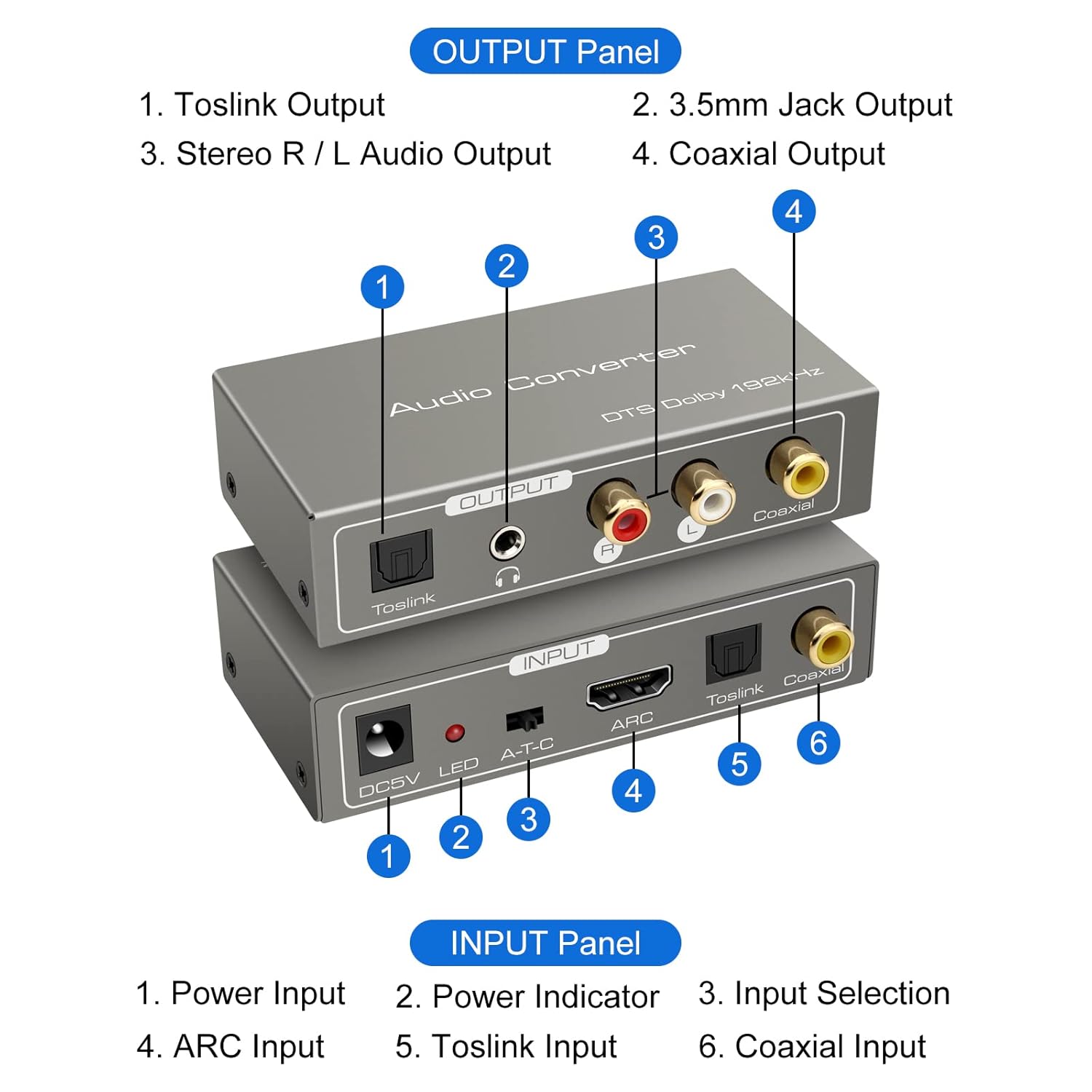
Panel de entrada:
- Entrada de alimentación DC5V: Conecte aquí el cable de alimentación USB proporcionado.
- Indicador LED: Se ilumina cuando el dispositivo está encendido.
- A-T-C Input Selection Switch: Used to select the audio input mode (A for ARC, T for Toslink, C for Coaxial).
- Entrada ARCO: Connect an HDMI cable from an ARC-compatible TV's HDMI ARC port.
- Entrada Toslink: Connect an optical fiber cable from your audio source.
- Entrada coaxial: Connect a coaxial cable from your audio source.
Panel de salida:
- Salida Toslink: Connect to an optical input on an ampamplificador o sistema de sonido.
- 3.5mm Jack Output: Connect to headphones or an auxiliary input on an audio device.
- Stereo R/L Audio Output: Connect RCA cables to the L/R analog inputs of an ampLifier o altavoces.
- Salida coaxial: Connect to a coaxial input on an ampamplificador o sistema de sonido.
Instrucciones de instalación
Follow these steps to correctly set up your VEDINDUST audio converter:
1. Conexión de alimentación
- Connect the provided USB power cable to the DC5V input port on the converter.
- Plug the other end of the USB power cable into a 5V USB power adapter (not included) or a USB port on your TV/device.
- Ensure the LED indicator on the converter illuminates, indicating it is powered on.
2. Conexión de entrada de audio
Elija uno de los siguientes métodos de entrada según su fuente de audio:

ARC Input Mode:
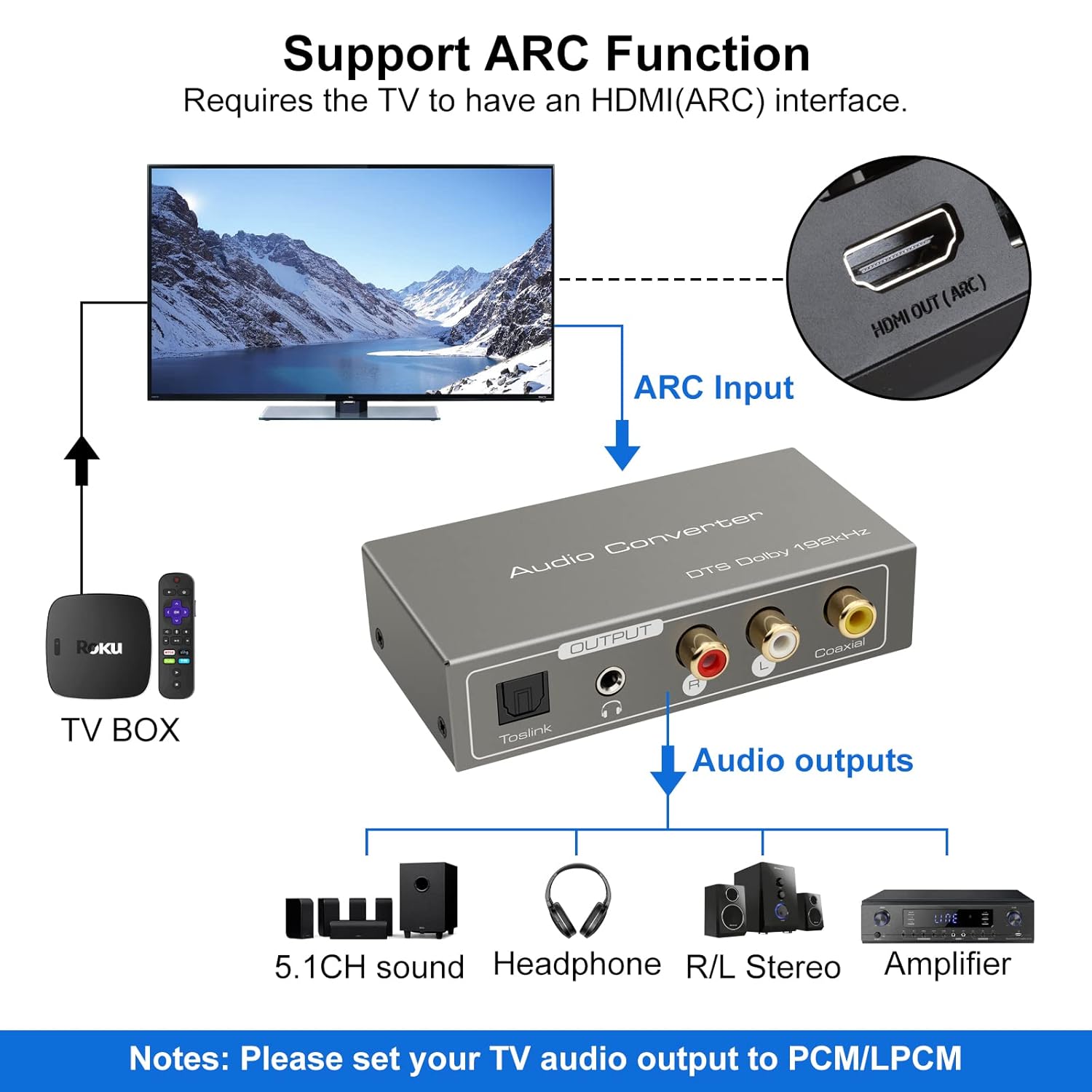
- Connect an HDMI cable from your ARC-compatible television's HDMI ARC output port to the ARC input port on the converter.
- Ensure your television's HDMI port supports ARC functionality.

TOSLink Input Mode:
- Connect an optical fiber cable from your audio source (e.g., game console, Blu-ray player) to the Toslink input port on the converter.
Coaxial Input Mode:
- Connect a coaxial cable from your audio source to the Coaxial input port on the converter.
3. Conexión de salida de audio
Connect the converter's output ports to your desired audio receiving devices:
- For Digital Audio: Connect an optical fiber cable to the Toslink Output or a coaxial cable to the Coaxial Output, then connect to your amplifier, soundbar, or home cinema system.
- For Analog Audio: Connect RCA L/R cables to the Stereo R/L Audio Output, or a 3.5mm audio cable to the 3.5mm Jack Output. Connect these to your amplifier, speakers, or headphones.
Instrucciones de funcionamiento
1. Selección del modo de entrada
Use the A-T-C switch on the input panel to select the active audio input:
- Ponga el interruptor en 'A' for HDMI ARC input.
- Ponga el interruptor en 'T' for TOSLink optical input.
- Ponga el interruptor en 'C' for Coaxial input.

2. Audio Format Configuration
For optimal performance and to ensure audio output, especially when using the R/L or 3.5mm jack outputs, it is crucial to configure the audio format on your source device (e.g., TV, game console).
- Importante: If you experience no sound output, set the audio format of your signal source (e.g., TV audio settings) to PCM or LPCM.
- The converter supports DTS / DSD / LPCM formats for Toslink/Coaxial output. However, for R/L or 3.5mm jack outputs, only LPCM/PCM audio format input is supported.
Solución de problemas
If you encounter issues while using the VEDINDUST HDMI ARC Digital to Analog Audio Converter, please refer to the following common problems and solutions:
-
Sin salida de sonido:
- Ensure the converter is properly powered via the DC5V input and the LED indicator is on.
- Verify that the A-T-C input selection switch is set to the correct input mode (A for ARC, T for Toslink, C for Coaxial).
- Check the audio settings on your source device (TV, game console, etc.). The audio output format must be set to PCM or LPCM, especially for analog (RCA L/R or 3.5mm) outputs.
- Confirm that all audio cables (HDMI, optical, coaxial, RCA, 3.5mm) are securely connected to both the converter and your audio devices.
- Test with different audio cables if possible, to rule out faulty cables.
-
ARC Function Not Working:
- Ensure your television's HDMI port specifically supports Audio Return Channel (ARC). Not all HDMI ports are ARC-enabled.
- Check your TV's audio settings to ensure ARC is enabled and configured correctly.
- Try restarting both your TV and the converter.
-
Mala calidad de audio:
- Asegúrese de que todas las conexiones estén firmes y libres de interferencias.
- Verify that the audio format from your source is compatible with the converter's outputs (LPCM/PCM for analog outputs).
- Avoid using excessively long or low-quality cables, which can degrade signal integrity.
Especificaciones técnicas
| Dimensiones del producto (L x An x Al) | 9.8 x 5 x 0.1 cm |
| Peso | 250 gramos |
| Fabricante | VEDINDUSTRIA |
| Número de modelo | 20220119 |
| País natal | Porcelana |
| Color | Gris |
| Tipo de conector | HDMI, 3.5mm Jack, Toslink, Coaxial |
| Dispositivos compatibles | Game Console, Blu-ray Player, Television, DVD Player, Satellite Receiver, Apple TV, HDTV, Soundbar, Amplifier, Speakers, Home Cinema System, AV Ampmás vivaz |
| Tipo de cable | HDMI, Optical, Coaxial, Auxiliary |
| Número de puertos | 5 |
| Código Postal | 798610310694 |
| Compatible SampFrecuencias ling | 32 KHz, 44.1 KHz, 48 KHz, 96 KHz, 192 KHz (24-bit) |
| Supported Audio Formats (Digital Output) | DTS, Dolby-AC3, DSD, LPCM |
| Supported Audio Formats (Analog Output) | LPCM, PCM |
Cuidado y mantenimiento
To ensure the longevity and optimal performance of your VEDINDUST audio converter, please follow these care guidelines:
- Limpieza: Use a soft, dry cloth to clean the device. Do not use liquid cleaners or aerosol sprays, as they may damage the unit.
- Almacenamiento: Guarde el dispositivo en un lugar fresco y seco, alejado de la luz solar directa y de temperaturas extremas.
- Manejo: Evite dejar caer o someter el dispositivo a impactos fuertes.
- Ambiente: Mantenga el dispositivo alejado del agua, la humedad y entornos con alta humedad.
Garantía y atención al cliente
For warranty information or if you require further assistance with your VEDINDUST HDMI ARC Digital to Analog Audio Converter, please contact VEDINDUST customer support through the retailer where you purchased the product or refer to the contact information provided with your purchase documentation.
Conserve su comprobante de compra para cualquier reclamo de garantía.