
Fnatic BOLT
Fnatic BOLT Wireless Gaming Mouse User Manual
Introducción
This manual provides detailed instructions for the setup, operation, maintenance, and troubleshooting of your Fnatic BOLT Wireless Gaming Mouse. Please read this manual thoroughly before using the product to ensure optimal performance and longevity.
Producto terminadoview
The Fnatic BOLT is a lightweight wireless gaming mouse designed for high performance. It features a durable construction and versatile connectivity options.
Componentes
- Botones de clic izquierdo y derecho
- Rueda de desplazamiento
- DPI Cycle Button (typically located on the bottom or top)
- Botones laterales (adelante/atrás)
- Puerto de carga USB-C
- Wireless Receiver (dongle)

Figura 1: Arriba view of the Fnatic BOLT Wireless Gaming Mouse, showing the main click buttons and scroll wheel.

Figura 2: Angulado view of the Fnatic BOLT Wireless Gaming Mouse, highlighting the two programmable side buttons.

Figura 3: Frente view of the Fnatic BOLT Wireless Gaming Mouse, displaying the USB-C charging port.
Configuración
1. Carga inicial
Before first use, it is recommended to fully charge the Fnatic BOLT mouse.
- Connect the provided USB-C cable to the charging port on the front of the mouse.
- Conecte el otro extremo del cable USB-C a un puerto USB con alimentación en su computadora o a un adaptador de pared USB.
- The mouse's indicator light will show charging status (refer to product documentation for specific light patterns). A full charge typically takes a few hours.
2. Conexión a su computadora
The Fnatic BOLT supports two wireless connection modes: 2.4 GHz wireless (via USB dongle) and Bluetooth.
2.1. Conexión inalámbrica de 2.4 GHz
- Locate the USB wireless receiver (dongle) that came with your mouse.
- Conecte el receptor USB a un puerto USB disponible en su computadora.
- Encienda el mouse utilizando el interruptor de encendido ubicado en la parte inferior del mouse.
- The mouse should automatically connect to the receiver. The indicator light will confirm a successful connection.
2.2. Conexión Bluetooth
- Asegúrese de que el Bluetooth de su computadora esté habilitado.
- Turn on the mouse and switch it to Bluetooth mode (refer to the mouse's bottom switch or button for mode selection).
- En su computadora, vaya a la configuración de Bluetooth y busque nuevos dispositivos.
- Select "Fnatic BOLT" from the list of available devices to pair.
- The mouse's indicator light will confirm successful pairing.
Instrucciones de funcionamiento
Ajuste de DPI
The Fnatic BOLT mouse allows you to adjust its Dots Per Inch (DPI) sensitivity. This mouse features 4 preset DPI levels.
- Locate the DPI cycle button, typically on the bottom of the mouse.
- Press the DPI button to cycle through the available sensitivity settings.
- An indicator light (often on the scroll wheel or top of the mouse) may change color or flash to indicate the current DPI level.
Funciones de los botones
- Click izquierdo: Acción primaria, selección.
- Botón derecho del ratón: Menú contextual, acción secundaria.
- Clic con la rueda de desplazamiento: Middle click, often used for opening links in new tabs or specific in-game functions.
- Desplazarse hacia arriba/abajo: Navigating documents or web páginas.
- Botones laterales: Default to Forward/Back in web browsers. These can often be customized via software (if available).
Gestión de energía
- To conserve battery life, turn off the mouse using the power switch when not in use for extended periods.
- The mouse may enter a sleep mode after a period of inactivity. Move the mouse or click a button to wake it up.
- Monitor the battery indicator (if available) to know when to recharge.
Mantenimiento
Limpieza
- Limpie periódicamente la superficie del ratón con un paño suave, seco y sin pelusa.
- Para suciedad difícil, ligeramente dampEnjuague el paño con agua o una solución limpiadora suave. Evite productos químicos agresivos.
- Clean the optical sensor on the bottom of the mouse with a cotton swab to ensure accurate tracking.
- No permita que entren líquidos en los componentes internos del ratón.
Cuidado de la batería
- Evite descargar completamente la batería con frecuencia.
- Guarde el ratón en un lugar fresco y seco cuando no lo utilice durante períodos prolongados.
- No exponga el ratón a temperaturas extremas.
Solución de problemas
El ratón no responde
- Comprobar la batería: Ensure the mouse is charged. Connect it to the USB-C cable and allow it to charge for a period.
- Interruptor de alimentación: Verify the mouse's power switch is in the "ON" position.
- Wireless Connection (2.4 GHz):
- Asegúrese de que el receptor USB esté conectado correctamente a un puerto USB que funcione. Pruebe con otro puerto USB.
- Ensure the mouse is within range of the receiver.
- Evite fuentes de interferencia (por ejemplo, otros dispositivos inalámbricos, objetos metálicos grandes).
- Conexión Bluetooth:
- Asegúrese de que el Bluetooth de su computadora esté habilitado.
- Check if the mouse is in Bluetooth pairing mode or already paired. Re-pair if necessary.
- Remove and re-add the device in your computer's Bluetooth settings.
- Reanudar: Reinicie su computadora.
Seguimiento inexacto
- Limpiar sensor: Limpie el sensor óptico en la parte inferior del mouse.
- Superficie: Asegúrese de usar el ratón sobre una superficie adecuada. Las superficies muy reflectantes o irregulares pueden afectar el seguimiento. Se recomienda usar una alfombrilla.
- Configuración de DPI: Adjust the DPI setting to a level that suits your preference and task.
Duración de batería corta
- Cargando: Asegúrese de que el ratón esté completamente cargado.
- Apagado: Remember to turn off the mouse when not in use.
- Uso: High-intensity usage or certain settings might consume more power.
Presupuesto
| Característica | Detalle |
|---|---|
| Marca | Fnático |
| Nombre del modelo | FnaticGear BOLT |
| Número de modelo del artículo | TORNILLO |
| Color | blanco |
| Tecnología de conectividad | Bluetooth, Wi-Fi (2.4 GHz Wireless) |
| Tecnología de detección de movimiento | Óptico |
| Número de botones | 6 |
| Orientación de la mano | Bien |
| Características especiales | Ligero |
| Tipo de fuente de poder | Inalámbrico (batería recargable) |
| Pilas incluidas | Sí (1 batería de metal de litio) |
| Contenido de energía de la batería de litio | 470 miliamp Horas (mAh) |
| Dimensiones del producto | 12.5 x 6.5 x 0.1 cm; 69 g |
| Dispositivos compatibles | computadora portátil, computadora personal |
| Sistemas operativos | Linux, Windows 7, Windows XP (and newer) |
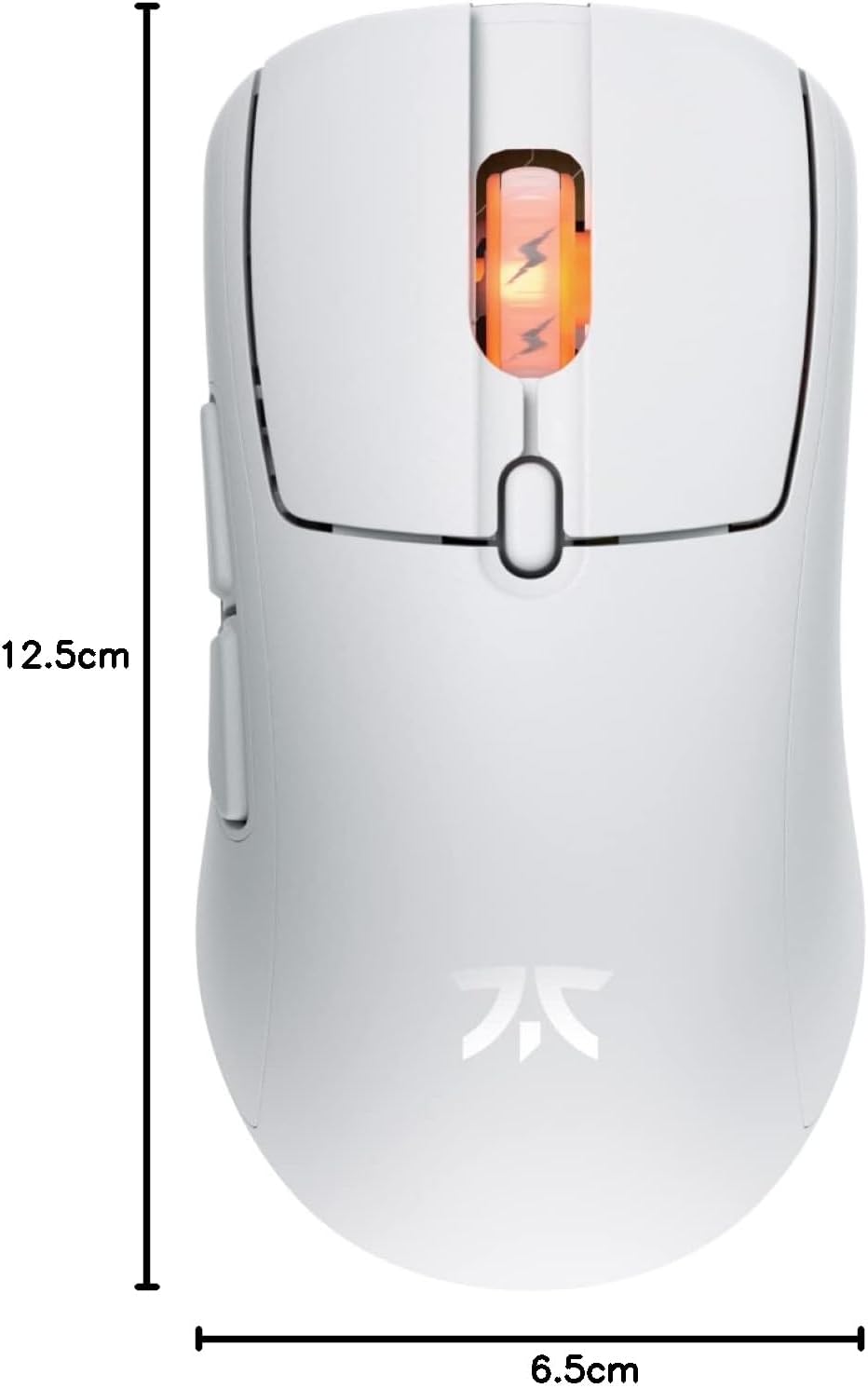
Figure 4: Diagram showing the dimensions of the Fnatic BOLT Wireless Gaming Mouse.
Garantía y soporte
For information regarding warranty coverage and technical support, please refer to the official Fnatic websitio o la tarjeta de garantía incluida con su producto.
You can typically find support resources, FAQs, and contact information on the manufacturer's official support pages.
Ask a question about this manual
Ask about setup, troubleshooting, compatibility, parts, safety, or missing instructions. Manuals+ will review the question and use this page’s manual context to help answer it.