
Introducción
This manual provides detailed instructions for the installation, operation, and maintenance of your Everycom EC-901 80mm Thermal POS Receipt Printer. Please read this manual thoroughly before using the printer to ensure proper functionality and to prevent damage.
Información de seguridad
- Asegúrese de que la impresora esté conectada a una fuente de alimentación con el voltaje correcto.tage.
- No exponga la impresora al agua ni a una humedad elevada.
- Evite colocar la impresora bajo la luz solar directa o cerca de fuentes de calor.
- Use only specified thermal paper for optimal performance and to prevent damage to the print head.
- No intente desmontar ni reparar la impresora usted mismo. Contacte con personal de servicio técnico cualificado.
Contenido del paquete
Verifique que todos los artículos estén presentes en el paquete:
- Impresora térmica de recibos Everycom EC-901 para punto de venta
- Roll paper × 1 Roll (for initial testing)
- CD-ROM (containing Drivers, Utility Software, Manuals)
- Guía de papel
- Cojinete de papel
- Cable USB
- Cable adaptador de corriente
Producto terminadoview
The Everycom EC-901 is a compact 80mm (3-inch) thermal POS receipt printer designed for efficient and reliable printing. It features a USB and LAN interface for versatile connectivity.

Figura 1: Frente view of the Everycom EC-901 Thermal POS Receipt Printer.
Características principales:
- Velocidad de impresión rápida: Up to 160mm per second for quick receipt output.
- Carga fácil de papel: Drop-in paper loading mechanism for quick and easy media changes.
- Diseño compacto: Low space requirement with an integrated power supply.
- Ancho de papel variable: Supports 80mm paper width.
- Conectividad: USB and LAN interface options.
- Resolución alta: 203 x 203 DPI for clear print quality.
- Niveles bajos de ruido: Operates quietly, suitable for various work environments.

Figure 2: Top-open design for easy paper roll installation.
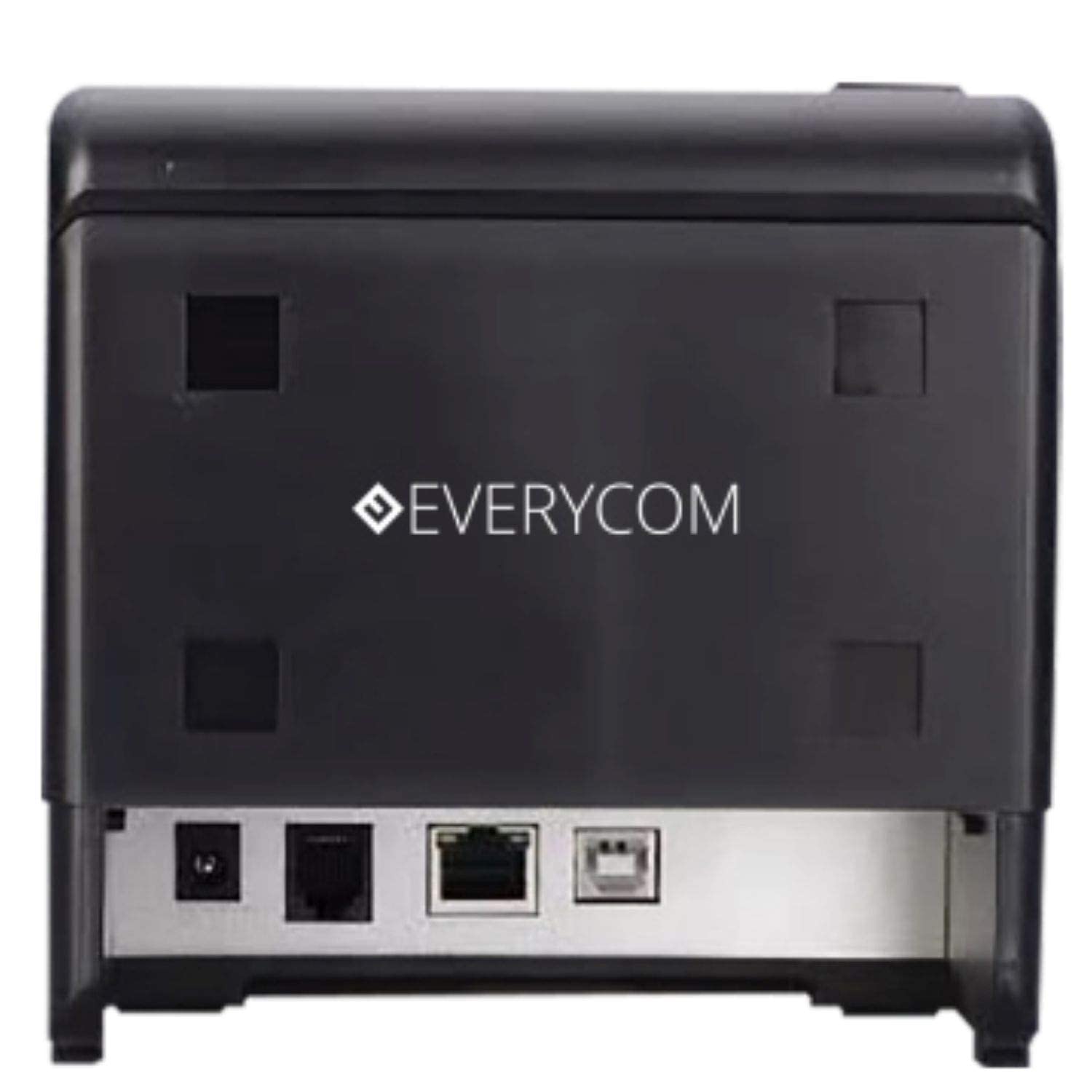
Figura 3: Posterior view showing USB and LAN connectivity ports.

Figure 4: The EC-901 printer is designed for low noise operation.

Figure 5: The EC-901 printer features an easy-to-use design for paper installation.
Configuración
1. Conexión de la impresora
- Connect the power adapter cable to the printer's power port and then plug it into a suitable electrical outlet.
- Para la conexión USB: Conecte un extremo del cable USB al puerto USB de la impresora y el otro extremo a su computadora.
- For LAN connection: Connect an Ethernet cable to the printer's LAN port and the other end to your network router or switch.
- Turn on the printer using the power switch located on the front or side of the device.
2. Instalación del rollo de papel
- Open the printer cover by pressing the release button or lifting the cover.
- Insert the thermal paper roll into the compartment with the paper feeding from the bottom and exiting towards the front.
- Saque una pequeña cantidad de papel más allá del cortador.
- Cierre la cubierta de la impresora firmemente hasta que encaje en su lugar.
3. Instalación del controlador
Insert the provided CD-ROM into your computer's CD/DVD drive. Follow the on-screen instructions to install the printer drivers and utility software. Drivers are typically compatible with Windows operating systems, including Windows 10.
Instrucciones de funcionamiento
Luces indicadoras:
- FUERZA: Indica que la impresora está encendida.
- ERROR: Lights up or flashes to indicate an error (e.g., print head overheating, cover open).
- PAPEL: Indica que hay poco papel o que no hay papel.
Impresión básica:
Once the printer is connected and drivers are installed, you can print receipts from your POS software or any application that supports printing. Ensure the Everycom EC-901 is selected as the default printer or the desired printer in your application's print settings.
Mantenimiento
Limpieza de la impresora:
- Apague la impresora y desconecte el cable de alimentación antes de limpiarla.
- Utilice un paño suave y sin pelusaampened with isopropyl alcohol to gently clean the thermal print head. Allow it to dry completely before use.
- Wipe the exterior of the printer with a soft, dry cloth. Do not use abrasive cleaners.
Reemplazo de papel:
When the PAPER indicator lights up or printing becomes faint, replace the paper roll following the steps outlined in the "Installing the Paper Roll" section.
Solución de problemas
| Problema | Posible causa | Solución |
|---|---|---|
| La impresora no se enciende. | Cable de alimentación desconectado o problema con la toma de corriente. | Verifique las conexiones del cable de alimentación. Asegúrese de que la toma de corriente funcione. |
| No hay impresión o salida en blanco. | No paper, paper loaded incorrectly, or print head issue. | Check paper roll and ensure it's loaded correctly. Clean the print head if necessary. Verify printer drivers are installed. |
| PAPER indicator is on. | Paper roll is empty or low. | Reemplace el rollo de papel. |
| ERROR indicator is on. | Printer cover open, print head overheating, or other internal error. | Ensure the printer cover is closed properly. Turn off the printer, wait a few minutes for it to cool down, then restart. If the issue persists, contact support. |
| La computadora no reconoce la impresora. | Driver not installed or USB/LAN cable issue. | Reinstall printer drivers. Check USB/LAN cable connections. Try a different port or cable. |
Presupuesto
| Característica | Detalle |
|---|---|
| Nombre del modelo | CE-901 |
| Tecnología de impresión | Térmico |
| Medios impresos | Papel (térmico normal) |
| Tamaño máximo de medios | 3 pulgadas (80 mm) |
| Velocidad máxima de impresión | 160 mm/segundo |
| Resolución | 203 x 203 DPI |
| Tecnología de conectividad | USB, LAN Interface |
| Salida de impresora | Monocromo |
| Sistema operativo | Windows 10 (y compatible con otras versiones de Windows) |
| Dimensiones del producto (LxAnxAl) | 19.8 x 14.8 x 14.8 cm |
| Peso del artículo | 1.8 kilogramos |
| Característica especial | Without Auto cutter |
Garantía y soporte
For technical assistance, warranty claims, or any product-related inquiries, please contact Everycom customer support.
- Número gratuito: 1800 121 4480
- Horario de trabajo: Lunes - Sábado, 10:00 - 6:30 (Excepto días festivos)