
1. Introducción
This manual provides essential instructions for the proper use and maintenance of your LOTUS Smartwatch Model 50003/A. Please read this guide thoroughly before using your smartwatch to ensure optimal performance and longevity.
The LOTUS Smartwatch 50003/A features an intuitive interface and elegant design, offering a variety of smart functions. It is equipped with Bluetooth connectivity, allowing seamless synchronization with your mobile devices. This synchronization enables features such as call and message notifications, music control, and other practical functions for daily life.
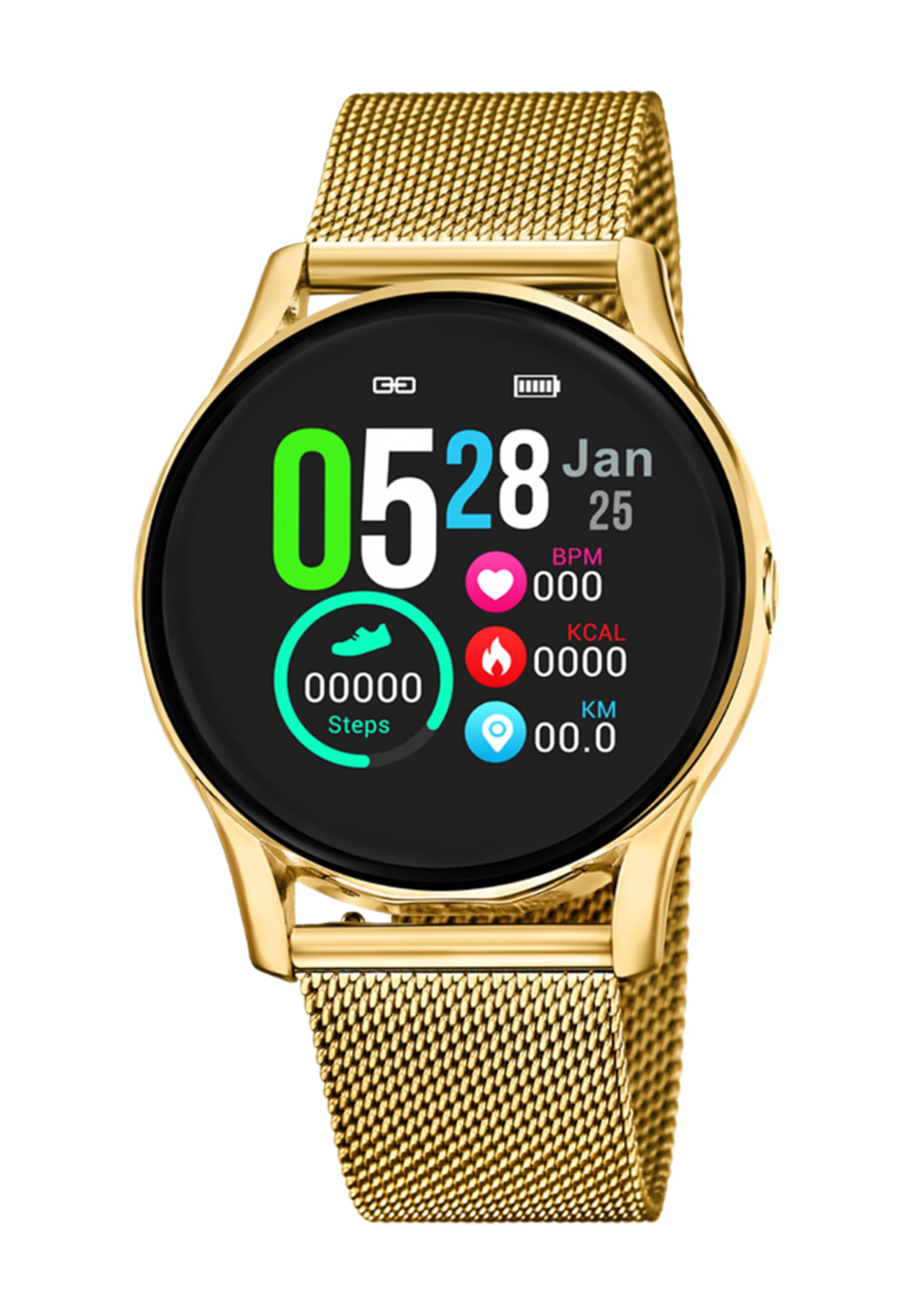
Imagen 1.1: Frente view of the LOTUS Smartwatch 50003/A.
2. Contenido del paquete
Please check the package contents upon unboxing. The standard package for the LOTUS Smartwatch 50003/A should include:
- LOTUS Smartwatch 50003/A
- Cable de carga
- Manual de usuario (este documento)
3. Guía de configuración
3.1. Carga del reloj inteligente
Antes del primer uso, cargue completamente su reloj inteligente.
- Conecte el cable de carga al puerto de carga en la parte posterior del reloj inteligente.
- Conecte el otro extremo del cable de carga a un adaptador de corriente USB (no incluido) o al puerto USB de una computadora.
- La pantalla del reloj indicará el estado de carga. La carga completa demora aproximadamente de 2 a 3 horas.
3.2. Instalación de la aplicación complementaria
To unlock all features and synchronize your smartwatch with your smartphone, you need to install the official LOTUS Connected app.
- Scan the QR code provided in the watch packaging or search for "LOTUS Connected" in your smartphone's app store (Google Play Store for Android, Apple App Store for iOS).
- Descargue e instale la aplicación.
- Siga las instrucciones que aparecen en pantalla para crear una cuenta o iniciar sesión.

Image 3.2: Synchronizing the smartwatch with the companion app on a smartphone.
3.3. Emparejamiento con su teléfono inteligente
Ensure Bluetooth is enabled on your smartphone and the smartwatch is charged.
- Open the LOTUS Connected app on your smartphone.
- Siga las instrucciones de la aplicación para agregar un nuevo dispositivo.
- The app will search for available smartwatches. Select "LOTUS 50003/A" from the list.
- Confirme la solicitud de emparejamiento tanto en su teléfono inteligente como en su reloj inteligente si se le solicita.
- Una vez emparejado, el reloj sincronizará la hora y los datos con su teléfono.
4. Instrucciones de funcionamiento
4.1. Navegación básica
- Pantalla táctil: Desliza el dedo hacia la izquierda/derecha, arriba/abajo para navegar por los menús y las funciones. Toca para seleccionar.
- Botones laterales: The smartwatch may have one or more physical buttons. Typically, one button serves as a power on/off, back, or home button. Refer to the on-screen prompts for specific button functions.

Imagen 4.1: Example of a smartwatch display showing activity data.
4.2. Características principales
- Notificaciones: Receive alerts for incoming calls, messages, and app notifications directly on your wrist. Manage notification settings via the LOTUS Connected app.
- Control de música: Control music playback on your connected smartphone (play, pause, skip tracks, adjust volume).
- Seguimiento de actividad: Monitor steps, distance, calories burned, and sleep patterns. View Estadísticas detalladas en la aplicación complementaria.
- Resistencia al agua: The smartwatch is water resistant. Avoid prolonged submersion or use in hot water/steam. Refer to specifications for exact water resistance rating.
5. Mantenimiento
5.1. Limpieza del reloj inteligente
- Limpie la pantalla y el cuerpo del reloj con un paño suave que no suelte pelusa.
- Para suciedad difícil, ligeramente dampEnjuague el paño con agua. Evite productos químicos agresivos o materiales abrasivos.
- Asegúrese de que los contactos de carga estén limpios y secos antes de cargar.
5.2. Cuidado de la batería
- Charge the smartwatch regularly. Avoid letting the battery completely drain for extended periods.
- Do not expose the smartwatch to extreme temperatures, as this can affect battery life and performance.
- Si el reloj no se utilizará durante un tiempo prolongado, cárguelo al 50 % aproximadamente antes de guardarlo.
6. Solución de problemas
6.1. Problemas comunes y soluciones
- El reloj no enciende: Asegúrese de que el reloj esté completamente cargado. Conéctelo al cargador y espere unos minutos antes de intentar encenderlo.
- No se puede emparejar con el teléfono inteligente:
- Asegúrese de que Bluetooth esté habilitado en su teléfono inteligente.
- Asegúrese de que el reloj inteligente esté dentro del alcance de su teléfono.
- Reinicie tanto su teléfono inteligente como el reloj inteligente.
- Intente desvincular y volver a vincular el dispositivo a través de la aplicación.
- Notificaciones no recibidas:
- Check notification settings in the LOTUS Connected app.
- Asegúrese de que la aplicación tenga los permisos necesarios en su teléfono inteligente.
- Verify that the smartwatch is properly connected via Bluetooth.
- Duración de la batería corta:
- Reducir el brillo de la pantalla.
- Desactivar notificaciones o funciones innecesarias.
- Asegúrese de que el reloj esté completamente cargado antes de usarlo.
6.2. Restablecimiento de fábrica
If issues persist, a factory reset may resolve them. This will erase all data on the smartwatch and restore it to its original settings.
- Navigate to the "Settings" menu on your smartwatch.
- Look for an option like "System," "Reset," or "Factory Reset."
- Confirme el reinicio cuando se le solicite.
- After resetting, you will need to re-pair the smartwatch with your phone and set it up again.
7. Especificaciones
| Característica | Detalle |
|---|---|
| Marca | LOTO |
| Número de modelo | 50003/A |
| Color | Negro |
| Compatibilidad del sistema operativo | Android, iOS |
| Tamaño de pantalla | 39.65 milímetros |
| Características especiales | Resistente al agua |
| Dispositivos compatibles | Teléfono inteligente |
| Composición de la batería | Metal de litio |
| Disponibilidad de repuestos | 5 años |
8. Garantía y soporte
Your LOTUS Smartwatch 50003/A comes with a manufacturer's warranty. Please refer to the warranty card included in your product packaging for specific terms and conditions.
Las piezas de repuesto para este modelo están disponibles hasta 5 años a partir de la fecha de compra.
For technical support, service, or warranty claims, please contact LOTUS customer service through their official websitio o la información de contacto proporcionada en la documentación de su garantía.


