
Lucci Air 21304101
Lucci Air Whitehaven 56-inch Ceiling Fan User Manual
Modelo: 21304101
Introducción
This manual provides detailed instructions for the installation, operation, and maintenance of your Lucci Air Whitehaven 56-inch 3-blade DC Smart WiFi Controlled Indoor/Outdoor Black Ceiling Fan. Please read this manual thoroughly before installation and use to ensure safe and efficient operation.
The Lucci Air Whitehaven fan features a modern 3-blade design, DC technology for energy efficiency and quiet operation, and smart WiFi control capabilities. It is suitable for both indoor and outdoor locations.
Información de seguridad
Always follow basic safety precautions when installing and operating electrical appliances. This includes, but is not limited to:
- Asegúrese de que la energía esté desconectada en el disyuntor antes de realizar la instalación o el mantenimiento.
- Todo el trabajo eléctrico debe ser realizado por un electricista calificado.
- Mount the fan to a structure capable of supporting the fan's weight (approximately 15 pounds).
- Ensure fan blades are at least 7 feet (2.1 meters) from the floor.
- No introduzca objetos en el recorrido de las cuchillas giratorias.
Contenido del paquete
Verifique que todos los componentes estén presentes antes de comenzar la instalación:
- Conjunto de motor de ventilador de techo
- 3 Fan Blades (ABS Plastic)
- Control remoto con soporte de pared
- Herrajes de montaje
- 1 x CP2032 Battery (for remote)
- Manual de instrucciones

Image: The Lucci Air Whitehaven 56-inch ceiling fan, showcasing its sleek black finish and three distinct blades.
Configuración e instalación
Installation of the Lucci Air Whitehaven ceiling fan requires assembly and electrical wiring. It is recommended that installation be performed by a licensed electrician.
1. Montaje del soporte
Secure the mounting bracket to a ceiling joist or a fan-rated outlet box. Ensure the bracket is firmly attached and can support the fan's weight.
2. Conexiones de cableado
Connect the fan's electrical wires to the household wiring according to local electrical codes. Typically, this involves connecting the live, neutral, and ground wires. Refer to the wiring diagram provided in the physical manual for specific color codes.
3. Montaje del ventilador
Attach the fan blades to the motor housing. The Whitehaven fan features three ABS plastic blades designed for optimal airflow. Ensure all screws are tightened securely.

Image: Technical line drawing illustrating the dimensions of the Lucci Air Whitehaven ceiling fan, including its 56-inch diameter and 11.8-inch height.
4. Securing the Fan to the Bracket
Carefully lift the fan assembly and attach it to the mounted bracket. Ensure all safety clips and screws are engaged to prevent accidental detachment.
Instrucciones de funcionamiento
The Lucci Air Whitehaven fan can be controlled via the included remote control or through the Bond Home app for smart WiFi control.
Operación por control remoto
The remote control allows for comprehensive control of the fan's functions:
- Botón de encendido: Enciende y apaga el ventilador.
- Control de velocidad: Select from 6 fan speeds (I to VI).
- Interruptor inverso: Changes the direction of blade rotation for summer (downward airflow) or winter (upward airflow) modes. This is a manual switch on the fan body.
- Luz encendida/apagada/atenuada: Controls the integrated light (if applicable to your model). Hold to dim.
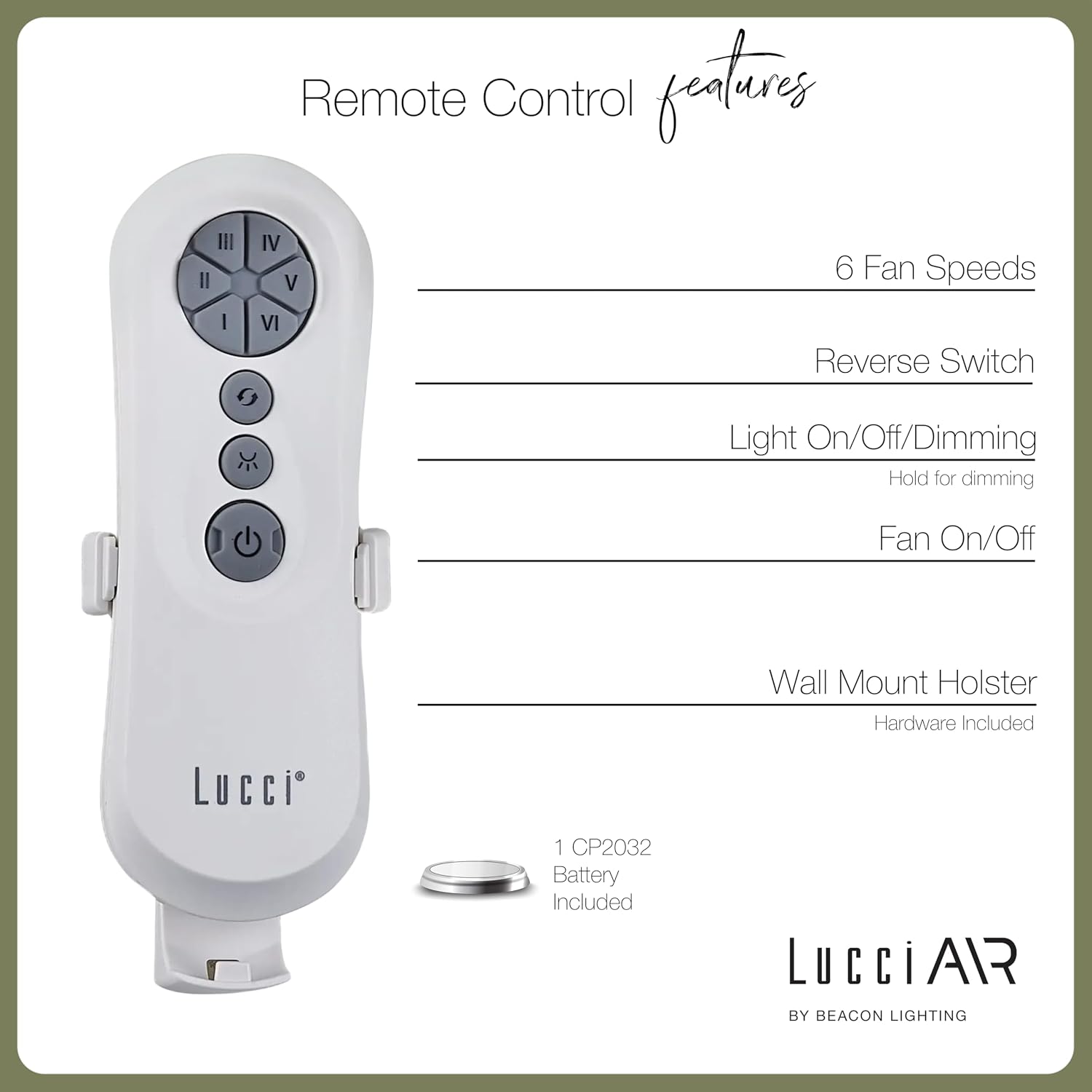
Image: Diagram detailing the features of the Lucci Air remote control, including buttons for 6 fan speeds, reverse switch, light control, and fan power, along with information about the wall mount holster and included battery.
Control WiFi inteligente
For advanced control and smart home integration, download the Bond Home app. The app allows you to control your fan from anywhere, set schedules, and integrate with voice assistants.
- Download the "Bond Home" app from your device's app store.
- Follow the in-app instructions to pair your Lucci Air Whitehaven fan.
- Once paired, you can control fan speed, direction, and lighting (if applicable) directly from your smartphone or smart speaker.
Mantenimiento
El mantenimiento regular garantiza la longevidad y el rendimiento óptimo de su ventilador de techo.
- Limpieza: Quite el polvo periódicamente de las aspas del ventilador y la carcasa del motor con un paño suave.amp cloth. Do not use abrasive cleaners or solvents. The manufacturer recommends "Hand Wash" for care, implying gentle cleaning.
- Inspección de la hoja: Check that all blade screws are tight at least twice a year. Loose blades can cause wobbling and noise.
- Lubricación de motores: The DC motor is typically sealed and does not require lubrication. Refer to the physical manual for specific instructions if unsure.
- Reemplazo de batería remota: Replace the CP2032 battery in the remote control when its range decreases or it stops responding.
Solución de problemas
| Problema | Posible causa | Solución |
|---|---|---|
| El ventilador no arranca | No llega energía al ventilador; conexiones de cables sueltas; batería del control remoto agotada. | Verifique el disyuntor; verifique que todas las conexiones de cables estén seguras; reemplace la batería del control remoto. |
| El ventilador se bambolea | Tornillos de cuchilla sueltos; cuchillas desequilibradas; soporte de montaje suelto. | Apriete todos los tornillos de las cuchillas; asegúrese de que las cuchillas estén equilibradas (puede ser necesario un kit de equilibrio); asegure el soporte de montaje. |
| El control remoto no funciona | Batería agotada; Control remoto no emparejado con el ventilador. | Replace CP2032 battery; Refer to pairing instructions in the physical manual or Bond Home app. |
| El ventilador hace ruido | Tornillos flojos; Zumbido del motor; Aspas golpeando una obstrucción. | Check and tighten all screws; Ensure no obstructions are in the fan's path. A slight motor hum is normal for DC fans. |
| WiFi control not connecting | Incorrect WiFi password; Router too far; Bond Home app issue. | Verify WiFi credentials; Move router closer or use a WiFi extender; Reinstall Bond Home app or contact Bond Home support. |
Presupuesto
| Característica | Detalle |
|---|---|
| Nombre del modelo | Refugio blanco |
| Número de modelo | 21304101 |
| Marca | Lucci Air |
| Dimensiones (D x W x H) | 56" x 56" x 11.8" |
| Longitud de la hoja | 28 pulgadas |
| Número de cuchillas | 3 |
| Material de la hoja | Plástico ABS |
| Color | Negro |
| Fuente de poder | CC (corriente continua) |
| Volumentage | 120 V |
| Quétage | 35 vatios |
| Capacidad de flujo de aire | 7070 pies cúbicos por minuto (CFM) |
| Número de velocidades | 6 |
| Método de control | Remote, Smart WiFi (Bond Home App) |
| Uso en interiores y exteriores | Al aire libre, en interiores |
| Peso del artículo | 15 libras |
| Código Postal | 811769032429 |
Garantía y soporte
The Lucci Air Whitehaven ceiling fan comes with a garantía limitada de por vidaConserve su comprobante de compra para reclamaciones de garantía.
For technical support, troubleshooting assistance beyond this manual, or warranty inquiries, please contact Lucci Air customer service. Contact information can typically be found on the manufacturer's websitio o en el embalaje del producto.
For Bond Home app related issues, please refer to the Bond Home support resources.
Producto adicional Views

Image: Two Lucci Air Whitehaven fans installed on an outdoor patio, demonstrating their suitability for outdoor use and modern aesthetic in an exterior setting.

Image: A Lucci Air Whitehaven fan installed in an indoor dining room, highlighting its sleek design complementing a modern interior space.

Image: The Lucci Air Whitehaven fan positioned in a contemporary living room, illustrating its integration into a comfortable indoor environment.

Imagen: Un lado detallado view of the Lucci Air Whitehaven ceiling fan, emphasizing the slim profile of its blades and motor housing.
Vídeos oficiales de productos
No se encontraron vídeos de vendedores oficiales para este producto en los datos proporcionados.
Ask a question about this manual
Ask about setup, troubleshooting, compatibility, parts, safety, or missing instructions. Manuals+ will review the question and use this page’s manual context to help answer it.