
1. Introducción
This manual provides essential information for the safe and efficient use of your OPPO F21 Pro (5G) smartphone. Please read this manual thoroughly before using your device to ensure optimal performance and longevity.
The OPPO F21 Pro (5G) is a high-performance smartphone featuring a 2.2 GHz Octa-core processor, 8GB of RAM, and 128GB of internal storage, expandable via microSDXC. It operates on Android 12 and is powered by a non-removable 4500 mAh Li-Po battery. Key features include a 6.43-inch AMOLED display, a 64 MP AI Triple Camera system, and 5G connectivity.
2. Configuración del dispositivo
2.1 Contenido del paquete
- OPPO F21 Pro (5G) Smartphone
- Cable USB
- Guía de inicio rápido (puede variar según la región)
- Información de seguridad (puede variar según la región)
2.2 Inserción de tarjetas SIM y tarjetas MicroSD
Your OPPO F21 Pro (5G) supports Dual-SIM functionality and a microSDXC card for expanded storage. The device uses Nano-SIM cards.
- Localice la bandeja de la tarjeta SIM en el costado de su teléfono.
- Inserte la herramienta de expulsión de SIM (si está incluida) en el pequeño orificio al lado de la bandeja y presione suavemente hasta que la bandeja salga.
- Coloque las tarjetas Nano-SIM y/o microSDXC en las ranuras designadas de la bandeja. Asegúrese de que los contactos dorados estén hacia abajo.
- Empuje con cuidado la bandeja hacia el interior del teléfono hasta que quede al ras del costado.
Nota importante sobre compatibilidad de red para compradores de EE. UU.:
Este smartphone no es compatible con redes CDMA, como VERIZON, SPRINT y US CELLULAR. Antes de comprarlo, verifique la compatibilidad con 3G o 4G/LTE con su operador.
2.3 Encendido / Apagado
- Para encender: Mantenga presionado el botón de encendido (ubicado en el lado derecho) hasta que aparezca el logotipo de OPPO.
- Para apagar: Mantenga presionado el botón de Encendido, luego seleccione “Apagar” en las opciones en la pantalla.
- Para reiniciar: Mantenga presionado el botón de Encendido, luego seleccione ‘Reiniciar’ en las opciones.
2.4 Configuración inicial
Upon first power-on, follow the on-screen instructions to complete the initial setup process. This includes selecting your language, connecting to Wi-Fi, setting up your Google account, and configuring security features like Face Recognition.
3. Operar su dispositivo
3.1 Navegación básica
Your OPPO F21 Pro (5G) runs on Android 12, offering an intuitive user interface. Use gestures or navigation buttons (configurable in settings) to move between apps, return to the home screen, and access recent applications.
3.2 Funciones de visualización

The front of the OPPO F21 Pro (5G) features a vibrant AMOLED display with a punch-hole cutout for the front camera.

Un detallado view of the punch-hole front camera, integrated seamlessly into the display.
The device features a 6.43-inch AMOLED display with a resolution of 1080 x 2400 pixels, protected by Schott Xensation glass. This display provides vivid colors and deep blacks for an enhanced viewExperiencia de aprendizaje.
3.3 Uso de la cámara
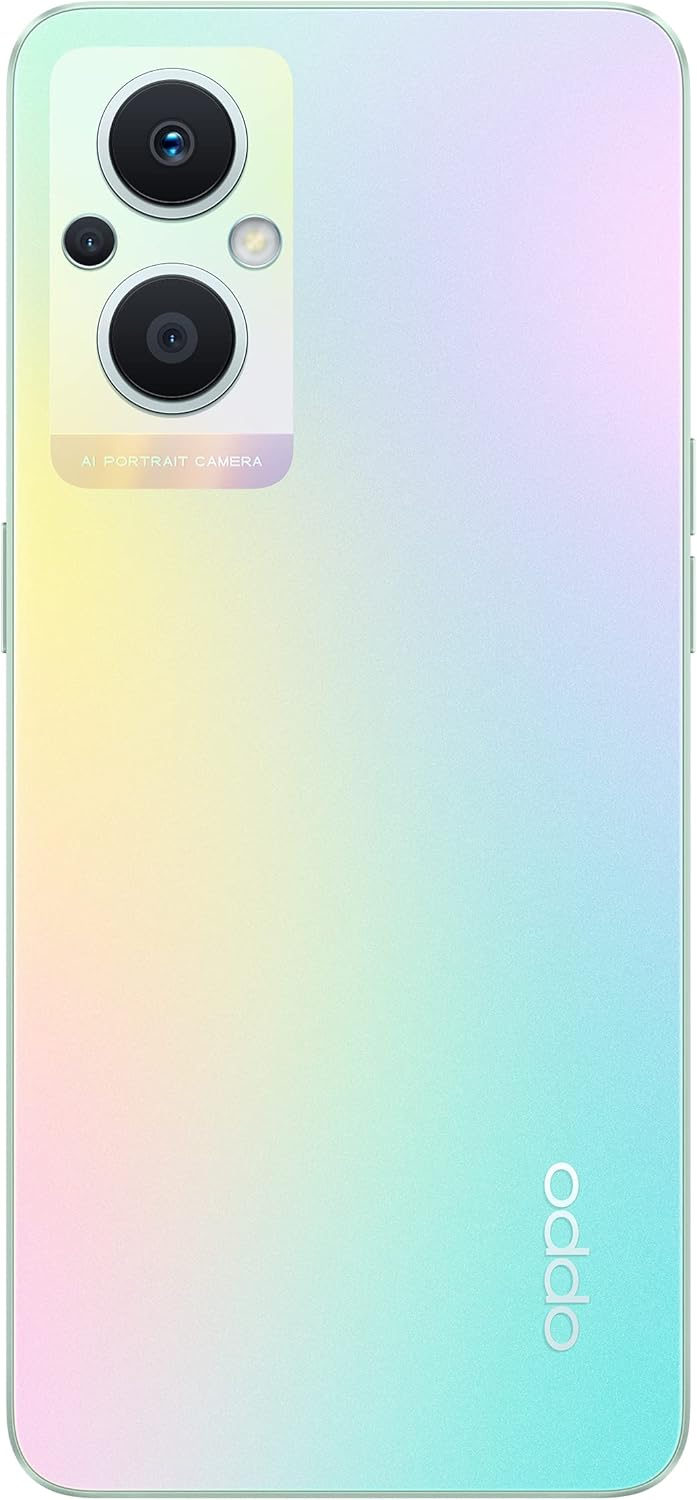
The back of the OPPO F21 Pro (5G) showcases its triple camera system and sleek design.

Un detallado view of the AI Portrait Camera module on the rear, highlighting the lenses and flash.
The OPPO F21 Pro (5G) is equipped with a versatile camera system:
- Cámara trasera: 64 MP (wide, f/1.7, PDAF), 2 MP (macro, f/2.4), 2 MP (depth, f/2.4).
- Cámara frontal: 16 MP (wide, f/2.4).
Access the Camera app from your home screen or app drawer. Select various shooting modes such as Photo, Video, Portrait, Macro, and more. Tap the screen to focus and press the shutter button to capture images or start/stop video recording.
3.4 Conectividad
- Red 5G: Supports N1/ N8/ N28/ N41/ N77/ N78 SA/NSA bands.
- Wifi: Conectarse a redes inalámbricas para acceder a Internet.
- Bluetooth: Combínalo con accesorios inalámbricos como auriculares y altavoces.
- USB tipo C: Para carga y transferencia de datos.
3.5 Funciones de seguridad
The device includes Face Recognition for convenient and secure unlocking. You can set this up in the Security settings menu.
4. Mantenimiento
4.1 Cuidado de la batería
Your OPPO F21 Pro (5G) is equipped with a 4500 mAh Lithium-Polymer battery. To maximize battery life:
- Evite temperaturas extremas.
- Utilice el cargador original y el cable USB proporcionados.
- Evite descargar completamente la batería con frecuencia.
- Optimice la configuración de la batería en el menú de configuración del dispositivo.
4.2 Limpieza del dispositivo
The device is rated as Water Resistant. To clean your phone:
- Apague el dispositivo antes de limpiarlo.
- Utilice un paño suave que no suelte pelusa.
- Evite utilizar productos químicos agresivos, limpiadores abrasivos o aire comprimido.
- No sumerja el dispositivo en agua.
4.3 Actualizaciones de software
Regularly check for and install software updates to ensure your device has the latest features, security patches, and performance improvements. You can check for updates in the device's Settings menu under 'About phone' or 'Software update'.
5. Solución de problemas
If you encounter issues with your OPPO F21 Pro (5G), try the following basic troubleshooting steps:
- El dispositivo no responde: Mantenga presionado el botón de encendido durante aproximadamente 10 a 15 segundos para forzar el reinicio.
- Problemas de red: Ensure your SIM card is correctly inserted. Check your network settings and ensure mobile data or Wi-Fi is enabled. Restart your device.
- Bloqueo de la aplicación: Cierra y vuelve a abrir la aplicación. Borra la caché y los datos de la aplicación en Ajustes > Aplicaciones. Si el problema persiste, desinstálala y vuelve a instalarla.
- La batería se agota rápidamente: Review battery usage in Settings to identify power-hungry apps. Reduce screen brightness, disable unnecessary features (GPS, Bluetooth, Wi-Fi) when not in use.
- Almacenamiento lleno: Eliminar innecesario files, photos, and videos. Move media to a microSD card if installed. Clear app caches.
Para problemas más complejos, consulte el soporte oficial de OPPO. websitio o póngase en contacto con el servicio de atención al cliente.
6. Especificaciones

Un sobreview of the OPPO F21 Pro (5G) showcasing its main features including the 64MP AI Triple Camera, AMOLED screen, and Qualcomm Snapdragon 5G SoC.

The OPPO F21 Pro (5G) in Rainbow Spectrum, displaying both its front and rear aesthetics.
| Característica | Especificación |
|---|---|
| Marca | OPPO |
| Nombre del modelo | OPPO F21 Pro (5G) |
| Sistema operativo | Androide 12.0 |
| Procesador | Qualcomm SM6375 Snapdragon 695 5G (6 nm), ocho núcleos (2 x 2.2 GHz Kryo 660 Gold y 6 x 1.7 GHz Kryo 660 Silver) |
| RAM | 8 GB |
| Almacenamiento interno | 128 GB |
| Almacenamiento expandible | microSDXC |
| Tamaño de pantalla | 6.43 pulgadas (16.33 centímetros) |
| Tipo de pantalla | AMOLED |
| Resolución | 1080 x 2400 píxeles |
| Cámara trasera | 64 MP (gran angular), 2 MP (macro), 2 MP (profundidad) |
| Cámara frontal | 16 MP (gran angular) |
| Capacidad de la batería | 4500 mAh (Lithium-Polymer, non-removable) |
| Tecnología celular | 5G (doble SIM) |
| Tecnología inalámbrica | Wi-Fi, Bluetooth |
| Tipo de conector | USB tipo C |
| Seguridad biométrica | Reconocimiento facial |
| Nivel de resistencia al agua | Resistente al agua |
| Dimensiones | 6.3 x 2.87 x 0.31 pulgadas |
| Peso del artículo | 173 gramos |
7. Información de garantía
Your OPPO F21 Pro (5G) smartphone comes with a Garantía del fabricante de 1 añosEsta garantía cubre defectos de materiales y mano de obra en condiciones normales de uso. Conserve su comprobante de compra para reclamaciones de garantía.
The warranty does not cover damage caused by misuse, accidents, unauthorized modifications, or normal wear and tear. For full terms and conditions, please refer to the warranty card included in your product packaging or visit the official OPPO websitio.
8. Soporte
Para obtener más ayuda, soporte técnico o encontrar centros de servicio, visite el soporte oficial de OPPO. websitio:
You may also find helpful FAQs and community forums on the support websitio.