
Introducción
The RAZEAK Syww 8 is an ultra-customizable wireless gaming mouse designed for high-performance gaming. Featuring a Pixart 3395 optical sensor with up to 26000 DPI, triple-mode connectivity (Wired, 2.4G Wireless, Bluetooth 5.0), and software-programmable functions, this mouse offers versatility and precision. Its unique design allows for replaceable mouse shells, click switches, and click spacers, enabling personalized aesthetics and feel.
Contenido del paquete
- RAZEAK Syww 8 Wireless Gaming Mouse
- Cable Paracord USB-C a USB-A
- Receptor USB de 2.4 GHz
- Manual de usuario
Producto terminadoview
Familiarize yourself with the key components and features of your RAZEAK Syww 8 gaming mouse.

Figura 1: Mouse layout with connection mode switch and pairing buttons. (1) Left Click, (2) Right Click, (3) Scroll Wheel/Middle Click, (9) 2.4G/BT Switch.

Figura 2: The customizable design of the RAZEAK Syww 8, showcasing its replaceable top shell.
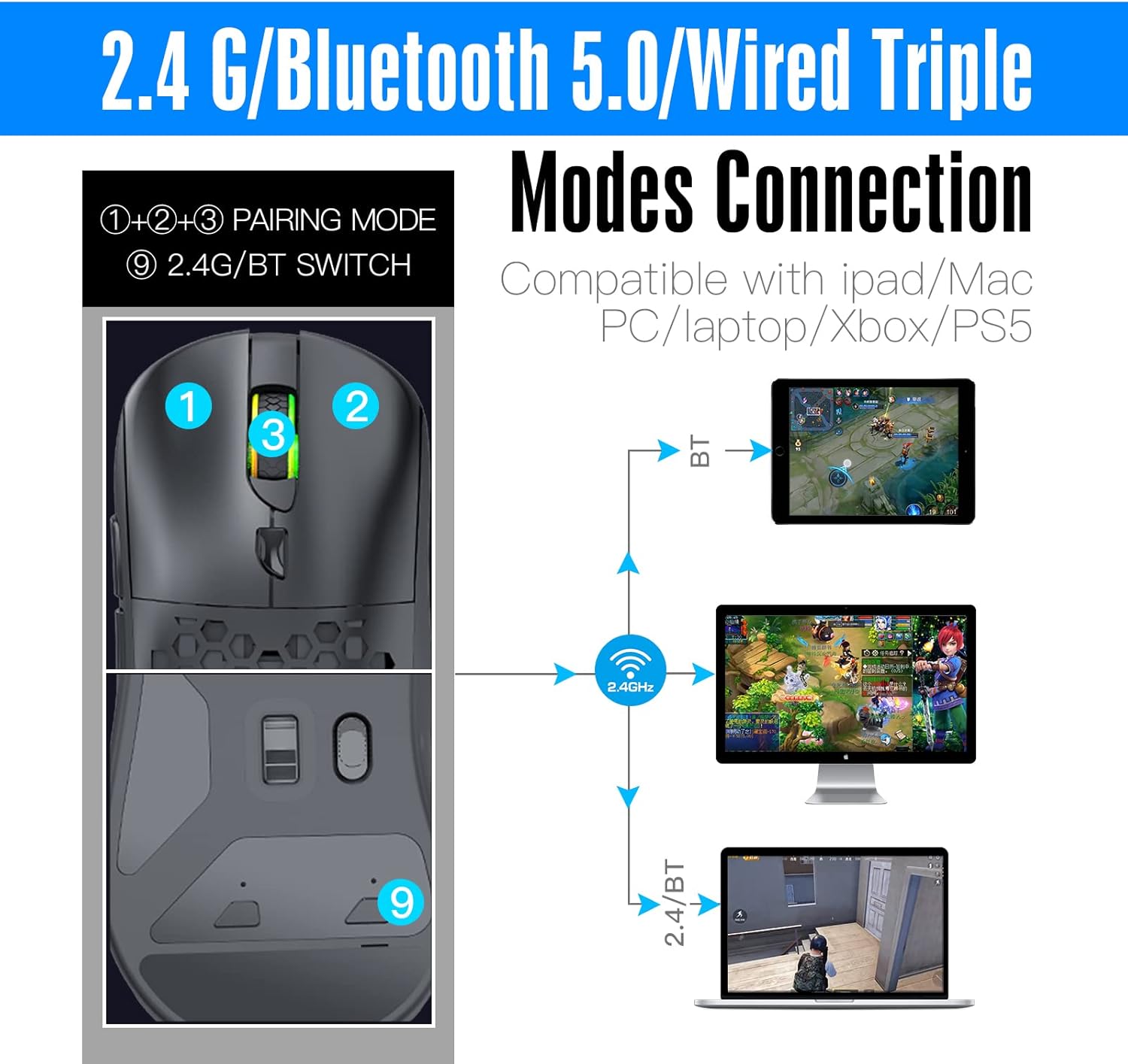
Figura 3: Detallado view of the Pixart 3395 advanced optical sensor, providing high precision tracking.

Figura 4: The light, flexible, and durable USB-C paracord cable for wired connection and charging.

Figura 5: The ergonomic and lightweight design (86g) of the mouse, suitable for various grip styles.
Configuración
Cargar el ratón
Connect the supplied USB-C paracord cable to the front port of the mouse and the other end to a USB-A port on your computer or a USB power adapter. The mouse will charge automatically. A full charge provides approximately 70 hours of continuous use with the backlight off.
Conectando el Mouse
The RAZEAK Syww 8 supports three connection modes: Wired, 2.4G Wireless, and Bluetooth 5.0. Use the switch on the bottom of the mouse (labeled '9' in Figure 1) to select your desired mode.
1. Modo cableado
- Ensure the mouse is connected to your computer via the USB-C paracord cable.
- The mouse will automatically function in wired mode.
2. Modo inalámbrico 2.4G
- Insert the 2.4 GHz USB receiver into an available USB-A port on your computer.
- Deslice el interruptor en la parte inferior del mouse a la posición '2.4G'.
- The mouse should connect automatically. If not, press the pairing button (if available, refer to specific instructions in the full manual) to initiate pairing.
3. Modo Bluetooth 5.0
- Deslice el interruptor en la parte inferior del mouse a la posición 'BT'.
- En su computadora o dispositivo, navegue a la configuración de Bluetooth y habilite Bluetooth.
- The mouse should appear as 'RAZEAK Syww 8' or similar in the list of discoverable devices. Select it to pair.
- If prompted, confirm the pairing code.
Instrucciones de funcionamiento
Ajuste de DPI
The mouse features a Pixart 3395 sensor with adjustable DPI up to 26000. Use the dedicated DPI button (usually located behind the scroll wheel) to cycle through preset DPI levels. The current DPI level may be indicated by an LED color change or through the software.
Personalización de software
For advanced customization, download the official RAZEAK software from the manufacturer's webSitio. El software le permite:
- Program button functions (6 programmable buttons).
- Ajuste la configuración de DPI y cree perfiles personalizadosfiles.
- Configure backlight modes and colors.
- Configurar macros para comandos complejos.
Customizing Mouse Shells and Switches
The Syww 8 is designed for ultra-customization. You can replace the mouse's back cover, click switches, and click spacers to personalize its appearance and tactile feedback. Refer to the full manual or online guides for detailed instructions on how to safely replace these components.
Mantenimiento
Limpieza
Para limpiar el ratón, utilice un paño suave y seco. Para la suciedad difícil, frote ligeramente.ampEnjuague el paño con agua. Evite usar productos químicos agresivos o materiales abrasivos, ya que pueden dañar la superficie o los componentes internos del ratón.
Cuidado de la batería
To prolong battery life, avoid fully discharging the mouse frequently. Store the mouse in a cool, dry place when not in use for extended periods. The integrated 580mAh lithium battery is not user-replaceable.
Solución de problemas
- El ratón no responde: Ensure the mouse is charged. Check the connection mode switch (Wired, 2.4G, BT) is set correctly. For 2.4G, ensure the USB receiver is properly inserted. For Bluetooth, verify pairing in your device's settings. Try connecting via the USB cable to rule out wireless issues.
- Conexión intermitente o con retraso (inalámbrica): Ensure the USB receiver (for 2.4G) is not obstructed and is close to the mouse. Avoid interference from other wireless devices. For Bluetooth, ensure your device's Bluetooth drivers are up to date.
- El software no detecta el mouse: Ensure the mouse is connected and powered on. Download the latest software version from the official RAZEAK website. Temporarily disable any firewall or antivirus software that might be blocking the application.
- La configuración de DPI o de los botones no se guarda: Ensure the software is running with administrator privileges. Save your profiles within the software after making changes.
Presupuesto
| Característica | Detalle |
|---|---|
| Nombre del modelo | Syww 8 |
| Número de modelo | RM-X08 |
| Conectividad | Con cable (USB-C), inalámbrico 2.4G, Bluetooth 5.0 |
| Sensor | Pixart 3395 Optical |
| DPI | Up to 26000 CPI (adjustable) |
| Velocidad de seguimiento | 650 IPS |
| Aceleración | 50G |
| Botones | 6 (programable) |
| Batería | Polímero de litio de 580 mAh |
| Duración de la batería | Aprox. 70 horas (luz de fondo apagada) |
| Peso | 86 gramos |
| Sistema operativo | Compatible with PC (Windows), Mac, iPad, Xbox, PS5 |
| Rango | 10 metros |
Vídeo del producto
Vídeo 1: Una breve demostración muestraasing the RGB lighting effects of the RAZEAK Syww 8 gaming mouse.
Garantía y soporte
RAZEAK offers a 2 año de garantía for the Syww 8 Wireless Gaming Mouse. If you encounter any product-related questions or issues, please contact RAZEAK customer service directly for assistance. Refer to the official RAZEAK webSitio para obtener información de contacto y más recursos de soporte.