
Shargeek STM2E-1
Manual del usuario del cargador portátil delgado Shargeek STORM2
Modelo: STM2E-1
Introducción
This manual provides comprehensive instructions for the safe and efficient use of your Shargeek STORM2 Slim Portable Charger. Please read this manual thoroughly before operating the device and retain it for future reference.
The Shargeek STORM2 Slim is a high-capacity portable power bank featuring a unique transparent design and an IPS display screen. It offers 130W max output with 100W USB-C and 30W USB-A ports, suitable for charging various devices including laptops, tablets, and smartphones.

Image: The Shargeek STORM2 Slim portable charger, showcasing its transparent design that reveals internal components and the included yellow USB-C to USB-C cables.
Características del producto
- Diseño transparente: The see-through casing reveals the internal battery and circuit layout, highlighting the device's engineering.
- IPS Display Screen: A clear screen provides real-time information on battery life, output distribution, temperature, operation hours, and active ports.
- Alta capacidad: 20000mAh battery capacity, capable of multiple charges for various devices.
- Carga rápida: Features a 100W USB-C PD port and a 30W USB-A port, supporting 130W max output for rapid charging.
- Compatibilidad universal: Charges laptops, phones, tablets, and other devices with USB-C or USB ports.

Imagen: Un detalle view of the Shargeek STORM2 Slim's IPS LCD screen, showing various data points such as input/output wattagmi, volumentage, current, battery level, and temperatures.
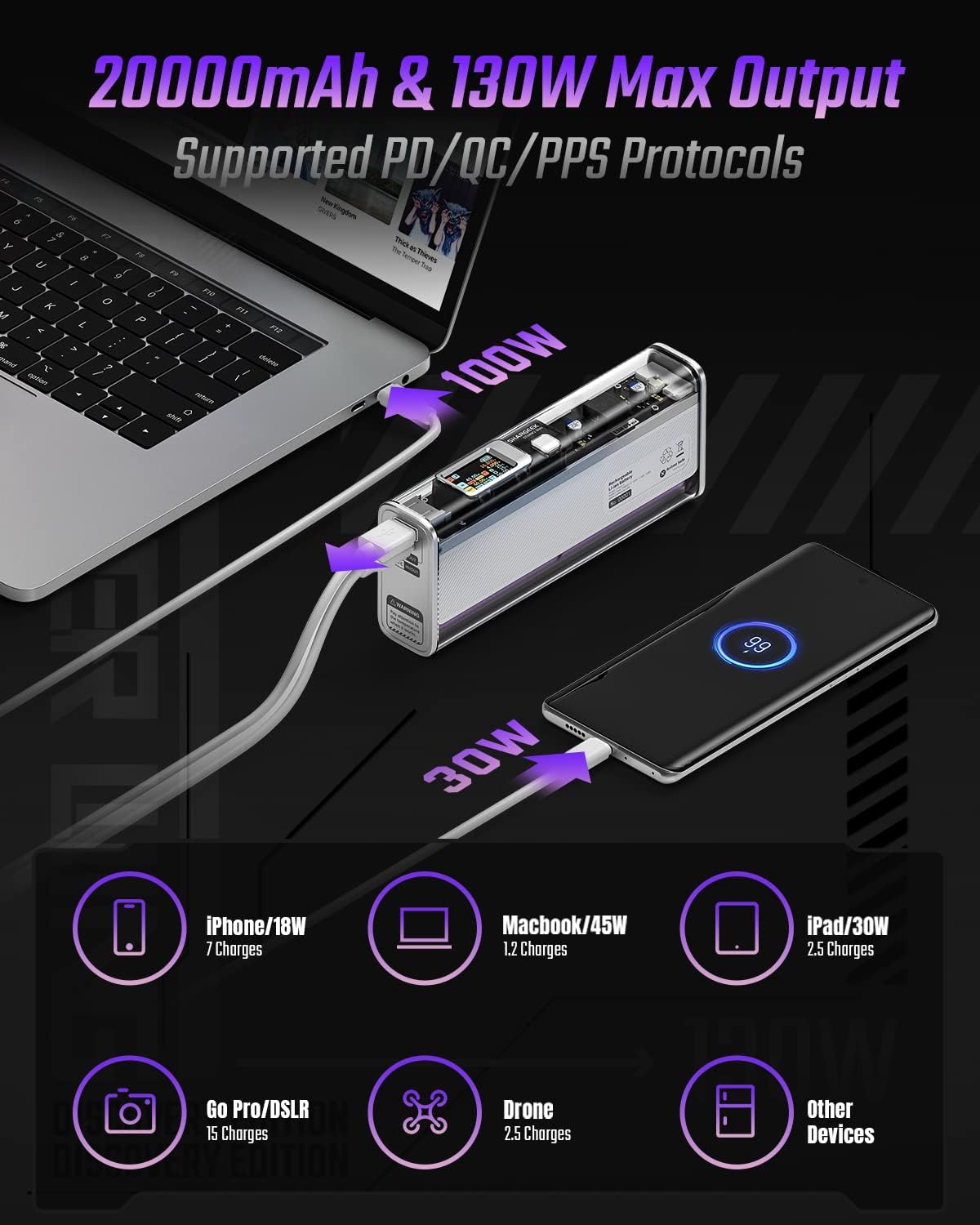
Image: The Shargeek STORM2 Slim connected via USB-C to a laptop for 100W charging and via USB-A to a smartphone for 30W charging, demonstrating its dual-port capability.
Configuración y primer uso
Contenido del paquete:
- Shargeek STORM2 Slim Portable Charger
- Cable USB-C a USB-C
- Manual de usuario (este documento)
Carga inicial:
- Before first use, fully charge your STORM2 Slim.
- Connect the provided USB-C to USB-C cable to the USB-C port on the STORM2 Slim.
- Connect the other end of the cable to a compatible USB-C power adapter (not included) with a minimum of 100W output for fastest charging.
- The IPS screen will display charging status and battery percentage. The device is fully charged when the screen indicates 100%.
- A full recharge typically takes approximately 90 minutes with a 100W power adapter.
Instrucciones de funcionamiento
Dispositivos de carga:
- Identify the appropriate charging cable for your device (USB-C to USB-C or USB-A to device-specific cable).
- Connect one end of the cable to your device and the other end to the corresponding port (USB-C or USB-A) on the STORM2 Slim.
- The IPS screen will automatically activate and display the charging output (watts, volts, amps) for the connected device(s).
- The STORM2 Slim can charge two devices simultaneously using both the USB-C and USB-A ports.
Understanding the IPS Screen:
The IPS screen provides detailed real-time information. Use the physical button on the side of the power bank to navigate through different display modes or access settings.
- Input/Output Dashboard: Shows power input (IN) when charging the power bank and power output (OUT) when charging devices, including wattagmi, volumentage, y corriente para cada puerto.
- Nivel de batería: Muestra el porcentaje de batería restante.tage and a visual icon.
- Volumentage y actual: Detailed readings for the internal battery cells.
- Temperatura: Shows the internal circuit board and battery temperatures.
- Duración: A resettable timer indicating the duration of current operation.
To access menus: Long-press the button. Para navegar: Short-press. Para seleccionar: Long-press.
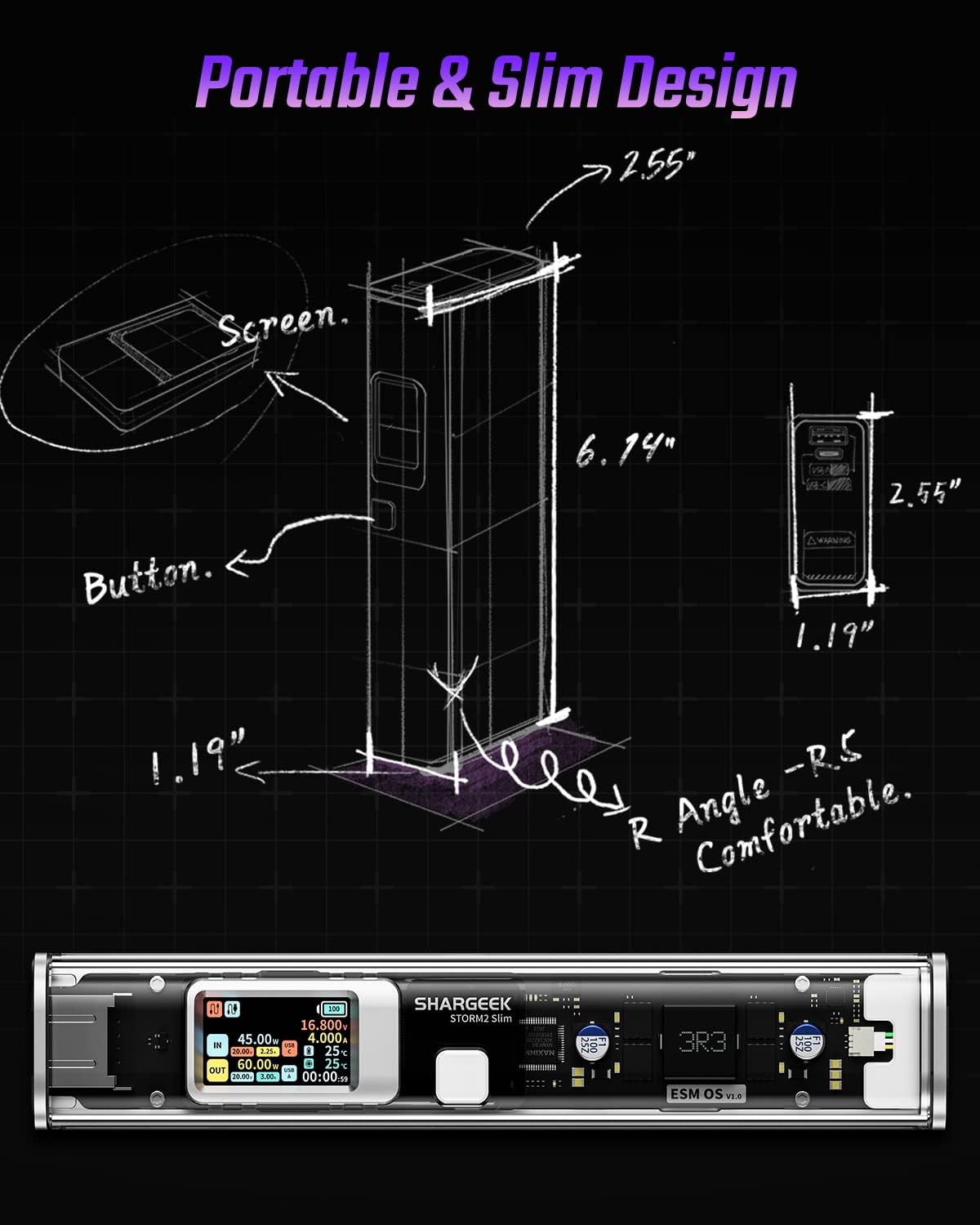
Image: A technical drawing illustrating the dimensions of the Shargeek STORM2 Slim and pointing out the screen and button locations.
Mantenimiento
- Limpieza: Utilice un paño suave y seco para limpiar el exterior de la batería externa. Evite utilizar productos químicos agresivos o materiales abrasivos.
- Almacenamiento: Guarde el dispositivo en un lugar fresco y seco, alejado de la luz solar directa, temperaturas extremas y alta humedad.
- Cuidado de la batería: Para prolongar la vida útil de la batería, evite descargarla completamente con frecuencia. Recárguela cuando el nivel de batería sea bajo. Si la va a guardar durante períodos prolongados, cárguela aproximadamente al 50-70 % cada 3-6 meses.
- Evite las gotas: While designed with an aluminum alloy frame for durability, avoid dropping the device as it may damage internal components or the transparent casing.
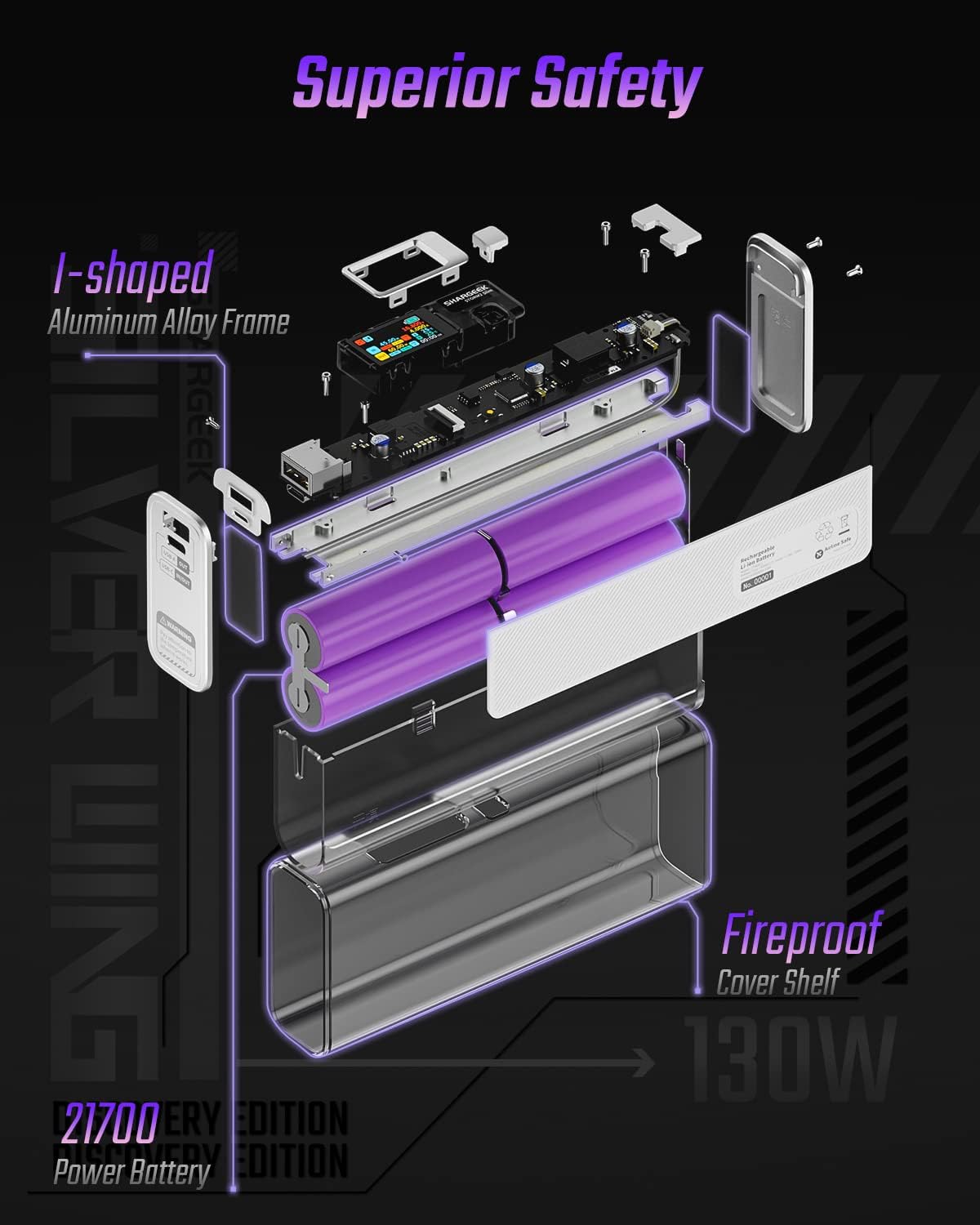
Image: An exploded diagram of the Shargeek STORM2 Slim, illustrating its internal structure including the I-shaped aluminum alloy frame, fireproof cover shelf, and 21700 power batteries, highlighting its robust construction.
Solución de problemas
| Problema | Posible causa | Solución |
|---|---|---|
| El dispositivo no se carga desde el banco de energía. | Low power bank battery; incompatible cable; device not properly connected; device requires more power than available. | Recharge the STORM2 Slim. Ensure cable is fully inserted and compatible. Check device power requirements against power bank output. Try a different cable or port. |
| El banco de energía no se carga. | Cable de carga o adaptador defectuoso; puerto del banco de energía dañado. | Try a different USB-C cable and power adapter. Ensure the adapter meets the recommended power output (e.g., 100W). If problem persists, contact support. |
| IPS screen is blank or unresponsive. | El banco de energía está apagado; falla de software temporal. | Press the button to activate the screen. If unresponsive, try connecting a device to charge or connecting the power bank to a charger to see if it activates. If problem persists, contact support. |
| Carga lenta. | Cable no compatible con carga rápida; dispositivo no compatible con carga rápida; varios dispositivos conectados. | Ensure you are using a high-quality USB-C PD cable. Verify your device supports fast charging. Charging multiple devices simultaneously may reduce individual charging speeds. |
Presupuesto
- Número de modelo: STM2E-1
- Capacidad de la batería: 20000 mAh
- Salida máxima: 130 W
- Salida USB-C: Entrega de potencia (PD) de hasta 100 W
- Salida USB-A: Hasta 30W
- Aporte: USB-C (up to 100W PD)
- Mostrar: Pantalla IPS
- Dimensiones: 3 x 6.5 x 15.59 cm (aproximadamente 1.18 x 2.56 x 6.14 pulgadas)
- Peso: Aproximadamente 689 g (1.52 libras)
- Tipo de batería: Iones de litio
Garantía y soporte
Información de garantía:
Shargeek products are covered by a limited warranty against defects in materials and workmanship. Please refer to the warranty card included with your purchase or visit the official Shargeek webSitio para conocer los términos y condiciones detallados de la garantía.
Atención al cliente:
For technical assistance, troubleshooting, or warranty claims, please contact Shargeek customer support through their official websitio o la información de contacto proporcionada en el embalaje de su producto.
Official Shargeek Store Link: Shargeek Official Store
Información de seguridad
- No exponga el dispositivo al agua, la humedad o temperaturas extremas.
- No desmonte, modifique ni intente reparar el dispositivo usted mismo. Esto anulará la garantía y podría causar daños o lesiones.
- Mantener fuera del alcance de los niños.
- Utilice únicamente cables de carga y adaptadores certificados y compatibles.
- Evite dejar caer o someter el dispositivo a impactos fuertes.
- Dispose of the device responsibly according to local regulations for electronic waste.
Documentos relacionados - STM2E-1
 |
Manual del usuario del banco de energía portátil SHARGEEK de 130 W Explore the SHARGEEK 130W Portable Power Bank (Model STM2E-1) with this comprehensive user manual. Learn about its specifications, essential safety notes, interface operation, and warning indicators for optimal use. |
 |
Manual del usuario del banco de energía portátil Shargeek de 130 W Manual de usuario del banco de energía portátil Shargeek 130W (modelo: STM2E-1), que detalla sus especificaciones, notas de seguridad, instrucciones de funcionamiento y explicaciones de la interfaz. |
 |
Manual del usuario del banco de energía portátil SHARGEEK de 100 W Manual de usuario del banco de energía portátil SHARGEEK 100W (modelo STM2-2), que detalla especificaciones, notas de seguridad, información de advertencia y guía operativa para sus características y funciones. |
 |
Manual del usuario del cargador de viaje SHARGEEK S140 140W GaN Manual de usuario completo del cargador de viaje GaN SHARGEEK S140 140W, que detalla especificaciones, información operativa, pautas de seguridad, soporte y declaración de sustancias peligrosas. |
 |
Manual del usuario de la batería externa UGREEN 20000 mAh PB723, 130 W Manual de usuario completo del banco de energía UGREEN 20000mAh PB723, con carga USB-C de 130 W, especificaciones, descripción del productoview, información de la pantalla, operaciones de los botones, solución de problemas, instrucciones de carga, distribución de energía, pautas de seguridad, protección del medio ambiente y detalles de la batería. |
 |
Cargador portátil UGREEN 20000mAh 130W PB721 Especificaciones detalladas y guía de uso del banco de energía portátil UGREEN 20000mAh 130W (PB721), con múltiples puertos USB y carga de alta velocidad. |
Ask a question about this manual
Ask about setup, troubleshooting, compatibility, parts, safety, or missing instructions. Manuals+ will review the question and use this page’s manual context to help answer it.