
Ysametp M10
Manual de usuario del miniproyector Ysametp M10
1080P Full HD Supported Portable Video Projector
Introducción
Gracias por la compraasing the Ysametp Mini Projector M10. This portable video projector is designed to provide a high-quality home theater experience with its 1080P Full HD support and 10000 Lux LED light source. It features dual built-in stereo speakers with an SRS sound system for immersive audio. Its compact size and multi-connection capabilities make it ideal for various entertainment and presentation needs. Please read this manual thoroughly before operating the projector to ensure proper use and maintenance.
Información de seguridad
Para garantizar un funcionamiento seguro y prolongar la vida útil de su proyector, tenga en cuenta las siguientes precauciones de seguridad:
- No obstruya las aberturas de ventilación. Asegúrese de que haya suficiente flujo de aire alrededor del proyector para evitar el sobrecalentamiento.
- No exponga el proyector a la lluvia ni a la humedad para evitar descargas eléctricas o incendios.
- No abra el proyector casing. Deje todas las reparaciones a personal de servicio calificado.
- Utilice únicamente el adaptador de corriente suministrado con el proyector.
- Coloque el proyector sobre una superficie plana y estable para evitar que se caiga.
- Evite la exposición directa de los ojos a la lente del proyector cuando elamp Está encendido.
- Desconecte el proyector de la toma de corriente durante tormentas eléctricas o cuando no lo utilice durante períodos prolongados.
Contenido del paquete
Por favor, compruebe el contenido del paquete al desembalarlo:
- 1 x Ysametp Mini Projector M10
- 1 cable HDMI
- 1 x 3-in-1 AV Line
- 1 x Cable de Alimentación
- 1 x Trípode
- 1 x Drawstring Backpack
- 1 x Control remoto (pilas no incluidas)
- 1 x Manual de usuario

Producto terminadoview
Familiarícese con los componentes y los puertos de conexión del proyector.

Puertos de entrada/salida:
- Puerto HDMI: Conéctese a dispositivos como TV Sticks, computadoras portátiles y consolas de juegos.
- Puerto USB: Conecte unidades USB para reproducción multimedia.
- Ranura para tarjetas TF: Inserte tarjetas TF para reproducción multimedia.
- Puerto VGA: Connect to computers or laptops.
- Puerto AV: Connect to older devices like DVD players using the 3-in-1 AV cable.
- Conector de audio de 3.5 mm: Conecte auriculares o altavoces externos.
Configuración
1. Ubicación y tamaño de la pantalla
Position the projector on a flat, stable surface. The projection size can range from 32 inches to 200 inches, with an optimal projection distance between 3.6 feet and 16.4 feet.

2. Conexión de alimentación
Connect the supplied power cord to the projector's power input and then plug it into a power outlet.
3. Enfoque y ajuste trapezoidal
After powering on, adjust the focus and keystone knobs located on top of the projector to achieve a clear and rectangular image. The focus ring adjusts image sharpness, while the keystone correction corrects trapezoidal distortion if the projector is not perfectly perpendicular to the screen.
Instrucciones de funcionamiento
1. Encendido/Apagado
- Encender: Pulse el botón de encendido del proyector o del control remoto.
- Apagar: Presione el botón de encendido nuevamente. El proyector se apagará.
2. Selección de fuente de entrada
Use the "Source" button on the remote control or the projector's control panel to select the desired input source (HDMI, USB, TF, VGA, AV).
3. Conexión de dispositivos
- HDMI: Connect an HDMI cable from your device (e.g., TV Stick, laptop, game console) to the projector's HDMI port.
- Tarjeta USB/TF: Insert a USB drive or TF card into the respective port. The projector will automatically detect the media or prompt you to select it.
- VGA: Connect a VGA cable from your PC/laptop to the projector's VGA port.
- AV: Use the provided 3-in-1 AV cable to connect to devices with AV output.
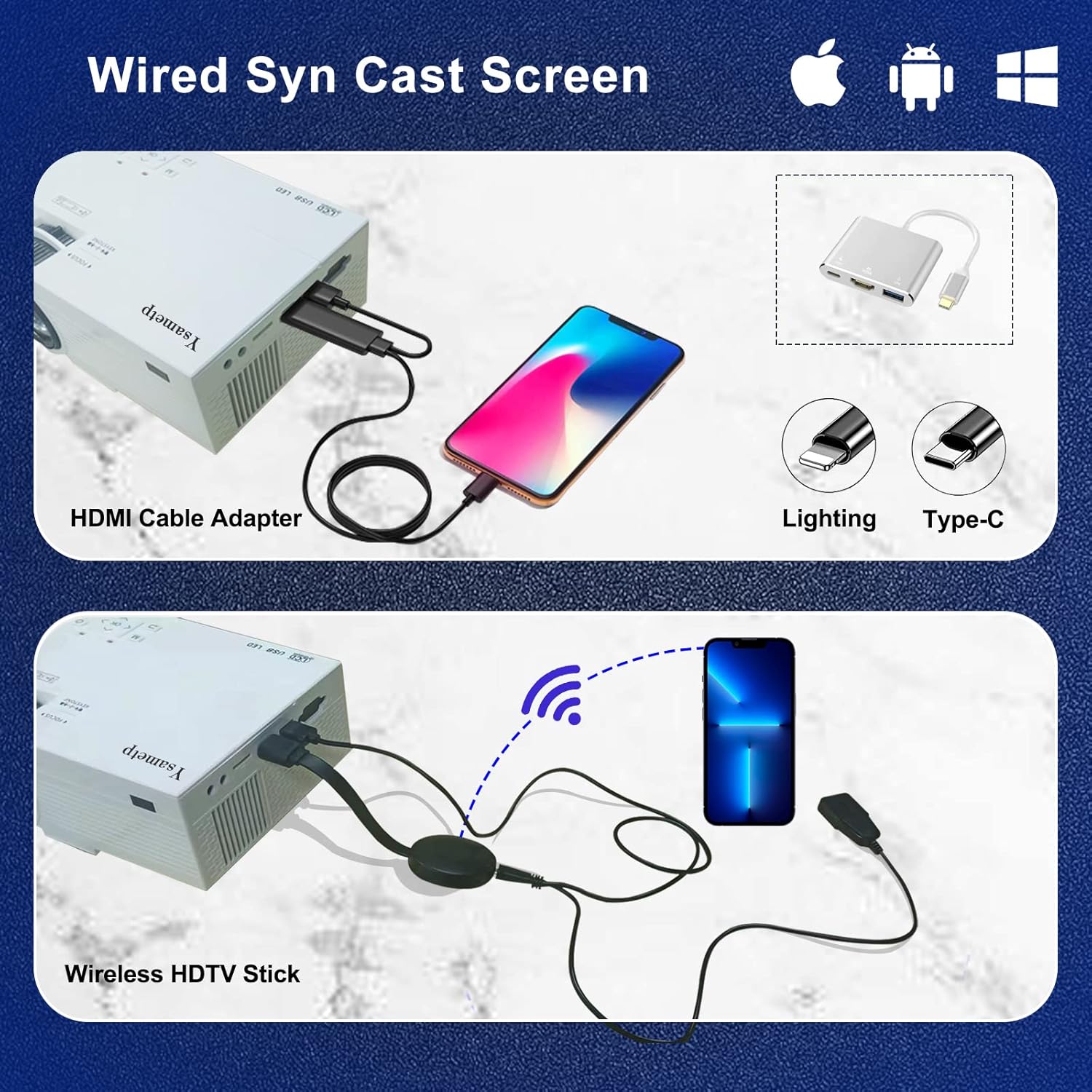
4. Wired Screen Mirroring (for Smartphones)
To mirror your smartphone screen, you will need an HDMI adapter (e.g., Lightning to HDMI for iPhone, USB-C to HDMI for Android) or a Miracast dongle/TV stick (like Roku, Fire TV Stick).

5 Salida de audio
The projector has dual built-in stereo speakers. For external audio, connect headphones or external speakers to the 3.5mm audio jack.

Mantenimiento
1. Limpieza
- Lente: Utilice un paño suave y sin pelusa, especialmente diseñado para lentes ópticas. No utilice limpiadores abrasivos.
- Casing: Limpie el exterior del proyector con un paño suave y seco. No utilice limpiadores líquidos ni en aerosol.
- Ventilación: Regularly check and clean the ventilation openings to prevent dust buildup, which can affect cooling performance.
2. Almacenamiento
When not in use, store the projector in a cool, dry place, away from direct sunlight and extreme temperatures. Use the provided drawstring backpack for protection during storage or transport.
3. LED Lifespan
The built-in LED light source is designed to support up to 55,000 hours of use, providing long-lasting performance.
Solución de problemas
| Problema | Posible causa / solución |
|---|---|
| No hay imagen en la pantalla. |
|
| La imagen está borrosa. |
|
| La imagen es trapezoidal. |
|
| No hay sonido. |
|
| El control remoto no funciona. |
|
Presupuesto
| Característica | Detalle |
|---|---|
| Marca | ysametp |
| Modelo | M10 |
| Tecnología de visualización | Pantalla LCD |
| Resolución nativa | 1920 x 1080 Pixels (Full HD Supported) |
| Brillo de la imagen | 11000 lux |
| Relación de contraste de imagen | 10000:1 |
| Relación de aspecto | 4:3 |
| Tamaño de proyección | 32 - 200 pulgadas |
| Distancia de proyección | 3.6 pies - 16.4 pies |
| Vida útil del LED | 55,000 horas |
| Nivel de ruido | 31 dB |
| Quétage | 60 vatios |
| Interfaz de hardware | VGA, USB, HDMI, 3.5mm Audio, TF Card |
| Dimensiones (L x An x Al) | 23.88 x 15.49 x 8.13 cm |
| Peso | 975.22 g (aprox. 2.15 libra) |
Garantía y soporte
Ysametp provides a Garantía del producto por 3 años for the Mini Projector M10.
If you encounter any problems or have questions regarding your projector, please do not hesitate to contact our customer support. Refer to the contact information provided on the product packaging or the official Ysametp webSitio para obtener ayuda.
Ask a question about this manual
Ask about setup, troubleshooting, compatibility, parts, safety, or missing instructions. Manuals+ will review the question and use this page’s manual context to help answer it.