
1. Producto terminadoview
The DEWIN SVP-916 is an intelligent single-phase adjustable voltage protector designed to safeguard electrical equipment from damage caused by overvoltage, bajo volumentage, or overcurrent conditions. It is suitable for single-phase AC 230V, 50/60Hz power distribution lines in residential and industrial settings. This device features DIN rail installation and automatic power restoration once voltage conditions return to normal.

Figura 1: Frente view of the DEWIN SVP-916 Adjustable Voltage Protector, showing the digital display for voltage and current, and control buttons.
2. Información y advertencias de seguridad
Please read and understand all safety instructions before installation and operation to prevent electric shock, injury, or damage to the device and connected equipment.
- The line conductor must meet the relevant standard current value. The load current must not exceed the maximum protection current value of the protector.
- The neutral line (N) must be connected correctly and securely. The neutral line of the protector is directly connected and does not have a disconnection function.
- After the product is powered on, avoid touching live parts to prevent electric shock.
- This protector does not provide isolation or short-circuit protection. An upstream miniature circuit breaker (MCB) must be installed to provide isolation and short-circuit protection. Disconnect the upstream circuit breaker when performing maintenance. Failure to use an MCB means the short-circuit current cannot be interrupted if a short-circuit fault occurs at the input or output of the protector.
- Due to the auto-recovery function, if overcurrent protection is triggered, immediately remove the load appliance and inspect the circuit. Otherwise, the protector may frequently cycle power to the load, potentially damaging both the appliance and the protector.
- If an undervoltage interruption lasts longer than 0.3 seconds, the protector will not automatically reset after power failure.
- If overcurrent protection is triggered more than 5 times within a specified period, the protector will lock and will not automatically restore power. You must manually press the "SET" button to unlock and restore power. This feature prevents continuous damage from persistent overcurrent conditions.
3. Características del producto
- Volumen ajustabletagy Protección: Provides configurable overvoltage y subvoltage protection thresholds.
- Protección contra la sobretensión: Detects and disconnects power during overcurrent conditions.
- Recuperación automática: Automatically restores power when voltage and current conditions return to normal operating parameters.
- Pantalla digital: Clear digital display shows real-time voltage y valores actuales.
- Bajo consumo de energía: Efficient operation with power consumption of ≤2W.
- Diseño duradero: Long mechanical life of ≥4000 times.
- Instalación en riel DIN: Designed for easy mounting on a standard DIN rail.
4. Especificaciones
| Parámetro | Valor |
|---|---|
| Marca | DEWIN |
| Modelo | SVP-916 |
| Corriente nominal | 63 Ampantes de |
| Volumentage | 230 Volt AC |
| Frecuencia | 50/60 Hz |
| Tipo de montaje | Carril DIN |
| Dimensiones del producto (Pr. x An. x Al.) | 6P x 8.1l x 6H cm (approx. 60mm x 81mm x 60mm) |
| Consumo de energía | ≤2 W |
| Vida útil de la maquinaria eléctrica | ≥4000 veces |
5. Instalación y configuración
The DEWIN SVP-916 is designed for DIN rail mounting within an electrical distribution box. Ensure all power is disconnected before beginning installation.
- Montaje: Securely attach the protector to a standard 35mm DIN rail in your electrical panel.
- Comprobación previa a la instalación: Ensure an appropriate miniature circuit breaker (MCB) is installed upstream of the voltage protector for isolation and short-circuit protection.
- Alambrado: Connect the input (IN) and output (OUT) terminals as shown in the wiring diagram. The Line (L) and Neutral (N) connections must be correct. The neutral line of the protector is a direct pass-through.

Figura 2: detallada view of the protector with labeled input (IN) and output (OUT) terminals, digital display, and control buttons.
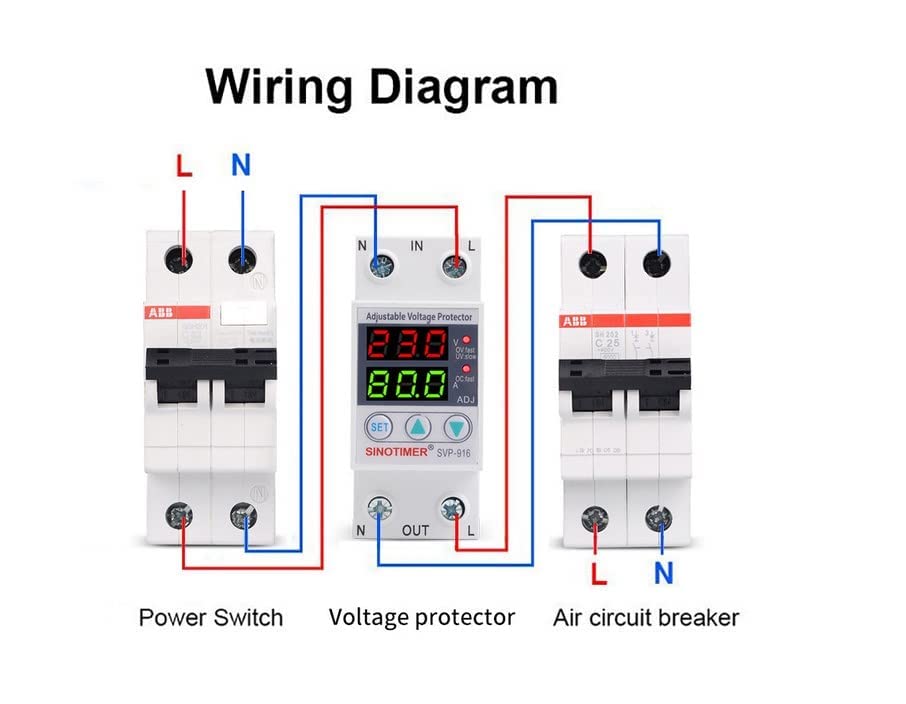
Figura 3: Diagrama de cableado que ilustra la conexión del vol.tage protector between a power switch and an air circuit breaker, showing Line (L) and Neutral (N) connections.
6. Instrucciones de funcionamiento
Once installed and powered on, the protector will display real-time voltage and current. The device operates automatically to protect connected loads.
6.1. Indicadores de visualización
- The upper digital display shows the current voltagmi (V).
- The lower digital display shows the current load current (A).
- LED indicators (OV.fast, UV.slow, OC.fast) illuminate to indicate specific protection events (Overvoltage fast, Undervoltage slow, Overcurrent fast).
6.2. Configuración de parámetros
To adjust protection thresholds:
- Presione el COLOCAR button to enter setting mode. The parameter to be adjusted will flash.
- Utilice el Arriba (↑) y Abajo (↓) botones para cambiar el valor.
- Prensa COLOCAR again to confirm the setting and move to the next parameter, or wait a few seconds for the device to automatically save and exit setting mode.
6.3. Automatic Recovery and Manual Reset
- The protector will automatically restore power when voltage and current conditions return to safe levels after a protection event.
- If an overcurrent event occurs more than 5 times within a short period, the protector will enter a locked state to prevent damage. In this state, power will not be restored automatically. You must manually press the COLOCAR button to clear the lock and restore power. Before doing so, identify and resolve the cause of the persistent overcurrent.
7. Mantenimiento
The DEWIN SVP-916 is designed for minimal maintenance. However, periodic checks are recommended:
- Inspección visual: Periodically check the device for any signs of physical damage, loose connections, or discoloration.
- Limpieza: Ensure the ventilation slots are free from dust and debris to maintain proper heat dissipation. Use a dry, soft cloth for cleaning. Do not use liquid cleaners.
- Integridad de la conexión: Verifique que todas las conexiones de cables permanezcan firmes y seguras.
- Prueba de funcionalidad: If possible and safe to do so, periodically test the protection functions by simulating an overvoltage o undervoltage condition (e.g., using a variable power supply) to ensure the device responds correctly.
Always disconnect power to the circuit before performing any maintenance or inspection.
8. Solución de problemas
If the protector is not functioning as expected, consider the following:
- Sin energía/pantalla apagada:
- Check the upstream circuit breaker to ensure it is not tripped.
- Verify input wiring (Line and Neutral) is correct and secure.
- Ensure the power supply is active.
- Tropiezos frecuentes (sobrevol.)tage/Undervoltagmi):
- Check the incoming power supply for stability.
- Review the set overvoltage/bajo volumentage thresholds. Adjust if necessary, ensuring they are appropriate for your equipment and local power grid.
- Frequent Tripping (Overcurrent) or Locked State:
- Immediately disconnect the load and inspect the connected electrical appliance for faults or excessive current draw.
- Compruebe si hay cortocircuitos en el cableado de carga.
- If the protector is in a locked state (after 5 overcurrent events), manually press the COLOCAR button to reset after resolving the underlying issue.
- Ensure the load current does not exceed the protector's rated current (63A).
- Lecturas incorrectas:
- Verify that the wiring connections are tight and correct.
- If readings appear consistently inaccurate, consult a qualified electrician.
Para problemas que no se resuelvan con estos pasos, comuníquese con atención al cliente.
9. Garantía y soporte
DEWIN products are manufactured to high-quality standards. This product comes with a standard manufacturer's warranty against defects in materials and workmanship. Please refer to your purchase documentation for specific warranty terms and duration.
For technical assistance, troubleshooting, or warranty claims, please contact DEWIN customer support through your retailer or the official DEWIN website. When contacting support, please have your product model (SVP-916) and purchase information ready.