
Introducción
This manual provides detailed instructions for the safe installation, operation, and maintenance of your bimar Wi-Fi Ceiling Fan, Model 1 (Ø 132). Please read this manual thoroughly before using the product and retain it for future reference.
Uso previsto: This high-performance ceiling fan is designed for ventilation in indoor domestic environments. Any other use is considered improper and potentially hazardous. The manufacturer cannot be held responsible for any damages resulting from improper use or repairs performed by unqualified personnel.
Instrucciones de seguridad importantes
Para reducir el riesgo de incendio, descarga eléctrica o lesiones a personas, tenga en cuenta lo siguiente:
- Lea todas las instrucciones antes de instalar el ventilador.
- La instalación debe ser realizada por un electricista calificado de acuerdo con todos los códigos eléctricos locales y nacionales.
- Asegúrese de que el lugar de instalación pueda soportar el peso del ventilador (aproximadamente 6.2 kg).
- Desconecte siempre la alimentación del disyuntor principal antes de realizar cualquier instalación o mantenimiento.
- No opere el ventilador con un cable de alimentación o enchufe dañado.
- Keep hands, hair, and clothing away from moving blades.
- No inserte ningún objeto en las aspas del ventilador mientras esté en funcionamiento.
- Este aparato no está diseñado para ser utilizado por personas (incluidos niños) con capacidades físicas, sensoriales o mentales reducidas, o con falta de experiencia y conocimientos, a menos que hayan recibido supervisión o instrucciones sobre el uso del aparato por parte de una persona responsable de su seguridad.
- Se debe supervisar a los niños para garantizar que no jueguen con el aparato.
¿Qué hay en la caja?
Your bimar Wi-Fi Ceiling Fan package includes the following components:
- bimar Wi-Fi Ceiling Fan unit (with 3 blades)
- Mando a distancia
- Mounting hardware (screws, brackets, etc.)
- Manual de instrucciones (este documento)

Image: The bimar Wi-Fi Ceiling Fan, featuring three light-colored wooden blades and a brushed metal motor housing and downrod.
Configuración e instalación
1. Instalación del ventilador
Se recomienda encarecidamente una instalación profesional realizada por un electricista calificado. Ensure the ceiling structure can safely support the fan's weight and that all wiring complies with local electrical codes.
- Prepare la ubicación de montaje: Turn off power at the circuit breaker. Securely attach the mounting bracket to a ceiling joist or a fan-rated outlet box.
- Ensamblar la varilla y el motor: Conecte la varilla descendente a la carcasa del motor del ventilador.
- Cuelga el ventilador: Levante con cuidado el conjunto del ventilador y cuélguelo del soporte de montaje.
- Conecte el ventilador: Connect the electrical wires (live, neutral, ground) from the ceiling to the fan's wiring, following the wiring diagram provided in the separate installation guide (if applicable).
- Coloque las cuchillas: Securely fasten the three blades to the motor housing.
- Asegure el dosel: Raise the canopy to cover the wiring and mounting bracket, securing it in place.

Imagen: Lateral view of the bimar ceiling fan, illustrating the angle of the light wood blades and the connection to the downrod.
2. Conexión Wi-Fi y de la aplicación
The bimar Wi-Fi Ceiling Fan is compatible with the Bimar Live Smart app for advanced control and scheduling.
- Descargar la aplicación: Buscar "Bimar Live Smart" in your smartphone's app store (iOS or Android) and install it.
- Crear una cuenta: Abra la aplicación y siga las instrucciones en pantalla para crear una nueva cuenta de usuario o iniciar sesión si ya tiene una.
- Agregar dispositivo: Power on the ceiling fan. In the Bimar Live Smart app, tap "Add Device" or the "+" icon. Select "Ceiling Fan" or the appropriate device type.
- Conectarse a Wi-Fi: Follow the app's instructions to put the fan into pairing mode (usually by pressing a button on the fan or remote for a few seconds). Connect the fan to your home 2.4GHz Wi-Fi network.
- Nombra el dispositivo: Once connected, you can name your fan for easy identification within the app.

Image: A modern living room featuring the bimar ceiling fan installed, with a smartphone displaying the Bimar Live Smart app interface, indicating Wi-Fi and voice control capabilities.
Instrucciones de funcionamiento
Your bimar Wi-Fi Ceiling Fan offers multiple control options for convenience.
1. Operación de control remoto
The included remote control allows direct access to all fan functions.
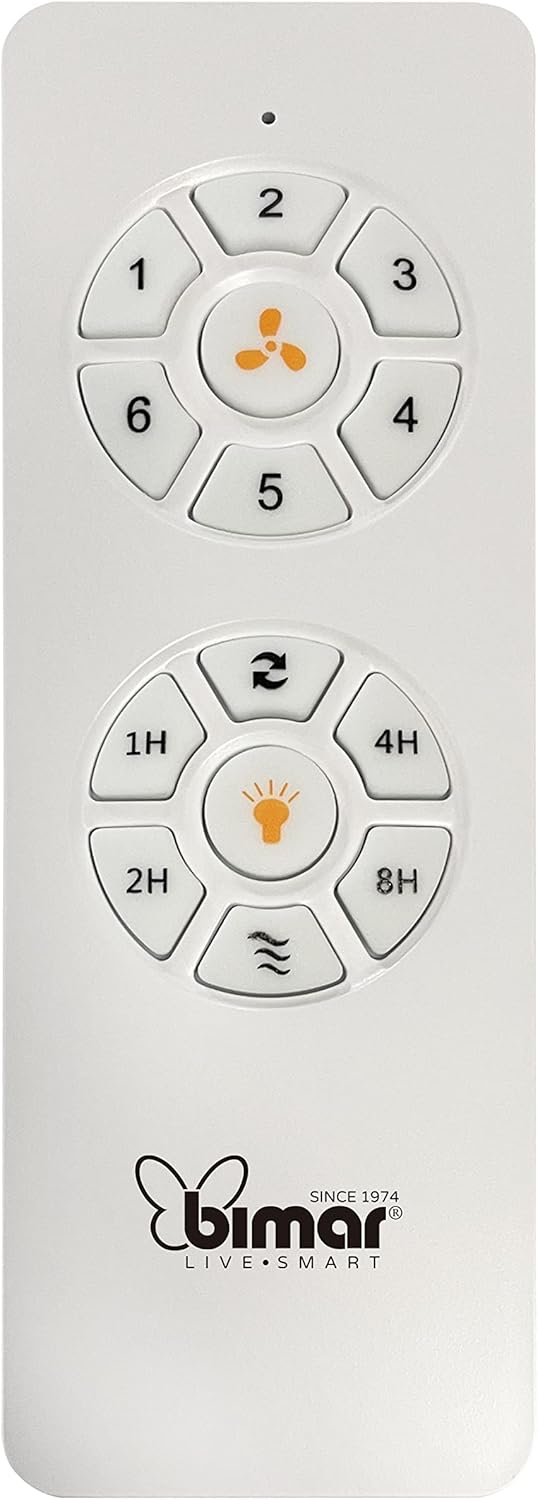
Image: The white remote control for the bimar ceiling fan, showing buttons for fan speed (1-6), fan on/off, timer (1H, 2H, 4H, 8H), mode selection, and reverse function.
- Encendido/apagado: Presione el botón del ícono del ventilador para encender o apagar el ventilador.
- Ajuste de velocidad: Use buttons 1-6 to select one of the six available fan speeds.
- Función de temporizador: Press 1H, 2H, 4H, or 8H to set the fan to automatically turn off after the selected duration.
- Selección de modo: Use the mode button (often represented by waves or arrows) to cycle through Normal, Natural, Sleep, and Breeze modes.
- Modo verano/invierno: The reverse button (often two arrows forming a circle) changes the blade rotation direction.
2. App Control (Bimar Live Smart)
Once connected to the Bimar Live Smart app, you can access enhanced features:
- Operación remota: Control all fan functions from anywhere with an internet connection.
- Programación: Program daily and weekly on/off times for automated operation.
- Minutero: Adjust the timer from 1 to 8 hours.
- Mode and Speed Selection: Easily switch between the 6 speeds and 4 operating modes.
3. Control por voz
The bimar Wi-Fi Ceiling Fan is compatible with popular voice assistants like Amazon Alexa and Google Assistant. After connecting the fan to the Bimar Live Smart app, link your Bimar account to your voice assistant app (e.g., Alexa app or Google Home app).
Example comandos de voz:
- "Alexa, turn on the ceiling fan."
- "Hey Google, set ceiling fan speed to 3."
- "Alexa, turn off the ceiling fan in 1 hour."
4. Operating Modes and Speeds
- 6 Ventilation Speeds: Adjust the airflow intensity to your preference.
- Modo normal: Flujo de aire constante a la velocidad seleccionada.
- Modo natural: Simula brisas naturales variando la velocidad del ventilador.
- Modo de sueño: Funciona a una velocidad más baja y silenciosa para un descanso tranquilo.
- Modo brisa: Provides a gentle, intermittent airflow.
5. Summer/Winter Function
The reversible blade function allows for year-round use:
- Modo Verano (rotación en sentido antihorario): Crea un flujo de aire descendente, generando una brisa refrescante.
- Modo invierno (rotación en sentido horario): Creates an upward airflow, circulating warm air trapped near the ceiling, improving heating efficiency.

Image: A diagram illustrating the airflow patterns for summer (indirect ventilation, pushing air upwards) and winter (direct ventilation, pulling air downwards) modes of a ceiling fan.
Mantenimiento
El mantenimiento regular garantiza un rendimiento óptimo y la longevidad de su ventilador de techo.
- Limpieza: Before cleaning, ensure the fan is turned off and power is disconnected at the circuit breaker. Use a soft, damp Paño para limpiar las cuchillas y la carcasa del motor. No utilice limpiadores abrasivos ni disolventes.
- Inspección de la hoja: Periodically check the blades for any signs of damage or warping. Ensure all blade screws are tight.
- Lubricación de motores: The fan's DC motor is designed for maintenance-free operation and does not require lubrication.
- Apretar los sujetadores: Con el tiempo, algunos sujetadores pueden aflojarse. Revise y apriete todos los tornillos y conexiones anualmente.

Imagen: Un primer plano view of the bimar ceiling fan's brushed metal motor housing and the attachment points for the light wood blades, highlighting areas for cleaning and inspection.
Solución de problemas
| Problema | Posible causa | Solución |
|---|---|---|
| El ventilador no arranca | No hay fuente de alimentación; Batería del control remoto baja; Cableado incorrecto. | Check circuit breaker and wall switch. Replace remote batteries. Verify wiring connections (consult electrician). |
| El ventilador se bambolea | Cuchillas o herrajes de montaje sueltos; Cuchillas desequilibradas. | Ensure all blade screws and mounting screws are tight. Use a balancing kit (not included) if necessary. |
| El control remoto no funciona | Low battery; Obstruction between remote and receiver; Remote not paired. | Replace remote batteries. Ensure clear line of sight. Refer to pairing instructions in the full manual. |
| Problemas de conexión wifi | Incorrect Wi-Fi password; Router too far; 5GHz network selected. | Verify Wi-Fi password. Move router closer or use a Wi-Fi extender. Ensure you are connecting to a 2.4GHz network. Reset fan and re-attempt pairing. |
| El ventilador es ruidoso | Loose screws; Blades hitting an obstruction; Motor issue. | Check and tighten all screws. Ensure nothing is obstructing the blades. If noise persists, contact customer support. |
Presupuesto
| Característica | Detalle |
|---|---|
| Marca | bimar |
| Número de modelo | 1 |
| Dimensiones del producto | 132 x 132 x 27.5 cm (Diámetro x Diámetro x Altura) |
| Peso | 6.2 kilogramos |
| Número de cuchillas | 3 |
| Material | Madera |
| Color | Black (Note: Blades are light wood finish as shown in images) |
| Tipo de motor | DC (Brushless, energy-saving) |
| Consumo de energía | 35 W |
| Métodos de control | Remote Control, Bimar Live Smart App, Voice Control (Amazon Alexa, Google Assistant) |
| Velocidades del ventilador | 6 |
| Modos de funcionamiento | Normal, Natural, Sleep, Breeze |
| Minutero | 1 a 8 horas |
| Características adicionales | Silent operation, Summer/Winter mode (reversible blades) |
| Fuente de poder | Eléctrico |
| Tipo de instalación | Montaje en el techo |

Image: The three light wood fan blades, detached and laid flat, showcasing su diseño y textura.


Imagen: Dos views of the bimar ceiling fan, illustrating different downrod lengths: one with a 25 cm downrod and another with a 13 cm downrod, affecting the overall height of the fan.
Garantía y soporte
For warranty information, technical support, or service inquiries, please refer to the warranty card included with your product or visit the official bimar webSitio. Conserve su comprobante de compra para reclamaciones de garantía.
Fabricante: Bimar S.r.l.
Contacto: Por favor visite the bimar store on Amazon or the official bimar websitio para detalles de contacto.