
1. Introducción
This manual provides detailed instructions for the Minno Maverick A10 Rugged 10-inch Android 10 Tablet. It covers initial setup, operation, maintenance, and troubleshooting to ensure optimal performance and longevity of your device. Please read this manual thoroughly before using the tablet.
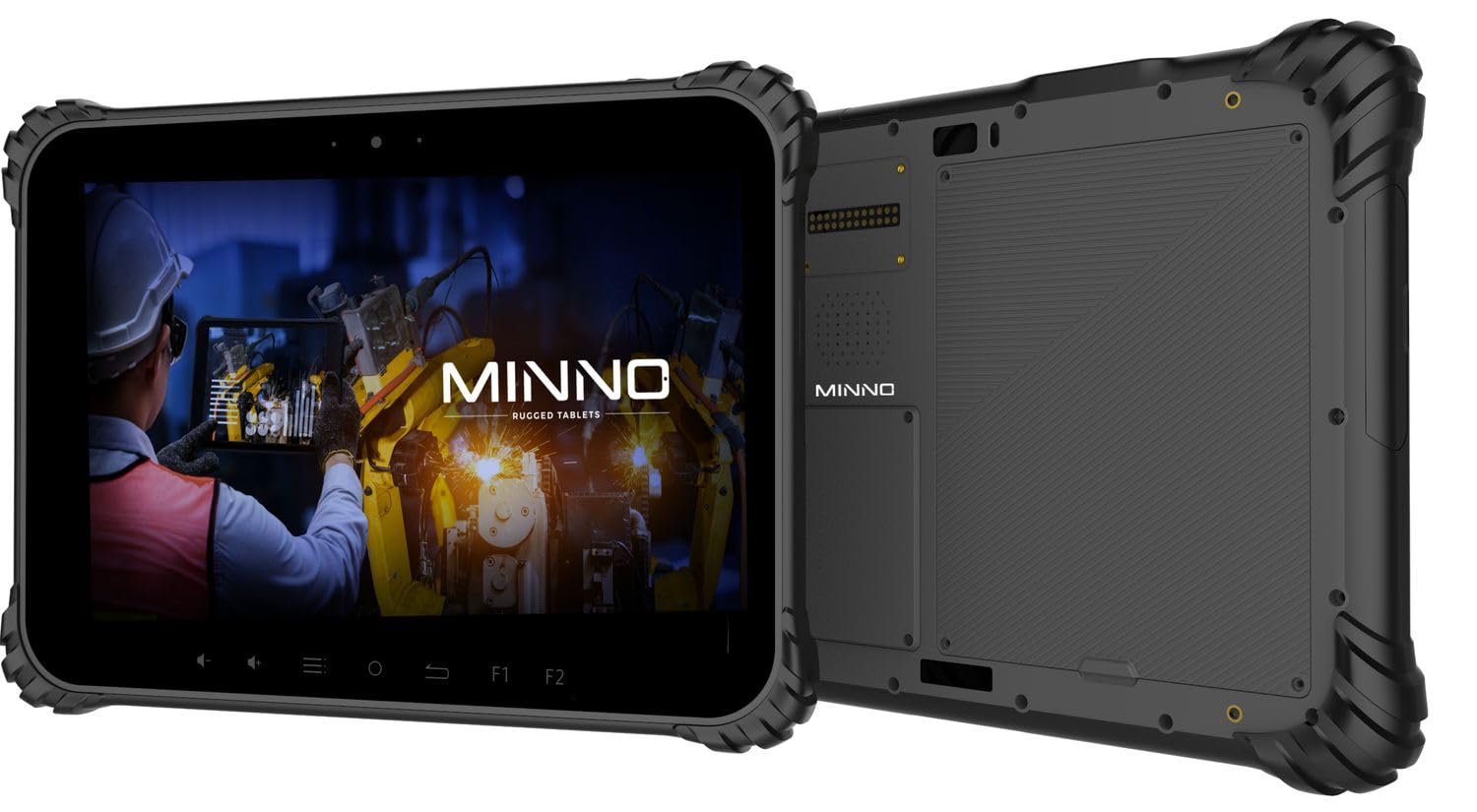
Figure 1.1: Minno Maverick A10 Rugged Tablet
2. Contenido del paquete
Verifique que todos los artículos estén presentes en el paquete:
- Minno Maverick A10 Rugged Android Tablet
- Adaptador de corriente
- Asa de maletín
- Hand Strap (pre-installed)
3. Dispositivo terminadoview
3.1 Características principales
- Diseño robusto: IP67 dust and waterproof, MIL-STD-810H certified for drop, shock, and vibration resistance.
- Mostrar: 10-inch sunlight-readable touchscreen.
- Actuación: Android 10 operating system, 4GB RAM, 64GB internal storage.
- Conectividad: LTE (unlocked for AT&T & T-Mobile), Wi-Fi, Bluetooth, NFC, GPS.
- Batería: 11,700 mAh swappable battery for extended use.
- Cámaras: 13 MP rear camera, 5 MP front camera.
- Botones físicos: Dedicated buttons for easy access to functions.

Figure 3.1: Minno Maverick A10 with core specifications
3.2 Botones y puertos físicos
The tablet features physical buttons for common functions and easy access, even in demanding environments.

Figure 3.2: Tablet cameras and easy access buttons
- Botón de encendido: Ubicado en el lateral, se utiliza para encender/apagar o activar/suspender el dispositivo.
- Subir/Bajar volumen: Ajusta el volumen del audio.
- Botones de función (F1, F2): Customizable buttons for quick access to specific applications or features.
- Botón de retorno: Navega de nuevo a la pantalla anterior.
- Botón de inicio: Vuelve a la pantalla de inicio.
- Botón de menú: Accesses application options or recent apps.
- Puertos USB: Para carga y transferencia de datos.
- Puertos cubiertos: Designed to protect against dust and water ingress.
4. Configuración inicial
4.1 Carga de la batería
Before first use, fully charge the tablet battery. Connect the provided power adapter to the tablet's charging port and plug it into a power outlet. The charging indicator will show the charging status.
4.2 Encendido / Apagado
- Para encender: Press and hold the Power button until the Minno logo appears on the screen.
- Para apagar: Mantenga pulsado el botón de encendido hasta que aparezca el menú de opciones de encendido. Seleccione "Apagar" y confirme.
- Para dormir/despertar: Presione brevemente el botón de encendido para poner la tableta en modo de suspensión o activarla.
4.3 Configuración inicial
Al encenderlo por primera vez, siga las instrucciones en pantalla para completar la configuración inicial, que incluye:
- Selección de idioma
- conexión de red wifi
- Google account setup
- Configuración de fecha y hora
4.4 Installing SIM/SD Card
The tablet supports a SIM card for LTE connectivity and an SD card for expanded storage. Locate the covered slot on the side of the tablet. Carefully open the cover, insert the SIM card and/or SD card into their respective slots, ensuring correct orientation. Close the cover securely to maintain IP67 rating.
5. Funcionamiento básico
5.1 Navegación con pantalla táctil
The 10-inch display is a multi-touch screen. Use standard Android gestures:
- Grifo: Seleccione un elemento o abra una aplicación.
- Toque y mantenga: Acceder a los menús contextuales o mover iconos.
- Golpe fuerte: Desplácese por las listas o cambie entre pantallas.
- Pellizcar para hacer zoom: Acercar o alejar las imágenes y web páginas.
5.2 Conectividad
- Wifi: Vaya a Configuración > Red e Internet > Wi-Fi para conectarse a las redes disponibles.
- LTE: Ensure a valid SIM card is installed. Go to Settings > Network & internet > Mobile network to enable mobile data.
- Bluetooth: Vaya a Configuración > Dispositivos conectados > Bluetooth para emparejar con accesorios Bluetooth.
6. Funciones avanzadas
6.1 Uso de la cámara
The tablet is equipped with a 13 MP rear camera and a 5 MP front camera. Open the Camera application to capture photos and videos. Adjust settings such as flash, timer, and mode within the app.
6.2 Navegación GPS
The integrated GPS module allows for location tracking and navigation. Ensure location services are enabled in Settings > Location for optimal performance with mapping applications.
6.3 Funcionalidad NFC
NFC (Near Field Communication) allows for short-range wireless communication. Enable NFC in Settings > Connected devices > Connection preferences > NFC to use features like contactless payments or quick data sharing with compatible devices.
7. Cuidado y mantenimiento
7.1 Limpieza de la tableta
Use a soft, lint-free cloth to clean the screen and body of the tablet. For stubborn marks, slightly dampEnjuague el paño con agua o una solución limpiadora de pantallas. Evite productos químicos agresivos o materiales abrasivos.
7.2 Cuidado de la batería
The tablet features a swappable 11,700 mAh battery. To maximize battery life:
- Evite temperaturas extremas.
- No descargue completamente la batería periódicamente.
- Utilice únicamente el adaptador de corriente proporcionado.
- If replacing the battery, ensure it is an official Minno replacement part.
7.3 Protección del medio ambiente
The Minno Maverick A10 is designed for harsh environments with IP67 and MIL-STD-810H certifications.

Figure 7.1: IP67 Dustproof and Spillproof Protection

Figure 7.2: MIL-STD-810H Certified Durability
- Clasificación IP67: Provides protection against dust ingress and immersion in water up to 1 meter for 30 minutes. Ensure all port covers are securely closed.
- Estándar MIL-810H: Certified to resist drops up to 4 feet, withstand prolonged intense vibrations, and operate in extreme temperatures from -4°F to 150°F.
8. Solución de problemas
If you encounter issues with your Minno Maverick A10, refer to the following common solutions:
| Problema | Posible solución |
|---|---|
| La tableta no se enciende | Ensure the battery is charged. Connect the power adapter and try again. If the battery is swappable, ensure it is correctly seated. |
| La pantalla táctil no responde | Restart the tablet by holding the power button. If the issue persists, perform a factory reset (data will be lost). |
| No se puede conectar al wifi | Comprueba si el Wi-Fi está habilitado en la configuración. Reinicia el router. Asegúrate de introducir la contraseña correcta. |
| LTE/Mobile data not working | Ensure a valid SIM card is properly inserted. Check mobile data settings and APN configurations. Contact your service provider. |
| Applications are crashing | Clear the cache of the problematic application (Settings > Apps > [App Name] > Storage & cache). Update the app or the Android system. |
9. Especificaciones
Detailed technical specifications for the Minno Maverick A10 Rugged Tablet:
| Característica | Especificación |
|---|---|
| Número de modelo | A10Z03001 |
| Sistema operativo | Androide 10 |
| Tamaño de pantalla | 10 pulgadas |
| Resolución de pantalla | 1280x800 (Max: 1920x1200 Pixels) |
| RAM | 4 GB |
| Almacenamiento interno | 64 GB |
| Marca del procesador | MediaTek |
| Tipo inalámbrico | 802.11ac (Wi-Fi), Bluetooth, NFC, GPS, 4G LTE |
| Trasero WebResolución de la cámara | 13 MP |
| Resolución de la cámara frontal | 5 MP |
| Batería | 11,700 mAh Lithium-ion polymer (swappable) |
| Peso del artículo | 3.89 libras |
| Dimensiones del producto | 10 x 1 x 8 pulgadas |
| Color | Negro |
| Certificaciones de durabilidad | IP67, MIL-STD-810H |
10. Garantía y soporte
10.1 Información de garantía
Minno warrants its products to be free from material and workmanship defects for 2 años Desde la fecha de compra. Esta garantía cubre defectos de fabricación en condiciones normales de uso. No cubre daños causados por mal uso, accidentes, modificaciones no autorizadas ni desastres naturales.
10.2 Atención al cliente
For technical assistance, warranty claims, or further inquiries, please contact Minno customer support through the official Minno website or your point of purchase. Have your model number (A10Z03001) and purchase date ready when contacting support.