
Información importante de seguridad
ADVERTENCIA: This product contains a lithium button/coin cell battery. Keep coin cell batteries out of reach of children. Ingestion can lead to severe injury or death in as little as 2 hours due to chemical burns and potential perforation of the esophagus.
Producto terminadoview
The GE LED+ A21 LED Light Bulb combines efficient LED lighting with a high-quality Bluetooth speaker and color-changing capabilities. It offers a versatile lighting and audio solution for indoor environments, controlled conveniently via an included wireless remote.
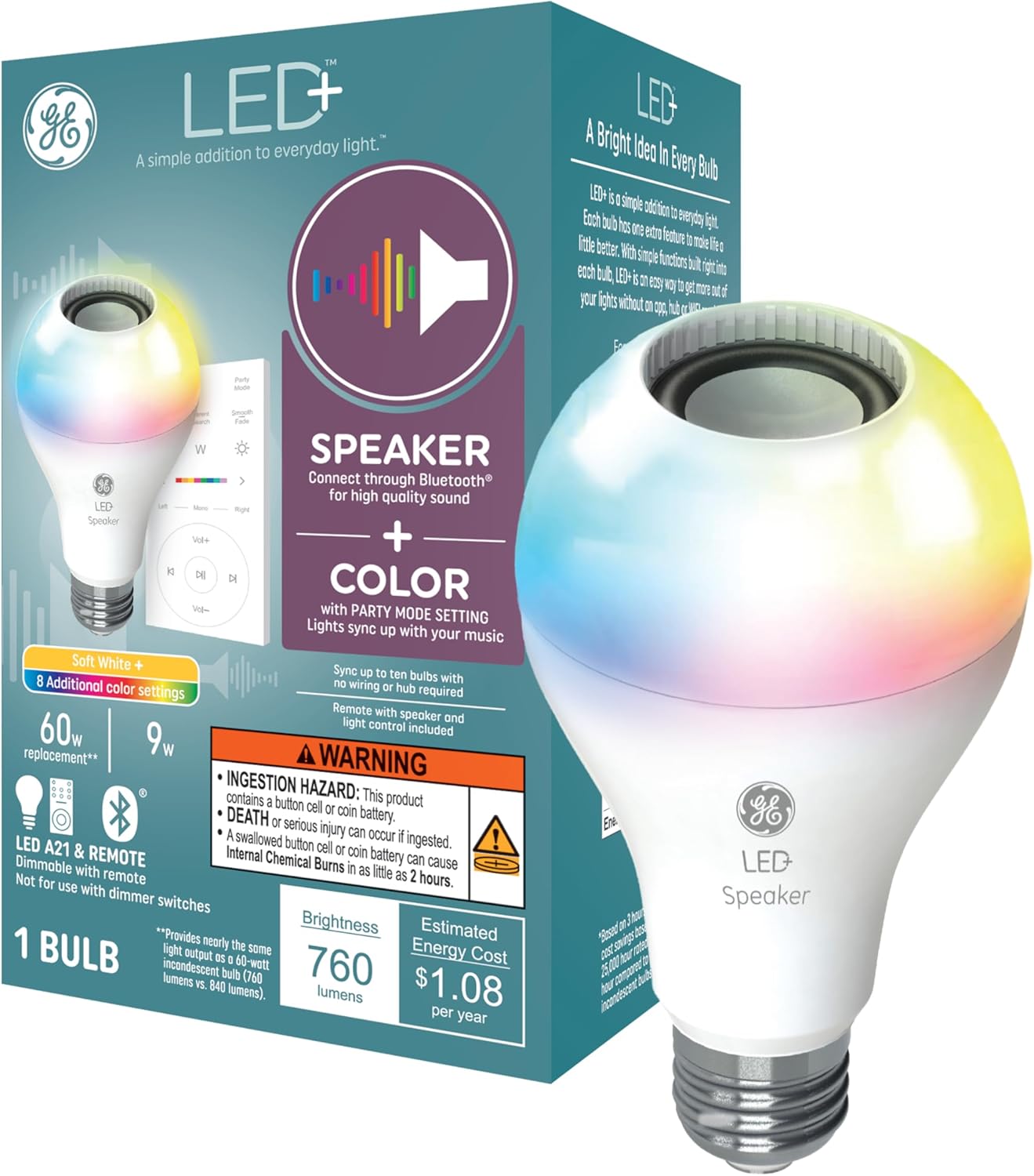
Figure 1: GE LED+ A21 LED Light Bulb and its packaging, highlighting speaker and color features.
Instrucciones de instalación
- Instale la bombilla: Carefully screw the GE LED+ A21 LED Light Bulb into any standard E26 medium base lamp or light fixture. Ensure the fixture is powered off before installation.
- Encendido: Turn on the light fixture. The bulb will illuminate in its default soft white setting.
- Conectar a través de Bluetooth: On your smartphone or tablet, enable Bluetooth and search for available devices. Select the GE LED+ speaker bulb to pair. No app, hub, or Wi-Fi is required for this connection.
- Configuración del control remoto: The included remote control is pre-paired with the bulb. Ensure the battery is correctly installed.

Figure 2: The GE LED+ A21 LED Light Bulb installed in a desk lamp, demonstrating remote control functionality.

Figure 3: Visual representation of the Bluetooth connectivity feature of the GE LED+ A21 LED Light Bulb.
Instrucciones de funcionamiento
The GE LED+ A21 LED Light Bulb offers versatile control over both lighting and audio through its wireless remote.
Control de luz
- Encendido/apagado: Utilice el botón de encendido del control remoto para encender o apagar la luz.
- Selección de colores: Choose from 8 different color settings or a soft white light using the dedicated color buttons or color slider on the remote.
- Ajuste de brillo: Increase or decrease the light brightness using the dimmer buttons on the remote.
- Modo fiesta: Activate Party Mode to sync the light colors with the rhythm of your music, creating a dynamic atmosphere.
Control de audio
- Transmisión de audio por Bluetooth: Once paired, stream audio wirelessly from your smartphone, tablet, or any other Bluetooth-enabled device directly to the bulb's integrated speaker.
- Ajuste de volumen: Control the speaker volume using the volume up/down buttons on the remote.
- Control de pista: Skip tracks forward or backward using the dedicated track control buttons on the remote.
- Sincronización de múltiples bombillas: For an enhanced surround sound experience, connect up to 10 GE LED+ speaker bulbs within 25 feet of the parent bulb. Turn on all bulbs to automatically sync them to the parent bulb for synchronized light and sound.

Figure 4: Multiple GE LED+ A21 LED Light Bulbs synchronized to provide high-quality sound throughout a room.

Figure 5: The GE LED+ A21 LED Light Bulb's party mode, where light colors sync with music.
Mantenimiento
The GE LED+ A21 LED Light Bulb is designed for long-lasting performance and minimal maintenance.
- Limpieza: Asegúrese de que la bombilla esté fría y apagada antes de limpiarla. Límpiela con un paño suave y seco. No utilice limpiadores líquidos ni productos abrasivos.
- Eficiencia Energética: This LED bulb uses only 9 watts of power, equivalent to a traditional 60-watt incandescent bulb, contributing to significant energy savings over its lifespan.
- Esperanza de vida: The bulb has an estimated lifespan of 13.7 years, based on typical usage.
Solución de problemas
- La bombilla no se enciende: Ensure the light fixture is receiving power and the bulb is securely screwed into the socket. Test the bulb in another working fixture if possible.
- Problemas de conectividad Bluetooth: Ensure Bluetooth is enabled on your device and the bulb is within range (approximately 25 feet). Try unpairing and re-pairing the bulb. If connecting multiple bulbs, ensure they are within range of the parent bulb.
- Sin sonido o volumen bajo: Check the volume settings on both your connected device and using the remote control. Ensure the bulb is successfully paired via Bluetooth.
- El control remoto no responde: Check the battery in the remote control and replace it if necessary. Ensure there are no obstructions between the remote and the bulb.
- Incompatibilidad: This light bulb is not compatible with voice control devices like Amazon Alexa or Google Assistant. It is also not designed for use with dimmer switches.
Presupuesto
| Característica | Especificación |
|---|---|
| Marca | GE Lighting |
| Nombre del modelo | LED+ Speaker Soft White & Color A21 (1-Pack) |
| Número de pieza | 93129723 |
| Tipo de luz | CONDUJO |
| Tamaño de la forma del bulbo | A21 |
| Base de la bombilla | E26 Medio |
| Quétage | 9 vatios |
| Equivalente incandescente | 60 vatios |
| Brillo | 760 lúmenes (blanco) |
| Temperatura de color | 2700 Kelvin (blanco suave) |
| Opciones de colores claros | Multicolor and Soft White |
| Volumentage | 120 voltios (100 a 120 voltios y 60 hercios) |
| Tecnología de conectividad | Bluetooth |
| Método de control | Remote (Push Button) |
| Uso en interiores y exteriores | Interior |
| Esperanza de vida estimada | 22 years (based on 3 hrs/day) / 13.7 years (from image) |
| Dimensiones | 3.94" de ancho x 6.38" de alto |
| Peso del artículo | 0.66 libras (10.5 onzas) |
| Pilas incluidas | Sí (1 batería de metal de litio para control remoto) |
| Certificaciones | cULus |

Figure 6: Key features and specifications of the GE LED+ A21 LED Light Bulb.

Figure 7: Dimensions of the E26 Medium Base, the most common base size for light bulbs.
Información de garantía
The GE LED+ A21 LED Light Bulb is covered by a Garantía limitada de 3 años from the date of purchase. Please retain your proof of purchase for warranty claims. For detailed warranty terms and conditions, refer to the product packaging or contact GE Lighting customer support.
Apoyo
For further assistance, technical support, or to explore other GE Lighting products, please visit the official GE Lighting websitio o comuníquese con su departamento de servicio al cliente.
GE Lighting Official Store: Visita la tienda en Amazon