
1. Introducción
The UMLIFE STC-1000 is a versatile digital temperature controller designed for precise temperature management in various applications. This device features a clear LED display, NTC 10K thermistor sensor, and dual relay outputs for both heating and cooling control. This manual provides detailed instructions for installation, operation, and maintenance to ensure optimal performance and longevity of your temperature controller.
2. Producto terminadoview
2.1 Características principales
- Digital LED display for clear temperature readings.
- Wide temperature measurement and control range: -50°C to 99°C.
- High control accuracy of 0.1°C.
- Dual relay output for simultaneous heating and cooling control.
- Waterproof NTC 10K thermistor sensor for reliable measurements in various environments.
- Función de calibración de temperatura.
- Delay start protection for cooling control.
- ABS flame-retardant shell for enhanced safety.
2.2 Componentes y pantalla
Familiarize yourself with the main components and display interface of the STC-1000 controller.

Figura 1: Front panel of the STC-1000 controller showing the digital display, power switch, UP button, Setting button, and DOWN button.
- Digital Display Window: Shows current temperature and parameter settings.
- Interruptor de alimentación: Enciende o apaga el dispositivo.
- Botón ARRIBA (▲): Aumenta valores o navega por los menús.
- Botón ABAJO (▼): Disminuye valores o navega por los menús.
- Setting Button (S): Ingresa al modo de configuración de parámetros.
- Indicador de frío: Illuminates when cooling relay is active.
- Indicador de calor: Illuminates when heating relay is active.

Figura 2: Physical dimensions of the STC-1000 controller and the included 1-meter NTC 10K waterproof sensor probe.
3. Especificaciones
| Parámetro | Valor |
|---|---|
| Modelo | STC-1000 |
| Rango de medición de temperatura | -50°C a 99°C |
| Rango de control de temperatura | -50°C a 110°C |
| Precisión de la medición | ±0.2 °C |
| Resolución | 0.1°C |
| Precisión del control | ±0.1 °C |
| Sensor | Sonda impermeable NTC 10K L=1M |
| Fuente de alimentación | 12 V CC |
| Consumo de energía | <3 W |
| Capacidad de contacto de relé | Cool (10A/220VAC), Heat (10A/220VAC) |
| Temperatura ambiente | De 0 °C a 60 °C |
| Temperatura de almacenamiento | -30°C a 75°C |
| Humedad relativa | 20-84% |
| Tamaño de montaje | 71 mm x 29 mm |
| Dimensiones del producto | 75 mm x 34.5 mm x 85 mm |
| Peso del artículo | 7 onzas (aprox. 198 g) |
| Material | Acrilonitrilo butadieno estireno (ABS) |
4. Configuración e instalación
Aviso importante de seguridad: Installation should be performed by qualified personnel. Ensure power is disconnected before wiring to prevent electric shock. Strictly distinguish between power supply, sensor, and relay interfaces. Maintain proper distance between sensor down-lead and power wires to avoid interference.
4.1 Diagrama de cableado
Refer to the following diagram for correct wiring connections. This model operates on DC 12V power supply.
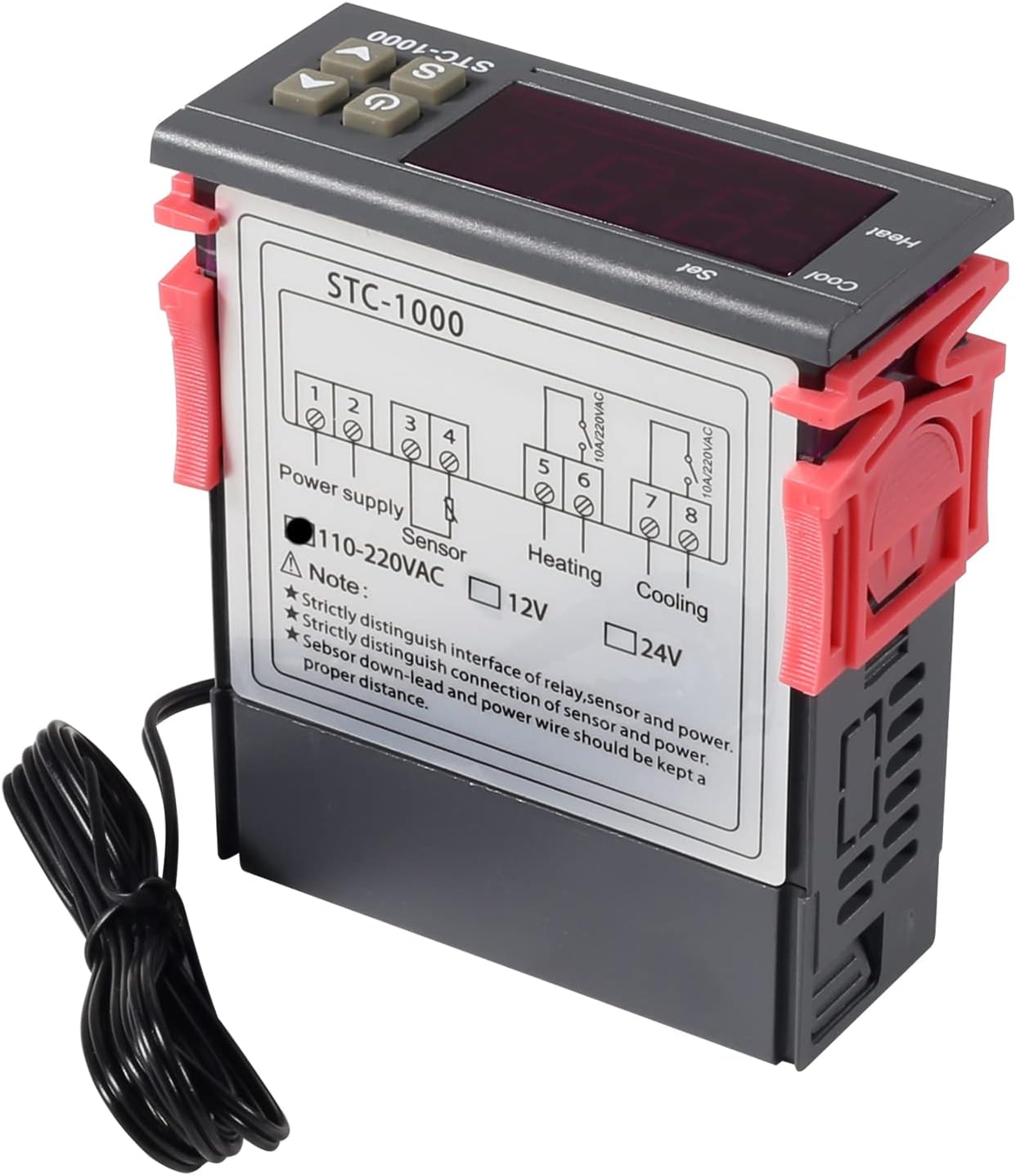
Figura 3: Wiring diagram for the STC-1000 12V temperature controller. Connections are for power supply, NTC sensor, heating relay, and cooling relay.
- Terminales 1 y 2: Power Supply (DC 12V).
- Terminales 3 y 4: NTC Sensor connection.
- Terminales 5 y 6: Heating Relay Output (Connect to heating device).
- Terminales 7 y 8: Cooling Relay Output (Connect to cooling device).
Ensure all connections are secure and insulated. Verify the power supply voltage matches the controller's requirement (DC 12V for this model).
4.2 Montaje
The STC-1000 is designed for panel mounting. Cut an opening of 71mm x 29mm in your panel. Insert the controller and secure it using the provided clips or mounting brackets.
5. Instrucciones de funcionamiento
The STC-1000 operates in Celsius only. It cannot be switched to Fahrenheit.
5.1 Encendido y apagado
- Presione el Interruptor de encendido button (marked with ⏻) to turn the controller on or off.
5.2 Ajuste de parámetros de temperatura
The controller has two main temperature settings: the Set Temperature (ST) y el Difference Temperature (DT), also known as hysteresis.
- A view the Set Temperature (ST): Presione brevemente el Setting (S) Botón. La pantalla mostrará la temperatura establecida actual.
- To modify the Set Temperature (ST):
- Mantenga pulsado el Setting (S) Botón durante aproximadamente 3 segundos hasta que la pantalla parpadee.
- Utilice el ARRIBA (▲) or ABAJO (▼) buttons to adjust the desired set temperature.
- Presione el Interruptor de encendido button to save the setting and exit, or wait for 10 seconds for it to save automatically.
5.3 Advanced Parameter Settings (F1-F4)
Para acceder y modificar parámetros avanzados:
- Mantenga pulsado el Setting (S) Botón durante aproximadamente 3 segundos hasta que la pantalla parpadee.
- Mientras la pantalla parpadea, presione el botón Setting (S) button again (do not hold) to cycle through parameters F1, F2, F3, F4.
- Utilice el ARRIBA (▲) or ABAJO (▼) Botones para ajustar el valor del parámetro seleccionado.
- Presione el Interruptor de encendido button to save the setting and exit, or wait for 10 seconds for it to save automatically.
| Parámetro | Descripción | Rango | Por defecto |
|---|---|---|---|
| F1 | Difference Temperature (Hysteresis): The difference between the set temperature and the temperature at which the relay switches off. | De 0.3 °C a 10 °C | 2.0°C |
| F2 | Highest Set Point Limit: Limits the maximum adjustable set temperature. | Set Temp to 110°C | 110°C |
| F3 | Lowest Set Point Limit: Limits the minimum adjustable set temperature. | -50°C to Set Temp | -50°C |
| F4 | Calibración de temperatura: Adjusts the temperature reading to match a known accurate thermometer. | -10°C a 10°C | 0.0°C |
5.4 Modos de calefacción y refrigeración
The STC-1000 automatically switches between heating and cooling based on the set temperature (ST) and difference temperature (DT).
- Modo de enfriamiento: If the current temperature is higher than (ST + DT), the cooling relay activates. It deactivates when the temperature drops to ST.
- Modo de calefacción: If the current temperature is lower than (ST - DT), the heating relay activates. It deactivates when the temperature rises to ST.
6. Mantenimiento
- Limpieza: Limpie la superficie del controlador con un paño suave y seco. No utilice limpiadores abrasivos ni disolventes.
- Cuidado del sensor: Ensure the NTC sensor probe is clean and free from debris. While waterproof, avoid unnecessary physical damage to the probe or cable.
- Conexiones: Periodically check wiring connections for tightness and signs of corrosion.
- Ambiente: Operate the controller within the specified ambient temperature and humidity ranges to ensure optimal performance and lifespan.
7. Solución de problemas
| Problema | Posible causa | Solución |
|---|---|---|
| Display shows "EE" | Error del sensor o circuito abierto. | Verifique la conexión del sensor. Reemplace el sensor si está dañado. |
| La pantalla muestra "HHH" | Temperature exceeds upper limit of measurement range. | Ensure the environment temperature is within the sensor's range (-50°C to 99°C). |
| La pantalla muestra "LLL" | Temperature falls below lower limit of measurement range. | Ensure the environment temperature is within the sensor's range (-50°C to 99°C). |
| El controlador no se enciende | No hay suministro de energía o volumen incorrectotage. | Check power connections and ensure DC 12V is supplied. |
| La calefacción/refrigeración no se activa | Incorrect temperature settings (ST, DT), wiring error, or device malfunction. | Verify ST and DT settings. Check heating/cooling device wiring. Ensure the device is within operating parameters. |
8. Garantía y soporte
UMLIFE products are manufactured to high-quality standards. For warranty information or technical support, please contact UMLIFE customer service through your purchase platform or visit the official UMLIFE website. Please have your product model (STC-1000 12V) and purchase details ready when contacting support.
Para obtener más ayuda, también puede consultar la UMLIFE Store on Amazon.